0:00
one of the best parts of owning a
0:01
chromecast with google tv
0:03
obviously is the remote it helps you get
0:06
and it makes it really simple to control
0:08
your television but they're going to be
0:10
times when you want to just cast stuff
0:11
right from your device that's in your
0:13
hand or maybe you just misplaced your
0:16
well luckily there is a new ui built
0:19
right into the youtube app on android
0:22
that allows you to actually replicate a
0:23
lot of the controls you would get from
0:26
once you've started a cast session so
0:41
okay so to get this started i'm going to
0:43
show you the first way the main way that
0:44
you're probably going to use this when
0:46
you're sitting on a couch or something
0:47
if you click into a video you start
0:49
watching it on your phone you realize
0:51
you know what i'd rather watch this on
0:52
the big screen and so we click the cast
0:55
we choose the chromecast starts playing
0:58
on the big screen and you're ready to go
1:00
what happens if you miss something
1:01
you're ready to rewind it well you click
1:03
that cast button again
1:05
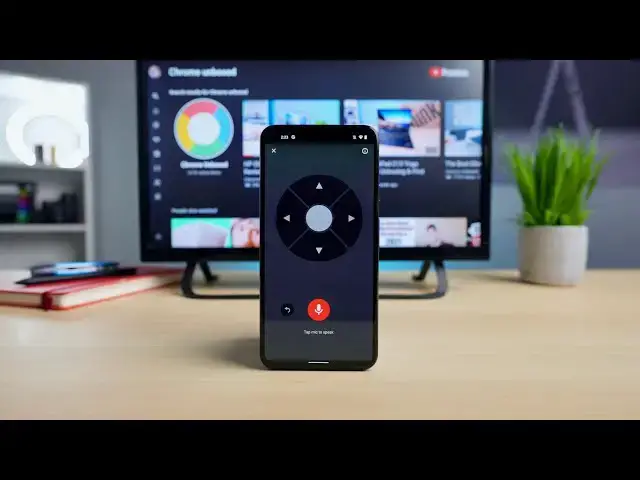
and boom there's this new interface
1:06
right here which has a volume slider
1:08
a voice search which we'll talk about in
1:10
just a second and then a remote
1:12
click that button and boom you get a
1:13
full screen remote right here and this
1:15
thing will act just like your
1:17
chromecast with google tv remote would
1:20
back i go back and forward so i can
1:24
i can press up and get the video extras
1:27
click the middle button to select choose
1:29
quality thumbs up thumbs down all that
1:32
i can hit the back button to go back and
1:34
remove all that stuff from the screen
1:36
and basically control the entire
1:38
playback here right here from this
1:40
remote that again this is no additional
1:42
app or additional setting this is just
1:44
something that is built into the youtube
1:47
on android phones at this point and
1:49
hopefully other youtube apps in the
1:51
future additionally what you can do is
1:53
down here on this voice search this will
1:54
act at least in youtube
1:56
just like your google assistant button
1:57
so if i click this i'm going to say yeah
2:01
videos by chrome unboxed
2:04
you see things pop up on the screen and
2:06
again i can navigate the ui
2:08
once i'm in this setting here and it
2:10
works just like you'd expect i mean heck
2:12
if you really want to you can go through
2:15
results and all that kind of stuff if
2:16
you'd like it's all just kind of
2:18
integrated right here
2:19
all in this application again that's
2:21
just kind of hidden away in youtube and
2:24
is super duper functional and super
2:26
duper helpful again if you have
2:28
can't find your remote or just honestly
2:31
just want to use the the
2:32
phone instead of going and hunting down
2:34
your remote and using a physical remote
2:36
but that's really it we just kind of
2:38
how to go about finding this thing if
2:40
you were interested or
2:41
you just happen to need it at some point
2:43
in the future again if i hit this cast
2:45
and i disconnect here then i'm going to
2:48
lose that functionality it's gone and i
2:50
can go back to using my remote if i want
2:51
but the minute i start a cast session it
2:53
doesn't matter if i'm in a video or not
2:55
as soon as i start a cast session with a
2:58
chromecast with google tv the minute i
3:00
hit that cast button again i get this
3:01
stuff up here i can voice search i can
3:04
or i can just close this menu here and
3:06
so we hope this helps some of you out i
3:08
know i'll be using this on a very
3:10
and i'm really hopeful it comes to other
3:12
youtube apps on other platforms
3:14
and then i hope the apk or the api i'm
3:17
will be something that you know other
3:19
developers can use for netflix or any
3:21
other streaming platform where you could
3:24
these kind of controls built right into
3:26
the application so that
3:27
again if you don't want to grab that
3:28
remote you don't necessarily have to to
3:30
take advantage of the new google
3:33
with google tv but guys that's been it
3:35
for this one if you like this video go
3:36
down there and give us a thumbs up
3:38
hit that subscribe button and make sure
3:39
to ring the notification bell as well if
3:41
you'd like to be alerted when we make
3:42
future videos just like this one until