Up next in 10



Thanks to GoDaddy for sponsoring this video. Head to https://godaddy.yt.link/LfN6wQB to start using GoDaddy Airo AI Builder with 50 free credits.
Buy the ASUS Chromebook CX15 from Walmart: https://walmrt.us/4w2WEhD
・・・・・・・
Join Chrome Unboxed Plus for access to our private Discord, an ad-free website experience, AMAs, exclusive giveaways, and more! Start your 7-day FREE TRIAL here: https://chromeunboxed.com/join/
Buy Chrome Unboxed Glowbar merch: https://cottonbureau.com/p/YGGDM3/shirt/glowbar#/23914930/tee-men-premium-heavyweight-black-100percent-cotton-s
👉 Shop the best Chromebook deals today: https://chromeunboxed.com/the-best-chromebook-deals-today-updated/
📧 Subscribe to our Upstream newsletter: https://bit.ly/4jVq0de
・・・・・・・
Read more: https://chromeunboxed.com/
☕ Fueled by Fresh Roasted Coffee! Buy the special edition Chrome Unboxed bag here: https://chromeunboxed.com/coffee
Subscribe to the channel: http://bit.ly/2xFuj6L
Follow us: https://x.com/chromeunboxed
https://www.instagram.com/chromeunboxed
https://www.threads.net/@chromeunboxed
https://www.facebook.com/Chromeunboxed
Show More Show Less View Video Transcript
0:00
On the desk here in front of me is one
0:01
of the newer Chromebooks by Asus and
0:04
it's got a few things that make it
0:05
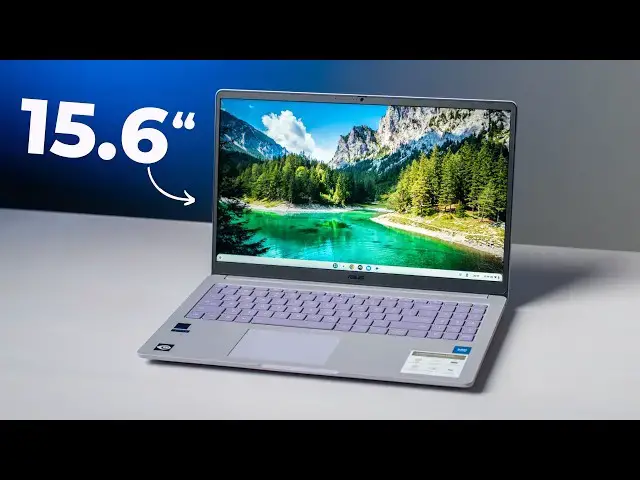
really special. One, it's only 199
0:08
bucks. Two, it's a 15.6 in screen. And
0:11
three, it's got an unproven, untested by
0:14
us at least new processor in it in the
0:16
Intel N50. So, there's a lot of stuff we
0:18
want to check out in this box. So, let's
0:20
dive in.
0:22
[music]
0:25
But before we jump in the box, a special
0:27
thanks to GoDaddy for sponsoring today's
0:29
video. If you've ever needed a website
0:32
or a web app built for your business or
0:34
your side hustle, but you didn't really
0:36
have the funds or technical knowhow to
0:38
build it for yourself, you really need
0:40
to check out GoDaddy Arrow AI Builder.
0:42
It lets you describe what you want in
0:44
plain English and turns it into a fully
0:46
working website, web app, or online
0:48
experience. There's zero code, no goofy
0:50
templates. to just create simply by
0:53
describing your vision and watching it
0:54
come to life the way that you imagined
0:56
it. You can literally go from a raw idea
0:59
to a live build in minutes instead of
1:01
weeks. And the best part, you can refine
1:04
that build through simple conversation
1:06
until it matches exactly what you're
1:08
looking for. Whether that's tweaking the
1:10
design or adding new sections, building
1:12
more features, or just adjusting your
1:14
layout, it takes all the heavy lifting
1:16
out of launching something new. And as a
1:18
former web developer, both on my own and
1:20
for a local PR firm, I can tell you it
1:22
used to be a real chore to go from idea
1:25
to a fully baked website. Thanks to
1:28
tools like GoDaddy Arrow AI Builder,
1:30
that friction is truly beginning to
1:32
disappear. Sound interesting? Well,
1:34
click the link in the description or
1:36
scan the QR code on the screen to start
1:38
using GoDaddy Arrow AI with 50 free
1:41
credits to get you off and running. All
1:43
right, so let's just hop in the box
1:45
here. you know, Asus uh asked us if we
1:48
wanted to check this one out as we're
1:49
waiting for that uh CM32 detachable and
1:52
kind of looked into it and CX15 came
1:55
out, I think last year uh and it wasn't
1:57
very remarkable, but then we saw the
1:59
CM15 at CES and it was like, oh, the
2:02
like the colorways are kind of fun. Uh
2:04
this one comes in three. One of them's
2:06
out of stock right now and then this is
2:07
the purple one and there's like a navy
2:09
one. Um yeah, I like that. Not exactly
2:12
my thing. I would mistake that for like
2:14
a gray or something cuz, you know, I'm
2:16
color deficient. So, I I like it, but I
2:19
also know it's kind of purpley. But,
2:20
yeah, the main things uh when we asked
2:21
them about this was, okay, like what
2:24
what's the story here? The the new Intel
2:26
N50s inside here. So, it's a dual core
2:28
6W chip. Probably really going after
2:30
like the mid-range ARM processors kind
2:32
of thing. So, if it gets the 13 hours of
2:34
battery that Asus is saying it gets,
2:37
that's pretty cool. Um, and then it's
2:39
15.6 6 in IPS screen 300 nits and it's
2:43
200 bucks and so I mean if it's even
2:45
decent for $200 if you're getting a
2:47
decent 15.6 in laptop that's pretty
2:49
cool. Um so that's fun. You get like
2:52
their nicer 45 watt charging block in
2:55
here instead of you know the uglier
2:56
two-piece ones. Um pretty nice
2:59
inclusion. Again price informs a lot of
3:02
stuff and so when something's 200 bucks
3:05
you know you can forgive a lot of things
3:07
man. Okay under this light I can
3:08
actually see the purple. So, I'm
3:09
assuming it's like super purple to
3:11
everybody else. Um, but kind of a coated
3:14
uh finish on the bottom, so kind of
3:16
grippy, which is nice. A lot of fans for
3:18
a low wattage chip, but uh or fan ports,
3:21
I'm sorry. And then uh this kind of nice
3:23
textured completely anti-fingerprint
3:27
uh top top thing here. I like how ASUS
3:29
has started putting their their logo
3:31
down at the bottom. I think it's a nice
3:32
look. Let's crack it open here.
3:36
Yeah, like even the purpley keys kind of
3:39
a muted size trackpad with a 15.6 in. A
3:43
lot of times we're getting these huge
3:44
ones thanks to uh what MacBooks have
3:46
done over the years, but perfectly
3:48
usable.
3:50
Seated very nicely,
3:52
good click mechanism. Uh definitely myar
3:55
uh which is not surprising. This thing
3:56
is 3 12 lb. Said 15.6 in. Hey, look at
4:00
this. That is for an all plastic
4:02
Chromebook. That's that's pretty sturdy.
4:04
Um, and again at only three and a half
4:06
pounds, it doesn't have to hold up its
4:07
weight too much. Definitely a 16 by9
4:10
screen, full HD here. It also has uh
4:12
milspec rating. Um, so should be good
4:15
against like minimal drops, dust, all
4:17
that kind of stuff. Uh, numeric keypad
4:20
around the side here. We're not going to
4:21
get any backlighting. Um, it looks like,
4:24
yeah, downward firing speakers. I'm not
4:26
expecting much there either, but we'll
4:28
check them out. Um, and then yeah,
4:30
webcam up top. It's a 720p webcam again
4:32
at 200 bucks. These are the types of
4:34
things you just fully expect. But we got
4:36
a matte finish non-touch uh 16x9
4:40
15.6 in screen here. So, I'm interested
4:42
to see what that thing looks like once
4:44
we get it powered on. Um and then let's
4:46
talk about ports. Over here on the side,
4:48
we got two USB type-C's, a full size
4:51
USBA, and then an HDMI slot, which is
4:54
also um just something on a 15.6 in
4:57
device. I'm like, please just put an
4:58
HDMI port on here uh instead of forcing
5:01
people to use a dongle. Uh but then on
5:03
the other side there's really nothing
5:05
except a Kensington lock. So um yeah,
5:08
interesting that all the ports are
5:09
crammed on one side. But hey, again, you
5:12
forgive a lot of things when a device is
5:14
199 bucks. So let me open this thing up,
5:16
get logged in real quick. That'll give
5:18
me a quick feel of the keys, the
5:20
trackpad, the screen. We'll check out
5:21
the camera, speakers, and all that kind
5:23
of stuff real quick. And uh so I'll be
5:25
right back. All right. So, after
5:27
spending a few minutes getting
5:28
everything updated and all that kind of
5:30
stuff, here are the things I can tell
5:31
you pretty quickly. Uh, the keyboard
5:33
deck feels really good. The keyboard
5:35
actually feels really good. It's quiet,
5:38
but the the keys have a good click to
5:40
them. Like, typing was not an issue. No
5:42
mistyping. Uh, the number pad's a little
5:44
small, but it technically works. It's
5:46
not as small as some of the ones we've
5:47
seen on Chromebooks. It's at least as
5:49
wide as my fingers. So, like when you
5:51
you go to kind of place your hand on it,
5:52
it's wide enough to kind of still type
5:54
by feel. uh if you're into that kind of
5:56
stuff for your spreadsheets or something
5:57
like that. Uh the camera at 720p is um
6:02
good with dynamic range contrast. I
6:05
mean, it's a it's a little grainy. It's
6:06
a 720p camera. Uh but as we normally do,
6:08
I'm going point back there into the
6:09
darkness. And you can see it kind of
6:11
adjusts pretty well um for a shot that's
6:14
relatively dark compared to our
6:16
foreground here. So, um it's going to
6:18
get you through your, you know, calls
6:19
and all that kind of stuff just fine.
6:21
speakers are always a question on
6:23
cheaper Chromebooks and um these
6:26
speakers are better than a lot of other
6:28
speakers on cheap Chromebooks. It
6:29
doesn't mean they're good. Um but
6:31
they're approaching maybe mediocre. Uh
6:33
give them a listen here. This is at full
6:35
volume. They're not loud
6:37
>> things going on in this Chromebook for a
6:38
really reasonable price. So it's enough
6:41
talking about here. Let's get in the
6:43
box.
6:47
>> There's a tad bit of like mid and low
6:49
end. There's no real bass to speak of,
6:51
but it's not completely, you know, like
6:53
that, uh, like you hear in a lot of
6:55
really cheap Chromebooks where it's all
6:57
mids and nothing else. Um, you're not
6:59
going to want to sit and listen to those
7:00
for a long period of time. But watching
7:02
that video does bring me to the screen.
7:04
And at 300 nits, it's not the brightest
7:06
thing you've ever seen, but the
7:07
anti-glare is working here. The image
7:09
looks great. Text looks great on screen.
7:12
Um, the scrolling is is nice and smooth.
7:15
Um, yeah. So, so well done on the
7:17
screen. Very nice small, minimal bezels.
7:19
I like the screen a lot. Uh be cool if
7:21
it was touchscreen, but again, 200
7:23
bucks. We got to keep remembering that.
7:25
So, I mean, you're talking like good
7:26
inputs, okay speakers. You're only
7:29
getting 4 gigs of RAM on this thing, 128
7:31
gigs of storage. The 128's good. The 4
7:33
gigs of RAM is probably going to hurt
7:34
along with this um two core processor. I
7:38
already noticed some stuttering. Just
7:40
I'm all I've got open is three tabs and
7:42
I even turned off Android apps here. Um
7:46
again, well, you know what? our upload
7:49
here the where the studio is sometimes
7:51
the internet is not great so our upload
7:53
is really bad um I did a speed test so I
7:57
would hold off on saying like once
7:59
stuff's loaded in I mean you're
8:01
scrolling pages and and pinch zooming
8:03
just fine so u I just I just want to
8:07
give you at least a little bit of
8:09
warning that this processor is not meant
8:11
for having a bunch of uh virtual desks
8:14
open and 20 tabs open if that's kind of
8:16
what you're doing. You definitely need
8:18
to probably um figure out how to get a
8:20
little bit more money together and get a
8:22
nicer Chromebook with a better processor
8:23
in it. I don't think the N50 is going to
8:25
be one that is uh for big multitasking.
8:28
This is going to be a I got a single
8:29
thing to do, couple web pages open, and
8:32
that's really all I'm working on at one
8:33
time and then move on to the next task.
8:35
It's going to be that kind of thing. Um
8:37
and then the battery hopefully will will
8:39
go along with that. uh we just charged
8:41
it so my battery numbers here aren't
8:42
right but I could see something with 6
8:44
watts giving you you know 10 to 12 hours
8:47
of use and um if that's the case then I
8:50
mean you you make some trade-offs when
8:51
we talk about performance and battery
8:53
life and so that's just kind of part of
8:54
it and again I just keep saying it over
8:55
and over again 199 bucks if this is a
8:58
device that you know you just had around
9:00
the house you know by the couch to pick
9:02
up and check social media and do some
9:04
like banking stuff or you know uh some
9:06
simple spreadsheet work I mean I think
9:08
it could do really well for that kind of
9:09
stuff and even some video calls. Um,
9:12
it's just not going to be uh any of
9:14
these devices with these N50s in them
9:16
are not going to be multitasking things.
9:18
Um, but that's not to say it's not
9:20
without its superlatives. I do just
9:21
really like the build quality here for
9:23
an all plastic device. I like how light
9:25
it is. 3 12 lb. Keyboard feels great.
9:27
Trackpad's good. Screen's good. Uh,
9:29
camera is usable. The colorways are
9:31
really nice. So, there's a lot of cool
9:33
things going on here with this uh this
9:35
new CX-15 from ASUS. And at 199 bucks,
9:38
it seems to be the price it's going to
9:40
kind of chill at. Um, yeah, it's a very
9:43
interesting uh device if you're looking
9:45
for something affordable that you can do
9:47
a handful of very simple tasks on um
9:49
that has a larger screen so you can kind
9:52
of spread out a little bit. But I think
9:54
that's it for this one, guys. If you
9:55
enjoyed this video, give us a thumbs up,
9:57
head down there, hit that subscribe
9:58
button, and be sure to ring the
9:59
notification icon as well if you'd like
10:01
to be alerted when we make future videos
10:03
just like this one. Till next time,
10:05
we'll see you.
10:08
>> [music]
10:14
[music]
Science