Up next in 10



Sponsored by Bilt. Learn more about Bilt and try out the Neighborhood Concierge at https://biltrewards.yt.link/Vxqq1OX.
Buy the Lenovo Chromebook Plus i 15″ from Best Buy: https://bestbuycreators.7tiv.net/6kd3Dr
・・・・・・・
Join Chrome Unboxed Plus for access to our private Discord, an ad-free website experience, AMAs, exclusive giveaways, and more! Start your 7-day FREE TRIAL here: https://chromeunboxed.com/join/
Buy Chrome Unboxed Glowbar merch: https://cottonbureau.com/p/YGGDM3/shirt/glowbar#/23914930/tee-men-premium-heavyweight-black-100percent-cotton-s
👉 Shop the best Chromebook deals today: https://chromeunboxed.com/the-best-chromebook-deals-today-updated/
📧 Subscribe to our Upstream newsletter: https://bit.ly/4jVq0de
・・・・・・・
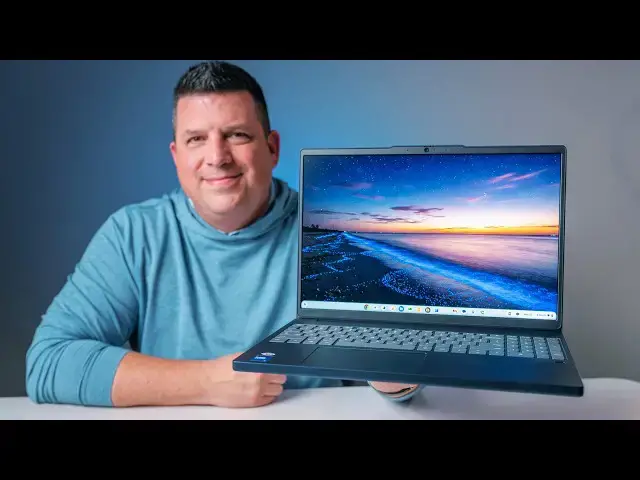
Every now and then, a device lands in the office that makes us scratch our heads a bit; not because it's bad, but because the combination of specs is just so confusing. That is exactly the case with one of Lenovo's newest arrivals, the Lenovo Chromebook Plus 15-inch, which originally broke cover at CES 2026.
Lenovo has put together an interesting formula here, pairing some undeniably high-end hardware features (like a 400 nit, 120Hz screen and fingerprint scanner) with a distinctly mid-range processor, RAM and storage. It normally retails for $600, but it regularly finds its way on sale for $500. I wasn't sure what to expect this one, and now that we've Unboxed it, I'm still a tad bit confused about the mixture of elements this machine possesses.
Read more: https://chromeunboxed.com/unboxing-the-new-lenovo-chromebook-plus-15-a-mix-of-high-end-and-mid-range/
☕ Fueled by Fresh Roasted Coffee! Buy the special edition Chrome Unboxed bag here: https://chromeunboxed.com/coffee
Subscribe to the channel: http://bit.ly/2xFuj6L
Follow us: https://x.com/chromeunboxed
https://www.instagram.com/chromeunboxed
https://www.threads.net/@chromeunboxed
https://www.facebook.com/Chromeunboxed
Show More Show Less View Video Transcript
0:00
Today in the office, we have one of
0:01
Lenovo's newest Chromebook Plus models,
0:03
the Lenovo Chromebook Plus i15-in.
0:08
I'm just going to call it the Lenovo
0:09
Chromebook Plus 15-in. It kind of goes
0:11
along with the Lenovo Chromebook Plus 14
0:13
that we've had before, and this one
0:15
comes with a really interesting mix of
0:16
like some high-end hardware with like a
0:18
mid-range processor, and I have not had
0:21
any time with this. They announced it at
0:23
CES 2026, but we didn't actually get
0:25
hands-on with it. So, I'm super excited
0:26
to see in this kind of price range. It's
0:29
$600, normally $500 on sale, what Lenovo
0:32
is doing in the Chromebook Plus space.
0:34
So, let's get in it.
0:40
But before we jump into the box, this
0:42
video is brought to you by Built. Look,
0:44
rent can easily be one of your biggest
0:46
monthly expenses, right? And up until
0:49
now, I'd wager that writing that check
0:51
or hitting that pay now button felt like
0:53
I don't know, kind of tossing your money
0:55
into a black hole. I mean, you pay on
0:56
time every single month, and you get
0:58
like nothing to show for it. Until now.
1:01
Built Rewards is a completely free
1:03
loyalty program that lets you earn
1:05
high-value points on your regular rent
1:08
payments. Whether your landlord is in
1:10
Built's massive property network, or you
1:12
use their seamless bill pay feature, you
1:15
get rewarded for just paying your rent.
1:17
And these aren't just random useless
1:19
points. The Point Guy and Bankrate have
1:22
consistently ranked Built as the highest
1:24
value point currency out there. You can
1:26
transfer them one-to-one to 17 plus
1:29
top-tier airline partners and hotel
1:31
networks to fund your next vacation, or
1:34
use them for fitness classes, or
1:36
literally put them right towards next
1:38
month's rent. Honestly, you have to pay
1:40
rent anyway, so you might as well get
1:42
like a vacation out of it, right?
1:43
There's zero cost to join, and all you
1:45
have to do is hit the link in the
1:46
description, or scan the QR code right
1:49
here on the screen, and get signed up
1:51
right now. You have nothing to lose, and
1:54
all sorts of points to gain.
1:57
All right, so let's jump in this thing.
1:59
Like I said, it's we're talking
2:00
mid-range specs here. So
2:02
it's the Intel Core 3 N305 processor. So
2:07
not a slouch, but not like the highest
2:09
powered thing in the world.
2:11
Paired with 8 gigs of RAM, 128 gigs of
2:13
storage. But it's got like supposedly,
2:15
you know, stuff like a fingerprint
2:16
scanner and a 120 hertz screen and I
2:19
think it gets like 4 or 500 nits of
2:21
brightness and that all that kind of
2:23
stuff. So yeah, it's it's an interesting
2:25
mix here and I'm very curious to know
2:29
whether or not once I get this thing out
2:31
if like the two-in-one and the Lenovo
2:34
Chromebook 14 if Lenovo's just decided,
2:36
"Hey, look, we built a Chromebook,
2:37
especially a Chromebook Plus, it's going
2:39
to be rigid and and well-made." Ooh,
2:41
that's more texture-y. You probably see
2:43
that.
2:44
It's definitely plastic on the bottom.
2:45
This is they're not trying to even
2:47
act like that's aluminum.
2:49
Very firm closed up, for sure.
2:52
Let's get this. Let's see what the
2:54
charger situation looks like real quick.
2:57
Yeah.
2:58
Nothing special there. I do I do like
3:00
Lenovo's blocks. I bypass this a lot of
3:03
times, but
3:05
I think it's just a that's a better
3:06
looking block than most, you know?
3:08
Again, it's not doing anything crazy
3:10
different.
3:12
Yeah, they always put like a little
3:13
splash of yellow inside that USB-C. I
3:15
don't know if it's going to pick up on
3:16
camera, but again, it's it's a charging
3:19
block. Yeah, very rigid. I think
3:21
somebody had this one before us. But
3:22
yeah,
3:24
lots of ports. We'll go over that in a
3:25
second, but definitely
3:28
yeah, plastic top and bottom.
3:32
Yeah, this is all plastic, but
3:34
incredibly like stable and firm feeling.
3:37
Reminds me a lot of the
3:39
Acer Chromebook 516, Chromebook Plus 516
3:43
GE, the gamer edition ones. So it's kind
3:45
of boxy, you know? It's not trying to
3:47
like like scoop into the other sides or
3:49
anything. It's just like straight up
3:50
MacBook type feel. Like let's just go
3:52
front to back. It's the same width,
3:54
and I think that provides a lot of
3:56
rigidity, and so I like that. Again,
3:58
definitely plastic. It looks like we got
3:59
some downward firing speakers. The color
4:02
on this is going to be real hard to grab
4:03
stuff on. I'm going to try to make sure
4:05
with Joe that we kind of sort of have
4:07
some stuff, but it looks like we have
4:08
bottom firing speakers only on this
4:11
thing.
4:12
See.
4:13
Yeah, no top firing ones, so that's
4:15
uh that's interesting.
4:17
Um let me see if I can get light on
4:19
these ports here. So, Kensington lock,
4:21
USB type C, USB type A, headphone,
4:24
microphone. Around the other side, we
4:26
have a microSD card slot, a USB type A,
4:30
a full-size HDMI slot, another USB type
4:32
C, and then what looks like a power
4:33
button.
4:35
This isn't a convertible, so that's
4:38
interesting. Um you don't really see
4:40
power buttons on the side of
4:41
clamshell-only devices, but that's what
4:43
we got here. Um and then again, that
4:45
kind of scalloped bottom. This is
4:46
definitely more plasticky uh than the
4:48
other Lenovos that do the same thing,
4:50
but it feels good in the hand. You're
4:52
not going to drop this thing.
4:54
Um I don't know the exact weight. We'll
4:55
figure that out here in a second. Um but
4:57
not overly heavy. I would say it's
4:58
probably close to 3 and 1/2 to 4 lb,
5:00
something like that. So, let's crack
5:02
this thing open real quick. I'm going to
5:04
have to get logged in and do all that
5:05
kind of stuff, but on the inside, we
5:07
have a pretty nice large uh trackpad.
5:10
It's obviously a physical trackpad, but
5:12
as Lenovos have been doing here lately,
5:14
really, really smooth. I would guess
5:15
this is their Mylar that kind of mimics
5:17
a glass trackpad. Uh click mechanism
5:20
feels really good. Trackpad seated very
5:21
nicely. You have a fingerprint scanner,
5:24
which is really cool. Not something you
5:26
normally see on a like a mid-range
5:27
Chromebook. Uh from what I can tell, no
5:29
backlight on the keys, but the keys feel
5:31
pretty good. This doesn't feel like a
5:33
super cheap uh flimsy keyboard. The
5:36
keyboard deck is relatively stable.
5:37
Again, for an all-plastic build, I'm
5:40
pretty surprised by how firm this thing
5:42
feels overall. And you get a numeric uh
5:44
keypad over here on the side, and it's
5:47
not one of those like squished ones cuz
5:48
they didn't put any upward firing
5:50
speakers here. So, uh kind of wish they
5:51
would have put some speakers up here.
5:53
You got a lot of space here. You could
5:54
have done that. Uh we'll see what those
5:56
sound like here in just a second, but no
5:57
backlighting on the keys, but they do
5:58
feel good. Have that new Chromebook Plus
6:00
layout.
6:01
Um and then we have a 5-megapixel camera
6:04
up top with a privacy shade. We'll check
6:06
it out and see how it how it looks. Uh
6:08
Lenovo's been making great uh
6:10
great cameras in in their devices here
6:12
of late. And then kind of the star of
6:14
the show here, let's see. Make sure this
6:16
one Yeah, this one is touchscreen. Uh
6:18
the one they sell at Best Buy is
6:20
touchscreen as well. Uh anti-glare
6:22
touchscreen
6:23
uh 1920 by 1200 resolution, so a little
6:26
bit above 1080p, 16 by 10, 15.3 in, so
6:30
nice big large display here.
6:32
But it uh 120 Hz and 400 nits of
6:35
brightness. So, like well done here,
6:37
Lenovo. Like this this screen is going
6:38
to look great. Um we obviously have it
6:40
turned way down for the camera here, but
6:43
I cranked it up underneath this light,
6:44
which is always really harsh, and it
6:45
looks nice and bright. The viewing
6:47
angles are great. It's not IPS display.
6:49
So, uh again, like a high-end kind of
6:51
display here, a 5-megapixel camera, a
6:53
fingerprint scanner, a really nice
6:55
keyboard and trackpad, a rigid build,
6:57
you know, it looks really nice on the
6:58
table. So, a lot of higher-end things
7:01
built in with this kind of mid-range
7:03
processor. And again, that is the Core 3
7:06
uh Intel Core 3 uh N355, 8 gigs of RAM,
7:09
128 gigs of storage, but as we saw,
7:11
microSD card on the on the side uh slot
7:14
there, so you can expand that storage
7:15
pretty easily. But let me get all this
7:17
stuff set up. It'll give me a chance to
7:19
type on the keyboard a little bit more,
7:20
and we'll cut right back.
7:22
All right. So, got the main stuff set
7:24
up. Um I have to retract something I
7:26
said early. Said the keyboard felt
7:28
great. Um it feels okay. It's a little
7:31
mushy. Um it it does sound clicky,
7:35
but like the feeling under my fingertips
7:37
isn't I don't know. There's just not the
7:39
response I'm looking for. I could see
7:41
making some mistakes on this. Again,
7:43
it's not like it's a bad keyboard, it's
7:44
just kind of mediocre. Uh the trackpad
7:47
on the other hand feels great. The click
7:48
mechanism is really, really awesome.
7:51
Um
7:52
but the absolute star of the show here
7:54
is the screen. So, this this 1080p plus
7:57
screen even has the the slightly rounded
8:00
corners, which a lot of newer higher-end
8:02
Chromebooks are doing. I really love
8:03
that, but the brightness is fantastic.
8:06
Uh hits 120 Hz when it's plugged in. Um
8:08
and when it's not plugged in, it goes
8:09
drops to 60, obviously, to save some
8:11
battery there.
8:12
Uh but the the 120 Hz, the 400 nits, the
8:16
anti-glare touchscreen, all that stuff,
8:18
uh that that would really be the selling
8:20
point of this device uh in my mind. And
8:23
jumping around some basic stuff, you
8:25
know, this this N355 processor isn't
8:27
going to blow anyone's mind, but just
8:28
like it was with the uh Lenovo
8:30
Chromebook plus two-in-one,
8:32
it's it's a perfectly capable processor.
8:35
Paired up with 8 gigs of RAM, it's going
8:37
to get you through most of the stuff
8:38
that you would want to do on a
8:40
Chromebook. Uh but a couple of the other
8:42
things that uh I was kind of just uh
8:45
guessing at, basically,
8:47
is the camera. So, let's open that up
8:49
real quick.
8:50
Yeah, so I'm going to double-check uh
8:53
stuff says 5-megapixel camera.
8:56
Yep, 5 megapixels.
8:58
Um yeah, colors look really good. Uh
9:01
contrast is really good. So, again,
9:03
we're going to point it Oh, wow, it it
9:05
adjusted really quick. Um it is dark
9:07
over there. I can kind of see my hand is
9:09
like absolute ghost here. Uh that's not
9:12
fair, but you can see Joe over there. Uh
9:14
you can see the brick on the wall, that
9:16
kind of stuff. Uh that looks really
9:17
good. And man, just as soon as I turn it
9:19
back to me, just adjusted back. Skin
9:21
tones look really good. So, A+ on the
9:23
camera here. Uh so, you don't have to
9:24
worry about in your meetings and all
9:26
that kind of stuff looking good. You're
9:27
going to look good on camera. Here's the
9:29
other thing I have not tested yet, so
9:31
you're going to you're going to see my
9:32
actual response uh
9:34
right away. I I'm not expecting much
9:37
from these speakers. Now, it's a big
9:38
chassis, there should be some room for
9:40
speakers, but the fact that they're just
9:42
um on the bottom here. Again, it's
9:44
probably impossible to see this on
9:45
camera, but literally like little bitty
9:47
spots right here on the front. Um
9:50
unless they're coming up through the
9:51
keyboard or something.
9:53
Uh just I I don't know how these could
9:54
possibly sound good, but
9:57
we're actually going to pull up one of
9:58
our videos and find out. Let's Let's go
10:01
to
10:03
we'll go to the Googlebook video.
10:04
>> widgets, the way you'd expect from a
10:05
desktop OS. It's a smaller edition that
10:08
Google didn't even really point out in
10:10
the presentation, but it's yet another
10:11
thing we've wanted to see from Chrome
10:13
OS.
10:13
>> So, let's dive in. It's been helping
10:18
>> Yeah, they'll sound about like you
10:20
expect them to when the speaker holes
10:22
are on the bottom and pointed down
10:23
directly at the desk. So, yeah, don't
10:25
expect a whole lot from a speaker
10:26
standpoint. They'll get you through a
10:28
phone call or something like that, but
10:29
you're probably going to want to put in
10:30
some headphones there.
10:32
So, it
10:33
I don't know. To me, that just um
10:36
it adds to the oddity that is this
10:39
particular Chromebook. So, at it's $600,
10:42
um you're getting a lot of good stuff.
10:44
Again, I've talked about the screen
10:45
quite a bit. Like, that screen is
10:47
excellent. I really like that. There's a
10:48
great camera. It's a fine keyboard. It
10:50
is definitely not backlit. Let me check
10:52
one more time.
10:54
Yeah, it is not backlit.
10:56
Um
10:57
you get a numeric keypad. You get a
10:58
fingerprint scanner. You get a really
10:59
nice trackpad. You get a really firm
11:01
build quality. You get tons of ports.
11:03
Um you get a fast enough processor
11:05
inside. Is that worth $600?
11:08
Uh maybe.
11:10
Um right now it's on sale for $500. I
11:12
feel like that's a more fair price. I
11:14
feel like somewhere more like in the 450
11:15
range would make this a much easier to
11:18
recommend device. If you're looking for
11:19
something with a bigger screen, and
11:21
that's like the most important thing to
11:22
you is a high high refresh, high
11:24
brightness, just really crisp, excellent
11:27
looking screen. If that's like the most
11:29
important thing to you, I could see this
11:31
being something that would would easily
11:32
appeal to you at this price point. But,
11:34
I have to say at this kind of price
11:36
point, so let's say no sale at $600.
11:39
Um
11:40
you got to think about this in a couple
11:41
different ways. One, we don't know if
11:43
this thing will get the Google Book OS,
11:46
whatever that's going to be called, that
11:47
upgrade. Uh we don't have that list
11:49
right now and the N355 processor does
11:53
not have an NPU. So, there's a good
11:55
chance that this just doesn't make the
11:56
cut because it doesn't have hardware to
11:58
support AI and AI is clearly what Google
12:01
Book and the OS that will run them on
12:03
those devices is going to be all about.
12:05
So, uh I don't know how that will get
12:07
handled. So, let's assume that you're
12:09
not going to get the new Google Book OS
12:11
option on a device like this, is it
12:13
still worth getting? Cuz everybody's
12:14
kind of looking at this going, "I want
12:16
the new thing. I want the best thing."
12:18
Um
12:19
Google is still supporting Chromebooks.
12:21
Uh this Chromebook will be supported for
12:23
8 to 10 years, somewhere in there. The
12:24
the boards kind of get mixed up, but
12:27
definitely 8 to 10 years. Uh this thing
12:29
will still be getting regular software
12:30
and security updates. And so, if you're
12:32
buying it as a Chromebook, if you're if
12:34
you're making a purchase and saying,
12:35
"Hey, I want a Chromebook. I want a
12:37
web-first
12:38
uh device that's lightweight that that
12:40
gets constant updates and does all the
12:43
great stuff that Chromebooks do, this is
12:45
going to be a decent option." And I do
12:46
think we'll see some sales on this to
12:48
probably get it in that $450, maybe even
12:50
$400 range. I can 100% see that
12:52
happening.
12:53
But, buy it for it being a Chromebook.
12:56
That's what I would say. This is a
12:57
device that is going to be great for 6,
12:59
8, 10 years uh down the road because
13:03
it's got all the pieces here that should
13:05
make it a good Chromebook for that time.
13:07
If you're buying it hoping for an
13:08
upgrade to something like what the
13:10
Google Book is going to offer, I don't
13:11
know that this is going to be a good
13:13
purchase decision for you. But, know
13:15
that going in, look for some deals on
13:16
this thing. And again, well, I'm going
13:18
to spend some time with this. We'll do a
13:19
review um and kind of see what this
13:21
thing feels like using it long term.
13:24
But, again, at 600 bucks, I can already
13:27
tell you there are other devices I would
13:29
recommend. But on sale, uh you know, 150
13:32
to 200 dollars off, it gets pretty
13:33
interesting because again, most of the
13:35
time you spend with a Chromebook is
13:36
staring at the screen. And this one from
13:39
at least the early onset
13:40
feels like it does that really, really
13:42
well. Well guys, that's it for this one.
13:44
If you enjoyed this video, give us a
13:45
thumbs up. Head down there, hit that
13:46
subscribe button, and be sure to ring
13:48
the notification icon as well if you'd
13:49
like to be alerted when we make future
13:51
videos just like this one. Until next
13:53
time, we'll see you.
Science