

Support our independent tech coverage. Chrome Unboxed is written by real people, for real people—not search algorithms. Join Chrome Unboxed Plus for just $2 a month to get an ad-free experience, access to our private Discord, and more. Learn more about membership here.
START FREE TRIAL (MONTHLY)START FREE TRIAL (ANNUAL)
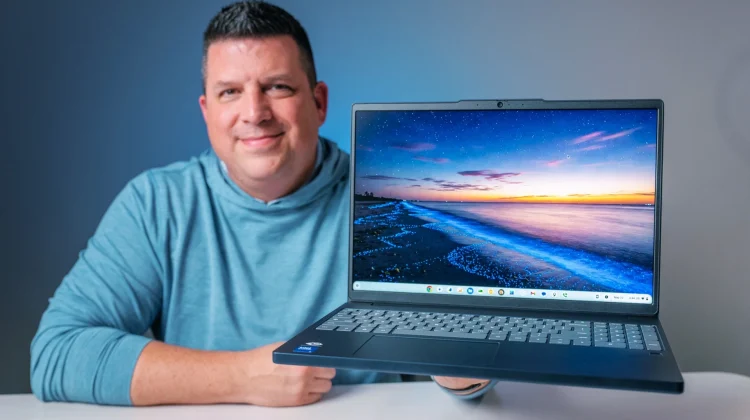
Every now and then, a device lands in the office that makes us scratch our heads a bit; not because it’s bad, but because the combination of specs is just so confusing. That is exactly the case with one of Lenovo’s newest arrivals, the Lenovo Chromebook Plus 15-inch, which originally broke cover at CES 2026.
Lenovo has put together an interesting formula here, pairing some undeniably high-end hardware features (like a 400 nit, 120Hz screen and fingerprint scanner) with a distinctly mid-range processor, RAM and storage. It normally retails for $600, but it regularly finds its way on sale for $500. I wasn’t sure what to expect this one, and now that we’ve Unboxed it, I’m still a tad bit confused about the mixture of elements this machine possesses.
The display is the star of the show
Let’s just cut straight to the best overall part of this new Chromebook: the screen. Lenovo did not skimp with the massive 15.3-inch, anti-glare IPS touchscreen that packs in a solid 1920×1200 (16:10) resolution. The real kicker is that it hits an impressive 400 nits of brightness and features a buttery-smooth 120 Hz refresh rate. It even sports premium rounded display corners, which gives off a bit more of that high-end vibe.
Most mid-range laptops stick you with a dimmer 250 nit panel. As a stark contrast, however, staring at this screen is an absolute joy that offers fantastic viewing angles and plenty of brightness to cut through most lighting scenarios. If you consume a lot of media or just appreciate a crisp, fluid visual experience, this display nails the experience.
High-end perks, mid-range power
Surrounding that gorgeous display is a collection of features you typically don’t see lumped together on a mid-range machine:
- The Good Stuff: You get a snappy fingerprint scanner for biometric security, a crisp 5-megapixel webcam with a physical privacy shutter (the color accuracy and auto-exposure on this camera are fantastic), and a generous port selection including a micro SD slot and full-sized HDMI.
- The Compromises: To hit this price point, the chassis is entirely plastic. It feels remarkably firm, boxy, and rigid – reminiscent of the sturdy Acer Chromebook Plus 516 GE – but there is no aluminum to be found here. Additionally, the keyboard is not backlit, and the keys themselves feel a little mediocre and mushy under the fingertips compared to Lenovo’s usual stellar standard. The bottom-firing speakers are also a bit of a letdown, sounding exactly like you’d expect downward-pointing speakers to sound.
Under the hood, everything is driven by the Intel Core 3 N355 processor, backed by 8GB of RAM and 128GB of storage. While it won’t break any benchmarking records, it is a perfectly capable setup that fluidly handles daily ChromeOS multitasking, tab loading, and web productivity without breaking a sweat.
Likely not Googlebook material
Because this laptop uses a mid-range Intel Core 3 chip, it does not include a dedicated NPU (Neural Processing Unit). As we’ve been tracking Google’s upcoming desktop-class Android platform on the horizon, AI hardware is going to be a major gatekeeper. Because of that lack of an NPU, there is a very high probability that this specific model will not receive an optional upgrade path to the new Googlebook OS down the road.
So, where does that leave you? If you are buying this machine hoping for a shortcut to Google’s next-generation operating system, you should probably look elsewhere. But if you are buying it strictly for what it is on paper (a rock-solid, secure, web-first Chromebook), it is a highly compelling package. Google is backing this hardware with 8 to 10 years of guaranteed, regular security and software updates.
At its standard $600 MSRP, it’s a bit tough to recommend over some of the fiercer competition. But when it dips down to $500 (as it has already at least once), the value proposition changes a lot. Most of the time you spend with a laptop is spent staring directly at the screen, and Lenovo gave this device an absolute home run of a display. If the parts of the equation Lenovo leaned in on are the things you most value, the Chromebook 15 does some things incredibly well, and it might be worth a look.
SUBSCRIBE TO UPSTREAM
Get Chrome Unboxed delivered straight to your inbox
Upstream is our flagship, curated newsletter with the top stories, most click-worthy deals, giveaways, and trending articles from Chrome Unboxed sent directly to your inbox a few times a week. Join 31,000+ subscribers.

