

Support our independent tech coverage. Chrome Unboxed is written by real people, for real people—not search algorithms. Join Chrome Unboxed Plus for just $2 a month to get an ad-free experience, access to our private Discord, and more. Learn more about membership here.
START FREE TRIAL (MONTHLY)START FREE TRIAL (ANNUAL)
Just a few days ago, we highlighted a quiet but significant update to the Lenovo IdeaPad Slim 3 Chromebook that brought the new MediaTek Kompanio 540 processor to the table. That specific configuration paired the new silicon with a healthy 8GB of RAM and 128GB of fast UFS storage, making its current $379 sale price an incredibly compelling mid-range option. But Lenovo isn’t stopping there.
While browsing the Best Buy site today, I stumbled across a second, more-affordable configuration of this exact same Chromebook. This alternate version makes a few internal compromises to drive the price tag down, but it keeps some of the more impressive parts of the more expensive version around, too.
The internal trade-offs
To get the price to drop significantly, Lenovo kept the new MediaTek Kompanio 540 processor but dialed back the memory and storage capacities.
Instead of the 8GB of RAM and 128GB of faster UFS storage found on the higher-end model, this budget-friendly configuration scales down to 4GB of LPDDR5x RAM and a standard 64GB eMMC storage drive.
While stepping down to 4GB of RAM and eMMC storage means it won’t be a massive multitasking powerhouse, it is still more than enough overhead for standard web browsing, content consumption, and lightweight daily tasks. Having the newer Kompanio 540 chip under the hood means that ChromeOS should still feel incredibly fluid and responsive.
The outer experience remains intact
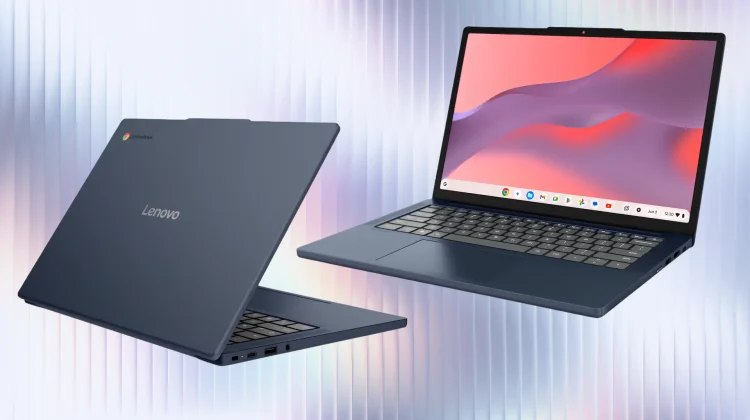
The most exciting part about this specific configuration is what Lenovo decided not to change. Often, when a manufacturer builds a budget-tier model, they downgrade the display panel to a washed-out, low-resolution screen to save a few bucks. That isn’t the case here. Instead, this $249 model retains the exact same outward experience as its $399 sibling:
- The gorgeous display: You are still getting the standout 14-inch WUXGA (1920×1200) IPS touchscreen. That crisp 2K resolution and 16:10 aspect ratio make reading articles and managing web apps a fantastic experience.
- Highly portable chassis: It keeps the exact same Cosmic Blue frame, weighing in at an incredibly travel-friendly 2.99 pounds.
- Modern connectivity and endurance: It still boasts an estimated 18 hours of battery life and retains updated Wi-Fi 6E connectivity for fast, reliable networking.
A massive discount right out of the gate
According to the listing, this 4GB/64GB configuration carries a standard retail price of $419. However, Best Buy has aggressively included it in their current promotional cycle right alongside the higher-end model. You can pick up the Lenovo IdeaPad Slim 3 Chromebook with 4GB of RAM and 64GB of eMMC storage right now for just $249.
If you have a student heading back to school or you just need a reliable, highly portable secondary device with a great screen for under $250, this is an absolute steal that should be at the top of your list.
SUBSCRIBE TO UPSTREAM
Get Chrome Unboxed delivered straight to your inbox
Upstream is our flagship, curated newsletter with the top stories, most click-worthy deals, giveaways, and trending articles from Chrome Unboxed sent directly to your inbox a few times a week. Join 31,000+ subscribers.

