

Support our independent tech coverage. Chrome Unboxed is written by real people, for real people—not search algorithms. Join Chrome Unboxed Plus for just $2 a month to get an ad-free experience, access to our private Discord, and more. Learn more about membership here.
START FREE TRIAL (MONTHLY)START FREE TRIAL (ANNUAL)
If you’ve spent any time reading our early thoughts on Googlebook OS, you already know one of my bigger gripes with the platform: that persistent top bar. In a desktop operating system, having static, unmovable mobile-style elements hogging the top edge of your display feels like an unnecessary addition. I’ve argued before that shelf or taskbar placement at the bottom – much like Samsung DeX, Lenovo’s desktop modes, or even classic ChromeOS – makes infinitely more sense for desktop productivity.
So when an open-source app called BentoBar popped up on my radar, I was intrigued. When I realized it was built by none other than Alex Kuscher – Senior Director of Laptops & Tablets at Google and one of the driving forces behind Googlebook – I immediately hopped over to the Play Store and installed it. And honestly? It’s already making me reconsider some of my frustrations.
Real utility where there used to be empty space
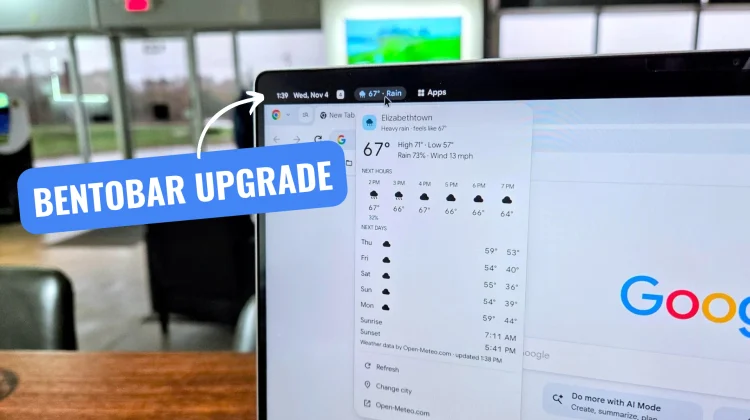
I got BentoBar up and running, configured a few settings, and the difference in daily use is night and day. Right out of the gate, I added a live weather pill, a calendar widget, and a dedicated app shortcut tray.
Instead of an inert clock and date taking up real estate, BentoBar actually wires into your workflow. The calendar icon drop-down pulls directly from my Google Calendar, showing upcoming events at a glance rather than just sitting there as static text. The weather module is fantastic when I’m working inside a full-screen window or an app and can’t see the primary desktop widgets. And having an app shortcut tray pinned right along the bar keeps me moving without constantly minimizing windows or bouncing back to the home screen.
What needs to happen next
In my recent thread on X, there’s an even more promising detail tucked into the conversation – we might eventually get the native ability to toggle off default system items in that top bar and just utilize BentoBar instead.
That would be a massive win. Right now, having BentoBar active means living alongside the somewhat redundant, non-interactive system clock and battery indicators. If Google gives us the toggles to hide those stock elements, BentoBar instantly becomes a must-have utility for Googlebook. You could completely replace the static system items with functional, interactive modules that actually do things when you click them.
Still, my overall aesthetic preference hasn’t completely shifted. I would still love the option to put all the items from the system bar at the bottom of the screen when docked or operating in desktop mode. There’s something undeniably clean about letting full-screen windows stretch cleanly to the very top edge of the panel. But as long as Google insists on keeping that top bar where it is, BentoBar does help to justify its existence.
SUBSCRIBE TO UPSTREAM
Get Chrome Unboxed delivered straight to your inbox
Upstream is our flagship, curated newsletter with the top stories, most click-worthy deals, giveaways, and trending articles from Chrome Unboxed sent directly to your inbox a few times a week. Join 31,000+ subscribers.

