Up next in 10



Join Chrome Unboxed Plus for access to our private Discord, an ad-free website experience, AMAs, exclusive giveaways, and more! Start your 7-day FREE TRIAL here: https://chromeunboxed.com/join/
Buy the Google Home Speaker from Best Buy: https://bestbuycreators.7tiv.net/VOgrka
・・・・・・・
Buy Chrome Unboxed Glowbar merch: https://cottonbureau.com/p/YGGDM3/shirt/glowbar#/23914930/tee-men-premium-heavyweight-black-100percent-cotton-s
👉 Shop the best Chromebook deals today: https://chromeunboxed.com/the-best-chromebook-deals-today-updated/
📧 Subscribe to our Upstream newsletter: https://bit.ly/4jVq0de
・・・・・・・
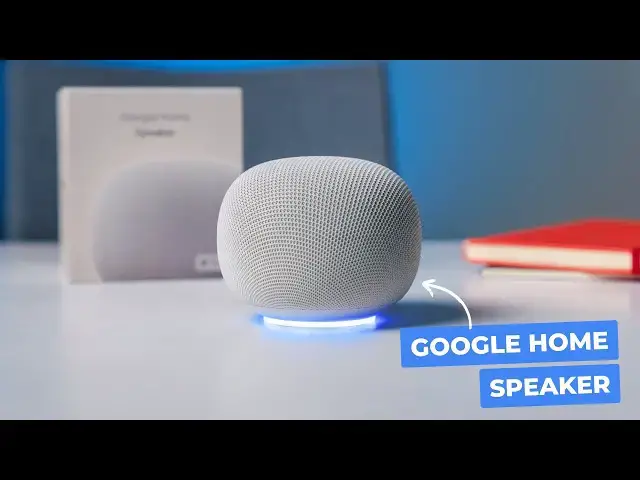
It is funny how things eventually come full circle. After years of navigating the somewhat confusing naming conventions of Nest Audio, Google Home Minis, and the Google Home Max, Google is officially bringing back the core branding. The brand new (and aptly named) Google Home Speaker just landed in the office this week, and I am incredibly excited to finally get it out of the box and onto the desk.
While a full, comprehensive review will take a bit of time as we live with the device and put it through its paces, I wanted to get it set up, test the initial audio quality, and see what the hardware actually feels like in person.
Read more: https://chromeunboxed.com/unboxing-the-brand-new-gemini-powered-google-home-speaker-video/
☕ Fueled by Fresh Roasted Coffee! Buy the special edition Chrome Unboxed bag here: https://chromeunboxed.com/coffee
Subscribe to the channel: http://bit.ly/2xFuj6L
Follow us: https://x.com/chromeunboxed
https://www.instagram.com/chromeunboxed
https://www.threads.net/@chromeunboxed
https://www.facebook.com/Chromeunboxed
Show More Show Less View Video Transcript
0:00
It's funny how things come full circle, isn't it
0:03
After years of Nest speakers and kind of getting rid of the Google Home speaker brand
0:08
here we are back with the Google Home speaker. Just landed in the office this morning and super excited to get this thing unboxed
0:17
Obviously, the review portion of this will take a little bit of time to just use it and
0:22
see what's all going on with this speaker, but we'd really like to get it at least set
0:26
up and see how it sounds and see how it looks on the table and stuff. So without further ado
0:31
let's get in here. All right. So undoubtedly, if you're watching this, you've probably seen
0:41
something about the Google Home speaker. And this device took longer than we expected to kind of
0:48
arrive. It was teased at the hardware show back in August of last year. If you remember, it showed
0:54
up like on a side table next to a couch and everybody was really excited about it. But Google
0:59
specifically has said, um, in some interviews since that, um, they spent plenty of time making
1:05
sure that the Gemini specifically was actually ready for this thing. And, uh, yeah, that's
1:10
that's cool looking, um, you know, recycled fibers and all that kind of stuff on the top. So I
1:15
you know, this, this looks a lot like, you know, the, the Nest audio, um, the, the smaller Google
1:21
home like there were nest minis and google home minis and like it's just been kind of a naming
1:26
nightmare over the last few years and then for me i thought you know until gemini came along like
1:31
smart speakers were just kind of on the way out because they weren't very smart anymore and so
1:37
that was that was a little annoying for a while but again we've come full circle we're back to just
1:43
google home speaker and so it's not mini it's not audio it's it's not max which we still have the
1:50
Google home max to love that thing. Uh, but hopefully this one is, um, ready for kind of the
1:56
the AI, um, insurrection that's happening. Um, hopefully Google has put enough hardware in here
2:03
for this thing to keep up for a long time. Uh, and the idea is if, if Gemini is in a good spot
2:09
Gemini live, which you get free for six months, if you buy one of these, um, and I can tell you
2:13
really quickly before we do anything else with this, I pulled it up because honestly, Google's
2:18
naming and plans and all that kind of stuff just are really hard to follow. So I had to ask Gemini
2:25
on my phone, is Google Home Premium Standard, which is what you would need to have Gemini Live
2:31
on this, is included in my current Google AI One plan? And it is included in AI Pro
2:38
And then if you have AI Ultra, you get the advanced plan. So the Google Home advanced plan
2:45
you know, it's Google. So they're going to have eight plans for different things. they are included in these ai plans um so we shouldn't have any problem testing out
2:54
the features and all that kind of stuff with this and and again if you don't have any of those things
2:59
you don't like paying for ai or any of that stuff but you do want to give gemini a try
3:03
uh gemini live specifically a try which is going to give you the conversational ability with this
3:08
thing uh that google said that you know this thing got pushed back a little bit because they wanted
3:12
to make sure Gemini live conversation, a continued conversation is ready on this thing. And if it all
3:19
works, um, and again, we're not going to solve that in this video, so please don't expect that
3:23
But if it all does work, um, the way that Google wants and the way that Google's expecting
3:28
my thought is that all of a sudden this becomes um what we always hoped smart speakers would be this very conversational thing that you can just kind of talk to If you pull up thoughts of like Iron Man you know Tony Stark talking to his various assistants over the time
3:46
Jarvis is the main one before, you know, whatever. I'm not going to get nerdy on that, but, you know, him just being able to speak to it like another human being
3:53
just being able to say, hey, you know, what's this and how do I do this and carry on a conversation
3:58
with that AI. If that can happen, even at a small level, I think Google will have accomplished
4:06
something pretty profound and pretty awesome and pretty usable. So let me get this thing plugged in
4:11
and set up. It's going to take us a few minutes to do that, obviously, but I just want to know
4:15
what it sounds like. It looks great. I think it's just going to sit on a shelf and kind of just be
4:19
out of the way. It's got a basic USB-C receiver, so no more hunting for the specific dongle that
4:25
goes into it and it is actually hard wired in here. So instead of putting the wire on the
4:30
on the power brick and then making it be a barrel and hook into here or finding a USB
4:35
C port on here and having people trying to plug stuff in, this thing's just connected. Um
4:39
cause honestly, when are you going to use it without a cable? It's not a battery powered device. So, um, you know, I like what I'm seeing already. We do have a mute switch down here
4:47
by the way, uh, which I know a lot of people really, really like, and you definitely want
4:50
every once in a while, you just need to be like, Hey, look, I need to make sure this thing's not listening to me. Then you have the kind of LED strip down here. So I'm curious to see how bright
4:58
that is, what it actually looks like, like on the table turned on, up and going. But I do prefer
5:03
what they've done here with the power. Cause if you lose this brick, you find another brick that works and you'll be fine. So I know with previous Nest and Google home stuff, you had that very
5:12
specific block. And if you somehow like moved or whatever, misplaced it, we just kind of out of
5:17
luck. That's just not going to be the case anymore with this one. So anyway, let me get this thing
5:21
plugged in, logged in, we'll get some audio samples off of it
5:26
kind of look at this LED, and then start preparing for what it was going to look like
5:29
to do a review on this thing. Oh, that's so fun. Hi
5:37
To get started, download the Google Home app on a phone or tablet. Here we have it, thanks
5:43
Okay. I didn't know if we had touch on top or not. Just a quick break
5:49
in the whole setup process. As we plugged it in, as soon as I opened the Google Home app, this notification toast popped up and little stuff
5:56
like that matters because ultimately a setup of these things historically has sometimes been
6:01
problematic. So, so far so good. I'm going to keep setting stuff up now. There we go. I love a quick
6:07
QR code scan to continue setup. It makes things so much easier. So much easier. I also really love
6:13
the LED and now granted this is a white table, so it's really kind of popping off of there
6:17
but like the glow and it like glows around and it's it's really cool looking this is another
6:22
fun thing that kind of just showed up and set a process compatible speakers displays can alert you
6:27
when they detect sounds like smoke carbon monoxide alarms glass breaking all that kind of stuff
6:32
i would assume it just sends you a notification to your phone say look i heard this uh something's
6:38
going on you might want to check out your house so uh pretty cool pretty cool addition here um
6:43
And I believe that this feature is part of that six month trial that I mentioned earlier
6:50
And or if you have the AI pro plan, you can get this
6:56
So I maybe spoke too quickly because I actually now after I kind of said, yeah, I want to
7:01
do this. I got these other devices that are in my house So the standard Nest Audio the old Google Home is showing up on here the Google Home Mini all of our displays and
7:13
everything at our house. There's a toggle switch for all of them. So I guess it's just a new
7:19
cloud-based thing. I mean, it's not that big of a deal for one of these devices to be able to pick
7:23
up those sounds, but that would be in the Google Home Premium subscription. So again, whether you
7:30
have AI pro you got that bundled in there or you just go get this by itself. Now that sound
7:35
detection, if that sounds interesting to you, it's going to be something you'll want to sign up for things you can do continue in the Google home app. Wow. That was a that's full. Um, I didn't
7:47
mention this in the early part because I wasn't even sure exactly how it was going to work, but we still get the touch top controls for volume and assuming assuming a plate Paul's kind of here in
7:56
the middle, we're going to crank some, some music on that. But just the way this thing was like, hi, I'm ready to help you. The spoken voice of it sounds so rich and full. Now, again, I'm not
8:05
expecting Google Home Max here. I'm not expecting this massive sound, but I think Google's had
8:12
enough iterations of this thing to expect some pretty good sound out of this. It's also a 360
8:16
degree sound, so it's going to sound the same over there, over here, over here, over here
8:20
which is very nice. So you put it in kind of a central location, it's going to sound really nice
8:24
There's a nice little, let me make sure my brightness is down. There's a nice little kind of getting started thing once you get through your setup that, you know, kind of walks you
8:33
through a handful of things as far as like the features of it and stuff, which is nice
8:38
Let's explore the new light ring. Learn more. I don't really want to learn more about it right now
8:43
but it'll kind of help you walk through some of that stuff. So you get a nice little brightness
8:47
toggle for your light. So let's see it's a little dimmer here
8:52
Oh, the brightness, when you're doing volume, the brightness goes with, um, with that
9:01
So let's see full brightness. Hey, nevermind. All right. And then we'll turn the brightness way down
9:14
Hey, it's a little dimmer. Couldn't seem like it's that dim. But, um, again, these are all things we're going to play with for the review
9:21
um mike control the orange light that gets mics off oh that's nice that's a nice addition too
9:26
so that little orange light that's always appeared on um google home devices when you turn the mic
9:32
off it just has a light sits on there um makes everyone go why's that orange light on there
9:36
um that you can turn that off so let's see i'm gonna turn it off we're gonna kill the mic the
9:42
mic's off yeah no orange light that's a nice addition now i do kind of like it being on there
9:48
Honestly, if so that you kind of know there's a glow down here on this one that tells you
9:52
Hey, the mic is not on so that you can kind of see it. No, for sure. Um, let's see if my brightness adjustment works now
10:00
Not really. Um, yeah. Oh yeah. I kind of saw it go down and up again
10:05
Whatever. Um, it's a basic thing. Obviously this is just going to kind of glow whenever you're doing stuff
10:10
All right. So let's see what this thing sounds like. Hey, play me some royalty free music from YouTube music
10:18
All right, playing 12 hours of copyright-free music
10:27
Free background music for YouTube videos and content creators on YouTube music
10:32
The spoken voice sounds so good. Just sounds so good Yeah that nice Rumbling the desk a little bit It a alternative sound Yeah sounds the same everywhere every direction
10:49
I can hear separation, you know, near the guitar, I can hear the stuff and still hear a little
10:57
bit of the conversation thing that the little track that they were playing. So it's got a nice rich sound to it
11:02
We're in a decent sized room here. I mean, if you're hosting people, you just need music going on in the background
11:08
This thing is going to more than provide that for you. And again, the middle, the middle button definitely works as a play pause
11:16
I'm curious if. No, I know maybe a long press would pull up the
11:22
Hey, thing I'm going to have to stop everything. Cancel. Hey, what's the weather look like for this weekend
11:34
What about this weekend? Okay, that sounds great
11:54
Real quick, what about Louisville, Kentucky? We might be going up there. this weekend in louisville look for heavy thunderstorms on saturday with a high of 82
12:07
and a low of 72 sunday will be warmer and so i really do like the you can tell the ongoing
12:13
conversation works you see this this light glow underneath here you know you can just keep talking
12:17
to you don't have to re-prompt or anything like that i also have to give it prompts for saying
12:21
louisville because that's people around kentucky say louisville uh even though for most people
12:27
would look at it and say it's Louisville or Louisville or something like that. We all call
12:31
it Louisville and that's how I pronounced it. So props to Google for getting that part right
12:36
So there's a lot to explore with the speaker. I'm very impressed by the sound of it. I like the way
12:40
it looks. It just kind of looks like a blown up, um, mini, uh, the home mini, the nest mini
12:44
whichever one you had. Um, but it sounds, uh, we'll, we'll definitely put this against the nest
12:49
audio. I feel like it's going to hold its own for sure. And it's 360 degrees. The led is just
12:56
this awesome touch, this glow down at the bottom. It helps you know that you can still interact with
13:00
it. It helps you know when it's listening, all that kind of stuff. I think this is going to be
13:03
an absolute knockout for anyone looking for a smart speaker, something they can cast audio to
13:08
that kind of stuff. I think Google's done a good job of putting this together and maybe even
13:13
holding it back a little bit until they knew that Gemini was ready, until the hardware was ready
13:17
because there is some stuff going on under the hood here too that allows some of this interaction
13:21
some of the ongoing interaction with Gemini to happen locally on device versus everything
13:25
having to go to the cloud. Now for weather, for instance, you saw it thinking it's going to have
13:30
to go to the cloud to get weather information. It doesn't hold all weather information on it
13:33
obviously, but the conversational part of going back and forth with Gemini, that stuff's happening
13:38
here. And that's important if you're going to have a conversational assistant. So I'm looking
13:43
very forward to spending time with this thing, getting together a review, doing some side-by-sides
13:48
with other smart speakers. But for now, that's it for this one. If you like this video, give us a
13:52
thumbs up, head down there, hit that subscribe button and be sure to ring the notification icon as well. If you'd like to be alerted when we make future videos, just like this one until next time
14:00
We'll see you
Science