Up next in 10



Thanks to Monarch for partnering with us! Start your free trial and get 50% off your first year of total money clarity using our link https://monarch.com/chrome or code chrome50 for 50% Off Monarch Core tier.
Buy the Lenovo IdeaPad Slim 3 Chromebook (8GB) from Best Buy: https://bestbuycreators.7tiv.net/ZVqMGR
Buy the Lenovo IdeaPad Slim 3 Chromebook (4GB) from Best Buy: https://bestbuycreators.7tiv.net/L0RLa0
Buy Chrome Unboxed Glowbar merch: https://cottonbureau.com/p/YGGDM3/shirt/glowbar#/23914930/tee-men-premium-heavyweight-black-100percent-cotton-s
👉 Shop the best Chromebook deals today: https://chromeunboxed.com/the-best-chromebook-deals-today-updated/
📧 Subscribe to our Upstream newsletter: https://bit.ly/4jVq0de
・・・・・・・
Read more: https://chromeunboxed.com/
☕ Fueled by Fresh Roasted Coffee! Buy the special edition Chrome Unboxed bag here: https://chromeunboxed.com/coffee
Subscribe to the channel: http://bit.ly/2xFuj6L
Follow us: https://x.com/chromeunboxed
https://www.instagram.com/chromeunboxed
https://www.threads.net/@chromeunboxed
https://www.facebook.com/Chromeunboxed
Show More Show Less View Video Transcript
0:00
Today in the office we have Lenovo's
0:03
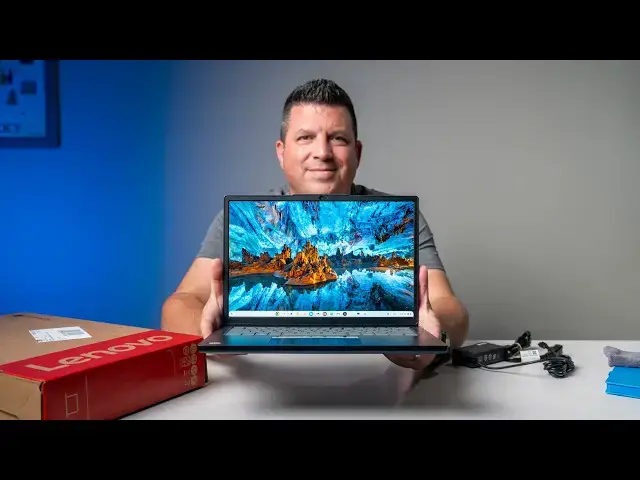
um updated Slim 3 Chromebook. This is
0:06
the 8 gig model. There is a 4 gig model
0:08
as well. We'll talk about that kind of
0:10
as we unbox it. But this is an update to
0:12
a Chromebook that has been popular for
0:15
years. I think the original came out in
0:16
2022 or somewhere in that uh somewhere
0:18
in that realm. So, we're talking 3 4
0:20
years since we've had one of these. And
0:22
it was always popular cuz it had a great
0:24
screen for the price. And it looks like
0:25
from the specs at least that Lenovo has
0:27
kind of carried that lineage over. and
0:29
that's what we're getting in this
0:30
version as well. So, super excited. Has
0:33
the Companio 540, which we have not
0:34
tested yet. Uh, so lots of fun things
0:37
going on in this Chromebook for a really
0:39
reasonable price. So, it's enough
0:40
talking about the uh intro here. Let's
0:42
get in the box.
0:47
Now, this is a budget friendly
0:49
Chromebook, but you know, whether you're
0:52
shopping for a budget friendly
0:53
Chromebook or something more expensive,
0:54
you need to figure out your budget and
0:56
whether this thing fits into it. And if
0:57
you're anything like me, managing that
0:59
kind of stuff, day-to-day finances, can
1:01
really start to feel like a full-time
1:03
job. And that's where Monarch comes in.
1:05
It's a private ad-free personal finance
1:08
platform that brings all of your
1:09
accounts into one clean dashboard. It
1:12
automatically tracks your spending and
1:13
net worth. It helps you stay financially
1:16
aligned by helping you clearly see all
1:18
of your accounts, your budgets, and
1:20
recurring bills all in one beautiful
1:22
view. It syncs with over 13,000
1:25
institutions for a fast, secure setup
1:27
with all your major banks and credit
1:29
cards and brokerages. Basically giving
1:31
you instant financial clarity. But what
1:33
I really love is the control without the
1:36
micromanagement. Monarch offers flexible
1:38
budgeting that cleanly separates your
1:41
fixed versus your flexible spending
1:43
using customizable rules and categories
1:45
to keep everything organized without
1:47
rigidity. It even delivers AI powered
1:49
insights that use your real financial
1:52
data to surface helpful explanations
1:54
about your money habits. Most
1:56
importantly, Monarch is completely
1:58
private and adree. You're the customer,
2:00
not the product. No ads, no selling your
2:03
data. Plus, it's completely
2:05
cross-platform, meaning you get a
2:06
beautiful, intuitive experience on both
2:08
web and mobile. If all of that sounds
2:10
good to you and you're ready to ditch
2:12
the multi-app financial juggling, you
2:14
can try it out right now. Just head over
2:16
to the link in the description and use
2:17
our code chrome50 at sign up to get 50%
2:21
off your first year and get a head start
2:23
on your financial clarity. All right, so
2:26
let's get in the box here. Uh, as I said
2:27
in the beginning of the video, this is
2:29
the 8 gig version. So 8 128. Uh, that's
2:32
8 gigs of RAM, 128 gigs of UFS storage.
2:36
The downgrade you get in the other
2:37
model, uh, that saves you 80 bucks. So
2:39
this one's $499.99 MSRP. to go to the
2:42
$419.99, you're cutting down to 4 gigs
2:45
of RAM, 64 gigs of eMMC storage, but
2:48
from what we can tell from the specs and
2:49
stuff. That's really the only
2:51
differences uh we're seeing across uh
2:53
for both of these devices. So, um
2:57
I mean, I thought this had Oh, it does.
2:59
It's kind of nice. And it actually has
3:00
like a pull tab, you know, like a phone
3:01
or something. That's kind of a nice a
3:03
nice touch. Let's see if it actually
3:04
worked, though. Oh, no.
3:08
I'm still got to rip it a little bit. It
3:10
was a good try.
3:12
It's my first time. Well, they tried to
3:14
make it look good. It didn't didn't work
3:16
out. I would just stick with the knife
3:18
or scissors. All right,
3:20
let's get in here.
3:27
Get some paperwork done in here. And
3:29
nothing out of the ordinary.
3:32
Your
3:34
classic Lenovo charger. Did it get I
3:37
love that Lenovo does this. I don't know
3:38
why, but like the little yellow on the
3:41
inside of their charging cable. It's a
3:44
nice touch. I like it.
3:46
You know what you came for. And man,
3:48
this feels very reminiscent of
3:51
um the the twoin- one that we just uh
3:54
unboxed not too long ago. Um a little
3:57
thicker. So, for a device called Slim,
3:59
not really that slim. It's going to be
4:01
hard to catch a lot of this on camera
4:02
cuz it's a dark same dark navy. You got
4:04
a USB uh over here on the side. USB type
4:07
A and C Kensington headphone microphone.
4:10
Um, and then on this other side here,
4:12
let me get this thing out of the way.
4:16
Paperwork in there, too. Uh, and then
4:17
you've got a an HDMI, uh, another USB
4:20
type A power, and, um, another USB
4:24
type-C over here. So, uh, nice port
4:26
selection here. Um, you've got the the
4:28
kind of wavy back. Now, this thing is
4:30
all plastic at this kind of price point,
4:31
obviously, but I like that Lenovo's kind
4:33
of sticking with this. Like, this is
4:35
what their Chromebooks look like uh for
4:37
this generation, but nice boxy sides. Uh
4:40
everything's squared off. They're not
4:41
trying to like scoop anything and try to
4:43
make it look any thinner than it really
4:45
is. And it's just under 3 lb, so it's
4:47
this is plenty portable. Um it feels
4:50
feels pretty nice in the hand. All
4:52
right, so let's open the lid up here.
4:54
And again, a 16x10 screen this time
4:57
around. The old Slim 3 was a a 16x9
5:00
screen. 400 nits is what it is rated uh
5:03
on the spec sheet.
5:06
Pretty decent keyboard. Again, I'm I'm
5:08
thinking of this through the lens of
5:09
like a mid-range kind of device. Uh it's
5:11
on sale right now for $379. Uh I don't
5:14
know if that will be the case whenever
5:16
you're watching this, but that means it
5:18
came out like immediately went on sale.
5:20
So, this is going to be a device that's
5:21
going to get sold or going to get uh put
5:23
on sale quite a bit.
5:26
Definitely a myar trackpad. Nice and
5:28
smooth,
5:30
not flopping around. Again, I feel like
5:32
that's kind of a problem that's that's
5:34
gone by the wayside with Chromebooks.
5:35
Maybe we complained about it enough over
5:37
over the years that they stopped
5:39
allowing those to pass. But yeah, Chrome
5:40
or the trackpad feels nice. We do have
5:42
upward firing speakers as well. Uh but
5:45
the star of the show obviously here is
5:47
the 16x10 400nit uh touchscreen. So,
5:50
you're getting, you know, a really great
5:52
screen. And I still advocate that it's
5:54
one of the most important things to nail
5:56
in a Chromebook. Like if the thing that
5:57
you're looking at constantly all day is
6:00
really good, the keyboard is serviceable
6:02
and the trackpad can get you by and as
6:03
long as the you know performance isn't
6:06
abysmal, like you've got the recipe for
6:08
a pretty st a pretty good Chromebook. Um
6:10
so I need to obviously this one's new
6:12
out of the box, so I'm going to have to
6:13
plug it in and get all signed in.
6:15
That'll give me a chance to check some
6:17
stuff out on it. Um, really interested
6:19
to see how the Companion 540 fares as
6:22
far as performance. Uh, we won't really
6:24
be able to test that out necessarily
6:25
completely today. I'd like to hear what
6:27
the the Waves Max audio sound like. Been
6:30
a little let down by some of those
6:32
Lenovo devices uh here lately. U but
6:35
yeah, uh let me let me get all signed in
6:37
and we'll we'll come back. Okay, now
6:39
that I'm all logged in and set up here,
6:42
um can confidently tell you the screen
6:44
is really really good. So, it's
6:46
anti-glare for one. Uh, but the 400
6:49
nits, uh, fantastic. We have it way
6:51
cranked down for the for the camera
6:53
here. You even get the rounded corners,
6:56
um, which we kind of have only seen in
6:58
like more premium or or lap or tablet
7:00
type devices. Um, so that's a nice
7:02
little touch, but the anti-glare helps
7:04
quite a bit to really like make the most
7:07
of all of that brightness that you get
7:09
in here. And it's obviously it's
7:10
touchscreen, uh, which is really nice.
7:12
So, A+ on the screen here. viewing
7:14
angles look awesome. This is just a
7:16
really impressive screen for a device
7:18
that's uh on sale right now for under
7:20
400 bucks. You got a 720p webcam up top
7:23
that um you know 720p is going to get
7:26
you everything you need for you know
7:28
like uh video calls and that kind of
7:30
stuff. It looks fine. I can tell you
7:32
like as soon as I point it over to the
7:33
camera, it's dark over there so you're
7:35
going to kind of miss some of it. Um but
7:37
the colors like the contrast and stuff
7:39
on it look really really good. Um,
7:41
there's just no way for me to show it to
7:43
you here, but it's doing a great job of
7:45
I mean, it is dark dark over there. So,
7:47
it's doing a great job of kind of uh
7:49
contrast adjustments happening really
7:50
really fast, but the color like my skin
7:52
tone and all that kind of stuff looks
7:54
really really nice on here. So, um,
7:56
while I'd like to see at least a 1080p
7:58
camera, it's a it's a decent sensor
8:00
there for sure. The upward firing
8:01
speakers are kind of like I expected
8:04
them to be, not very good. Um, that
8:07
probably pushing into the bad category
8:08
here. I'll just I'll let you kind of
8:10
take a quick listen.
8:11
>> All the power and battery life,
8:14
but in a convertible form factor, this
8:17
one's for you.
8:20
>> It's very quiet.
8:22
>> But before we get into all that,
8:23
>> there's no bass to speak of. Spoken word
8:25
sounds very tiny. I They're not good. Um
8:28
they're not good at all. Um, I wish I
8:30
just I'm not asking for like incredible
8:33
speakers on all of these things, but I
8:34
know there are affordable speakers out
8:37
there for laptops that sound way better
8:39
than this. So, um, that's a little bit
8:41
of a bummer, but oh well. Can't win them
8:43
all. Fantastic screen. Not great
8:46
speakers. But then if we move down to
8:47
the keyboard, um, I didn't even realize
8:49
it. Can you see the I It's not bleeding
8:52
much. Can you see the back lighting
8:53
though? Um, it's got a backlit keyboard.
8:55
Didn't even know that was the case. Um,
8:57
that's a nice addition. And you know,
9:00
after setting it up, quiet keys, but
9:03
nice and clicky, so good and tactile.
9:05
Um, and the the entire deck here, even
9:07
though it's all plastic, does feel
9:09
relatively rigid. You can see some
9:11
there's some deflection there for sure.
9:13
So, if I kind of hold it out here, you
9:15
can see if I'm really wrenching, I can
9:17
get a little deflection. That's just
9:19
part of plastic, but overall, like I
9:21
don't feel like picking it up from one
9:22
side like this that it's just completely
9:24
bending or like clicking the trackpad or
9:26
anything. So, that's another nice touch
9:28
and that helps make the keyboard feel a
9:29
little bit more secure. And then the
9:31
trackpad is smooth, works uh multi-
9:34
gestures are fine. I spoke too early
9:36
though when I said earlier that it had
9:38
no movement at all. Um, you can barely
9:40
kind of tell before it clicks. You can
9:43
hear it.
9:44
That's not clicking. That's clicking.
9:47
So, there is a little movement there. I
9:49
don't I don't like that. I just don't
9:51
like seeing that. It's too easy of a
9:53
problem to fix before it ships out. I
9:54
really hope that that's not the case
9:56
across the board. Not a dealbreaker. It
9:58
works fine. Um it's not like the the
10:01
trackpad's not working, but it's you
10:04
it's almost sounds like I'm double
10:05
clicking every time. It's it's one of
10:06
those small annoyances that really
10:08
aggravate me. And just want to make sure
10:09
you all know that that's the case and uh
10:12
before you go out and consider buying
10:13
one of these. So, in general, I mean,
10:16
the thing that I'm probably most
10:17
intrigued about this device other than
10:19
the screen, but we saw the screen.
10:20
Screen's awesome. Um, they definitely
10:22
went in and said, "Let's let's spend
10:23
money on that." Um, the other part of it
10:25
is the Companion 540 and moving around
10:27
the device while I was setting it up and
10:29
stuff felt nice and smooth, but that's
10:31
not putting it under a workload and
10:33
that's only a thing I can do with, you
10:34
know, a full review. And so, obviously,
10:36
that's what's happening next. But for a
10:38
device that's on sale right now, again,
10:40
for $379 right now, that's a lot of
10:42
superlatives, a lot of nice things in
10:44
the package at $500,
10:47
depending on how the Companion 540
10:48
shakes out, how it works. um five $500
10:52
is pushing it into the point where you
10:54
got to now think of other devices that
10:55
might you might catch on sale for the
10:57
same amount and get a little bit more
10:58
horsepower under the hood, maybe some
11:00
more features, pen input, convertible,
11:02
that kind of stuff. So, it's going to be
11:03
an interesting review process with this.
11:06
Um, but I I like what they've put
11:08
together here. If it's one that just
11:09
stays on sale and is in that $350 to
11:11
$400 range all the time, I think it's a
11:13
great laptop for students. It's a great
11:15
laptop to have around the house. And I'm
11:18
just really glad Lenovo decided to go in
11:21
and kind of refresh this Slim 3 lineup.
11:23
And I'm very excited to take it for the
11:25
full review. But for now, that's it for
11:27
this one. If you enjoyed this video,
11:29
give us a thumbs up. Head down there,
11:30
hit that subscribe button, and be sure
11:32
to ring the notification icon as well if
11:34
you'd like to be alerted when we make
11:35
future videos just like this one. Until
11:37
next time, we'll see you.
Science