

Support our independent tech coverage. Chrome Unboxed is written by real people, for real people—not search algorithms. Join Chrome Unboxed Plus for just $2 a month to get an ad-free experience, access to our private Discord, and more. Learn more about membership here.
START FREE TRIAL (MONTHLY)START FREE TRIAL (ANNUAL)
Over the last few weeks, we’ve been absolutely flooded with leaks surrounding the upcoming Googlebook hardware. And while this hardware lineup looks incredible and is unlike anything we’ve ever seen before, there was one detail in a recent render that immediately caught my eye—and it finally, finally confirms one of my biggest hopes for the new platform.
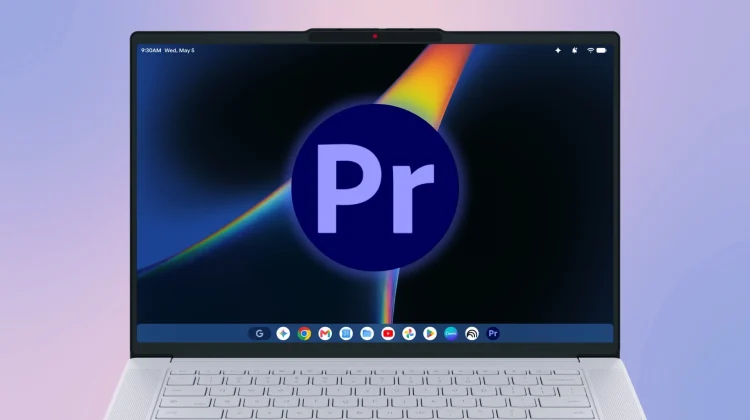
According to a leaked render of the upcoming Lenovo Googlebook 15, the platform will launch with some version of Adobe Premiere. If you look closely at the app dock in the leaked image, that familiar purple “Pr” icon is sitting right there natively on the desktop. There is already a mobile version of Premiere in the works for Android so seeing this icon makes me hopeful that they are developing a large-screen version for Googlebooks.

A promise finally fulfilled
If you have been following over the years, you know this is a deeply personal victory for me. I have spent the better part of a decade begging for a native Adobe video editing experience on Chromebooks.
Back in 2018, Adobe representatives specifically promised that “Project Rush” would be coming to Chromebooks. And then in 2019 it landed on Android, so we thought it would show up on Chromebooks at any moment. By 2020, we had users sideloading the APK, the app was popping up in the Beta channel, and Google was even using marketing graphics showing a Pixelbook Go explicitly running Adobe Rush. And then… crickets. The app never launched for ChromeOS, and to this day, you still can’t install it from the Play Store on a Chromebook.

But this new Googlebook leak shows that the wait might finally be over! While I’ve had some success with CapCut Online on a Chromebook, Adobe will be able to bring their decades of experience and professional video editing capabilites to the table.
The power of native Android apps
The reason this is finally happening now comes down entirely to the underlying architecture of the Googlebook platform. In a recent exclusive interview with Google VP John Maletis, he confirmed that native, premium apps will be ready for the Googlebook launch.
Instead of running a containerized emulation layer like ChromeOS has done for years, Googlebooks will run on a native Android environment. “We now have an ability to run truly native Android applications, not emulated,” Maletis explained to us. “So performance of these apps is incredible.”
Because the Googlebook platform removes that emulation middleman, it sounds like developers are finally seeing a clear path to deploy their heavy-hitting applications on these premium laptops without having to jump through extra hoops.
When we asked him specifically about Adobe and Microsoft, Maletis confirmed that these traditional developers are “all in and rethinking the way that they want to deliver their applications and their services to customers.” By providing a native environment that actually supports large-screen optimization, keyboard shortcuts, and trackpad gestures right out of the box, Google is giving companies like Adobe the exact canvas they need to deliver a true desktop-class experience.
Opening the door for the Creative Cloud
While this leaked image isn’t official, seeing that Premiere icon on the dock of the Lenovo render makes me incredibly hopeful that Adobe is one of those traditional developers going “all in” for the launch. And honestly, this opens the door for so much more.
If Adobe is bringing a native version of Premiere to Googlebook, there is no reason we shouldn’t expect to see the rest of the Creative Suite follow suit. A native desktop-class version (not just a dumbed-down mobile version) of Photoshop, Illustrator, or Lightroom running on a premium Googlebook with proper keyboard and trackpad input would instantly make this platform a viable option for serious creative professionals.
We will know more in just a few weeks when we attend the Googlebook press event in NYC, but seeing that purple Premiere icon sitting proudly on the dock is the exact reassurance I needed Google is taking this new category seriously. The future of premium Google-powered laptops is looking very, very bright.
SUBSCRIBE TO UPSTREAM
Get Chrome Unboxed delivered straight to your inbox
Upstream is our flagship, curated newsletter with the top stories, most click-worthy deals, giveaways, and trending articles from Chrome Unboxed sent directly to your inbox a few times a week. Join 31,000+ subscribers.

