

Support our independent tech coverage. Chrome Unboxed is written by real people, for real people—not search algorithms. Join Chrome Unboxed Plus for just $2 a month to get an ad-free experience, access to our private Discord, and more. Learn more about membership here.
START FREE TRIAL (MONTHLY)START FREE TRIAL (ANNUAL)
In just a couple of weeks, we’ll be on the ground in New York City for Google’s official Googlebook preview event. We know we’re going to see an unprecedented day-one fleet of six to eight brand-new flagship devices from HP, Dell, Acer, Asus, and Lenovo spanning traditional clamshells and 2-in-1 convertibles.
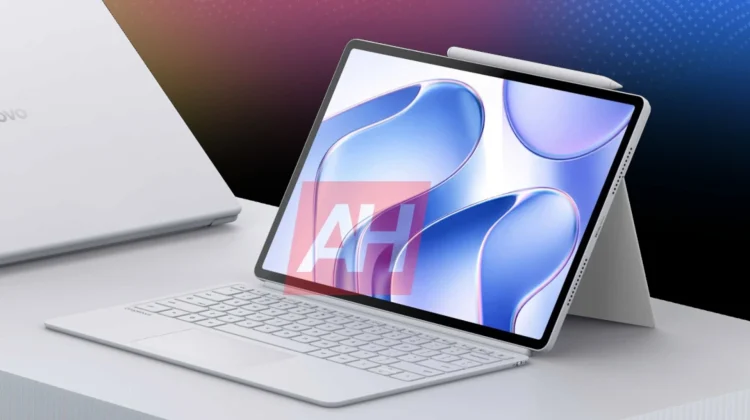
I’m genuinely excited to get my hands on all of them, and I’m overall extremely excited by the entire Googlebook category in general; but if I’m being completely honest, there is one specific machine sitting at the absolute top of my personal watchlist: the Lenovo Googlebook Duet m.
My excitement for this device isn’t just about shiny new hardware, either. It is rooted in years of watching Lenovo masterfully tackle the detachable Chromebook tablet form factor, consistently pushing the envelope within the constraints of budget silicon and low-to-mid tier pricing. With Googlebook, the hardware handcuffs are coming off quite a bit and more importantly, the underlying software is finally getting the overhaul it has needed for years.
Duet through the years: great hardware built on budget compromises
Lenovo has carried the torch for detachable tablets in the Google computing ecosystem for over half a decade. Sure, Google released their own ill-fated Pixel Slate before the first Lenovo Chromebook Duet, but Lenovo is the company that picked up the mess left behind and created multiple iterations of great tablets on a budget over the past 6 years.
Starting all the way back in 2020, the original Lenovo Chromebook Duet hit the scene and it took the Chromebook world by storm. It wasn’t a powerhouse, but for under $300, Lenovo gave us a compact, surprisingly well-built companion device that proved people genuinely wanted a lightweight ChromeOS tablet.
Lenovo followed that success up with the Lenovo Chromebook Duet 3 and the larger Lenovo Chromebook Duet 5. In fact, I called the Duet 5 my favorite tablet at the time because Lenovo nailed the thin-and-light chassis, delivered absurd battery life, and paired it with a gorgeous Samsung OLED display. More recently, the Lenovo Chromebook Duet 11″ took all those cumulative lessons and refined the kickstand, dual USB-C placement, and portability to near perfection.
Yet, as much as I loved using those devices, every single one had to make peace with the same fundamental trade-off: middling, budget-tier processors. Whether it was an entry-level MediaTek chip or a Snapdragon 7c, Lenovo was always designing around an aggressive sub-$500 price ceiling. You got incredible portability and great battery life, but heavy multitasking, multi-window management, and desktop-style work always pushed those SoCs right past their limits.
ChromeOS was and is still poor at tablet mode
Beyond the budget silicon, ChromeOS tablets still suffer from a glaringly bad tablet mode. As we previously discussed in our video on 5 things ChromeOS tablets could learn from the Pixel Tablet, ChromeOS has always excelled when attached to a keyboard and trackpad, but its tablet mode has consistently felt half-baked.
The touch UI is clunky, widgets and shortcuts aren’t a thing, and Android apps have all the hangups we’ve seen since they were introduced via the ARCVM container. That friction meant that despite loving the concept of a detachable Chromebook I could use both for work and for consumption, I almost never pulled the screen off the keyboard to actually use any of those above-mentioned devices as standalone tablets.
If I want to kick back on the couch, play a touch-based mobile game, read an ebook, or browse social feeds, devices like the Pixel Tablet or Samsung’s Galaxy Tab series run circles around ChromeOS for these sorts of use cases. The UI makes far more sense, the animations are smoother, touch response is instant, and the app ecosystem is natively built for touch. But those same Android tablets fail quite hard when you snap on a keyboard and try to get truly productive.
The Googlebook Duet m could mark the end of the compromise
That is why the Googlebook Duet m feels like such a massive turning point. Because Googlebook is built on a desktop-class Android foundation that runs a full-fat desktop Chrome browser on top, the Duet m gets to be two completely uncompromised devices in one.
When you pull the Duet m off its magnetic keyboard dock, you’ll get the fluid, responsive Android tablet experience that Samsung and Pixel tablets have perfected. Native Android apps will execute with zero container lag, touch gestures and widgets will behave naturally, and content consumption from reading and Netflix downloads to gaming will all be superb.
But then, the moment you snap the keyboard back on, you won’t be stuck with a mobile experience trying to be a true desktop companion. Instead, you will get an uncompromising, full-blown desktop Chrome browser with all your extensions, window management, and web app workflows intact with desktop-ready Android apps at your disposal.
Unshackling Lenovo’s hardware design
Pairing that software unity with flagship-tier hardware should make the Duet m even more compelling. With Googlebook launching as a premium set of devices, Lenovo won’t have to cut corners to hit a budget price point – and that means we’ll see hardware inclusions like:
- Flagship Silicon: Fast, battery-sipping ARM processing from MediaTek that glides through multi-window productivity and heavy mobile games without breaking a sweat.
- Stunning OLED Panel: High-resolution, rich contrast, and punchy colors that make everyday reading, video playback, and photo editing look incredible.
- True Quad Speakers: Full-bodied audio built for immersive media consumption.
- Wireless Recharging Stylus: An integrated, magnetic wireless-charging pen dock on the chassis.
- Premium Metal Chassis & Biometrics: A rigid, high-end unibody featuring a physical fingerprint scanner and a rock-solid folio stand.
Finally, a tablet I will actually use for work and play
For years, ChromeOS detachables were fantastic mini-laptops trapped inside tablet bodies that rarely got used as actual tablets.
With the Lenovo Googlebook Duet m, that compromise looks to be officially dead. You’ll get the desktop power of Chrome when it’s time to work, and a genuine, top-tier Android tablet when it’s time to relax. When we get to the event in New York on September 15 and get the opportunity to get our hands on all these new Googlebooks, this is the exact machine I’ll be running to first. And I cannot wait to share it with you.
SUBSCRIBE TO UPSTREAM
Get Chrome Unboxed delivered straight to your inbox
Upstream is our flagship, curated newsletter with the top stories, most click-worthy deals, giveaways, and trending articles from Chrome Unboxed sent directly to your inbox a few times a week. Join 31,000+ subscribers.

