

Support our independent tech coverage. Chrome Unboxed is written by real people, for real people—not search algorithms. Join Chrome Unboxed Plus for just $2 a month to get an ad-free experience, access to our private Discord, and more. Learn more about membership here.
START FREE TRIAL (MONTHLY)START FREE TRIAL (ANNUAL)
It should be pretty well known at this point that the arrival of the Android kernel to Chrome OS is on the way; and with it, a unique opportunity presents itself. It’s no secret that the Chrome OS tablet experience hasn’t been updated in any substantial way in years. Despite repeated calls for some pretty big, very needed updates, the core user interface has remained largely unchanged.
However, the integration of the Android kernel promises to streamline feature implementation, potentially ushering in a new era for Chrome OS tablets. Take the Pixel Tablet, for instance; it demonstrates a far more refined user interface and intuitive design that Android has cultivated over years, offering what could be a bit of a blueprint for Chrome OS tablets in the near-ish future.
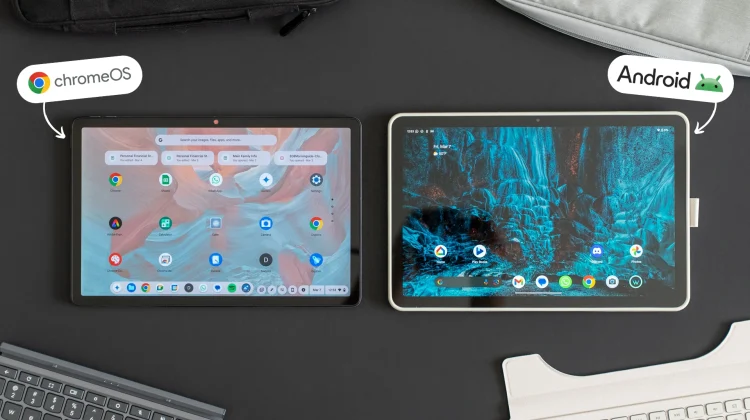
Setting the Chrome OS-powered Duet 11 and the Android-based Pixel Tablet side by side, we can see some of the stark contrasts currently happening with the general user experience. While both offer tablet functionality, their approaches are worlds apart, highlighting areas where Chrome OS can significantly improve.
Home screens
One of the most glaring differences lies in the home screen experience. The Pixel Tablet comes with the expected, customizable layout: complete with widgets and app placement flexibility, reminiscent of a familiar smartphone interface.
In contrast, Chrome OS tablets offer a rudimentary, vertically scrolling app list, lacking the personalization and layout flexibility users expect from a modern tablet. This stark contrast really highlights the need for Chrome OS to adopt a more dynamic approach to its home screens both in tablet mode and on the desktop.
Notifications and Quick Settings
Notifications and quick settings are another area where Android excels. The intuitive swipe-down gesture, a common staple of basically all mobile devices at this point, provides seamless access to notifications and settings on the Pixel Tablet.
Chrome OS, more rooted in a desktop ideology, maintains a static, right-aligned notification and settings panel that feels clunky and even a bit counterintuitive in a tablet context. The adoption of a swipe-down notification shade would significantly improve Chrome OS’ tablet approachability for those coming from other operating systems.
Google Discover feed
The absence of Google Discover on Chrome OS is a pretty big ommission in the tablet world. The personalized news feed, an expected feature of most Android devices at this point, provides a curated and engaging experience that I know many users have come to habitually rely on. Chrome OS users have no options whatsoever for Discover, and it’s absence is truly felt when you are in tablet mode for sure.
Widgets
I’ve gone blue in the fact asking for widgets over the years on ChromeOS, and they still aren’t here at all. It’s a really big drawback to using a ChromeOS tablet versus one running Android, for sure, and one that I really hope gets fixed.
Widgets provide quick access to important information and give users added functionality, flexibility, and customization. The ability to place widgets on the home screen and lock screen instantly makes using the Pixel Tablet a far better lean-back tablet experience, and I hate that Chromebooks have nothing to compete with that for now.
Lock screen functionality
Finally, the lock screen experience on Chrome OS is basic, offering minimal functionality beyond device locking. Android, particularly on the Pixel Tablet, offers a rich lock screen experience with widgets, notifications, and quick settings access.
Again, it just comes down to the things you generally pick up a tablet to do, and the Pixel Tablet gets so much of this equation right as ChromeOS tablets get it mostly wrong. While Chrome OS excels as a desktop operating system, tablet mode flat-out needs an overhaul.
And the coming introduction of the Android kernel could be the pivotal opportunity Google needs to bridge the gap between Chrome OS and Android tablets. By adopting key features and design principles from Android, Chrome OS tablets can unlock their full potential and offer up an experience that is the best of both worlds.
Will these sorts of changes happen? We don’t know just yet, but I hope so. To be fair, if the roles were reversed and I tried to compare the Pixel Tablet to the Duet 11″ on the desktop, we’d be dunking on the Pixel Tablet instead. ChromeOS and Android have a lot to learn from one another, and I’m very hopeful that in the tablet arena, at least, that the ChromeOS team picks up on a lot of what Android has already figured out.
SUBSCRIBE TO UPSTREAM
Get Chrome Unboxed delivered straight to your inbox
Upstream is our flagship, curated newsletter with the top stories, most click-worthy deals, giveaways, and trending articles from Chrome Unboxed sent directly to your inbox a few times a week. Join 31,000+ subscribers.

