


Support our independent tech coverage. Chrome Unboxed is written by real people, for real people—not search algorithms. Join Chrome Unboxed Plus for just $2 a month to get an ad-free experience, access to our private Discord, and more. Learn more about membership here.
START FREE TRIAL (MONTHLY)START FREE TRIAL (ANNUAL)
With early images and videos being out in the wild of Google’s upcoming Pixel Watch, one thing that has caught many potential buyers’ attention is the size of the bezels around the display. It is cleverly hidden at this point, but if you pay enough attention, it’s pretty easy to see the bezel size with a handful of the watch faces Google is showing off. I’ve dropped a few below for you to look through.


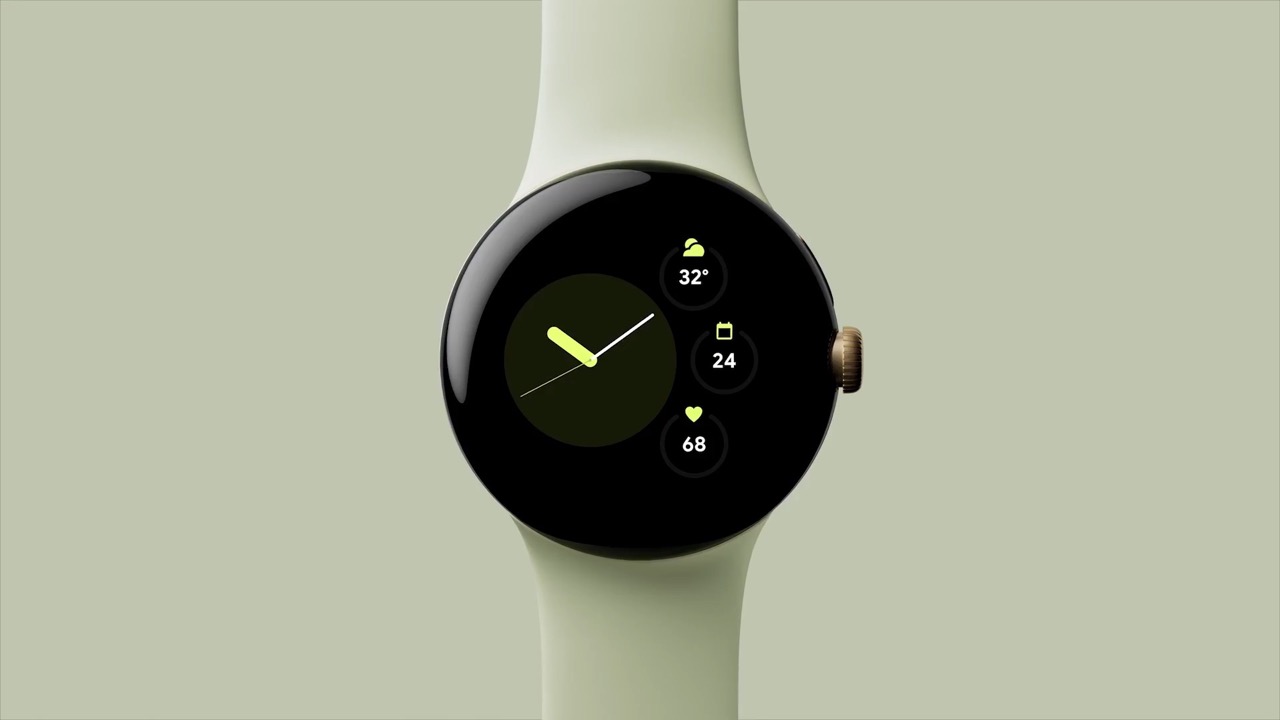

At first glance, you simply don’t notice it. However, looking at the full-screen, round watch faces, you can draw some conclusions for yourself at the size of the surrounding screen bezels. The last picture in that gallery above makes the actual display portion of the Pixel Watch look comically small. While I don’t think that watch face is completely indicative of the screen-to-body ratio of the Pixel Watch, it does highlight the fact that the display won’t come anywhere close to the edges of the body of this watch.
Likely not as bad as it looks
However, look at the first image in that gallery above and realize that the final face-on view in the above image collection may be a bit misleading. There’s a good chance that particular watch face doesn’t stretch edge-to-edge on the available display area and is making the admittedly-not-tiny bezels look chunkier than they actually are. Don’t get me wrong, they aren’t small by any stretch of the imagination, but they probably aren’t as wide as it looks like they are in that particular photo.
Less of an issue than you realize
Second, even if the bezels are a tad larger than we all want, there’s a chance that it won’t ever be 100% noticeable. For instance, when I look at my Fitbit Versa 4, I almost never consider the size of the bezels. Just today, I really leaned in and took inventory of them and the truth is: they’re pretty big.
But as I tried to find a spot in the UI where I could really, truly see them, I realized the entire interface is built to hide them. From settings to watch faces to apps, everything is inherently in dark mode and when combined with an OLED screen, it becomes very difficult to discern where the display ends and the bezels begin. Check out a couple images that showcase this below.


The more I considered this on the Fitbit Versa 3, the more I realized that bezels on the Pixel Watch – if handled properly – aren’t a massive deal. From all we’ve seen thus far, the entire UI of the Pixel Watch will be dark mode, meaning the deep blacks of the OLED screen will simply bleed over to the edges without users seeing the bezels in a clear-cut fashion.
I was actually a little shocked when I took the photos of my Fitbit simply because I never actually percieve the bezels being that large on a day-to-day basis. Instead, I focus on the UI, the rounded edges looking nice, and the fact that the size of the bezels seems to have no bearing on the way I look at or interact with my watch.

While I’d love to see razor-thin bezels on the Pixel Watch, the truth is even Apple uses a bit of this visual trickery on the Apple watch as well. It is a bit more maximized in the images above with the Apple Watch SE, but you get the point. In the dark theme, the watch bezels are no problem. With a white background, things don’t look quite as stellar. In the end, however, I’d wager most Apple Watch users aren’t thinking about it too much.
For now, I think we all need to wait and see what the Pixel Watch looks like on a wrist and in action. Product photos and leaks have a tendency to give us skewed outlooks on what a product really looks like and feels like in the hand. Remember the Pixel 6 and the original images of the camera bar? It was divisive at first, but once we had it in our hands, the oddness of that design element melted away quickly. I really think that will be the case with the Pixel Watch, but we have to wait just a bit longer to see if that is the case or not. Stay tuned.
SUBSCRIBE TO UPSTREAM
Get Chrome Unboxed delivered straight to your inbox
Upstream is our flagship, curated newsletter with the top stories, most click-worthy deals, giveaways, and trending articles from Chrome Unboxed sent directly to your inbox a few times a week. Join 31,000+ subscribers.

