

Support our independent tech coverage. Chrome Unboxed is written by real people, for real people—not search algorithms. Join Chrome Unboxed Plus for just $2 a month to get an ad-free experience, access to our private Discord, and more. Learn more about membership here.
START FREE TRIAL (MONTHLY)START FREE TRIAL (ANNUAL)
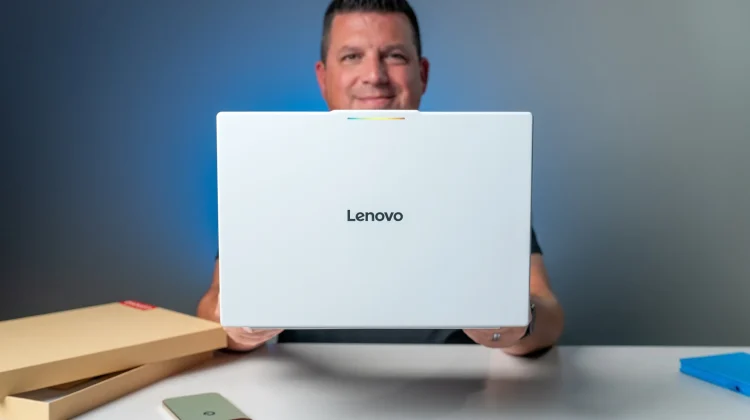
All five Googlebook models have officially arrived in the studio, and to kick this first wave of unboxing videos off, we decided to start with the largest of the batch: the Lenovo Googlebook 15.
While we got a brief, crowded look at these devices during Google’s New York City showcase, getting them on the studio desk where we can actually dig into the hardware and explore the brand-new Googlebook OS is a completely different experience. You can watch the entire unboxing video below, but here is a quick breakdown of what makes this 15-inch laptop stand out right out of the box.
Exceptional, lightweight hardware
The very first thing you notice when pulling the Lenovo Googlebook 15 out of the box is the texture. The magnesium/aluminum (with carbon fiber underpinnings) chassis features a buttery smooth finish that feels incredible to the touch and does a fantastic job of resisting fingerprints. Despite housing a massive 15.3-inch display, the entire device weighs in at under 3 pounds, making it surprisingly portable for its size.
Lenovo also nailed the core inputs and biometrics. The laptop features a massive, smooth glass haptic trackpad that clicks perfectly anywhere on its surface, paired with a backlit keyboard that will feel instantly familiar to long-time Chromebook users. For security, you get an IR sensor for seamless face unlock alongside a dedicated fingerprint scanner tucked into the top corner. Under the hood, the Lenovo Googlebook 15 is a powerhouse:
- Processor: Intel Core Ultra 5 325
- Memory/Storage: 16GB DDR5 RAM and a 512GB SSD
- Display: 15.3-inch 3K (2880 x 1800) 120Hz OLED Touchscreen with anti-glare
- Audio: Huge, rich upward-firing speakers with Dolby Atmos
- Connectivity: Wi-Fi 7, Bluetooth 6, and a robust port selection (Full-size HDMI, two USB-C Thunderbolt ports, one USB-A port, and a headphone/mic jack).
A quick taste of Googlebook OS and “Better Together”
While a full software review will take time as we learn the ins and outs of this entirely new, Android-based desktop operating system, the initial integration with mobile devices is already looking incredibly promising.
During the unboxing, we tested a few of the day-one “Better Together” features using a Pixel 11 Pro XL, and the continuity is fantastic:
- Direct File Access: Your phone’s entire file storage system appears directly inside the Googlebook’s native file browser. No need to use Quick Share or email images to yourself; you can just drag and drop directly from your phone’s recent photos (as long as the file is 200MB or less).
- Continue On: If you are editing a Google Doc on your phone and open your Googlebook, a prompt instantly appears on your desktop shelf allowing you to click and pick up exactly where you left off.
- App Streaming & Triage: You can cast Android apps directly from your phone to the laptop screen for quick tasks (like checking a DoorDash order), and dismissing a text message notification on your desktop instantly clears it from your phone.
We have so much more to learn, test, and figure out regarding Googlebook OS over the coming weeks. And with all five devices arriving at the same time, we have a lot of work to do. Stay tuned for unboxings of each Googlebook to be followed by more in-depth looks at things like the out-of-box experience, the OS as a whole, and of course, reviews of each Googlebook.
SUBSCRIBE TO UPSTREAM
Get Chrome Unboxed delivered straight to your inbox
Upstream is our flagship, curated newsletter with the top stories, most click-worthy deals, giveaways, and trending articles from Chrome Unboxed sent directly to your inbox a few times a week. Join 31,000+ subscribers.

