

Support our independent tech coverage. Chrome Unboxed is written by real people, for real people—not search algorithms. Join Chrome Unboxed Plus for just $2 a month to get an ad-free experience, access to our private Discord, and more. Learn more about membership here.
START FREE TRIAL (MONTHLY)START FREE TRIAL (ANNUAL)
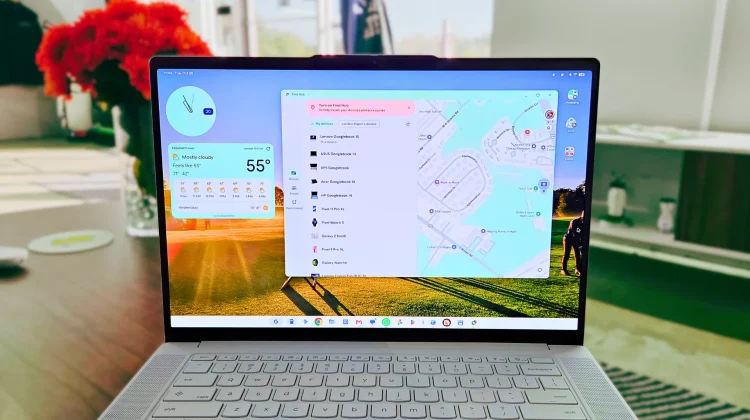
When you spend $1,000 or more on a brand-new laptop, knowing you can track it down if it gets lost or stolen is pretty high on the priority list. So when early Googlebook adopters noticed that the native Find Hub app suddenly stopped working on their new devices, it caused some immediate head-scratching.
Was it a bug? Was Google abandoning tracking on their latest platform? Or was something else going on under the hood?
Thankfully, we finally have an answer. In a statement provided to Android Authority, Google officially confirmed that it pulled Find Hub from first-generation Googlebooks on purpose, explaining that a simple mobile Android port just doesn’t cut it for laptop tracking.
Why a mobile tracking app fails on a laptop
The core issue comes down to the fundamental difference between how we use a phone versus how we use a laptop. As Google explained:
The Find Hub app is natively designed for mobile form factors, whereas a laptop naturally interacts with the finding network differently. Because the majority of laptop tracking occurs when the device is closed and asleep, we determined that a standard mobile app installation does not yet deliver the optimized, form-fitting experience we demand for Googlebook users.
In short: your phone stays powered on in your pocket all day, constantly pinging cell towers and nearby Bluetooth beacons. A laptop, on the other hand, spends most of its travel time shut, disconnected from Wi-Fi, and in deep sleep. Simply letting the standard Android Find Hub app run inside Googlebook OS gave users a false sense of security, because once the lid was shut, the app could no longer reliably broadcast its location.
Rather than leave a half-baked solution in place that fails when you actually need it, Google adjusted its Play Store server settings to prevent Find Hub from being preloaded or downloaded on launch Googlebooks. If, like me, you’ve had your device since the beginning, you might still have the app on your Googlebook – it just won’t connect your device to the Find Hub network right now.
Apple has already cracked this nut with its Find My network on macOS, leveraging low-energy Bluetooth chirps detected by passing Apple devices even when a MacBook is closed and sleeping. Google clearly needs a similar system-level, firmware-integrated solution for Googlebook OS rather than relying on a sandboxed Android app.
While it is good to know the sudden removal wasn’t an unexplained glitch, leaving a fleet of premium laptops without clear, reliable location tracking kinda stinks for now. We will keep an eye on future system updates to see how Google plans to build a true, desktop-class tracking network for Googlebook hardware.
SUBSCRIBE TO UPSTREAM
Get Chrome Unboxed delivered straight to your inbox
Upstream is our flagship, curated newsletter with the top stories, most click-worthy deals, giveaways, and trending articles from Chrome Unboxed sent directly to your inbox a few times a week. Join 31,000+ subscribers.

