

Support our independent tech coverage. Chrome Unboxed is written by real people, for real people—not search algorithms. Join Chrome Unboxed Plus for just $2 a month to get an ad-free experience, access to our private Discord, and more. Learn more about membership here.
START FREE TRIAL (MONTHLY)START FREE TRIAL (ANNUAL)
My son is a big fan of playing games like Mad Libs and Lucky Trivia on our Nest Hub. Funny enough, he actually discovered them for himself thanks to Google’s efforts to put them in the spotlight for families over the past year. While we haven’t seen many new games as of late, however, I was recently asked to review an immersive word puzzle game by its developer, Volley, that operates on something that has become pretty central to our culture these days – GIFs. It was featured on The Keyword’s holiday Nest Hub promotional video back in December, but it’s only now becoming available.
“Magic Word” was developed by Volley, the same team that published “Are You Smarter Than a 5th Grader” and Song Quiz” on smart displays. They’re a 35 person team that takes popular IPs in partnership with their original developers and makes them accessible to many through smart displays using Actions on Google. You can try out Magic Word for yourself by saying “Hey Google, talk to Magic Word”. It’s actually pretty fun, and I’ve been playing it with my son a bit. Basically, you’re presented with four GIFs and told to fill in the blanks or guess the word using them as clues. All of the GIFs will be based on the same theme so that you can do so.
Once you think you’ve got the right answer, you just say it with your voice or type it in using the touchscreen. This allows you to play in situations where you have the volume down late at night or can’t speak out loud for any other reason. If you do find yourself in an environment where you’re surrounded by others, the game has no player limit, so everyone can get in on the fun.
You can see an example game played out in the trailer above if you’re interested. It’s clear that voice interactions are the future of smart devices, at least in combination with traditional input methods, and I’m happy to see more of a variety of games available for my family and yours to enjoy. Magic Word was created with Interactive Canvas, a framework for Google Assistant that leverages Google’s Conversational Actions and adds in visual elements.
In addition to having an ‘Endless Mode’ which lets you do puzzle after puzzle, there’s also a ‘Daily Puzzle’ which refreshes every 24 hours. Lastly, and before you go off and put this in front of your kids, I’ll offer one fair warning. Magic Word does feature an IAP model where you can purchase coins through a shop and the prices range from just one dollar for 100 coins all the way up to $100 for 20,000 coins. I really don’t know anyone who would pay money on their Nest Hub to make a guessing game easier as it’s meant just to blow off some steam and not as a competitive gaming tool. Volley’s choice here seems excessive and concerning, especially considering their target audience is clearly families and perhaps even children.
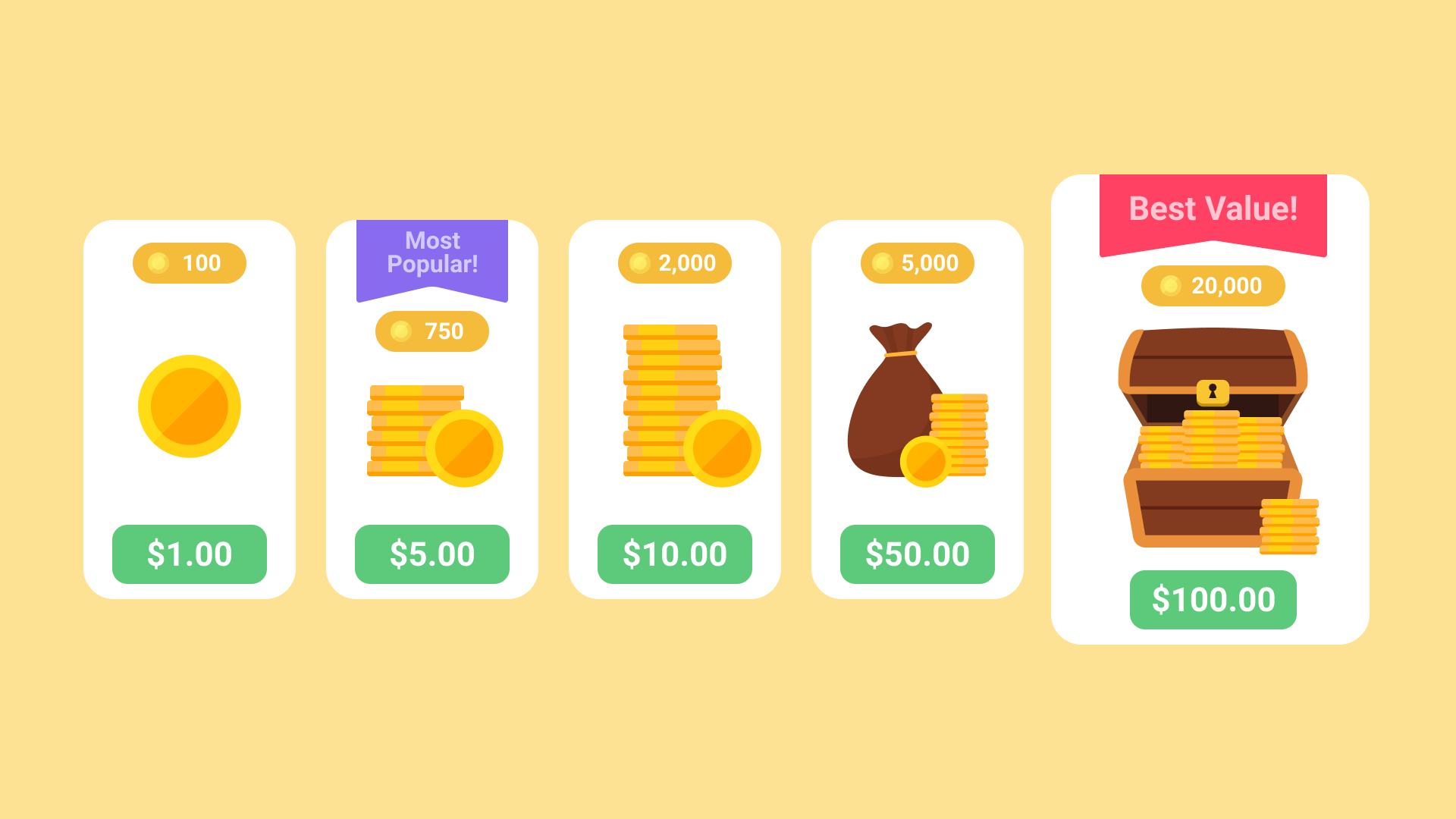
This alone gives me concern that developers are going to begin leveraging smart displays to introduce operant conditioning or “skinner boxes” into your ‘at a glance’ devices where they traditionally never belonged. The fact that they’ve highlighted the $100 offer as the ‘Best Value!’ makes this even worse. Anyway, If you can play Magic Word without needing to spend money and making sure that your children don’t do so, I think it’s fun for lazy afternoons. If you absolutely must get extra guesses for coins, just buy a dollar’s worth here or there, as the developers deserve some buy-in for their polished efforts.
SUBSCRIBE TO UPSTREAM
Get Chrome Unboxed delivered straight to your inbox
Upstream is our flagship, curated newsletter with the top stories, most click-worthy deals, giveaways, and trending articles from Chrome Unboxed sent directly to your inbox a few times a week. Join 31,000+ subscribers.


