

• Skip to main content
  • Skip to primary sidebar
  • Deals
  • Features
  • Guides
  • Chromebooks
  • Videos
  • Podcast
  • More +
    • Reviews
    • Unboxing
    • Upcoming Devices
    • Chromebook Plus
    • Chrome
    • ChromeOS
    • Chrome OS Flex
  • Search
  • Sign Up
  • Log In
Chrome Unboxed – The Latest Chrome OS News

Chrome Unboxed - The Latest Chrome OS News

A Space for All Things Chrome, Google, and More!

  • Deals
  • Features
  • Guides
  • Chromebooks
  • Videos
  • Podcast
  • More +
    • Reviews
    • Unboxing
    • Upcoming Devices
    • Chromebook Plus
    • Chrome
    • ChromeOS
    • Chrome OS Flex
  • Search
  • Sign Up
  • Log In

Google Tasks is getting rid of its unintuitive navigation drawer and will let you star entries

August 25, 2021 By Michael Perrigo View Comments

Support our independent tech coverage. Chrome Unboxed is written by real people, for real people—not search algorithms. Join Chrome Unboxed Plus for just $2 a month to get an ad-free experience, access to our private Discord, and more. Learn more about membership here.
START FREE TRIAL (MONTHLY)START FREE TRIAL (ANNUAL)

With Google Tasks rolling out to more Workspace tiers, gaining inline editing on the web, and more importantly, adding landscape mode to its app on Chromebooks, you’d think Google would refrain from providing yet another task management solution to its users. Even though Chat has its own Google module now with no way to import from Google Tasks, it has yet to give up on its struggling Android app.

A new update finally rids you of the ridiculously unintuitive navigation drawer that you used to pull up from the hamburger menu on the bottom-left of the screen. In its place is a horizontal top bar navigation strip which is much more user-friendly! In the past, I’ve had to swap between lists quite frequently, and having to constantly pop open the bottom drawer was just insanely annoying!

Xremove ads

You can see in the images below from XDA Developers APK Teardown that a new star icon is also present on the horizontal navigation. This ‘Starred’ section will allow you to see all entries that you’ve favorited for quick access. Of course, to do so, each task now has a star icon next to it that you can tap or click and it also shows in the individual task editing screen as well. Being able to star things is virtually a universal and expected feature across Google services nowadays, so the fact that it’s been missing from Tasks is one of those things I never really gave much thought to, but also think makes a lot of sense now that it’s being added.
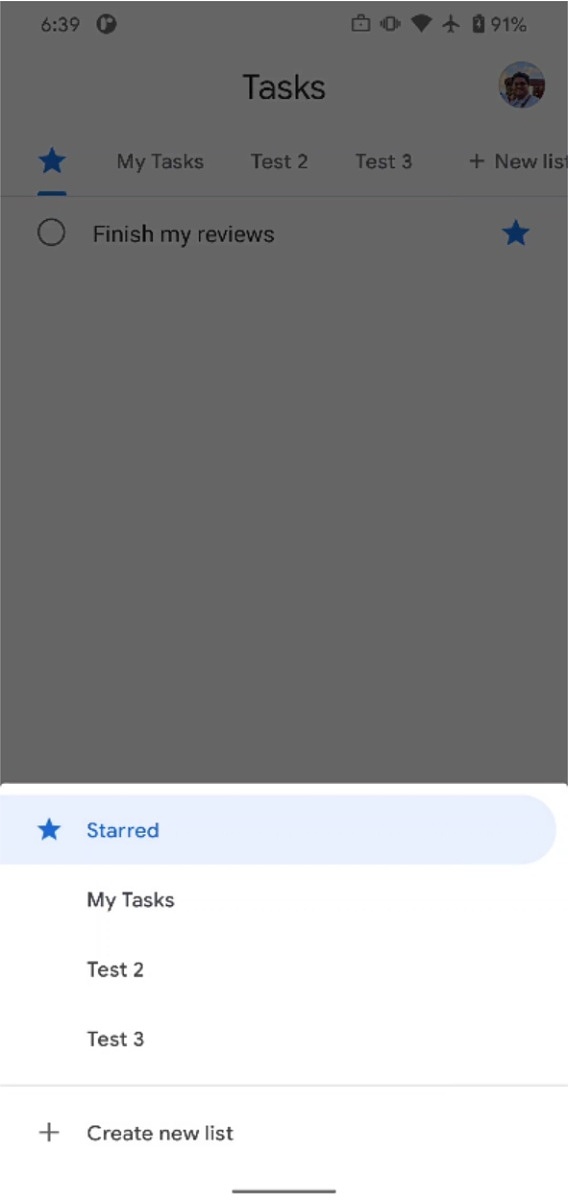
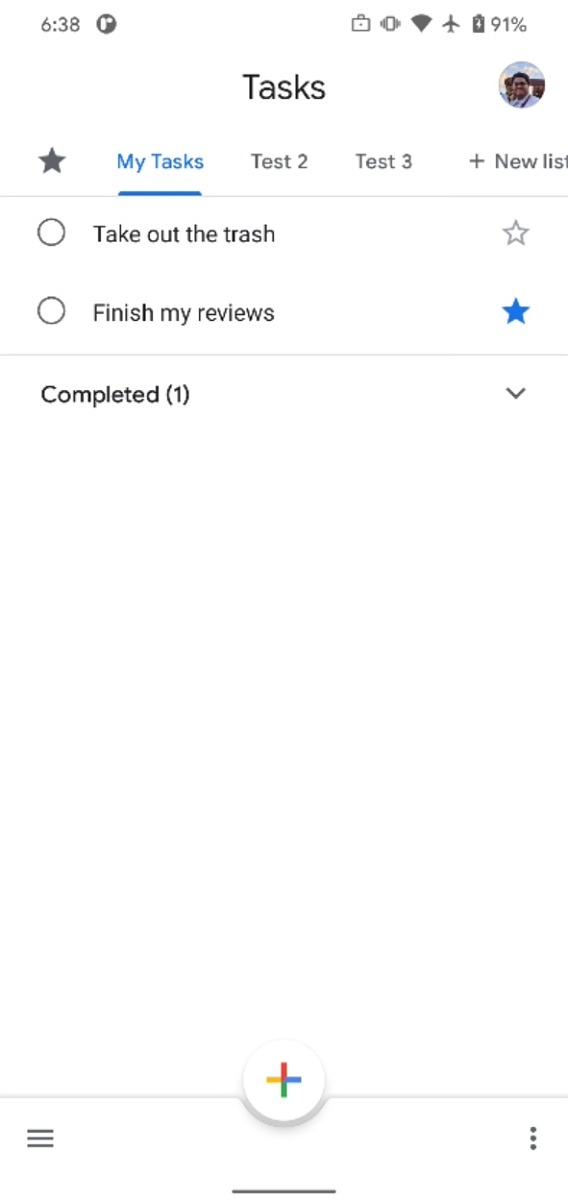
Source: XDA Developers

I don’t yet have this update on my Chromebook or on my phone, so I probably wouldn’t expect to see it right away, if I were you. APK Teardowns show off what’s to come, and there’s usually a waiting period before said features appear for most users. It’s also possible that these two items could get scrapped before release, but I highly doubt that. Navigation in the app has been a major point of contention for a long time, so it would be in Google’s best interest to follow through with this one.

Featured Videos

Xremove ads

SUBSCRIBE TO UPSTREAM

Get Chrome Unboxed delivered straight to your inbox

Upstream is our flagship, curated newsletter with the top stories, most click-worthy deals, giveaways, and trending articles from Chrome Unboxed sent directly to your inbox a few times a week. Join 31,000+ subscribers.

SUBSCRIBE HERE!

Filed Under: Apps, New & Upcoming Features, News, Updates

About Michael Perrigo

Known as "Google Mike" to his customers, Michael worked at Best Buy as a Chromebook Expert who dedicated his time to understanding the user experience from a regular Chromebook owner's perspective. Having spent nearly 20 years meeting you face-to-face, he strives to help you understand your technology through carefully crafted guides and coverage, relentlessly seeking out the spark in what's new and exciting about ChromeOS.

Primary Sidebar

Googlebook

Googlebook will automatically organize your files using on-device AI ‘Collections’

By Robby Payne
September 11, 2026

Lenovo Googlebook i 15 confirmed via Bluetooth SIG ahead of NYC media event

By Robby Payne
September 10, 2026

HP Googlebook 14c specs confirmed by Energy Star: Snapdragon X Elite and 32GB RAM

By Robby Payne
September 9, 2026

How many years of updates Googlebook gets could make or break it on Day One

By Robby Payne
September 8, 2026

Your Android phone might soon double as a wireless mouse for Googlebook

By Robby Payne
September 5, 2026

More Googlebook

Xremove ads

Deals

The best Chromebook deals today

By Robby Payne
September 2, 2026

The best Chromebook ever made is $350 off at Best Buy right now

By Robby Payne
August 21, 2026

The excellent, powerful Acer Chromebook Plus Spin 514 is $150 off right now

By Robby Payne
August 12, 2026

Acer’s new Chromebook 315 is wildly affordable and points to the real future of Chromebooks

By Robby Payne
August 11, 2026

You can score the massively upgraded ASUS CX54 Chromebook Plus for just $599 right now

By Joseph Humphrey
July 28, 2026

More Deals

Xremove ads

Reviews

Acer Chromebook Plus Spin 514 Review: the best convertible you can buy [VIDEO]

By Robby Payne
July 1, 2026

Lenovo Chromebook Plus 2-in-1 Review: pretty great in a vacuum

By Robby Payne
April 23, 2026

My review after 6 weeks with the Lenovo Chromebook Plus 14 [VIDEO]

By Robby Payne
August 11, 2025

One week with the best small Android tablet you can buy, and I’m sold

By Robby Payne
May 9, 2025

Best Chromebooks of 2024 [VIDEO]

By Robby Payne
November 28, 2024

More Reviews

Xremove ads

TWITTER · FACEBOOK · INSTAGRAM · YOUTUBE · EMAIL · ABOUT

Copyright © 2026 · Chrome Unboxed · Chrome is a registered trademark of Google Inc.
We are participants in various affiliate advertising programs designed to provide a means for us to earn fees by linking to affiliated sites.

PRIVACY POLICY