

Support our independent tech coverage. Chrome Unboxed is written by real people, for real people—not search algorithms. Join Chrome Unboxed Plus for just $2 a month to get an ad-free experience, access to our private Discord, and more. Learn more about membership here.
START FREE TRIAL (MONTHLY)START FREE TRIAL (ANNUAL)
When exploring a brand-new desktop operating system like Googlebook OS, it is easy to get caught up in the big headline features like cross-device app streaming, AI integrations, and shared file browsers. Sometimes, however, it is the tiny, unexpected quality-of-life perks that end up making the biggest impact on your daily routine.
For me, one of the coolest small surprises of using a Googlebook is discovering that the platform gets native access to the Pixel Weather app.
If you use a non-Pixel Android phone – like my daily driver Galaxy Z Fold 8 – you know the struggle of finding a clean, reliable weather application in the Play Store that isn’t bogged down by cluttered layouts, intrusive ads, or aggressive subscription paywalls. Google’s revamped Pixel Weather app has long been one of my favorite pieces of software on Pixel hardware, and having it natively available on Googlebook OS is an awesome perk.
Where to find it in the Play Store
Finding it can be slightly confusing at first because of how Google labels it across the system. If you go looking for it in the Google Play Store on your Googlebook, it simply shows up as Weather (or Google Weather).
However, the moment you install it and open up your desktop widget picker, the system drops the generic “Weather” branding and instead lists it under Pixel Weather. For what it’s worth, in your app tray, it’s just “Weather”.
Once you launch the app, you get the exact same gorgeous, Material You interface that used to be strictly locked to Pixel phones and the Pixel Tablet. The customizable data blocks – covering everything from UV index and wind speed to air quality, humidity, and live precipitation maps – scale beautifully to a larger laptop window, giving you a clean, ad-free dashboard without any of the usual third-party bloat.
Awesome widgets built for the Googlebook homescreen
While the full application is great to click into when you want to check a 10-day forecast or radar map, the real magic on Googlebook OS comes down to the widgets.
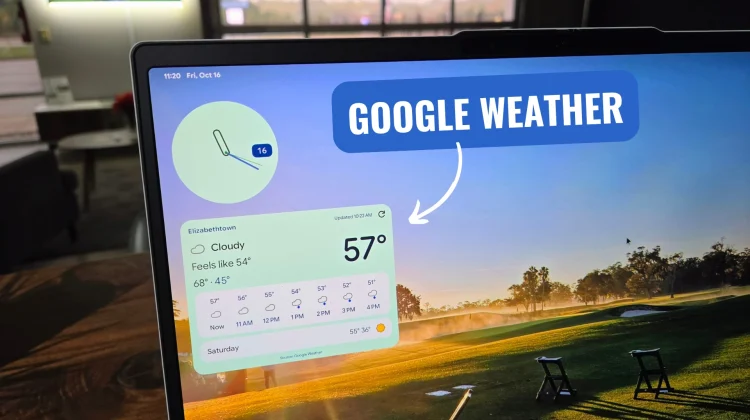
Because Googlebook OS treats the desktop canvas much like an Android homescreen, you can pin widgets directly to your wallpaper (which pairs perfectly with the G key + V “Peek Desktop” shortcut). The Pixel Weather widgets look fantastic pinned to the desktop corner, offering glanceable conditions and multi-day forecasts that blend seamlessly into the OS aesthetic.
I know a weather app sounds like a tiny detail in the grand scheme of a brand-new laptop platform. Still, having Google treat Googlebook hardware like part of the first-party Pixel family when it comes to exclusive software is a massive win in my book.
SUBSCRIBE TO UPSTREAM
Get Chrome Unboxed delivered straight to your inbox
Upstream is our flagship, curated newsletter with the top stories, most click-worthy deals, giveaways, and trending articles from Chrome Unboxed sent directly to your inbox a few times a week. Join 31,000+ subscribers.

