

Do you remember "iGoogle"? I certainly do! Google's cluttered but useful homepage full of widgets (known as "gadgets") was a personal dashboard for information that would benefit the user throughout the day which spawned many other tools similar to it like Netvibes. Sadly, the company shut down … [Read more...] about Google Search homepage adding Discover-style information cards
Chrome
Support our independent tech coverage. Chrome Unboxed is written by real people, for real people—not search algorithms. Join Chrome Unboxed Plus for just $2 a month to get an ad-free experience, access to our private Discord, and more. Learn more about membership here.
START FREE TRIAL (MONTHLY)START FREE TRIAL (ANNUAL)
Google brings Chrome’s Privacy Sandbox to Android but won’t pull the plug on existing ad tools (yet)

Efforts to protect user privacy have been an ongoing and sometimes-uphill battle. We as users of Google services understand that nothing comes for free and that Google is - at the end of the day - an advertising company. Still, we want to retain as much of our privacy as possible without having to … [Read more...] about Google brings Chrome’s Privacy Sandbox to Android but won’t pull the plug on existing ad tools (yet)
Soon, you’ll be able to fully manage your Chrome downloads from the top toolbar

Coming to us from trusted Redditor and Chrome update hunter Leopeva64-2, the Chrome browser's downloads are not only moving up to the top-right of your window, as we've previously reported but will soon feature a few new enhancements. This update is currently live in Chrome Canary. As you can see … [Read more...] about Soon, you’ll be able to fully manage your Chrome downloads from the top toolbar
How to take a scrolling screenshot on your Chromebook or in the Chrome browser
Contents If you're interested in taking a "scrolling screenshot" or full webpage screenshot in Chrome or on your Chrome OS device, look no further! Today, I'm going to show you three different methods for getting the same end result - a vertical, extra-long screenshot that encapsulates all … [Read more...] about How to take a scrolling screenshot on your Chromebook or in the Chrome browser
Chrome adds the Dino game, quick access to Lens search, and Incognito Mode widgets to Android

In its effort to help users find answers and access things faster in Chrome, Google is now adding a few new widgets on Android. I generally don't use widgets on my Pixel phone, but that's just because I feel they're less useful than gimmicky, but with these latest updates, I may very well do … [Read more...] about Chrome adds the Dino game, quick access to Lens search, and Incognito Mode widgets to Android
“Chrome Journeys” makes it even easier to pick up where you left off searching for something

I discovered "Chrome Journeys" all the way back in September of this past year. It's a Chrome browser exclusive feature baked into the History page that allows you to continue searching where you left off and groups visited pages based on their topic or category. Google then revealed the feature … [Read more...] about “Chrome Journeys” makes it even easier to pick up where you left off searching for something
Chrome revamps its logo for the first time since 2014, customizes it per operating system

It's been eight years since Google Chrome has changed its logo design, and this week, it's finally time! In-house Chrome designer Elvin Hu took to Twitter to show off the new design, and at first blush, you may not realize the differences. First showing off the history of the browser icon, you … [Read more...] about Chrome revamps its logo for the first time since 2014, customizes it per operating system
[Update: Available] Chrome 98 adds desktop screenshots, improvements to PWAs, and more

Update: February 3, 2022 - Chrome 98 is no longer in beta! You can now update to this version on the out-of-the-box Stable version of the browser to enjoy the mentioned improvements. The title of this article has been changed to remove the word "Beta", but the body of the content keeps it … [Read more...] about [Update: Available] Chrome 98 adds desktop screenshots, improvements to PWAs, and more
One-click audio muting for any Chrome tab may soon come back from the dead

Today, you can already mute any Chrome tab's audio by right-clicking it and selecting "Mute site" as depicted in the image below. It's a feature that Google added a while back to help alleviate those annoying audio ads that abruptly blast through your computer speakers without your permission (How … [Read more...] about One-click audio muting for any Chrome tab may soon come back from the dead
Avoid accidentally nuking all of your Android Chrome tabs with this new confirmation dialog
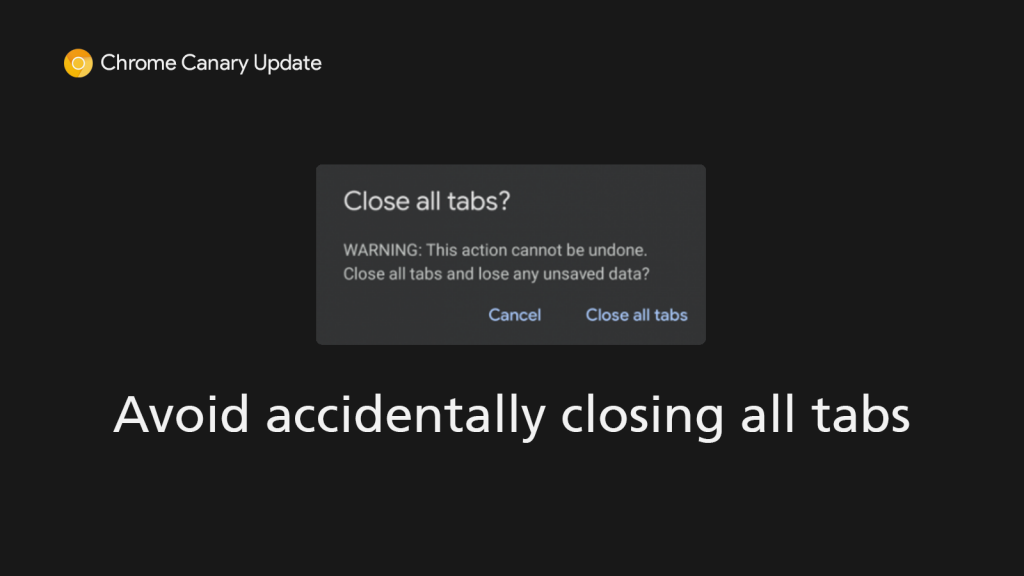
Open the Chrome browser on your phone and tell me in the comments how many tabs you have accumulated so far. How often do you go back to them and actually use and close each tab after you build them up? Are you like me and gain over a hundred tabs, attributing value to them over the course of a … [Read more...] about Avoid accidentally nuking all of your Android Chrome tabs with this new confirmation dialog
Google introduces FLoC replacement called Topics, will serve ads based on local device data

Just last year, Google introduced something called "FLoC", or the "Federated Learning of Cohorts" in which it would group people based on different criteria for ad targeting. This was set into "incubation" where it would be tested to see if it would be a viable replacement for the long-standing … [Read more...] about Google introduces FLoC replacement called Topics, will serve ads based on local device data
Chrome Canary adds quick access to extension permissions with new ‘eye’ icon

Discovered by Chrome Story, a new developer flag in Chrome Canary will place an 'Eye' icon at the top-right of the browser's window. As you can see in the image below, it will be located to the left of the extensions 'puzzle piece' icon. Clicking this new 'eyecon' will allow you to see what … [Read more...] about Chrome Canary adds quick access to extension permissions with new ‘eye’ icon
