
Support our independent tech coverage. Chrome Unboxed is written by real people, for real people—not search algorithms. Join Chrome Unboxed Plus for just $2 a month to get an ad-free experience, access to our private Discord, and more. Learn more about membership here.
START FREE TRIAL (MONTHLY)START FREE TRIAL (ANNUAL)
If you’ve spent any time using a first-wave Googlebook over the last few weeks, there’s a chance you’ve probably run into at least one small daily annoyance that makes you miss the muscle memory of some Chromebooks: the lack of hardware media playback control.
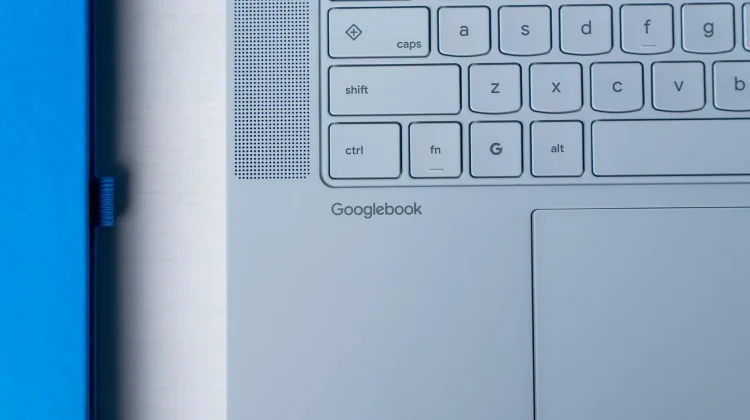
Unlike the ASUS Googlebook 14, which actually includes a dedicated play/pause button on the top row, laptops like the Lenovo Googlebook 15, Dell XPS Googlebook, HP Googlebook 14c, and Acer Googlebook 14 all shipped without one. You get a mute button, sure; but if you’re listening to music or a podcast while working and need to pause things quickly without muting your whole system, you’re stuck clicking back into whatever tab or app is playing audio just to hit the space bar. Thankfully, Google knows this is a gap, and a proper fix is already on the way.
Keyboard shortcuts for media playback are officially in the works
Over on the r/Googlebook subreddit, a Lenovo Googlebook 15 owner recently voiced that exact frustration, wishing for a faster way to pause music when someone walks up to talk or a phone call comes in. Google’s Mishaal Rahman chimed in on the Reddit thread to confirm that dedicated keyboard shortcuts for media controls like play/pause, previous track, and next track are actively in development and planned for a future Googlebook OS update.
As GbookHub spotted, Rahman didn’t share an exact release timeline or the final key combinations just yet. Right now, keyboard shortcut customization on Googlebook OS is pretty barebones and mostly tied to Gboard, so having system-level media shortcuts baked directly into the OS will be a very welcome quality-of-life upgrade for anyone using hardware without that dedicated top-row key.
How to quickly pause audio from the status bar right now
While we wait for those keyboard shortcuts to land in an upcoming build, Rahman also pointed out a handy built-in workaround that is easy to miss if you haven’t gone looking for it.
Whenever audio is actively playing on your Googlebook, you’ll see a small “now playing” chip sitting up in the persistent top status bar showing the icon of the app generating the sound. Instead of hunting down your browser tab or switching windows:
- Move your cursor up to the now playing chip in the top status bar.
- Hover directly over the app icon inside that chip and it will automatically morph into a play/pause button.
- Click it to immediately pause or resume your audio without ever leaving your active window.
It isn’t quite as instant as tapping a physical key or firing off a quick shortcut from the home row, and it’s yet another reminder that Googlebook OS is still very much an early, evolving desktop platform. Still, knowing that status bar icon doubles as a quick-pause toggle saves plenty of tab-hunting frustration in the meantime.
SUBSCRIBE TO UPSTREAM
Get Chrome Unboxed delivered straight to your inbox
Upstream is our flagship, curated newsletter with the top stories, most click-worthy deals, giveaways, and trending articles from Chrome Unboxed sent directly to your inbox a few times a week. Join 31,000+ subscribers.

