

• Skip to main content
  • Skip to primary sidebar
  • Deals
  • Features
  • Guides
  • Chromebooks
  • Videos
  • Podcast
  • More +
    • Reviews
    • Unboxing
    • Upcoming Devices
    • Chromebook Plus
    • Chrome
    • ChromeOS
    • Chrome OS Flex
  • Search
  • Sign Up
  • Log In
Chrome Unboxed – The Latest Chrome OS News

Chrome Unboxed - The Latest Chrome OS News

A Space for All Things Chrome, Google, and More!

  • Deals
  • Features
  • Guides
  • Chromebooks
  • Videos
  • Podcast
  • More +
    • Reviews
    • Unboxing
    • Upcoming Devices
    • Chromebook Plus
    • Chrome
    • ChromeOS
    • Chrome OS Flex
  • Search
  • Sign Up
  • Log In

“Chrome Journeys” makes it even easier to pick up where you left off searching for something

February 8, 2022 By Michael Perrigo View Comments

Support our independent tech coverage. Chrome Unboxed is written by real people, for real people—not search algorithms. Join Chrome Unboxed Plus for just $2 a month to get an ad-free experience, access to our private Discord, and more. Learn more about membership here.
START FREE TRIAL (MONTHLY)START FREE TRIAL (ANNUAL)

I discovered “Chrome Journeys” all the way back in September of this past year. It’s a Chrome browser exclusive feature baked into the History page that allows you to continue searching where you left off and groups visited pages based on their topic or category.

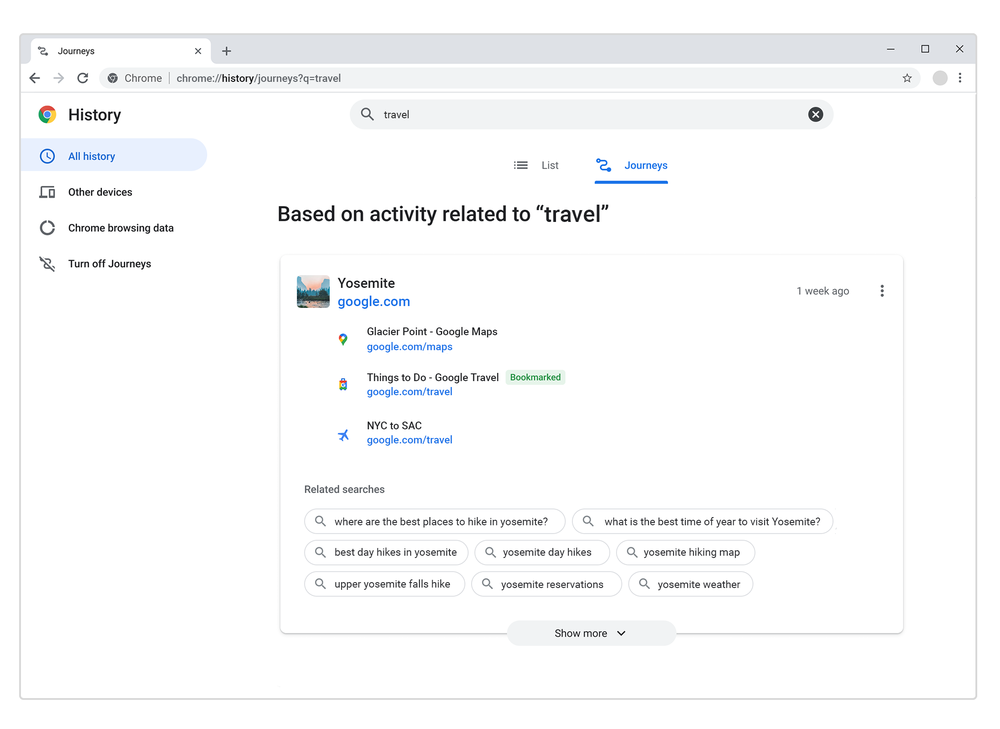
Google then revealed the feature officially back in October via its Chromium blog but is today rolling it out to all users on Chrome Stable. As you can see in the image below, you can access this new “Journeys” feature by visiting the browser’s History page with the shortcut “Ctrl + H” or by going to “History” via the three dots “more” menu at the top right of the screen.
Xremove ads
The Journeys feature of Chrome groups together your search history based on topic or intent

Our days are constantly filled with interruptions. You might be researching across multiple pages for hikes for the weekend or information about vaccines, then quickly need to switch over to a last-minute work call, only to forget where you originally left off. Now with Journeys, rolling out in the latest version of Chrome for desktop, you can revisit past explorations grouped by topic.

The Keyword

As an added bonus, you can now click into the search bar, begin typing something, and choose the “Resume your research” button to be taken back to where you left off on your search journey, even if it was something you were using weeks ago.

Google states that Journeys will even take into account how much you’ve interacted with any given website in that cluster so it can place the most relevant information at the forefront while simultaneously bringing you suggestions for related searches.

Featured Videos

Xremove ads

To start, Journeys will be available in English, German, Spanish, French, Italian, Dutch, Portuguese, and Turkish in Chrome for all desktop operating systems. I’m curious to know whether or not you’ve used this feature in preview builds of the browser up until now, and if not, whether you think this is something you will use or find useful going forward.

As a reminder, you can delete your Journeys or turn the feature off at any time. Right on the History page for Chrome, you’ll see a “Turn off Journeys” button on the left-hand sidebar. In the future, you may be able to access Journeys across desktop, mobile, and any other devices with your account signed in so long as Google sees significant feedback for such a thing being added.

SUBSCRIBE TO UPSTREAM

Get Chrome Unboxed delivered straight to your inbox

Upstream is our flagship, curated newsletter with the top stories, most click-worthy deals, giveaways, and trending articles from Chrome Unboxed sent directly to your inbox a few times a week. Join 31,000+ subscribers.

Xremove ads
SUBSCRIBE HERE!

Filed Under: Chrome, New & Upcoming Features, News, Updates

About Michael Perrigo

Known as "Google Mike" to his customers, Michael worked at Best Buy as a Chromebook Expert who dedicated his time to understanding the user experience from a regular Chromebook owner's perspective. Having spent nearly 20 years meeting you face-to-face, he strives to help you understand your technology through carefully crafted guides and coverage, relentlessly seeking out the spark in what's new and exciting about ChromeOS.

Primary Sidebar

Googlebook

Googlebook perk officially confirms Adobe Premiere is on the way

By Joseph Humphrey
September 22, 2026

I’m confused why the Lenovo Googlebook Duet m wasn’t at Google’s big launch event

By Robby Payne
September 22, 2026

MediaTek unveils Dimensity CX C10 Max: 3nm, 55 TOPS NPU, and built for future Googlebooks

By Robby Payne
September 21, 2026

Googlebook is here, and we went hands-on with the new software in NYC [VIDEO]

By Robby Payne
September 21, 2026

We went hands-on with all 5 new Googlebook laptops: here is our first look [Video]

By Robby Payne
September 21, 2026

More Googlebook

Xremove ads

Deals

The best Chromebook deals today

By Robby Payne
September 2, 2026

The best Chromebook ever made is $350 off at Best Buy right now

By Robby Payne
August 21, 2026

The excellent, powerful Acer Chromebook Plus Spin 514 is $150 off right now

By Robby Payne
August 12, 2026

Acer’s new Chromebook 315 is wildly affordable and points to the real future of Chromebooks

By Robby Payne
August 11, 2026

You can score the massively upgraded ASUS CX54 Chromebook Plus for just $599 right now

By Joseph Humphrey
July 28, 2026

More Deals

Xremove ads

Reviews

Acer Chromebook Plus Spin 514 Review: the best convertible you can buy [VIDEO]

By Robby Payne
July 1, 2026

Lenovo Chromebook Plus 2-in-1 Review: pretty great in a vacuum

By Robby Payne
April 23, 2026

My review after 6 weeks with the Lenovo Chromebook Plus 14 [VIDEO]

By Robby Payne
August 11, 2025

One week with the best small Android tablet you can buy, and I’m sold

By Robby Payne
May 9, 2025

Best Chromebooks of 2024 [VIDEO]

By Robby Payne
November 28, 2024

More Reviews

Xremove ads

TWITTER · FACEBOOK · INSTAGRAM · YOUTUBE · EMAIL · ABOUT

Copyright © 2026 · Chrome Unboxed · Chrome is a registered trademark of Google Inc.
We are participants in various affiliate advertising programs designed to provide a means for us to earn fees by linking to affiliated sites.

PRIVACY POLICY