


Support our independent tech coverage. Chrome Unboxed is written by real people, for real people—not search algorithms. Join Chrome Unboxed Plus for just $2 a month to get an ad-free experience, access to our private Discord, and more. Learn more about membership here.
START FREE TRIAL (MONTHLY)START FREE TRIAL (ANNUAL)
It’s only been a week since Chrome’s history clusters, or ‘Journeys’ began appearing on the Canary channel, and now, Google has released a new development blog post detailing it as an official experiment for Chrome Canary and Dev. Detailed as an experiment that’s meant to help users continue a search task, Journeys will appear on your browser’s History page once you enable the flag.
You’ll notice that in the example below, ‘Yosemite’ is being researched as the user prepares for a vacation. Instead of having to trudge through all of the History based on date, they can now see all searches related to Yosemite, even if it doesn’t include that keyword. Journeys groups or clusters things based on their relevance. This way, if you end up emailing a friend, or shopping for a pair of shoes in between, your journey to the national park isn’t split up into fragments.
Honestly, I love this. This feels like a continued effort of the ‘Recents’ section that Google Assistant has, which groups tabs to allow you to ‘Rediscover topics you looked for in the Google app recently.’ I can’t think of any instance where I’ve actually used it as it’s buried in your profile image in the Google Search app, but having it on desktop seems more accessible.

Google says you can turn Journeys off and that you’re in control of them, and it only groups history on your current device – not others that have your account signed in. Additionally, if future feedback and interest point to a need or desire for it, the feature could make its way into Chrome Sync and appear on multiple devices, but not at this time.
For example: you can turn off Journeys at any time, and as always, you can easily clear your browsing history right from your Chrome settings, or by typing “clear browsing data” into the address bar. If you’d like, you can also clear history that’s related to a particular journey vs. your history overall.
Chromium Blog
Another experiment that’s rolling out is the ‘Side Panel’ or the ability to compare two search results without leaving the tab you’re on. After visiting a result from Google search, a new Google icon will appear to the left of your Omnibox. Clicking it will open a left-hand side panel (not to be confused with the new right-hand side panel for Reading List, Bookmarks, and Lens results) that will have a copy of said Google results so you can jump between them in the main window.
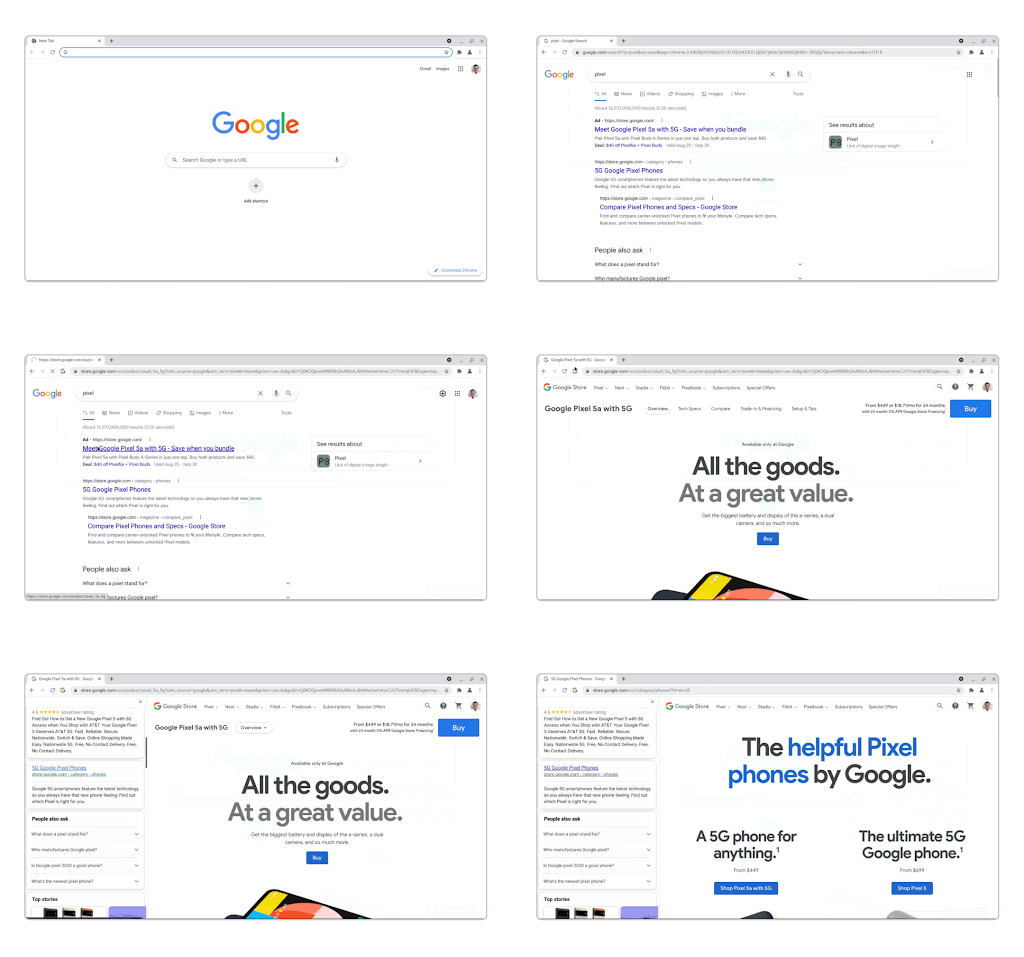
If you recall the recent implementation of this same thing on Chrome for Android, then you’ll probably have expected it to roll out to desktop at some point. For now, enabling the Side Panel flag will toggle this on for you. It’s a useful tool since any search journey you’re going on will take you all over the web, but having both side panels open at the same time sure does look and feel funny. Go ahead and send some feedback if you like these experiments or have something to say about how they’ve been implemented.
SUBSCRIBE TO UPSTREAM
Get Chrome Unboxed delivered straight to your inbox
Upstream is our flagship, curated newsletter with the top stories, most click-worthy deals, giveaways, and trending articles from Chrome Unboxed sent directly to your inbox a few times a week. Join 31,000+ subscribers.


