

Support our independent tech coverage. Chrome Unboxed is written by real people, for real people—not search algorithms. Join Chrome Unboxed Plus for just $2 a month to get an ad-free experience, access to our private Discord, and more. Learn more about membership here.
START FREE TRIAL (MONTHLY)START FREE TRIAL (ANNUAL)
We’ve been doing a lot of channel surfing here lately at Chrome Unboxed. The latest builds of the developer and beta versions of Chrome OS have provided us with lots of goodies and previews of long-awaited features and upcoming additions.
The much-anticipated Google Play Store is finally starting to find its way to “other” devices and with the rapid advance of versions 55 & 56, we believe the stable release of Android Apps to be just around the corner.
Other features like Quick Unlock(PIN) and File App Preview have quietly made their way into the official channel and appear to be working beautifully.
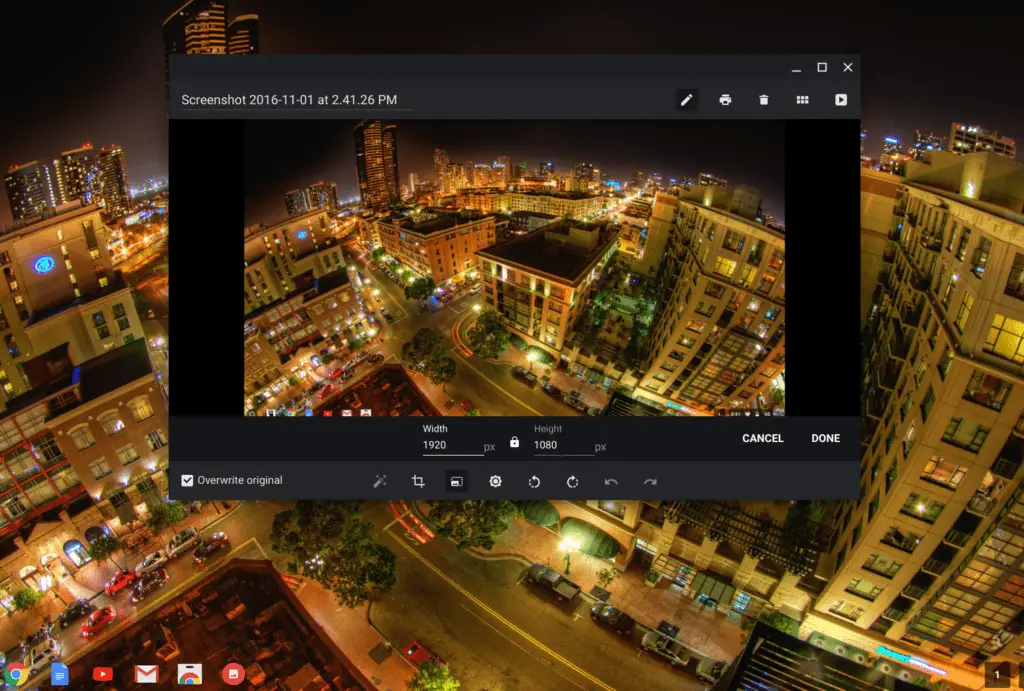
Another feature that we have been very excited to see in development is native image resizing in the Chrome OS image viewer. Originally spotted last month, we have seen the progression of image resizing moving steadily over the past few weeks.
Yesterday, the enhancement to Chrome OS’s editor made its way to the Beta Channel in the update to version 55. As you can see in the above image, the editor now gives you standard resizing options with the ability to lock or unlock the image ratio.
This may seem like an insignificant accomplishment in the grand scheme of things but, in my opinion, it is another sign of just how capable Chrome OS is as an all-inclusive operating system.
If you’re interested in giving this feature a try just head to Settings>About Chrome OS>more info>change channel>beta.

