

• Skip to main content
  • Skip to primary sidebar
  • Deals
  • Features
  • Guides
  • Chromebooks
  • Videos
  • Podcast
  • More +
    • Reviews
    • Unboxing
    • Upcoming Devices
    • Chromebook Plus
    • Chrome
    • ChromeOS
    • Chrome OS Flex
  • Search
  • Sign Up
  • Log In
Chrome Unboxed – The Latest Chrome OS News

Chrome Unboxed - The Latest Chrome OS News

A Space for All Things Chrome, Google, and More!

  • Deals
  • Features
  • Guides
  • Chromebooks
  • Videos
  • Podcast
  • More +
    • Reviews
    • Unboxing
    • Upcoming Devices
    • Chromebook Plus
    • Chrome
    • ChromeOS
    • Chrome OS Flex
  • Search
  • Sign Up
  • Log In

You can now write and format programming code properly in Google Docs

December 15, 2022 By Johanna Romero View Comments

Smart Canvas Google Docs

Support our independent tech coverage. Chrome Unboxed is written by real people, for real people—not search algorithms. Join Chrome Unboxed Plus for just $2 a month to get an ad-free experience, access to our private Discord, and more. Learn more about membership here.
START FREE TRIAL (MONTHLY)START FREE TRIAL (ANNUAL)

In the current version of Google Docs, contributors who want to present code have to manually highlight and then apply a font or paragraph style after pasting the code into the page. This has been a challenge and a shortcoming of Google Docs, as it was challenging to illustrate that certain text was meant to be programming code.

This is now about to change as Google is introducing a brand new Smart Canvas feature that will make this process far simpler. “Building Blocks” were introduced to Google Workspace as a Smart Canvas feature that provides formatting templates, such as meeting notes, email drafts, etc. Now, there will be a new Building Block type available specific to programming code, which gives you the ability to visualize code with industry standards, making code readable and collaboration much easier. 

Xremove ads

You will also have the option to choose the programming language you want your code to be formatted in, such as C/C++, Java, Javascript, Python, and Unset. To format and display code in a Doc, select Insert > Building blocks > Code blocks, then choose your programming language.
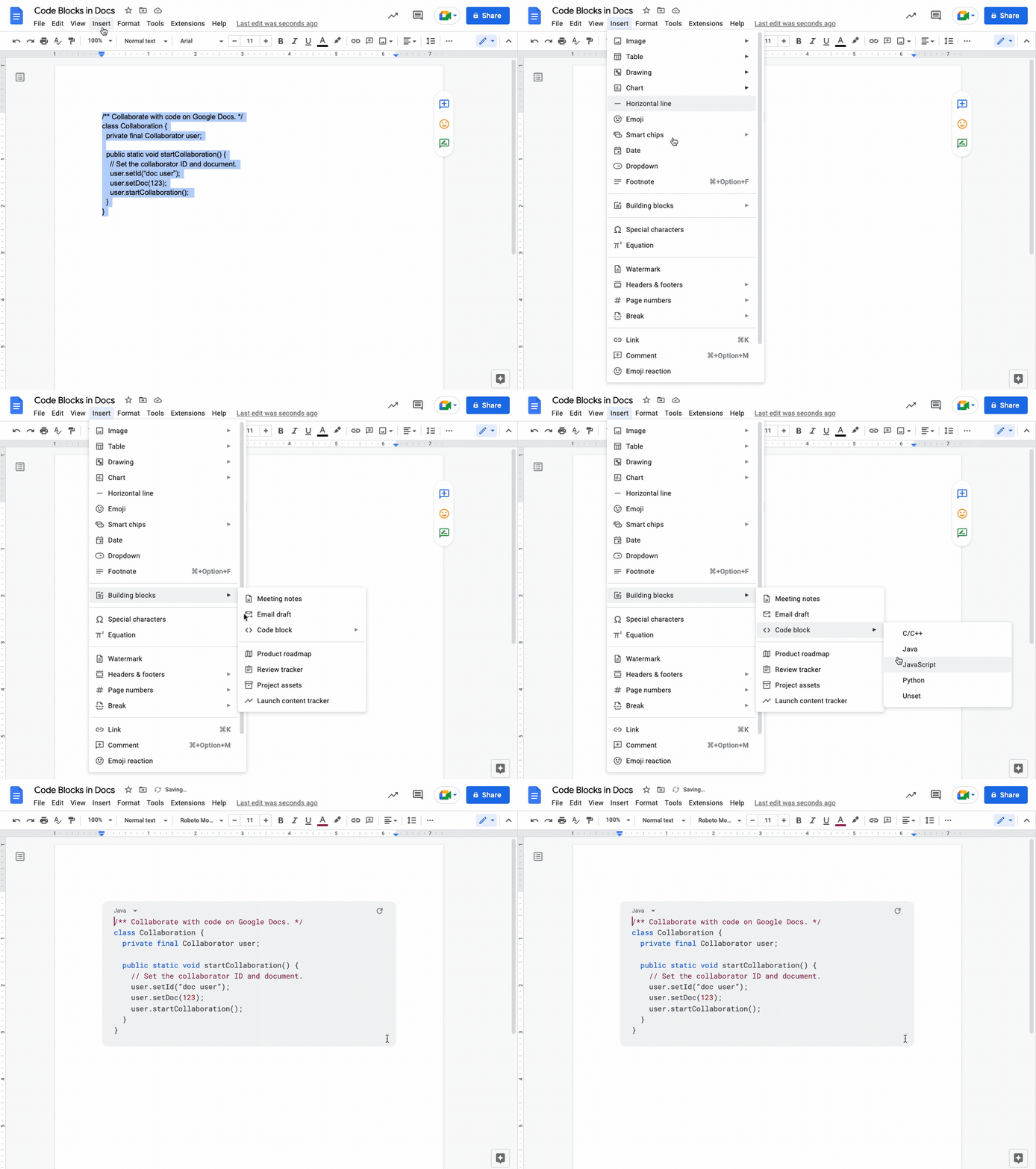
This is not an attempt to turn Google Docs into an IDE (Integrated Development Environment) to write and compile code, but simply an attempt to improve the formatting of code within a document to differentiate it from standard text. This feature has already begun to roll out to Rapid Release domains with an extended rollout that will potentially take longer than two weeks. Scheduled Release domains will start to see this feature starting on January 3rd, 2023. Availability will be as follows:

Featured Videos

Xremove ads
  • Available to Google Workspace Business Standard, Business Plus, Enterprise Standard, Enterprise Plus, Education Standard, Education Plus customers and Nonprofits
  • Not available to Google Workspace Essentials, Business Starter, Enterprise Essentials, Education Fundamentals, the Teaching and Learning Upgrade, Frontline, as well as legacy G Suite Basic and Business customers
  • Not available to users with personal Google Accounts

Filed Under: Workspace Tagged With: code, google docs, google workspace

Primary Sidebar

Googlebook

If your Googlebook ‘Better Together’ features stopped working, you need to check this

By Robby Payne
October 16, 2026

One of the best Pixel-exclusive apps is quietly available on your new Googlebook

By Robby Payne
October 16, 2026

One of the biggest missing features in Googlebook’s Chrome browser is getting fixed

By Robby Payne
October 15, 2026

A new affordable wave of Snapdragon-powered Googlebooks is in the works

By Robby Payne
October 15, 2026

Googlebooks just solved one of the most annoying parts of using a laptop for work

By Robby Payne
October 14, 2026

More Googlebook

Xremove ads

Deals

My favorite convertible Chromebook is $150 off right now and primed for Googlebook OS

By Robby Payne
September 29, 2026

Google Pixel Buds 2a in Hazel bundled with a new Googlebook laptop at Best Buy

Score a free $129 pair of Pixel Buds 2a with any Googlebook pre-order at Best Buy

By Robby Payne
September 28, 2026

The best Chromebook deals today

By Robby Payne
September 2, 2026

The best Chromebook ever made is $350 off at Best Buy right now

By Robby Payne
August 21, 2026

The excellent, powerful Acer Chromebook Plus Spin 514 is $150 off right now

By Robby Payne
August 12, 2026

More Deals

Xremove ads

Reviews

Acer Chromebook Plus Spin 514 Review: the best convertible you can buy [VIDEO]

By Robby Payne
July 1, 2026

Lenovo Chromebook Plus 2-in-1 Review: pretty great in a vacuum

By Robby Payne
April 23, 2026

My review after 6 weeks with the Lenovo Chromebook Plus 14 [VIDEO]

By Robby Payne
August 11, 2025

One week with the best small Android tablet you can buy, and I’m sold

By Robby Payne
May 9, 2025

Best Chromebooks of 2024 [VIDEO]

By Robby Payne
November 28, 2024

More Reviews

Xremove ads

TWITTER · FACEBOOK · INSTAGRAM · YOUTUBE · EMAIL · ABOUT

Copyright © 2026 · Chrome Unboxed · Chrome is a registered trademark of Google Inc.
We are participants in various affiliate advertising programs designed to provide a means for us to earn fees by linking to affiliated sites.

PRIVACY POLICY