

• Skip to main content
  • Skip to primary sidebar
  • Deals
  • Features
  • Guides
  • Chromebooks
  • Videos
  • Podcast
  • More +
    • Reviews
    • Unboxing
    • Upcoming Devices
    • Chromebook Plus
    • Chrome
    • ChromeOS
    • Chrome OS Flex
  • Search
  • Sign Up
  • Log In
Chrome Unboxed – The Latest Chrome OS News

Chrome Unboxed - The Latest Chrome OS News

A Space for All Things Chrome, Google, and More!

  • Deals
  • Features
  • Guides
  • Chromebooks
  • Videos
  • Podcast
  • More +
    • Reviews
    • Unboxing
    • Upcoming Devices
    • Chromebook Plus
    • Chrome
    • ChromeOS
    • Chrome OS Flex
  • Search
  • Sign Up
  • Log In

You can now use custom prompts to turn your Google Photos into videos

January 27, 2026 By Joseph Humphrey View Comments

Support our independent tech coverage. Chrome Unboxed is written by real people, for real people—not search algorithms. Join Chrome Unboxed Plus for just $2 a month to get an ad-free experience, access to our private Discord, and more. Learn more about membership here.
START FREE TRIAL (MONTHLY)START FREE TRIAL (ANNUAL)

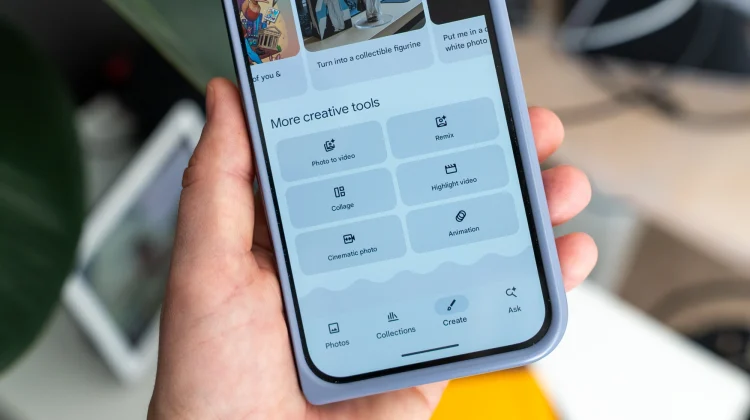
When Google first announced the Photo to Video feature for Google Photos last year, it immediately caught our attention. But you were restricted to two simple choices when generating the video: “Subtle movements” or “I’m feeling lucky.” While those presets produced some mind-blowing results—like adding a cinematic pan to a landscape or 3D movement to an object—you didn’t really have any control over the final output. Well, that changes today.

Custom Prompts are here

According to a new post on the Google Photos Help Forum, Google is rolling out an update that gives you way more creative control. In addition to the existing presets, you can now use text prompts to tell the AI exactly what you want.

Xremove ads

If you have a specific vision, you can type in a prompt to describe the movement, style, or effect you are looking for. If you are stuck, Google has also included prompt suggestions to give you a little inspiration. And if the first result isn’t quite right, you can refine your prompt to fine-tune the video until it matches what is in your head.

Check out Today’s Best Chomebook Deals

Audio is coming too

This update isn’t just about visuals, though. Google also noted that every video created with this feature—whether it uses a custom prompt or a template—can now include audio by default, too. It’s a small addition, but sound adds a layer of immersion that really helps bring these dynamic clips to life.

Featured Videos

Xremove ads

The new text prompt capabilities are rolling out now, though Google notes they are currently limited to users who are 18 years of age or older. If you haven’t tried this tool yet, check the “Create” tab in Google Photos to see what it can generate for you!

SUBSCRIBE TO UPSTREAM

Get Chrome Unboxed delivered straight to your inbox

Upstream is our flagship, curated newsletter with the top stories, most click-worthy deals, giveaways, and trending articles from Chrome Unboxed sent directly to your inbox a few times a week. Join 31,000+ subscribers.

SUBSCRIBE HERE!

Filed Under: Apps, News

About Joseph Humphrey

Joe has been a part of Chrome Unboxed since 2016 when he started helping Robby produce YouTube videos. Although normally behind the scenes, Joe has spent countless hours editing reviews and unboxings of many, many Chromebooks. Now a Partner in Unboxed Media, Joe is constantly thinking strategically about the Chromebook industry and how Chrome Unboxed can continue to innovate in the space.

Primary Sidebar

Googlebook

How to easily sideload Android apps on your new Googlebook

By Robby Payne
October 10, 2026

Master your new Googlebook with this simple keyboard shortcut trick

By Robby Payne
October 10, 2026

Logitech brings its powerful Options+ software to Googlebook with dedicated Gemini features

By Robby Payne
October 9, 2026

How to unlock the hidden ‘Glowbar Disco’ app on your new Googlebook

By Robby Payne
October 9, 2026

Unboxing the Lenovo Googlebook 15: A gorgeous 15-inch debut for Google’s new OS [VIDEO]

By Robby Payne
October 9, 2026

More Googlebook

Xremove ads

Deals

My favorite convertible Chromebook is $150 off right now and primed for Googlebook OS

By Robby Payne
September 29, 2026

Google Pixel Buds 2a in Hazel bundled with a new Googlebook laptop at Best Buy

Score a free $129 pair of Pixel Buds 2a with any Googlebook pre-order at Best Buy

By Robby Payne
September 28, 2026

The best Chromebook deals today

By Robby Payne
September 2, 2026

The best Chromebook ever made is $350 off at Best Buy right now

By Robby Payne
August 21, 2026

The excellent, powerful Acer Chromebook Plus Spin 514 is $150 off right now

By Robby Payne
August 12, 2026

More Deals

Xremove ads

Reviews

Acer Chromebook Plus Spin 514 Review: the best convertible you can buy [VIDEO]

By Robby Payne
July 1, 2026

Lenovo Chromebook Plus 2-in-1 Review: pretty great in a vacuum

By Robby Payne
April 23, 2026

My review after 6 weeks with the Lenovo Chromebook Plus 14 [VIDEO]

By Robby Payne
August 11, 2025

One week with the best small Android tablet you can buy, and I’m sold

By Robby Payne
May 9, 2025

Best Chromebooks of 2024 [VIDEO]

By Robby Payne
November 28, 2024

More Reviews

Xremove ads

TWITTER · FACEBOOK · INSTAGRAM · YOUTUBE · EMAIL · ABOUT

Copyright © 2026 · Chrome Unboxed · Chrome is a registered trademark of Google Inc.
We are participants in various affiliate advertising programs designed to provide a means for us to earn fees by linking to affiliated sites.

PRIVACY POLICY