Up next in 10



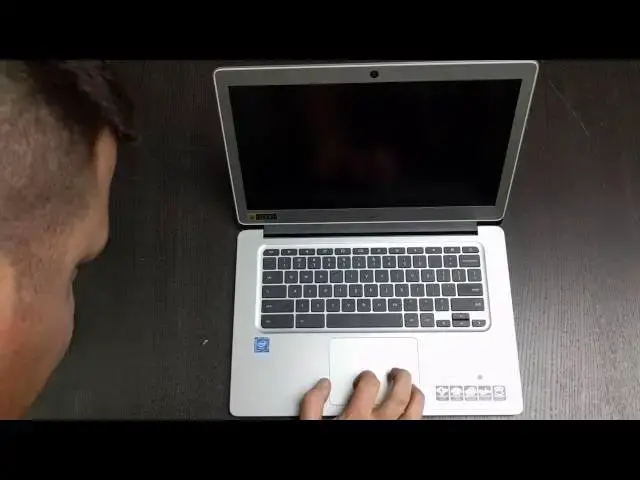
In this one, we'll take a first look at the Acer Chromebook 14 as we unbox it and give some initial impressions!
[ the first version of the video didn't have the final 2 minutes of wrap up and Octane testing...sorry! ]
Show More Show Less View Video Transcript
0:01
[Music]
0:18
hey folks Robbie pay here with chrome
0:19
unbox coming at you today with an
0:21
unboxing of the Acer Chromebook 14 now
0:23
this is not the Acer Chromebook 14 for
0:26
work uh that is a device that's going to
0:29
be a little bit more difficult to get a
0:30
hold of um at this point Acer did start
0:33
selling the uh consumer version of
0:38
v14 and it is the all
0:42
aluminum uh clad device versus the one
0:46
with all the waterproofing fun stuff
0:48
going on in the glass top so as we can
0:50
see here let me see if I can get this a
0:52
little
0:53
closer focus in there we are working
0:55
with Celeron it is quad core uh but it
0:58
is the n316 60 um so it is in the um
1:03
fanless class so not quite as strong as
1:06
the core ey or the the Celeron that
1:08
comes in that class um 4 gigs of RAM and
1:12
uh um pretty awesome screen all metal
1:15
build all that kind of stuff so I'm
1:18
going bust into this guy and
1:19
see see what's going on here
1:34
questions concerns this is pretty
1:36
standard Acer Fair small charger which
1:39
is nice two
1:43
pieces cloth we got the get started
1:46
guide and yeah this is all the same
1:49
stuff that's always been in every Acer
1:51
Chromebook box thus far
1:56
so and here it is there's a little
1:59
sticker over the Crome
2:00
logo hopefully that is
2:06
removable
2:08
um yeah we'll look at that here in a
2:09
minute hopefully that's removable cuz if
2:11
not that's kind of
2:14
tacky I don't know that it is
2:21
guys I don't think that's
2:23
removable that is kind of tacky um maybe
2:27
it will come off I don't know um you can
2:29
see already that hand prits being left
2:31
by my hands on it cuz it is all aluminum
2:34
nice aluminum top nice aluminum bottom
2:36
came out of a FedEx truck so it's a
2:38
little chilly uh but is collecting we
2:40
got speaker grills down here Fort screws
2:43
no fans um nothing across the back on
2:46
the side over here two USB 3.0 uh 31s I
2:50
believe uh full size HDMI Kensington
2:52
lock over here have earphone jack and
2:55
power uh there is no SD card slot on
2:58
this um so you're Rel ated to using USB
3:02
uh if you want to expand storage in any
3:03
way shape or form surely to goodness
3:06
that thing comes off there I know I'm
3:07
really spinning some time on this but
3:09
it's really bizarre okay let's open it
3:12
up and there's a good
3:14
chance as with most Chromebooks it won't
3:17
power
3:20
on no so when I'm kind of getting the
3:23
plug arranged here we'll talk over a
3:25
couple other things um I'll run a quick
3:29
um
3:31
Octane on it before we cut this one down
3:35
but we're looking at a full 1080p uh I
3:38
would call this like semi gloss uh it's
3:40
probably going to be a bit um reflective
3:44
or anti-reflective anti-glare
3:47
um but it's not going to be completely
3:49
anti-glare it does have some reflection
3:51
in it so as long as it's decently bright
3:53
it should hold up pretty
3:56
well nice large trackpad
4:00
hard to tell what it's made
4:07
of I don't think that's glass but if it
4:11
is it's a thin sheet it doesn't feel bad
4:13
um texture is pretty good um I don't get
4:17
the int like I don't think that's glass
4:20
rubbing on it but it's not terrible um
4:24
time will tell you know good trackpads
4:27
work well over the course of hours not
4:29
not just minutes so there's couple
4:31
things going against it right now
4:32
obviously that it just came out of a
4:34
cold environment and is now in a warm
4:36
one uh we are working with a full 1080p
4:39
display it is 14 in and if I were to put
4:42
it next to cuz I've seen this in videos
4:44
if I were to put it next to a MacBook
4:45
Air 13in uh the dimensions are pretty
4:49
close so they've kind of crammed a 14-in
4:51
screen and 13-in body which is kind of
4:53
nice uh it doesn't it doesn't feel any
4:55
bigger than the 13-in devices I've used
4:58
uh just from handl it sure all right
5:01
guys real quick uh before we sign off
5:03
I'm going to run uh an octane and this
5:06
is as guessed so we don't have a bunch
5:07
of my stuff running or trying to install
5:09
in the
5:10
background
5:25
um and while it's running after just the
5:27
first few minutes of this machine I I I
5:29
am a little disappointed in the screen I
5:31
do realize it's a $300 machine um that's
5:34
just kind of part of it but uh with what
5:36
Acer has done and other machines like
5:38
the
5:39
c910 um even though it what didn't feel
5:42
like the most stunning display ever made
5:45
um it felt um a lot brighter than this
5:49
one this just feels really really muted
5:51
uh off angle and even on angle it's not
5:53
like it gets exceptionally better um so
5:56
it's a little disappointing to see such
5:58
a mediocre scen screen so um you know in
6:02
the full review I'll I'll speak to how
6:04
that works I'll take it down to the
6:05
coffee shop and get you know sit outside
6:08
that kind of stuff and just see how it
6:09
does uh in the dayto day but um yeah not
6:14
too excited about that also in the
6:16
review we'll we'll get uh Crouton
6:19
running yeah
6:20
7888
6:22
um this thing is not going to be a a
6:24
speed demon by any means now likely with
6:27
a score like that usually we're going to
6:29
see um a Chromebook that handles sitting
6:33
on the couch and browsing uh watching
6:35
some Facebook doing your basic internet
6:37
tasks um around the house type stuff um
6:39
if you're getting into productivity
6:41
stuff spreadsheets uh doing any kind of
6:43
graphic work Crouton is probably going
6:45
to tax it pretty hard I would guess uh
6:47
but you never know benchmarks aren't
6:49
everything and so I'll I'll put it
6:50
through some Paces use it as a work
6:52
device which I think taxes most
6:54
Chromebooks as much as I know how to and
6:57
uh I'll get back with you guys with a a
6:59
full review and some impressions in you
7:01
know maybe a week or so and uh until
7:04
then guys thanks for watching uh if you
7:06
liked it give it a thumbs up subscribe
7:07
to the channel uh so you can be updated
7:09
whenever the full review comes out for
7:11
this device and be on the lookout in the
7:13
future for hopefully the HP Chromebook
7:15
13 G1 um hopefully we're going to
7:18
finally figure out a way to get a hold
7:19
of that thing um and get it reviewed as
7:23
well so until next time guys thanks
#Computers & Electronics
#Laptops & Notebooks
#Consumer Electronics