Up next in 10

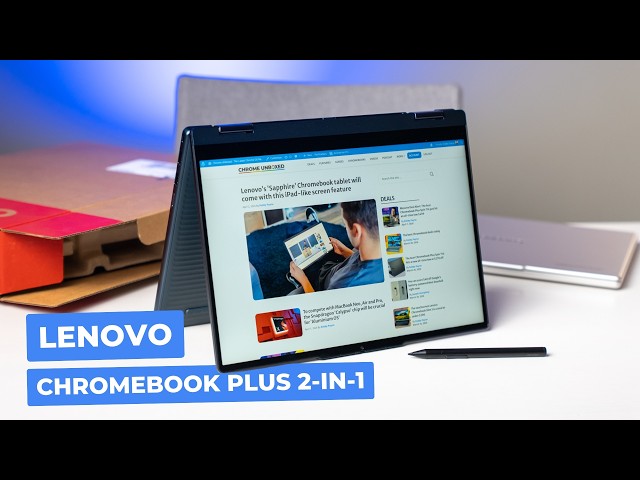
Lenovo Chromebook Plus 2-in-1: Unboxing & First Impressions
Apr 10, 2026


Join Chrome Unboxed Plus for access to our private Discord, an ad-free website experience, AMAs, exclusive giveaways, and more! Start your 7-day FREE TRIAL here: https://chromeunboxed.com/join/
Buy the Lenovo Chromebook Plus 2-in-1 from Best Buy: https://bestbuycreators.7tiv.net/OY1AzA
👉 Shop the best Chromebook deals today: https://chromeunboxed.com/the-best-chromebook-deals-today-updated/
📧 Subscribe to our Upstream newsletter: https://bit.ly/4jVq0de
・・・・・・・
Read more: https://chromeunboxed.com/
☕ Fueled by Fresh Roasted Coffee! Buy the special edition Chrome Unboxed bag here: https://chromeunboxed.com/coffee
Subscribe to the channel: http://bit.ly/2xFuj6L
Follow us: https://x.com/chromeunboxed
https://www.instagram.com/chromeunboxed
https://www.threads.net/@chromeunboxed
Show More Show Less View Video Transcript
0:00
Here in the studio today, we have Lenovo's newest Chromebook, the Lenovo Chromebook Plus 2in-1. And
0:06
if you've looked at this device over the past few months since it's been out, uh, kind of like we
0:10
have, been really curious to see what exactly Lenovo did with this h what feels a little more
0:16
of an entry- level, like mid-range version of probably my favorite Chromebook in the world,
0:22
the Lenovo Chromebook Plus 14. And so, um, I've handled one in Best Buy a couple times. We kind
0:27
of waited around for Lenovo to send us a review model, but I don't think those are going out. So,
0:31
we just went and got one. So, um, without any further ado, let's jump in the box.
0:41
So, before we actually jump in the box, there are a couple things I want to point
0:44
out about this device. One, uh, from the limited time I've had handling it,
0:48
it does feel a lot like the Lenovo Chromebook plus 14, which is a very good thing. It's convertible,
0:53
too. So, for those of you that have looked at that device and thought, "Man, I'd love it if it,
0:57
you know, converted um it it does that." Uh, but there's a bunch of different trade-offs, too. So,
1:02
again, I don't want to turn this into some sort of comparison video, but there are some things I'm
1:05
curious about, you know, genuinely, as the prices uh can get really similar. So, this is 579 MSRP,
1:12
so on a daily basis, $579. And while the the high-end um Chromebook Plus 14 is $750, it does
1:20
go on sale for $150, $200 off. And so it ees down into the same price point as this. And on paper
1:26
at least, it's really hard to justify spending that money unless you have to have a twoin- one.
1:30
Uh it's hard to justify spending the same kind of money for these two devices. And we'll we'll get
1:34
into all the specs here in just a second as we get into the box. But that's that's a very interesting
1:39
thing to me about this particular Chromebook. Now, it does come in the the navy colorway,
1:45
uh which I'm kind of excited to see um in person kind of in the studio. Again, I've
1:50
I've just handled it in passing at a Best Buy. Um, my main thing with it was, hey, I want to get uh
1:56
my hands on this thing cuz I'm curious. It looks a lot like the uh Chromebook Plus 14. You know,
2:02
is it built out of the same stuff? Um, and so um from what I could tell uh in my limited time,
2:10
uh the answer to that is yes, at least on the outside. Uh two-piece charging brick,
2:14
so nothing real special here. Um, I can't remember the charger with the Lenovo,
2:20
the Chromebook Plus 14. I think it might come with a a cooler, a little bit of a block. Uh,
2:25
and again, that's, you know, if you remember, the the Chromebook Plus 14 is ARM powered,
2:31
so it's the MediaTek uh, Companion Ultra. Um, it's it's the fastest Chromebook that's
2:36
ever been made. Um, and I love almost everything about it. Screen, speakers, keyboard, trackpad,
2:42
the speed, the battery life is insane. like it's it's a fantastic device. So, this makes this an
2:49
interesting device uh in this category. Okay, so uh gorgeous gorgeous laptop. I mean, I love I
2:56
love these navy colored Chromebooks and the feel in the hand. Very similar. I'm curious though.
3:05
It's heavier than the the Chromebook Plus 14. Same thickness, very similar chassis. I mean,
3:14
those are very, very identical. Um, I don't remember on this one cuz I never do it. Yeah,
3:19
you don't get a one finger lift on the on the 14. I seriously doubt you'll get it here,
3:23
but we'll give it a try. No. Uh, definitely not. But it feels very quality. And yeah, the bottom of
3:29
the chassis, uh, nice and rigid kind, as you can see there, it it literally feels just like this
3:34
one in the hand. Um, so inside you got, since we're already opened here, you got fingerprint
3:40
scanner. what feels like a very similar trackpad and keyboard upward firing speaker with the um is
3:49
it Waves uh I can't barely see it on this Navy uh yeah Waves Max audio. So yeah, we'll have to test
3:56
the speakers out real quick to see um webcam with the uh sliding um privacy guard there. So
4:04
a lot of the same stuff you see in this. I mean, these are high-end specs um that that you know,
4:09
we expect. Obviously, out of a device that starts close to $600, it should be pretty nice. It's a
4:13
Chromebook Plus. Uh on the inside, this device is uh the Core 3 or um yeah, Core 3 uh N355. Um so,
4:23
it's not going to be on the level of the Companion Ultra as far as performance, but it should not be
4:28
slow. 8 gigs of RAM, 128 gigs of storage. Uh let's look at these ports here. These are going to be
4:33
tough. Can you get those on camera? Just going to have to trust me, I think, on this. Um, with
4:38
this Navy, it is It's hard for me to see them, but uh, so that's a big benefit. Make sure that that
4:44
I'm looking at that. Yep. Full size HDMI, two US, uh, B type-C's, headphone microphone jack, and a,
4:50
uh, micro USB or micro SD card slot, excuse me. Uh, and then two, uh, USBA's over here. So,
4:58
from a port selection standpoint, this thing really kills the the 14 cuz 14's only got Yeah,
5:04
you got two USBC's and one A. Um, for me that hasn't been a problem, but if you need more ports
5:09
and you need to easily hook stuff up, this is this is going to be the one for you. Um, it definitely
5:14
has that. And man, it just it feels really really excellent. Um, got some fan ports on the back
5:19
here, which you don't get obviously with the the 14 being an ARM chip. So, this is Intel silicon,
5:25
needs some fans. Um, so that's probably some of the extra weight that you have here, but overall,
5:30
this thing feels really, really solid. Really well made. I'm I'm very impressed with this. All right,
5:37
so I did open it up. It didn't turn on. So, I'm going to plug it in real quick, get signed in.
5:41
You know the deal. U, that'll give me a second to feel the keyboard a little bit, feel the trackpad,
5:45
see the screen, all that kind of stuff. Speaking of the screen, it is uh uh full HD plus, so it's
5:50
uh 1920 x 1200, so 16x10 gives you a little bit of a taller aspect ratio. exactly what you get on the
5:57
plus um the Lenovo Chromebook plus 14. Uh and it's 300 nits of brightness. So, it'll be interesting
6:02
to see uh how that screen actually looks under the lights and all that kind of stuff. So,
6:06
let me break from here, get it plugged in, get signed in, all that kind of stuff, and we'll
6:10
uh we'll check out the the screen, the speakers, and all that kind of stuff. Okay, so as always,
6:15
I got to spend a few minutes with this uh actually using it. What I can tell you right off the bat is
6:21
actually handling it, opening the hinge, you know, converting it, uh, because obviously it converts.
6:26
It's got nice squared off sides, uh, so it does feel good. It's obviously heavy for trying to use
6:31
it like a tablet, but, you know, when you need to convert something or you need to set it up
6:35
and and, you know, do some sort of presentation or something like that, uh, it's going to be really,
6:39
really great for that. Um, everything feels uh, quite snappy. will obviously talk way more
6:44
about real world performance uh in the review cuz it's it's almost impossible to get that um in an
6:51
unboxing, but there's not been anything in the in the UI moving around that has felt sluggish
6:55
or slow at all. Um so the 355 is uh seemingly doing a pretty good job there. Um what I want
7:02
to show you that uh is is pretty significantly different from the Lenovo 14 is the speakers. Um
7:08
and we'll get to that in just a second. Uh, but first, the screen looks awesome. So, uh, again,
7:14
at 300 nits, we have it way cranked down for the camera. Uh, it's bright, it looks great,
7:19
it's sharp. Uh, it's the same resolution as this one. So, I mean, it's it's a good-looking screen.
7:24
It's not OLED. Obviously, the the Chro 14 is OLED, so that's a really nice step up, but it does look
7:30
really good. And 300 nits is going to be fine for brightness in most settings. Probably not going to
7:35
love it outdoor. Um, the back lit keyboard looks great. There's there's very little if any bleed
7:41
uh around the the keyboard characters and they're not a weird gray color so that you know the the
7:46
Lenovo did uh the 14 does a good job of that too of having the darker gray key caps so that you
7:51
know the the light can get through and you can see it in the dark but uh in regular lighting
7:55
conditions you don't lose all the symbols on the keyboard. Trackpad feels great, smooth, very
8:00
similar uh very similar to the one on the the 14. The fingerprint scanner works as you would expect.
8:06
And again, you got this nice array of ports. And so really, the primary differentiators here are,
8:11
you know, how good are the speakers, how good's the performance. Again, we'll we'll talk about
8:15
that later. Uh and and whether or not you need a convertible, like with pen support, cuz it does.
8:20
We have a USI pen here. Uh it obviously works uh just fine with USI pen, whichever one you want
8:25
to pick up and buy. Um so, you know, those are some upsides. You got a lot more ports
8:29
than you do on the the standard 14 claim show. You've got a convertible form factor. You've got
8:33
pen support. So, there are some definite upsides here. And this thing does feel like in the hands,
8:38
it does feel premium, but the speakers are letting me down a little bit on on first glance. So,
8:43
take a listen to this. My laptop and all sorts of settings these days. I have no issue whatsoever in
8:49
saying that this is my favorite Chromebook ever made. It's not awful. Just not a lot of low end.
8:56
Decently loud. Before we move on, we and they're upward firing so you get some stereo separation.
9:00
But just listen to the absolute difference in the same exact clip from the Chromebook plus 14 things
9:06
these days. I have no issue whatsoever in saying that this is my favorite way.
9:16
You know, now granted this one, the Chromebook 14 is branded Dolby Atmas instead of the Waves audio.
9:23
So, to be fair, they're not branded as the same audio setup. Uh, and they are definitely not the
9:28
same. So, while on the outside, everything looks basically the same between the two. It
9:33
is definitely not exactly the same. Um, but most of the things that you're going to deal with on a
9:38
Chromebook, your screen, your performance, your keyboard, your trackpad are very,
9:42
very good. And I feel like they just carried that DNA right over. And so, those are great things to
9:47
see. The camera looks u looks really awesome. Uh, it's 1080p. Um, and you know, the the the color
9:54
representation looks really good. The dynamic range is good. So, I'm going point it over there.
9:59
Joe is literally over there in the dark, so it's pulling up all those dynamic range pieces. Um,
10:03
you know, I nothing bad to say about the camera. So, the cameras are great. And again, the speakers
10:08
are going to be serviceable. Like, if you're in a video call and stuff, like they're they're fine.
10:11
They're just not exceptional. Uh, and because the chassis looks exactly the same between the two.
10:17
I don't know. I was kind of wondering, maybe they just slipped in the same speakers. But,
10:20
uh, overall, um, I'll have to say I'm more impressed by this than I thought I would be. Um,
10:26
because I just love the original Chromebook Plus 14 so much. Uh, I think there's some
10:31
upsides here. And it warrants a review for sure. Like, we've got to spend some time with this. Um,
10:36
and and let me get my thoughts together around it. Um, I'm not really a convertible guy. Uh,
10:41
I don't really use that functionality that often, but you know, I will try to kind of
10:45
force myself into that for this, especially to be able to differentiate it from this very similar,
10:50
very awesome Chromebook Plus 14. Uh, but yeah, um, I again, I'm impressed. I'm impressed with
10:57
the build quality. Um, uh, hopefully we'll start seeing this device go on sale a little bit more
11:01
often. I don't think there's been one for a few months, but that would get it down into that like
11:05
$400 range. And that would be uh really really enticing, especially when the the the
11:11
Chromebook Plus 14 is not on sale. But I think that's going to be it for this one. Um you be
11:17
uh on the lookout for a review coming soon. But uh if you like this video, give us a thumbs up,
11:22
head down there, hit subscribe, and be sure to ring the notification icon as well if you'd like
11:26
to be alerted when we make future videos just like this one. Until next time, we'll see you.
#Science