Up next in 10



👀 All our initial unboxing videos focus in on the hardware, but if you want a deeper look at the good and bad of the underlying OS, check out this video: https://youtu.be/fGjL5_v2wZk
Join Chrome Unboxed Plus for access to our private Discord, an ad-free website experience, AMAs, exclusive giveaways, and more! Start your 7-day FREE TRIAL here: https://chromeunboxed.com/join/
Buy the HP Googlebook 14 at Best Buy: https://bestbuycreators.7tiv.net/dyJVrj
Buy Chrome Unboxed Glowbar merch: https://cottonbureau.com/p/YGGDM3/shirt/glowbar#/23914930/tee-men-premium-heavyweight-black-100percent-cotton-s
・・・・・・・
Read more: https://chromeunboxed.com/the-hp-googlebook-14-is-official-snapdragon-x-elite-power-3k-oled-and-19-hour-battery/
・・・・・・・
👉 Shop the best Chromebook deals today: https://chromeunboxed.com/the-best-chromebook-deals-today-updated/
📧 Subscribe to our Upstream newsletter: https://bit.ly/4jVq0de
☕ Fueled by Fresh Roasted Coffee! Buy the special edition Chrome Unboxed bag here: https://chromeunboxed.com/coffee
Subscribe to the channel: http://bit.ly/2xFuj6L
Follow us: https://x.com/chromeunboxed
https://www.instagram.com/chromeunboxed
https://www.threads.net/@chromeunboxed
https://www.facebook.com/Chromeunboxed
Show More Show Less View Video Transcript
0:00
Here on the table in front of me, we
0:01
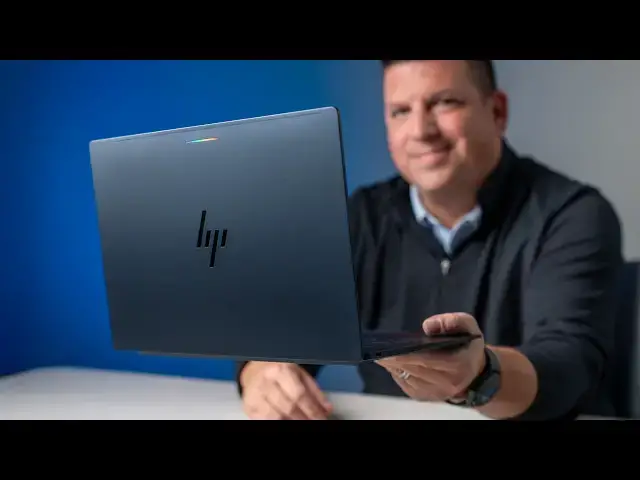
have the all-new HP Google Book 14, one
0:05
of the five Google books. Uh, that was
0:07
part of the initial launch. And like we
0:10
do, we are going to hop in the box and
0:13
get some first impressions, like real
0:15
life, real hands-on first impressions of
0:17
this hardware. Um, because it's been a
0:19
little bit since we've seen it in New
0:20
York City. So, I'm excited to check it
0:22
out and show it off to you. All right,
0:24
so let's just uh hop in the box here.
0:27
And yeah, this is different. Uh the
0:30
other Google books that we've unboxed so
0:31
far have like a cool box for the Google
0:33
book itself. Uh this one is just a
0:36
pretty standard cardboard box. Uh
0:41
okay. A little bit of interest. Look at
0:42
this charging ball. Let's see. I'm going
0:45
to have to tear it all up. Just the way
0:47
it is sometimes.
0:50
That's kind of fun.
0:52
Like a narrow tube. Retractable prongs
0:56
there. That's very nice. I love that. I
0:58
mean, this is cool. 65 watt charger. Uh,
1:01
two-piece, obviously.
1:04
Uh, nice USBC cable there. Pretty cool.
1:07
Might need that. There's something else
1:09
fun in here.
1:11
No, probably just paperwork.
1:17
Yeah, pretty standard fair here.
1:20
Let's move that to the side.
1:24
Check this guy out. I did not get to
1:26
mess with this one too much in New York.
1:28
Uh the table was really busy. It's one
1:30
of two of the Snapdragon X Elite Google
1:33
Books. Um so super excited to start
1:36
messing with this. We've already unboxed
1:37
the Dell uh which is the other uh
1:40
Snapdragon device and I'm very impressed
1:43
with that one and no different here.
1:46
Man, this thing looks incredible. It
1:48
reminds me a lot of the like Dragonfly
1:51
uh Chromebooks we had over the years. um
1:54
some pretty sharp edges with that really
1:56
navy blue color that definitely is going
1:58
to be picking up some fingerprints. Like
2:00
I'm already leaving I'm already leaving
2:02
all kinds of stuff on that. So, this is
2:03
definitely one if you're going to uh uh
2:06
grab this one, you want to have uh some
2:08
sort of polish cloth around probably
2:10
pretty regularly. Let's just let's just
2:11
see how well it does with it. Hey, it
2:13
wiped right off. I didn't have to do
2:15
anything extra to it. So, that's nice.
2:16
At least if you're going to collect
2:17
fingerprints, get rid of them quick. Um,
2:19
so even though this is a Snapdragon X
2:21
Elite, uh, we still have big fan ports
2:24
on the bottom here. And then
2:26
I don't know if you're going to be able
2:27
to see those, but tucked up underneath
2:29
the hinge. There's a bunch of fan ports
2:31
there as well. Um, around the side over
2:33
here, we just have one single USB type-C
2:36
and then the USB type-C over here.
2:38
Headphone microphone jack. So, this is
2:40
not a port monster. Uh, pretty simple
2:43
sim similar to the the setup on the
2:45
Dell. Uh, but man, this thing just feels
2:48
incredible. Um, not the lightest of the
2:50
bunch. I want to say this one's pushing
2:52
closer to that 3 lb range. So, plenty
2:54
portable. Uh, just man, like all Google
2:57
books, it just feels fantastic in the
3:00
hand. It's real kind of soft touch uh
3:02
aluminum they got going on here. Um,
3:04
integrated like feet. I don't know if
3:06
you can see kind of see like this little
3:09
ramp here. So, that whole piece right
3:11
there sticking up is rubber. Uh, same
3:12
down here. So when you set it down, it
3:15
just I mean it really almost like grabs
3:16
onto the table. I like that. It's
3:18
obviously going to lift it up a little
3:19
bit and give it a little bit more air
3:21
when it's sitting on the table for those
3:22
fans to do their job. Um hopefully that
3:25
Snapdragon processor inside will be
3:27
super efficient. Uh they do get they do
3:29
get warm just like any other high-end
3:31
processor. Um so having some fans on
3:33
there is good. We got uh downward firing
3:36
speaker ports down here. I don't
3:38
remember if this one go and crack the
3:39
lid real quick.
3:41
Um yeah, no upward firing. So, kind of
3:44
like downward firing speakers kind of to
3:46
the side there. So, I'd be interested to
3:48
see how those sound. Um, let's check and
3:51
see before we get all logged in here.
3:55
One finger lift. Got to love that. Um,
3:58
hinge does not lay flat. It's about as
4:00
far as we're going to get with it. But
4:02
yeah, just gorgeous aesthetic. That new
4:04
HP logo. You've got your um your glow
4:07
bar up there at the top. And man, I'm
4:09
just smudging the heck out of this
4:11
thing. So many fingerprints. So yeah, be
4:14
forewarned. But other than the
4:15
fingerprint part, this thing feels
4:17
absolutely incredible. All right, so
4:19
let's take a look for real now on what's
4:21
on the inside. We'll start up top with
4:24
the 5 megapixel uh uh front-facing
4:27
camera here. It's got a privacy shade on
4:29
it. So 5 megapixels is a little bit of
4:30
an up uh uptick from some of the other
4:32
1080p uh sensors we get on other Google
4:35
books, but if you've been following
4:37
along for a little while, the screen
4:38
here should sound pretty familiar. 500
4:41
nit uh OLED display um 16x10 14 in 2880
4:47
by800 and so that puts it just a little
4:50
bit over quad HD high resolution very
4:52
sharp very bright punchy colors I mean
4:55
you can just see the black detail there
4:57
you can't really even see the bezel so
4:59
um OLED screens are awesome for that
5:00
kind of stuff um and then down here
5:04
oh man that keyboard's that's that's
5:06
saucy
5:09
of the Google books books I've messed
5:10
with. That might be the best keyboard.
5:12
Man, that feels great. I'm going to
5:13
enjoy typing on that. Um, then we got a
5:16
haptic trackpad.
5:18
Nice and quiet. Um, if you've seen the
5:21
Lenovo unboxing we did, for whatever
5:22
reason, like the chassis on that one, it
5:24
had kind of like a hollow sound to it.
5:25
Feels great. Works great. Uh, but this
5:27
one is is much quieter.
5:31
Very nice. Um, I've got to get logged in
5:33
obviously to this thing. Oh, we also
5:35
have a uh fingerprint scanner on the
5:36
power button right up here in the
5:38
corner. um standard Google book layout.
5:40
Uh apart from that, uh again, Snapdragon
5:43
X Elite, 16 gigs of RAM, 512 gigs of
5:46
internal storage. Um so, a beast just
5:50
like uh every other Google book out
5:52
there. Uh super impressive specs. But
5:54
let me get logged into this thing, use
5:56
the keyboard, trackpad for just a
5:57
second. We'll we'll take a look at the
5:59
camera, get a listen to the speakers,
6:01
and uh and I'll give you some
6:02
impressions, quick impressions of the
6:04
keyboard and the trackpad and stuff.
6:06
Okay, got all in and set up and yeah, as
6:10
as it felt in the just early portions of
6:12
it, typing on this keyboard is
6:14
fantastic. So far, I think the the the
6:16
best one of the bunch of the the launch
6:18
bunch. Um trackpad is haptic. Feels
6:22
great. Uh like you would expect it
6:23
[clears throat] to. Uh but one thing I
6:25
did notice that um is interesting cuz
6:28
the first three that we've unboxed are
6:30
all uh anti-glare screens. And this is
6:32
the first of these like OLED real punchy
6:35
screens that doesn't have any like
6:37
anti-glare coating on it. Um, that's
6:39
good and bad. So, it's it's bad cuz
6:41
you're going to get glare uh, you know,
6:42
under different lighting conditions, but
6:44
the good part is it lets all of that
6:46
punch and all of that color of the OLED
6:48
really shine through. And so, um,
6:51
hopefully that's not that's not too
6:53
bright, is it? Um, the the absolute just
6:57
like inky blacks, but then like the
6:59
crispness of this this background image.
7:01
I mean, the screen just looks
7:02
phenomenal. All the screens on all the
7:04
Google books are really good, don't get
7:06
me wrong. Uh, but not having the
7:07
anti-glare on there, it really does look
7:10
pretty awesome. Um, so yeah, let's talk
7:12
about um let's let's go first to um just
7:16
some audio here. So, let me go pull up
7:18
uh one of our recent videos here. I get
7:21
one that actually has a little bit of
7:22
audio at the beginning, a little bit of
7:24
uh music. All right, folks. Google Books
7:26
are here. We have all five models of
7:29
them here in the studio. and pretty
7:31
rich.
7:31
>> We had to pick one to start off with
7:33
with these unboxings. So, it is the
7:36
largest of talk about Google books. You
7:38
want to see
7:40
>> Let's get to it.
7:45
>> All right. So, really good stereo
7:47
separation, full rich. Again, it was one
7:50
of the pillars like of of Google Book
7:52
hardware. They had to have good
7:53
speakers. And so, uh HP has delivered
7:55
that in spades. I still think probably
7:58
arguably the best laptop speakers I've
8:00
ever heard on any device was uh the the
8:02
Dragonfly Pro Chromebook. I just it was
8:04
insane. We we went know a colleague that
8:07
still has one of those and uh we were
8:09
comparing speakers and man she cranked
8:11
that thing up and I was like still no
8:13
competition. That that thing is wild. Uh
8:15
like rattles the keys and everything. Uh
8:17
but these these speakers sound really
8:19
really good. Uh, so no worries there. If
8:21
you want to uh consume some content on
8:24
Netflix or YouTube or something like
8:25
that and don't want to mess with the ear
8:26
earbuds, you know, this is going to work
8:28
well for you. All right, so let's take a
8:29
look at this 5 megapixel camera and see
8:32
what it looks like here.
8:35
I mean, really good contrast, good
8:37
colors, sharp, too. It's 5 megapixel.
8:40
Um,
8:41
yeah, it does well with different
8:43
lighting. So, you know, in general,
8:45
maybe a selfie here and there, but
8:47
you're going to be taking video calls.
8:48
And, you know, I would assume with the
8:50
dual array microphones, the great
8:52
speakers in this camera, you're going to
8:54
enjoy doing video calls as as much as is
8:57
possible to do so. Now, before we get
8:59
out of here, I do want to show you a
9:00
couple quick things uh that Google Books
9:03
do that, you know, like Chromebooks
9:04
don't and some of their um better
9:06
together features that, you know, in
9:09
general set them apart. And uh but
9:11
before I do that, uh I did want to
9:13
mention like you're probably noticing
9:15
we're not getting down deep into Google
9:17
book OS just yet with these unboxings.
9:19
And our unboxings are coming out a
9:20
little bit later than maybe you would
9:22
have expected. Joe went and had another
9:25
baby, you know. So, um he's been pretty
9:28
busy with that and is just kind of
9:30
getting back in the in the groove of
9:31
things. And so, uh, it's it's changed
9:33
our schedule up a little bit and and
9:35
honestly, it's given me more time, uh,
9:37
to really ingest everything that is
9:40
Google Book OS, both the good and the
9:41
bad. So, we'll have plenty to say about
9:43
that. Um, there's good stuff. There's
9:45
some rough stuff around the edges, but
9:47
there's a good chance that by the time
9:49
we get to our reviews, a lot of that
9:51
stuff's going to be taken care of. Uh,
9:52
Google's on it. They've been responsive.
9:54
So, uh, we're excited about about where
9:57
the platform's heading, but I just
9:58
wanted to point that out before we get
10:00
into a little bit of the software stuff
10:01
here with some of this better together
10:03
stuff. All right, so first up, after
10:04
you've paired your phone up, which is
10:06
pretty quick, uh, scan a QR code and
10:08
you're up and running. Um, if I'm on my
10:11
phone and I'm looking at something, so
10:13
I'm I'm looking at some putters here at
10:14
PXG. If I get to my desk and forget
10:18
like, oh man, I was looking at those
10:19
putters. What What was I looking at?
10:20
What model was that? You can see down
10:22
here on the desktop at the bottom
10:24
there's a little Chrome icon here that
10:26
has a little phone down there. It tells
10:27
me that hey, this is something you were
10:29
doing on your phone prior that you can
10:31
just pick up and go here. So, let's just
10:33
click it and see where it takes us.
10:35
Should take us to Yeah, PXG's putter
10:38
page. So, the exact same exact same
10:40
website I was on. It works with Google
10:42
services, Google Docs, Gmail, that kind
10:44
of stuff. But if you're in the middle of
10:45
doing something, you can jump right on
10:46
your laptop and just kind of continue
10:48
on. It's what it's called, continue on
10:50
uh with that activity. One of the other
10:52
really cool things you can do with a
10:53
Google book and an Android phone is cast
10:55
your apps. So when I click this little
10:57
icon down here, I see the apps that are
10:59
actually installed on my device. And so
11:02
there's stuff that's installed that I
11:04
don't really want to install it on the
11:06
Google book as well. Like Door Dash, for
11:08
instance, is on here. I don't use Door
11:10
Dash that often, but if you're, you
11:12
know, wanting to monitor the delivery uh
11:14
that you've got coming, I can pull up
11:16
the the phone app. Now, this is
11:18
streaming directly from my phone. You
11:20
can tell the the animations are a little
11:21
stuttery. It's because it's actually
11:23
streaming that app from this phone. So,
11:25
it's like creating a a web stream and
11:27
and allowing me to see and control the
11:29
app on my phone without my phone waking
11:30
up. But I can go in here, check the
11:32
order, make any adjustments I need to.
11:33
And when I'm done, just close it out and
11:35
I don't have to actually install this
11:37
application on the Google Book. And last
11:39
but not least, if I go to my files, you
11:42
can look in here and I can go there's my
11:44
phone right there. I can see all of my
11:47
phone files right here. So, if I go
11:49
DCIM, uh, I think I missed that.
11:53
If I go DCIM
11:55
and I go camera,
11:58
I can see the photos that here, let me
11:59
just do that. You can see the photos and
12:02
and videos that I've recently taken,
12:03
they're right there. So, if I need to
12:05
drag them into another application, put
12:06
them in an email or something like that.
12:08
No more quick sharing, no more need to
12:10
upload the photos and then download,
12:12
move it. It's just open it up as if it's
12:14
sitting on this Google book. It's not,
12:16
but it'll behave for files up to 200
12:19
megabytes. It'll behave exactly like
12:21
it's sitting right here on this device.
12:23
And then one last thing I'll point out
12:25
with better together features, your
12:27
notifications on your phone and your
12:29
Google book kind of work together. So
12:31
you can see this Instagram I've got
12:33
here. I'm just going to dismiss it here
12:36
and then it's gone there. And same here.
12:38
So if I dismiss, you can see I've got
12:40
the Samsung notification here. If I
12:43
dismiss it here, dismisses on my phone.
12:44
So, you're kind of triaging those
12:46
notifications in one place all the time,
12:48
not having to go bounce back and forth
12:50
and I got rid of that one here, but it's
12:52
still up there. And that would be a
12:53
mess. Um, and so very cool that you can
12:55
do that. And again, it just kind of
12:57
works out of the box. So, one final
12:59
thing. Um, I did notice that the
13:01
fingerprint scanner has this nice little
13:02
blue LED above it that just kind of
13:04
glows for a second when it's time to
13:05
unlock the device. Almost like a hey,
13:08
I'm over here. You can use me to unlock
13:10
the device. Um, obviously the
13:12
fingerprint scanner works uh like you
13:14
would expect, but you also have face
13:16
unlock. And here I'm going to show you
13:17
how fast. Maybe get about right here so
13:20
you can kind of see the screen. But once
13:21
you've interacted and you unlock or
13:22
open, you know, go to swipe to open
13:24
this, you'll see the face unlock icon up
13:26
here
13:29
and it's ready to go. I love that. Uh
13:31
the Lenovo has that as well. I think
13:33
it's a fantastic ad. It's just nice to
13:35
be able to unlock the thing and it sees
13:36
you and it moves on. It even works with
13:38
my glasses on, too. So, uh, that's a
13:40
nice touch. But that's about it for this
13:42
one. Um, you know, this is like all
13:45
Google books, uh, adorned with the
13:47
really fun glow bar up top, packed out
13:50
with every bit of awesome hardware you
13:52
could want. $1299 is the starting price
13:54
of this over at Best Buy. Um, so again,
13:57
we know these devices are not cheap. We
13:58
know that they command a high price tag,
14:00
but you are paying for absolute high
14:03
quality across the board from top to
14:05
bottom in every aspect. Um, so I'm
14:08
excited to, you know, put this
14:10
Snapdragon device through the paces. Uh,
14:12
see what the battery life's like. The
14:14
performance according to synthetic
14:15
benchmarks is pretty awesome. And, uh,
14:17
this and the Dell both beat the, uh,
14:19
Intelbased devices a little bit in
14:21
single and multi-core scores. And so,
14:23
I'm excited to see how they perform. I'm
14:25
excited to see what the battery life's
14:26
like. Uh, but we need to spend some time
14:28
with these devices, obviously. And I'm
14:30
looking very forward to getting our last
14:32
unboxing done and starting that process
14:34
of of reviewing Google Books and Google
14:37
Book OS. Well guys, that's it for this
14:38
one. If you enjoyed this video, give us
14:40
a thumbs up. Head down there, hit that
14:41
subscribe button. Be sure to ring the
14:43
notification icon as well if you'd like
14:44
to be alerted when we make future videos
14:46
just like this one. Till next time,
14:48
we'll see you.
14:50
[music]
14:59
>> [music]
Laptops & Notebooks
Science