0:00
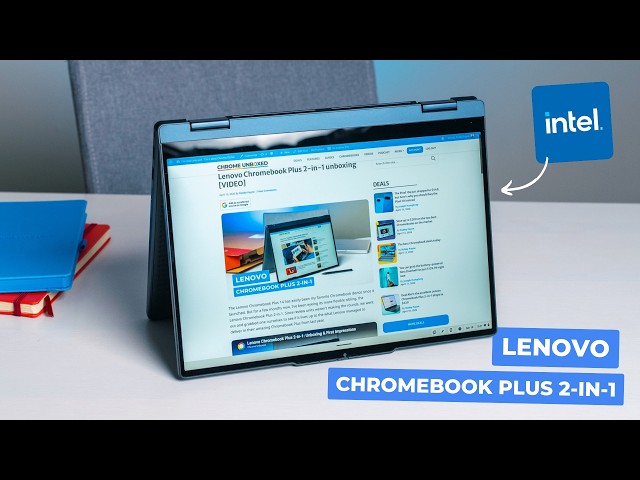
When the clamshell Lenovo Chromebook
0:01
Plus 14 arrived last year, I confidently
0:04
called it the best Chromebook I had ever
0:06
used. And when the newer two-in-one
0:08
version arrived at Best Buy a bit out of
0:10
the blue, I was pretty eager to see if
0:12
Lenovo was capable of building a cheaper
0:14
convertible version of the same
0:16
Chromebook I absolutely loved that still
0:18
possess some of the good stuff from the
0:20
more expensive clamshell only version.
0:22
And after spending some time with the
0:24
new Lenovo Chromebook Plus two-in-one,
0:26
there's a lot to love about this device
0:28
for sure, but there's also a lot of
0:29
uncertainty I still have about
0:31
recommending it above a few other
0:33
specific devices it's clearly competing
0:35
with. So, let's just get into it.
0:41
>> On the outside, Lenovo once again nailed
0:42
the aesthetic. The cosmic blue, it's
0:45
navy but whatever, color is gorgeous and
0:48
the build quality feels every bit as
0:49
rigid as the clamshell Lenovo Chromebook
0:51
Plus 14. And they even managed to snag a
0:54
MIL-SPEC rating certification for the
0:57
chassis, meaning it's officially tough
0:59
enough to handle like drops and bumps
1:00
and dust and just the daily rigors of
1:02
being thrown in and out of a backpack.
1:04
It is a bit heavier than its sibling at
1:06
3.3 lb and because it houses an Intel
1:08
processor instead of an ARM processor,
1:11
it does require cooling fans. That means
1:13
you're going to see fan vents that you
1:14
won't find on the ARM-powered clamshell
1:16
version. Overall though, the build
1:18
quality of this rivals literally
1:20
anything in the entire Chromebook market
1:22
and that both impressed me and kind of
1:24
surprised me. Now, if there's one area
1:26
where this two-in-one absolutely dunks
1:28
on the clamshell version, it's in the IO
1:31
category. Now, if you hate carrying
1:32
dongles, you're going to love this port
1:34
selection. Lenovo packed in an absolute
1:36
massive array of ports on the side and
1:39
they include two USB 3.2 type C's, two
1:42
USB 3.0 type A's, a full-size HDMI 1.4 B
1:47
port, a microSD card slot, Kensington
1:50
lock, and a headphone microphone jack.
1:52
Simply put, you won't need to carry any
1:54
extra accessories to get connected to
1:56
whatever you want to connect this
1:57
Chromebook to. Opening up the lid,
1:59
you're greeted with a 14-in 16x10 full
2:02
HD plus IPS touchscreen. It's rated at
2:04
300 nits and it's been plenty bright and
2:07
punchy enough for any indoor situation
2:09
that I've been in, like near a window or
2:11
even with harsh overhead lighting. The
2:13
very subtle rounded corners of the
2:15
display look a bit more modern than, you
2:16
know, plain squared-off panels and the
2:19
touch and pen input that this thing has
2:21
are super responsive and they're clearly
2:23
good things to have for a device that
2:24
leans into the 360° convertible form
2:27
factor. Right above that screen is a
2:29
solid 5 MP webcam that will serve you
2:31
well for, you know, video calls,
2:33
selfies, document scanning, all that
2:34
kind of stuff when you need it.
2:36
Additionally, Lenovo's keyboard DNA
2:38
really shines pretty brightly here as
2:39
well. The keys are all very solid and
2:41
clicky, the backlighting is excellent in
2:43
all lighting conditions without a ton of
2:45
bleed, and the trackpad is perfectly
2:47
smooth and clicky. And they even
2:49
included a fingerprint scanner right
2:50
there that works flawlessly and is an
2:53
addition that we just don't normally see
2:55
outside of, you know, really higher-end
2:57
Chromebooks. The audio, unfortunately,
2:58
is the first major letdown. The
3:00
upward-firing speakers use Lenovo's
3:03
Waves Maxx Audio and they're just kind
3:05
of mediocre. They don't have any of the
3:07
richness or the punch that comes in the
3:09
standard Chromebook Plus 14 model and I
3:12
was a bit let down by this, honestly.
3:14
With the build quality of this device
3:16
being so close to this other Chromebook
3:18
that I hold in such high regard, I was
3:20
really hoping for some really solid
3:23
Just not the case here. And one of the
3:24
biggest differences comes under the hood
3:26
with this device where we have the Intel
3:28
Core 3 N3505 paired up with 8 gigs of
3:31
RAM and 128 gigs of UFS 2.2 storage. In
3:34
a vacuum, it's fine. It handles standard
3:37
multitasking and the built-in Google AI
3:39
features without much fuss and I've
3:41
really only seen a few small performance
3:43
hiccups here and there. It's honestly
3:45
been pretty solid from a performance
3:47
standpoint. But compared to the MediaTek
3:49
Kompanio Ultra found in the clamshell
3:50
version of this device and in the Acer
3:52
Chromebook Plus Spin 514, it feels like
3:55
a pretty big downgrade. First, you lose
3:58
the fanless dead silent operation and
4:01
second, the battery life takes a
4:02
noticeable hit. I was able to squeeze
4:04
about 7 hours of real-world use out of
4:07
it, but nowhere near the multi-day
4:09
battery life we see on modern ARM
4:11
Chromebooks like the Lenovo Chromebook
4:13
Plus 14. And all of that leads me to the
4:15
main rub of this device. At an MSRP of
4:17
$579, the Lenovo Chromebook Plus
4:19
two-in-one finds itself in a really
4:21
tough spot in the midst of its current
4:24
competition, namely Lenovo's own
4:26
Chromebook Plus 14 I've referenced many
4:28
times already, along with the Acer
4:30
Chromebook Plus Spin 514. Again, in a
4:33
vacuum, this device is pretty stellar
4:35
across the board, but we just can't
4:37
ignore the very direct competition that
4:39
it faces. When the Lenovo Chromebook
4:41
Plus 14 goes on sale for like $599 like
4:44
it does a lot, you're choosing now
4:46
between a really solid convertible and
4:48
what is arguably the best Chromebook
4:50
ever made at almost the exact same
4:52
price. And in that situation, unless you
4:54
absolutely must have a convertible, the
4:57
purchase decision really becomes a
4:58
no-brainer. Now, in the event that you
5:00
do need the flexibility of a
5:01
convertible, the Acer Chromebook Plus
5:03
Spin 514 offers the superior MediaTek
5:06
Kompanio Ultra and gets you a 120 Hz
5:09
screen for even less money on most days.
5:12
Now, its MSRP is $699, but it's
5:14
available for $499 right now as we're
5:16
filming this review. Now, as you can
5:18
tell, the price makes all the difference
5:20
here. So, when this Lenovo two-in-one
5:22
has dropped to $429 a couple of times
5:25
since launch, the logic shifts quite a
5:27
bit. At that sort of price, now you're
5:29
saving 170 bucks over the clamshell
5:32
Lenovo's best price and $70 over the
5:35
Acer's current really low sale price.
5:37
And when this happens, I can easily
5:39
recommend this device all day long. For
5:41
a bit over 400 bucks, you're getting a
5:43
high-end build quality, great screen, 5
5:46
MP camera, fantastic keyboard and
5:48
trackpad, fingerprint scanner, huge port
5:50
selection, and a convertible form
5:52
factor. That's a lot to like for 429
5:55
bucks and I'll happily tell you to
5:56
consider it at that price. At MSRP
5:59
though, I'd definitely take a look
6:01
around at the current deals available.
6:03
But guys, that's it for this one. If you
6:04
enjoyed this video, give us a thumbs up,
6:06
head down there, hit that subscribe
6:07
button, and be sure and hit the
6:09
notification icon as well if you'd like
6:11
to be alerted when we make future videos
6:12
just like this one. Till next [music]