Up next in 10



Join Chrome Unboxed Plus for access to our private Discord, an ad-free website experience, AMAs, exclusive giveaways, and more! Start your 7-day FREE TRIAL here: https://chromeunboxed.com/join/
👉 Shop the best Chromebook deals today: https://chromeunboxed.com/the-best-chromebook-deals-today-updated/
Buy the Acer Chromebook Plus 514 at Costco: https://bit.ly/514plus
📧 Subscribe to our newsletter: https://bit.ly/4jVq0de
・・・・・・・
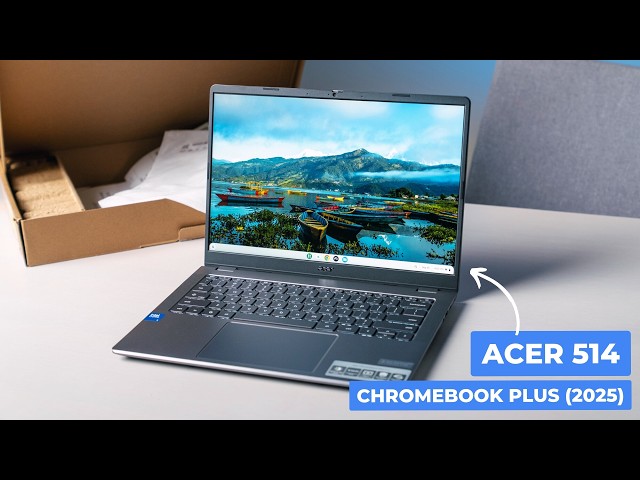
Acer has a knack for quietly releasing some truly compelling Chromebooks, especially in the mid-range. A while back, they dropped an impressive Chromebook Plus 514 that really stood out, thanks to its generous 512GB storage. Now, they're back with a refreshed version of that same device, and it looks like a very worthy successor that comes packed with great specs and an incredibly aggressive price tag - currently sitting at just $249.
Read more: https://chromeunboxed.com/acer-chromebook-plus-514-2025-unboxing-hands-on-initial-thoughts/
☕ Fueled by Fresh Roasted Coffee! Buy the special edition Chrome Unboxed bag here: https://chromeunboxed.com/coffee
Subscribe to the channel: http://bit.ly/2xFuj6L
Follow us: https://x.com/chromeunboxed
Show More Show Less View Video Transcript
0:00
So, here in the office today, we have an
0:01
interesting device. This is a follow-up
0:03
to a Chromebook that Acer kind of put
0:05
out um very quietly, and it's the Acer
0:09
Chromebook Plus 514, and it's just the
0:11
new version of that device. And if
0:12
you're not familiar with it, it showed
0:14
up um just kind of quietly in the
0:17
background at Costco, but it came with
0:19
half a terabyte of storage and some
0:21
other decent specs that made it a pretty
0:23
good device when we went to uh unbox and
0:25
review that one. This is just the
0:27
followup to that device with some
0:29
updated specs and hopefully maybe some
0:31
updated things like screen and keyboard
0:32
and all that kind of stuff. We won't
0:34
know until we get in the box. So, let's
0:35
do it.
0:37
[Music]
0:40
But before we hop in the box, I'm not
0:42
sure if you can tell or not, but we're
0:44
in yet another new studio. Um, but the
0:47
cool part is this one's actually here to
0:50
stay. So over the last 3 months we've
0:52
been in two to carry the seven four four
0:56
different studios. Um and it's been
0:59
interesting. U I don't know if uh most
1:01
of you all follow along but you know
1:03
we've we've opened a brand new
1:05
brickandmortar business called Proof
1:07
Golf. It's a golf simulator business.
1:09
Has nothing to do with Chromebooks. Um
1:11
but because of that move and some things
1:13
that changed at the office that we were
1:15
at the office space uh stopped renting
1:17
uh at that place. We were just in flux
1:20
for a long time. Filming at Joe's house,
1:23
uh filming in the store room of a uh
1:25
small gift shop downtown. Obviously, in
1:27
that 3 month span, we we finished up a
1:30
couple videos in our old office space.
1:32
And so, we've just kind of been bouncing
1:33
around for a long time, and we're super
1:35
excited uh to finally be in this space
1:38
where we can kind of call it home again.
1:40
Um we're not constantly wondering when
1:42
we wake up on a Monday morning uh where
1:44
are we going to film this week or how's
1:46
that going to work or how are we going
1:47
to make it work this week? Uh it's it's
1:49
it's nice to be in this space and so uh
1:51
we want to show some of this stuff off
1:53
behind the scenes and um we're going to
1:56
do that actually. Uh we're going to do a
1:57
little bit of a video and show off this
1:59
new space that we're in this new place
2:01
that we are uh in. And uh we're going to
2:04
show that off in our um Chrome & Box
2:06
Plus community. And so if you don't know
2:08
what that is, that's a a spot where uh
2:10
people get together and discuss Google
2:12
products and all sorts of things,
2:14
Chromebooks, Android phones, all that
2:15
kind of stuff. Uh but also uh they also
2:18
get um ad free access to our website and
2:22
uh all these perks like AMAs with the
2:24
Chrome OS team and uh you know access to
2:26
Joe and myself and it's a great a great
2:29
place to be a great place to hang out.
2:30
Uh you get obviously u access to videos
2:33
like what we're talking about here and
2:35
it's two bucks a month. Uh and and so
2:37
we'd love for you to check that out if
2:38
if any of that sounds of any interest to
2:41
you. uh just head over to
2:42
chromeunbox.com/join
2:44
and you can learn more about that and
2:46
get started. But now let's get in this
2:48
box. As I said uh in the open um this
2:52
isn't like some wildly unique device
2:54
unless there's something about it that
2:56
um I'm not I'm I'm not privy to, but
2:59
it's a it's an update um to an existing
3:02
device that that I really liked. It it
3:04
was one of those the the I don't say
3:06
original. They've done quite a few
3:08
different Chromebook 514s and then they
3:10
had the Chromebook plus 514. So the
3:12
initial Chromebook plus movement. Um it
3:15
was a AMD powered device at that first
3:18
event we went to. I didn't love it. Um
3:22
but then they released another 514 after
3:24
that that went back to a 16x9 screen.
3:26
And so I was like uh you know the AMD
3:27
had a 16x10 14in touchscreen and this
3:31
kind of dumbed it down to a 16x9 screen.
3:33
I believe this one gets back to 16x10.
3:36
I'm not sure if it's touched. We're
3:37
gonna find out here in a second. Um, but
3:39
it updates to the new Intel. I'm gonna
3:44
get on the side of the box so I tell you
3:45
exact. Oh, there's a sticker over it.
3:47
Um, it is the I'll pull up the
3:49
diagnostics to make sure once I get into
3:50
the device here. Uh, it's the the latest
3:53
version of the i3. There was N305. I
3:56
think this is the N355,
3:58
I think. Uh, but the same 8 gigs of RAM
4:00
this time around, which is obviously
4:02
dictated by uh Chromebook Plus there on
4:04
the lid. Um, but the 8 gigs of RAM and
4:06
then the wild 512 gigs of storage. So,
4:10
half a terabte of storage here, which is
4:12
pretty wild in an affordable device.
4:15
This is listed for $3.99 on Acer's
4:17
website. From what I can tell still at
4:20
this point, it's not showing up at like
4:22
Costco or Sam's or Walmart, but it
4:24
definitely will at some point here in
4:26
the future. So, this is just an
4:27
iteration on a device again that we got
4:30
in and I was like, "This is weird that
4:31
this thing has half terb of storage."
4:33
and I used it and kind of liked it
4:35
actually. So, um, let's take a look
4:37
around the outside here. Obviously,
4:41
yeah, we're dealing with all plastic, I
4:43
think. I don't know. That's kind of
4:45
cool. I seriously doubt
4:48
pretty sure it's plastic. Uh, we got our
4:49
fan ports down here. This is pretty
4:51
standard Acer fair here. Um, around the
4:54
side, we've got a USB type A, uh, USB
4:57
type-C, um, Kensington lock, headphone
5:00
microphone jack. Come around the side.
5:02
Full size HDMI port port. Uh, awesome
5:05
there. Uh, USBA, USB type-C. So, lots of
5:09
port selection. Love to see that 100%.
5:12
Um, say probably in the 3-ish lb range
5:15
here. So, 14-in device. Not crazy thick,
5:18
not crazy thin. Just a good old standard
5:22
laptop feel. Nice and firm with it all
5:25
closed up. So, I like what I'm seeing on
5:27
the outside thus far. All right. So,
5:29
actually, let me check the charger out.
5:30
You never know. Sometimes there's a
5:32
little surprise. Oh, there's a surprise.
5:35
This is one of those weird charger boxes
5:36
that you can like flip into a laptop
5:38
stand.
5:40
I don't know anybody that's ever done
5:41
it. Uh they've only done this before on
5:44
their uh like the more recycled Vero uh
5:46
devices, so
5:49
I don't like doing this on camera. Okay,
5:52
that worked pretty easy. Boom. Yeah.
5:57
Laptop stand.
5:59
Anyway, um
6:03
yeah, very standard charger, two-piece.
6:06
Nothing to see there. So, let's crack
6:08
this bad boy open.
6:11
Uh that's an inset screen, which usually
6:13
means not touch, but it does mean um um
6:16
it's anti-glare. It could be touch. I'm
6:18
not saying it's not. Um we've got a
6:20
camera shade up top. I love seeing that.
6:22
Um let's see. Do we have backlight? Yep,
6:25
back lighting on the keys. Let me turn
6:26
it up so you can maybe see it.
6:30
And with that, Can you see it there,
6:32
Joe? Okay. Yeah. So, cool. Key back
6:35
lighting. Ocean glass trackpad, which
6:38
again, like Acer has has been doing this
6:40
with their medium to high range
6:42
Chromebooks for a while. Ocean Glass is
6:44
the trackpad. It's huge. And then they
6:46
just make sure it's set right. I guess
6:49
maybe they heard my complaints over so
6:51
many years that, you know, I was just
6:52
sick and tired of of trackpads wobbling
6:55
uh where they're supposed to be. This
6:56
thing's in here really nice.
6:58
Quiet, thuddy click mechanism. Love that
7:02
keys feel good on first blush. You have
7:05
upward firing speakers as well. Love to
7:07
see that. Uh we'll obviously test those
7:09
here in just a second. Um and then we'll
7:11
figure out the brightness on the screen
7:13
as closely as I can. But yeah,
7:15
Chromebook Plus and you're getting all
7:17
the basics here. Again, $3.99 is what
7:19
Acer has it listed for. Good chance it
7:21
shows up at Costco, Walmart, something
7:22
like that for 350. Uh that was the the
7:24
the winning uh formula with this
7:26
screen reader on Chrome OS. Chrome box
7:28
is primarily used.
7:30
It is touchscreen. That's awesome. Uh
7:32
but that was the winning formula with
7:33
this device the first time around is
7:35
that um it it came packing such a large
7:38
um internal storage and then got the
7:41
rest of the stuff pretty much right and
7:43
it was like 350 bucks. And so if this
7:45
one's $400 $350
7:48
um obviously we're going to have to test
7:49
this one. I don't think we reviewed that
7:51
first one cuz it was just kind of
7:52
straightforward. It's like here here's
7:54
this device. Like it's got all the
7:55
pieces you need to make a good
7:57
Chromebook. This is the first device
7:58
with the Core 3. Um um Core, how do they
8:03
go? So Core 3. No, it's not. It's just
8:06
Core. No, I don't know what the actual
8:09
naming of this is. It says Core 3 on
8:11
here. Um but I think it's 355. And so
8:14
it's the first device with that chip in
8:15
it that we've used. So, I will
8:17
definitely do an actual review on this
8:19
even if it's a quick one uh just to talk
8:21
about that chip because we have not had
8:22
it or there's newer versions of the of
8:25
the smaller core chips uh in that line
8:27
as well. So, I'm I'm really interested
8:29
to see how they do uh from a performance
8:32
standpoint. But, let me get this thing
8:33
set up like we always do. Um so, give me
8:36
a chance to type, use the trackpad a
8:38
little bit, and see the brightness of
8:39
the screen, yada yada yada. Uh and I'll
8:41
come back and kind of let you know uh
8:42
what this thing looks like. All right,
8:44
so we are back logged in and after
8:46
spending just a few minutes with this
8:48
device, the one thing I can say about it
8:50
is it's not going to blow your mind in
8:52
any facet, but just like its
8:54
predecessor, it just gets a lot of the
8:56
stuff right uh that you want to see in a
8:58
device. And by the way, it's the Core 3
9:01
and 355. So I was going back and forth
9:04
between 305 and 355. I was right on that
9:07
part. For some reason, my brain was just
9:08
not working with the Core 3N thing. So
9:11
anyway, Core 3 N 355, 8 gigs of RAM, uh
9:16
uh 512 gigs of storage, and uh Wi-Fi 7
9:20
in this guy. So uh the update to the
9:23
chip gives you the update to Wi-Fi 7,
9:24
which is really cool. So if you have a
9:26
Wi-Fi 7 router, uh you can take
9:27
advantage of some of those benefits from
9:29
Wi-Fi 7. We got a 1080p camera up top.
9:32
Uh let me make sure and turn this screen
9:34
brightness down just a bit. Um, and so,
9:37
uh, this time around, I'm pretty sure
9:39
the predecessor had the 16 by9 screen
9:41
that I mentioned earlier. Uh, it did
9:43
everything else better, I felt like, but
9:45
it had a 16x9 screen. So, now we've got
9:47
an anti-glare 16x10
9:50
14in 1080p touchscreen, 300 nits. It
9:53
looks great. The colors are punchy. Uh,
9:55
I really enjoy uh, the display here.
9:57
It's really clicky keys. They've got a
9:59
quiet but nice tactile feel. So, uh,
10:03
excellent on the keyboard and adding
10:05
back lighting. I don't think the one
10:06
before had back lighting. I could be
10:07
wrong on that. Uh but yeah, the trackpad
10:10
feels great. Like the the the inputs on
10:11
this thing just feel really really
10:13
topnotch. Um I'll say the speakers on
10:15
it. I'll play you something real quick.
10:18
Um they're fine. Um we're talking, you
10:21
know, pretty standard um uh standard
10:24
fair when it comes to uh Chromebooks.
10:26
Let me pull up this clip. It's going to
10:28
play an ad. So, let me go let that go
10:30
past. But yeah, I mean they're upward
10:32
firing. So sometime I don't know. I see
10:34
upward firing keys and I think like, oh
10:36
man, this could be just fantastic. Um,
10:39
these aren't that. But let me give you a
10:42
little bit of spoken word here
10:43
after just a few hours of use. Now,
10:45
seeing it back at the Chromebook
10:46
showcase in New York back in June was
10:48
just a small taste of what makes this
10:50
clearly geared towards spoken word
10:52
that were there. I wasn't 100% sold on
10:54
it all right away.
10:55
They kind of have the sound new reality
10:57
that has whatsoever in saying that this
10:59
is my favorite album ever made.
11:05
So, no real low-end there. Um, which is
11:08
not at this price point, that's not
11:09
surprising. Um, I always hope to be like
11:12
stunned by a set of upward firing
11:14
speakers like, "Oh my god, I didn't
11:16
expect it." Like, "Those sound great."
11:17
Uh, these these don't really. And the
11:19
same can be said of the camera. it, you
11:22
know, it's 1080p because, you know,
11:23
Chromebooks uh Chromebook Pluses have to
11:26
have a 1080p camera, but it it's almost
11:29
like it's a little out of focus, which
11:31
is super weird. Um, I mean, it's fine.
11:35
It may just be the image is that soft,
11:36
but usually under this light, we get a
11:38
pretty good look. Um, the the dynamic
11:40
range is really good. Like, the colors
11:42
of it and stuff look really good. I'll
11:43
point it over here at Joe. You can see,
11:45
I mean, it's that it is dark, dark, dark
11:48
over there. This is a bigger room than
11:49
we used to be in. Uh, so the light is
11:52
not over there at all. You're picking up
11:53
at least you can see Joe. I mean, it's
11:55
seeing him better kind of than I am. Um,
11:58
it's just a little soft the image is for
12:00
1080p. Um, so it's whatever on on a
12:04
video call and stuff like that. It's
12:05
going to look fine. Uh, it does have the
12:07
privacy shade up top as I mentioned
12:08
before. So, I do love seeing that on
12:10
Chromebooks, but that's not really where
12:13
this Chromebook shines. where it shines
12:15
is the processor, the RAM, the storage,
12:18
the screen, the keyboard, the trackpad,
12:21
the the things that honestly at the end
12:22
of the day, the stuff that you spend the
12:24
most time with, and the port selection.
12:26
I mean, you got USBC's on both side,
12:27
USBA's on both side, Wi-Fi 7, you got a
12:30
full size HDMI port. Like, you're going
12:32
to be able to hook up to the the stuff
12:34
that you need to hook up to pretty
12:35
easily. Um, and you know, use a set of
12:38
headphones to to negate the speakers.
12:41
And honestly, who is using a Chromebook
12:43
camera for anything other than video
12:44
calls anyway? So, um, overall, I think
12:47
this is a very worthy update. It's
12:49
iterative, obviously. Um, Acer didn't go
12:52
try to, you know, break the mold here
12:54
and do something crazy different. Um,
12:56
but I think this new 514 Chromebook plus
12:58
514 is a device that once it starts
13:01
showing up places, cuz right now on
13:02
Acer's website, when you go to even the
13:05
place where you could buy it from them,
13:06
it just says explore and takes you to a
13:08
page about it. um once it becomes
13:11
available for purchase, I think this is
13:13
going to be a device that is a good fit
13:15
for a lot of people because it's got a
13:17
reasonable price point and it gets the
13:19
main stuff, the screen, the keyboard,
13:21
the trackpad, the speed, um this N355. I
13:25
I I got a 68,000 on Octane, if that
13:29
means anything to you. It means it's
13:30
plenty fast. Uh lots of RAM, lots of
13:33
storage, obviously half terabyte, plenty
13:34
of ports. So, like the core things about
13:37
the the Chromebook Plus experience, this
13:38
thing gets right. And $3.99 to start. I
13:41
mean, that's before any sales. That's
13:43
before any, you know, possible markdowns
13:45
for a retailer that that buys in bulk
13:47
and sells it cheaper. I mean, I think
13:49
this is a winning formula for a device
13:50
that's been just kind of quietly
13:52
announced and just kind of showed up out
13:54
of nowhere. But, I think it's a it could
13:56
be a good fit for a lot of you. And the
13:58
moment it goes on sale, obviously, we'll
13:59
cover that on the website. But for this
14:02
video, that's it for this one. If you
14:03
enjoyed it, give us a thumbs up. Head
14:05
down there, hit that subscribe button,
14:06
and be sure to ring the notification
14:08
icon as well if you'd like to be alerted
14:10
when we make future videos just like
14:12
this one. Until next time, we'll see
14:14
you.
14:15
[Music]
#Computers & Electronics
#Consumer Electronics
#Shopping