Up next in 10

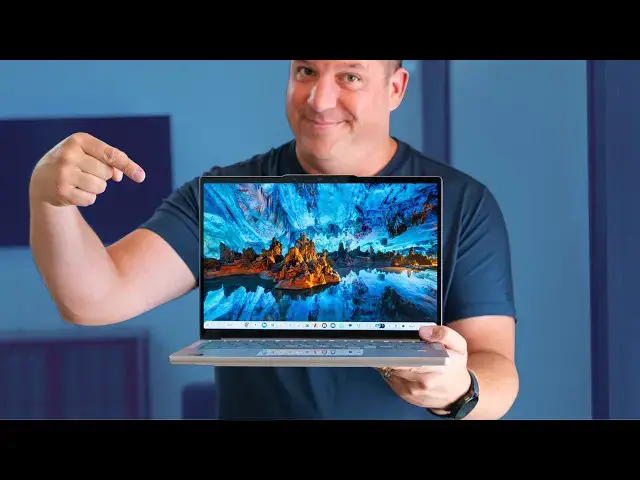
Lenovo Chromebook Plus 14 Review: The BEST Chromebook Ever Made
Sep 11, 2025


Enter to win a brand-new Lenovo Chromebook Plus 14 from Chrome Unboxed 👉 https://bit.ly/3HuMzH4
The giveaway ends on August 31, 2025, at 11:59 PM ET.
Buy the Lenovo Chromebook Plus (16GB RAM) from Best Buy: https://bestbuy.7tiv.net/je6oQ0
Buy the Lenovo Chromebook Plus from Lenovo: https://howl.link/11zp47958mko6
Join Chrome Unboxed Plus for access to our private Discord, an ad-free website experience, ad-free podcast, AMAs, and a SECRET CODE for this giveaway! Start your 7-day FREE TRIAL here: https://chromeunboxed.com/join/
Shop the best Chromebook deals today: https://chromeunboxed.com/the-best-chromebook-deals-today-updated/
📧 Subscribe to our newsletter: https://bit.ly/4jVq0de
・・・・・・・
I’ve had the Lenovo Chromebook Plus 14 in my bag for a bit over 6 weeks at this point, and I have to be honest with you: I knew it was my favorite Chromebook ever after just a few hours of use. Seeing it at the Chromebook Showcase in New York back in June was only a small taste of what makes this device so special, and like many others, I wasn’t 100% sold on its awesomeness right away. However, after putting it in the bag and having it by my side for real-world work in my new reality that has me working directly from my laptop in all sorts of settings these days, I have no issue saying that this is my favorite Chromebook ever made.
Read more: https://chromeunboxed.com/yes-the-lenovo-chromebook-14-is-the-best-chromebook-ive-ever-used/
☕ Fueled by Fresh Roasted Coffee! Buy the special edition Chrome Unboxed bag here: https://chromeunboxed.com/coffee
Subscribe to the channel: http://bit.ly/2xFuj6L
Follow us: https://x.com/chromeunboxed
https://www.instagram.com/chromeunboxed
https://www.threads.net/@chromeunboxed
https://www.facebook.com/Chromeunboxed
Show More Show Less View Video Transcript
0:00
So, I've had the Lenovo Chromebook Plus
0:02
So, I've had the Lenovo Chromebook Plus
0:02
So, I've had the Lenovo Chromebook Plus 14 in my bag for a bit over six weeks at
0:04
14 in my bag for a bit over six weeks at
0:04
14 in my bag for a bit over six weeks at this point. And I've got to be honest
0:06
this point. And I've got to be honest
0:06
this point. And I've got to be honest with you, I knew it was my favorite
0:07
with you, I knew it was my favorite
0:07
with you, I knew it was my favorite Chromebook ever after just a few hours
0:09
Chromebook ever after just a few hours
0:09
Chromebook ever after just a few hours of use. Now, seeing it back at the
0:11
of use. Now, seeing it back at the
0:11
of use. Now, seeing it back at the Chromebook Showcase in New York back in
0:13
Chromebook Showcase in New York back in
0:13
Chromebook Showcase in New York back in June was just a small taste of what
0:15
June was just a small taste of what
0:15
June was just a small taste of what makes this device so special. And like
0:17
makes this device so special. And like
0:17
makes this device so special. And like many others that were there, I wasn't
0:18
many others that were there, I wasn't
0:18
many others that were there, I wasn't 100% sold on its awesomeness right away.
0:21
100% sold on its awesomeness right away.
0:21
100% sold on its awesomeness right away. But after putting it in the bag and
0:23
But after putting it in the bag and
0:23
But after putting it in the bag and having it at my side for realworld work
0:25
having it at my side for realworld work
0:26
having it at my side for realworld work in my new reality that has me working
0:28
in my new reality that has me working
0:28
in my new reality that has me working directly from my laptop and all sorts of
0:30
directly from my laptop and all sorts of
0:30
directly from my laptop and all sorts of settings these days, I have no issue
0:32
settings these days, I have no issue
0:32
settings these days, I have no issue whatsoever in saying that this is my
0:34
whatsoever in saying that this is my
0:34
whatsoever in saying that this is my favorite Chromebook ever made.
0:38
favorite Chromebook ever made.
0:38
favorite Chromebook ever made. [Music]
0:40
[Music]
0:40
[Music] Real quick before we move on, we decided
0:42
Real quick before we move on, we decided
0:42
Real quick before we move on, we decided just as we were filming this that we
0:44
just as we were filming this that we
0:44
just as we were filming this that we love this Chromebook so much that we are
0:46
love this Chromebook so much that we are
0:46
love this Chromebook so much that we are giving one away. All the details can be
0:48
giving one away. All the details can be
0:48
giving one away. All the details can be found down in the description along with
0:50
found down in the description along with
0:50
found down in the description along with a link to get you over to get entered
0:52
a link to get you over to get entered
0:52
a link to get you over to get entered into this giveaway. And if you watch the
0:54
into this giveaway. And if you watch the
0:54
into this giveaway. And if you watch the rest of this video, trust me, you're
0:55
rest of this video, trust me, you're
0:55
rest of this video, trust me, you're going to want this Chromebook. And as a
0:57
going to want this Chromebook. And as a
0:58
going to want this Chromebook. And as a special perk for all of our Chrome Unbox
1:00
special perk for all of our Chrome Unbox
1:00
special perk for all of our Chrome Unbox Plus members, you'll all get a secret
1:01
Plus members, you'll all get a secret
1:02
Plus members, you'll all get a secret code that gets you extra entries into
1:04
code that gets you extra entries into
1:04
code that gets you extra entries into this giveaway. So, if you're not part of
1:05
this giveaway. So, if you're not part of
1:05
this giveaway. So, if you're not part of that community yet, it's a great place
1:07
that community yet, it's a great place
1:07
that community yet, it's a great place to be. I would absolutely encourage that
1:09
to be. I would absolutely encourage that
1:09
to be. I would absolutely encourage that you go check that out as well over at
1:11
you go check that out as well over at
1:11
you go check that out as well over at chromeunbox.com/join.
1:14
Now, before we get into this, I think it
1:16
Now, before we get into this, I think it
1:16
Now, before we get into this, I think it is a relevant detail to share with you
1:18
is a relevant detail to share with you
1:18
is a relevant detail to share with you that over the past few months, our lives
1:20
that over the past few months, our lives
1:20
that over the past few months, our lives have been turned upside down. We've
1:22
have been turned upside down. We've
1:22
have been turned upside down. We've opened a new business in our hometown
1:23
opened a new business in our hometown
1:23
opened a new business in our hometown that's completely different than Chrome
1:25
that's completely different than Chrome
1:25
that's completely different than Chrome Unboxed in basically every way. And it's
1:28
Unboxed in basically every way. And it's
1:28
Unboxed in basically every way. And it's completely dominated our time for a
1:29
completely dominated our time for a
1:29
completely dominated our time for a solid 3 months now. Right smack dab in
1:32
solid 3 months now. Right smack dab in
1:32
solid 3 months now. Right smack dab in the middle of that project, we also
1:33
the middle of that project, we also
1:33
the middle of that project, we also moved out of our offices and our studio.
1:35
moved out of our offices and our studio.
1:36
moved out of our offices and our studio. And so that makes my time spent with
1:37
And so that makes my time spent with
1:37
And so that makes my time spent with this particular Chromebook far more
1:39
this particular Chromebook far more
1:39
this particular Chromebook far more intimate, far more hands-on and
1:41
intimate, far more hands-on and
1:41
intimate, far more hands-on and realworld than any review that I've done
1:43
realworld than any review that I've done
1:43
realworld than any review that I've done in the past out of just sheer necessity.
1:46
in the past out of just sheer necessity.
1:46
in the past out of just sheer necessity. Over that time, I've worked on couches
1:47
Over that time, I've worked on couches
1:48
Over that time, I've worked on couches at my home, at Joe's home, and coffee
1:50
at my home, at Joe's home, and coffee
1:50
at my home, at Joe's home, and coffee shops, bar tops, restaurants, you name
1:51
shops, bar tops, restaurants, you name
1:51
shops, bar tops, restaurants, you name it. The Lenovo Chromebook Plus 14 has
1:54
it. The Lenovo Chromebook Plus 14 has
1:54
it. The Lenovo Chromebook Plus 14 has been my only work device in every
1:56
been my only work device in every
1:56
been my only work device in every imaginable setting over the past 6
1:57
imaginable setting over the past 6
1:58
imaginable setting over the past 6 weeks, and it has held up incredibly
2:00
weeks, and it has held up incredibly
2:00
weeks, and it has held up incredibly well in that time. Sometimes things just
2:02
well in that time. Sometimes things just
2:02
well in that time. Sometimes things just work out like that. But the combination
2:03
work out like that. But the combination
2:03
work out like that. But the combination of this killer screen, portability,
2:05
of this killer screen, portability,
2:05
of this killer screen, portability, battery life, speed, speakers, device
2:07
battery life, speed, speakers, device
2:07
battery life, speed, speakers, device size, excellent build quality, you name
2:09
size, excellent build quality, you name
2:09
size, excellent build quality, you name it, uh has been an absolute lifesaver
2:12
it, uh has been an absolute lifesaver
2:12
it, uh has been an absolute lifesaver for me. And I'm beyond grateful that
2:14
for me. And I'm beyond grateful that
2:14
for me. And I'm beyond grateful that this Chromebook exists precisely at this
2:16
this Chromebook exists precisely at this
2:16
this Chromebook exists precisely at this time for all the things I've needed to
2:18
time for all the things I've needed to
2:18
time for all the things I've needed to use it for over the past 6 weeks. So,
2:20
use it for over the past 6 weeks. So,
2:20
use it for over the past 6 weeks. So, let's talk about all of those things
2:21
let's talk about all of those things
2:21
let's talk about all of those things now, shall we?
2:24
now, shall we?
2:24
now, shall we? We'll start as we normally do on the
2:26
We'll start as we normally do on the
2:26
We'll start as we normally do on the outside. Made of mostly powdered
2:28
outside. Made of mostly powdered
2:28
outside. Made of mostly powdered aluminum, the Lenovo Chromebook Plus 14
2:30
aluminum, the Lenovo Chromebook Plus 14
2:30
aluminum, the Lenovo Chromebook Plus 14 is not what you would call striking. It
2:32
is not what you would call striking. It
2:32
is not what you would call striking. It looks nice, but when the lid is shut,
2:34
looks nice, but when the lid is shut,
2:34
looks nice, but when the lid is shut, you'd pass it by on a shelf pretty
2:35
you'd pass it by on a shelf pretty
2:35
you'd pass it by on a shelf pretty quickly, and I promise that would be a
2:37
quickly, and I promise that would be a
2:37
quickly, and I promise that would be a massive mistake. All closed up, the
2:39
massive mistake. All closed up, the
2:39
massive mistake. All closed up, the device is tidy without a ton of like
2:41
device is tidy without a ton of like
2:41
device is tidy without a ton of like sloping lines to attempt to create a
2:43
sloping lines to attempt to create a
2:43
sloping lines to attempt to create a slimmer than it actually is kind of
2:44
slimmer than it actually is kind of
2:44
slimmer than it actually is kind of look. Instead, it kind of goes with a
2:47
look. Instead, it kind of goes with a
2:47
look. Instead, it kind of goes with a decidedly Pixelbook Go vibe.
2:49
decidedly Pixelbook Go vibe.
2:49
decidedly Pixelbook Go vibe. Pill-shaped, square front to back, even
2:52
Pill-shaped, square front to back, even
2:52
Pill-shaped, square front to back, even with a riged bottom section that really
2:54
with a riged bottom section that really
2:54
with a riged bottom section that really solidifies Google's DNA in this one.
2:56
solidifies Google's DNA in this one.
2:56
solidifies Google's DNA in this one. Lenovo said as much on stage at the
2:58
Lenovo said as much on stage at the
2:58
Lenovo said as much on stage at the presentation, and there's no question
2:59
presentation, and there's no question
2:59
presentation, and there's no question that Google was heavily vested in the
3:01
that Google was heavily vested in the
3:01
that Google was heavily vested in the creation and execution of the Lenovo
3:03
creation and execution of the Lenovo
3:03
creation and execution of the Lenovo Chromebook Plus 14. There's little to no
3:05
Chromebook Plus 14. There's little to no
3:06
Chromebook Plus 14. There's little to no flex in the chassis. It's 2.5 lb weight
3:09
flex in the chassis. It's 2.5 lb weight
3:09
flex in the chassis. It's 2.5 lb weight makes it feel easy to carry around on
3:10
makes it feel easy to carry around on
3:10
makes it feel easy to carry around on the go. And don't get me wrong, it
3:12
the go. And don't get me wrong, it
3:12
the go. And don't get me wrong, it doesn't feel cheap or flimsy at that
3:13
doesn't feel cheap or flimsy at that
3:13
doesn't feel cheap or flimsy at that weight. It just instead reminds me a bit
3:15
weight. It just instead reminds me a bit
3:15
weight. It just instead reminds me a bit more of the feeling I get with the
3:17
more of the feeling I get with the
3:17
more of the feeling I get with the really thin and really light Galaxy
3:18
really thin and really light Galaxy
3:18
really thin and really light Galaxy Chromebook plus from Samsung. And trust
3:20
Chromebook plus from Samsung. And trust
3:20
Chromebook plus from Samsung. And trust me, it's just a very good thing. Now,
3:22
me, it's just a very good thing. Now,
3:22
me, it's just a very good thing. Now, crack open that lid and you're met with
3:24
crack open that lid and you're met with
3:24
crack open that lid and you're met with a 14inch 16x10 1920 x 1200 OLED panel
3:27
a 14inch 16x10 1920 x 1200 OLED panel
3:27
a 14inch 16x10 1920 x 1200 OLED panel that would be the absolute star of the
3:29
that would be the absolute star of the
3:30
that would be the absolute star of the show if the rest of this Chromebook
3:31
show if the rest of this Chromebook
3:31
show if the rest of this Chromebook wasn't so incredible. Still, it's a huge
3:33
wasn't so incredible. Still, it's a huge
3:33
wasn't so incredible. Still, it's a huge highlight and one that I have absolutely
3:35
highlight and one that I have absolutely
3:35
highlight and one that I have absolutely loved working from. The little curves at
3:37
loved working from. The little curves at
3:37
loved working from. The little curves at the corners of the screen give it an
3:39
the corners of the screen give it an
3:39
the corners of the screen give it an extra nudge of a googly vibe and the
3:41
extra nudge of a googly vibe and the
3:41
extra nudge of a googly vibe and the contrast, the brightness, which is 400
3:43
contrast, the brightness, which is 400
3:43
contrast, the brightness, which is 400 nits by the way, and the responsiveness
3:45
nits by the way, and the responsiveness
3:45
nits by the way, and the responsiveness of this screen are absolutely top shelf.
3:47
of this screen are absolutely top shelf.
3:47
of this screen are absolutely top shelf. The model we're testing comes with touch
3:49
The model we're testing comes with touch
3:49
The model we're testing comes with touch and it's the one I would definitely
3:51
and it's the one I would definitely
3:51
and it's the one I would definitely recommend. It just feels so like a big
3:54
recommend. It just feels so like a big
3:54
recommend. It just feels so like a big tablet that it just invites touch
3:56
tablet that it just invites touch
3:56
tablet that it just invites touch interactions. And so having them
3:57
interactions. And so having them
3:57
interactions. And so having them available is just really nice when
3:59
available is just really nice when
3:59
available is just really nice when you're using this Chromebook. Whether
4:00
you're using this Chromebook. Whether
4:00
you're using this Chromebook. Whether you're at the office or at home on the
4:02
you're at the office or at home on the
4:02
you're at the office or at home on the couch, lean back and in consumption
4:04
couch, lean back and in consumption
4:04
couch, lean back and in consumption mode. And that's another spot that this
4:06
mode. And that's another spot that this
4:06
mode. And that's another spot that this Chromebook shines. The camera nestled up
4:08
Chromebook shines. The camera nestled up
4:08
Chromebook shines. The camera nestled up in the top bezel is a 5 megapixel
4:10
in the top bezel is a 5 megapixel
4:10
in the top bezel is a 5 megapixel shooter. And it's very solid in terms of
4:11
shooter. And it's very solid in terms of
4:11
shooter. And it's very solid in terms of like dynamic range and clarity. And
4:13
like dynamic range and clarity. And
4:14
like dynamic range and clarity. And it'll do really great for video calls
4:15
it'll do really great for video calls
4:15
it'll do really great for video calls and document scanning and even a quick
4:17
and document scanning and even a quick
4:17
and document scanning and even a quick selfie if you need it. And at 5
4:19
selfie if you need it. And at 5
4:19
selfie if you need it. And at 5 megapixels, that means you can push it
4:21
megapixels, that means you can push it
4:21
megapixels, that means you can push it up to quad HD in your video captures and
4:23
up to quad HD in your video captures and
4:23
up to quad HD in your video captures and calls if allowed. Additionally, while
4:25
calls if allowed. Additionally, while
4:25
calls if allowed. Additionally, while the screen isn't 120 Hz, the response
4:27
the screen isn't 120 Hz, the response
4:27
the screen isn't 120 Hz, the response time of the screen showcases animations
4:30
time of the screen showcases animations
4:30
time of the screen showcases animations without like a bunch of ghosting. And
4:31
without like a bunch of ghosting. And
4:31
without like a bunch of ghosting. And so, it did have me wondering for a
4:33
so, it did have me wondering for a
4:33
so, it did have me wondering for a little bit if it was a higher refresh,
4:34
little bit if it was a higher refresh,
4:34
little bit if it was a higher refresh, like a 75 or 90 Hz. But I tested it. It
4:38
like a 75 or 90 Hz. But I tested it. It
4:38
like a 75 or 90 Hz. But I tested it. It is indeed 60 Hz. And it just feels
4:40
is indeed 60 Hz. And it just feels
4:40
is indeed 60 Hz. And it just feels better than that the entire time you're
4:42
better than that the entire time you're
4:42
better than that the entire time you're using it. So, everything you do, watch,
4:44
using it. So, everything you do, watch,
4:44
using it. So, everything you do, watch, read, or create on the screen just looks
4:46
read, or create on the screen just looks
4:46
read, or create on the screen just looks really, really good. So, I have no notes
4:49
really, really good. So, I have no notes
4:49
really, really good. So, I have no notes for this thing. It's it's an absolute
4:50
for this thing. It's it's an absolute
4:50
for this thing. It's it's an absolute home run. Now, you probably got it from
4:52
home run. Now, you probably got it from
4:52
home run. Now, you probably got it from the opening, but there's very little I
4:53
the opening, but there's very little I
4:53
the opening, but there's very little I have to complain about this Chromebook
4:55
have to complain about this Chromebook
4:55
have to complain about this Chromebook on any front. And that holds true for
4:57
on any front. And that holds true for
4:57
on any front. And that holds true for the bottom half of this device, too. The
4:59
the bottom half of this device, too. The
4:59
the bottom half of this device, too. The keyboard, the trackpad, the speakers are
5:01
keyboard, the trackpad, the speakers are
5:01
keyboard, the trackpad, the speakers are all superlatives. And again, I have no
5:04
all superlatives. And again, I have no
5:04
all superlatives. And again, I have no real notes here. The keyboard is back
5:06
real notes here. The keyboard is back
5:06
real notes here. The keyboard is back lit. It's accurate. It's clicky. And
5:08
lit. It's accurate. It's clicky. And
5:08
lit. It's accurate. It's clicky. And easily one of the best I've used on a
5:09
easily one of the best I've used on a
5:09
easily one of the best I've used on a Chromebook. Now, Lenovo makes some great
5:11
Chromebook. Now, Lenovo makes some great
5:11
Chromebook. Now, Lenovo makes some great keyboards, but I would have to say this
5:13
keyboards, but I would have to say this
5:13
keyboards, but I would have to say this is by far my favorite one from them.
5:16
is by far my favorite one from them.
5:16
is by far my favorite one from them. Similarly, the glass trackpad is large.
5:18
Similarly, the glass trackpad is large.
5:18
Similarly, the glass trackpad is large. It's smooth. It's well seated in the
5:19
It's smooth. It's well seated in the
5:19
It's smooth. It's well seated in the chassis, and it's accurate. All my
5:21
chassis, and it's accurate. All my
5:21
chassis, and it's accurate. All my gestures work with great ease, and apart
5:23
gestures work with great ease, and apart
5:23
gestures work with great ease, and apart from wishing it was haptic. There's just
5:25
from wishing it was haptic. There's just
5:26
from wishing it was haptic. There's just really nothing to criticize here. It
5:28
really nothing to criticize here. It
5:28
really nothing to criticize here. It really hearkens back again to the
5:29
really hearkens back again to the
5:29
really hearkens back again to the Pixelbook Go. It's very similar in its
5:31
Pixelbook Go. It's very similar in its
5:31
Pixelbook Go. It's very similar in its size, it has a similar kind of click and
5:33
size, it has a similar kind of click and
5:33
size, it has a similar kind of click and sound, and I love that trackpad, and I
5:35
sound, and I love that trackpad, and I
5:36
sound, and I love that trackpad, and I love this one, too. And adjacent to all
5:37
love this one, too. And adjacent to all
5:37
love this one, too. And adjacent to all of that, it's a perfectly good
5:39
of that, it's a perfectly good
5:39
of that, it's a perfectly good fingerprint scanner, and like many
5:41
fingerprint scanner, and like many
5:41
fingerprint scanner, and like many others we've had on Chromebooks over the
5:42
others we've had on Chromebooks over the
5:42
others we've had on Chromebooks over the years, it works reliably and quickly.
5:44
years, it works reliably and quickly.
5:44
years, it works reliably and quickly. It's not doing anything like different
5:45
It's not doing anything like different
5:45
It's not doing anything like different or new. It's just another piece of this
5:47
or new. It's just another piece of this
5:47
or new. It's just another piece of this puzzle that just works. And then you
5:49
puzzle that just works. And then you
5:49
puzzle that just works. And then you have the speakers. And while I won't
5:50
have the speakers. And while I won't
5:50
have the speakers. And while I won't tell you they're the best speakers ever
5:52
tell you they're the best speakers ever
5:52
tell you they're the best speakers ever on a Chromebook, that superlative still
5:53
on a Chromebook, that superlative still
5:53
on a Chromebook, that superlative still sits with the HP Dragonfly Pro and the
5:56
sits with the HP Dragonfly Pro and the
5:56
sits with the HP Dragonfly Pro and the Pixelbook Go coming in a close second.
5:58
Pixelbook Go coming in a close second.
5:58
Pixelbook Go coming in a close second. These speakers are right up there for
6:00
These speakers are right up there for
6:00
These speakers are right up there for sure. As the first Chromebook with Dolby
6:02
sure. As the first Chromebook with Dolby
6:02
sure. As the first Chromebook with Dolby Atmas, the quad speaker setup in the
6:04
Atmas, the quad speaker setup in the
6:04
Atmas, the quad speaker setup in the Lenovo Chromebook Plus 14 is impressive.
6:06
Lenovo Chromebook Plus 14 is impressive.
6:06
Lenovo Chromebook Plus 14 is impressive. They're loud, they're full, they're
6:08
They're loud, they're full, they're
6:08
They're loud, they're full, they're rich, and surrounding in a way that most
6:11
rich, and surrounding in a way that most
6:11
rich, and surrounding in a way that most Chromebooks just don't come close to.
6:12
Chromebooks just don't come close to.
6:12
Chromebooks just don't come close to. with speaker grills up on top and along
6:14
with speaker grills up on top and along
6:14
with speaker grills up on top and along the side and bottom, you get big sound
6:16
the side and bottom, you get big sound
6:16
the side and bottom, you get big sound for anything you want to listen to. And
6:18
for anything you want to listen to. And
6:18
for anything you want to listen to. And they're definitely good enough to enjoy
6:20
they're definitely good enough to enjoy
6:20
they're definitely good enough to enjoy a movie or a show without really needing
6:22
a movie or a show without really needing
6:22
a movie or a show without really needing to reach for headphones. While they're
6:23
to reach for headphones. While they're
6:23
to reach for headphones. While they're not at the top spot on my list, I really
6:26
not at the top spot on my list, I really
6:26
not at the top spot on my list, I really do enjoy listening to music, watching
6:27
do enjoy listening to music, watching
6:28
do enjoy listening to music, watching YouTube videos, playing games, doing
6:29
YouTube videos, playing games, doing
6:29
YouTube videos, playing games, doing basically anything with these speakers
6:31
basically anything with these speakers
6:31
basically anything with these speakers in play. They are just an absolute
6:33
in play. They are just an absolute
6:33
in play. They are just an absolute pleasure to listen to. Now, as good as
6:35
pleasure to listen to. Now, as good as
6:35
pleasure to listen to. Now, as good as everything on the outside is, the real
6:37
everything on the outside is, the real
6:37
everything on the outside is, the real star of the show here is what's going on
6:39
star of the show here is what's going on
6:39
star of the show here is what's going on under the hood. The Lenovo Chromebook
6:41
under the hood. The Lenovo Chromebook
6:41
under the hood. The Lenovo Chromebook Plus 14 is the first Chromebook to debut
6:43
Plus 14 is the first Chromebook to debut
6:43
Plus 14 is the first Chromebook to debut with the new MediaTek Companion Ultra
6:45
with the new MediaTek Companion Ultra
6:45
with the new MediaTek Companion Ultra SOC, and this chip is everything I've
6:47
SOC, and this chip is everything I've
6:47
SOC, and this chip is everything I've hoped for in a high-end ARM processor on
6:49
hoped for in a high-end ARM processor on
6:50
hoped for in a high-end ARM processor on a Chromebook. Benchmarks place it as the
6:51
a Chromebook. Benchmarks place it as the
6:52
a Chromebook. Benchmarks place it as the fastest Chromebook ever, and that feels
6:53
fastest Chromebook ever, and that feels
6:53
fastest Chromebook ever, and that feels right. At no time has this Chromebook
6:55
right. At no time has this Chromebook
6:55
right. At no time has this Chromebook even thought about stuttering. Even with
6:57
even thought about stuttering. Even with
6:57
even thought about stuttering. Even with dozens of tabs, multiple virtual desks,
7:00
dozens of tabs, multiple virtual desks,
7:00
dozens of tabs, multiple virtual desks, silly amounts of open windows and apps,
7:02
silly amounts of open windows and apps,
7:02
silly amounts of open windows and apps, this Chromebook and its 16 gigs of RAM,
7:04
this Chromebook and its 16 gigs of RAM,
7:04
this Chromebook and its 16 gigs of RAM, and 256 gigs of storage, never breaks a
7:07
and 256 gigs of storage, never breaks a
7:07
and 256 gigs of storage, never breaks a sweat. and it's doing all of it with no
7:09
sweat. and it's doing all of it with no
7:09
sweat. and it's doing all of it with no fans. This has long been the hope and
7:11
fans. This has long been the hope and
7:11
fans. This has long been the hope and promise of ARMin laptops, and the Lenovo
7:14
promise of ARMin laptops, and the Lenovo
7:14
promise of ARMin laptops, and the Lenovo Chromebook Plus 14 absolutely delivers
7:17
Chromebook Plus 14 absolutely delivers
7:17
Chromebook Plus 14 absolutely delivers fantastic performance across the board
7:19
fantastic performance across the board
7:19
fantastic performance across the board in a silent, thin, and light chassis.
7:21
in a silent, thin, and light chassis.
7:21
in a silent, thin, and light chassis. But that performance isn't just boosted
7:23
But that performance isn't just boosted
7:23
But that performance isn't just boosted for web applications. Android apps have
7:25
for web applications. Android apps have
7:25
for web applications. Android apps have also been so much more stable on this
7:27
also been so much more stable on this
7:27
also been so much more stable on this device than I've ever experienced on a
7:29
device than I've ever experienced on a
7:29
device than I've ever experienced on a Chromebook. As an example, on this
7:30
Chromebook. As an example, on this
7:30
Chromebook. As an example, on this particular Chromebook, I've opted to go
7:32
particular Chromebook, I've opted to go
7:32
particular Chromebook, I've opted to go with the Android versions of both
7:34
with the Android versions of both
7:34
with the Android versions of both WhatsApp and YouTube Music because of
7:36
WhatsApp and YouTube Music because of
7:36
WhatsApp and YouTube Music because of how stable they work. Having the Android
7:38
how stable they work. Having the Android
7:38
how stable they work. Having the Android version of WhatsApp means I can take and
7:40
version of WhatsApp means I can take and
7:40
version of WhatsApp means I can take and make calls and video chats right from my
7:42
make calls and video chats right from my
7:42
make calls and video chats right from my desktop. And using the Android version
7:45
desktop. And using the Android version
7:45
desktop. And using the Android version of the YouTube Music app, not the
7:46
of the YouTube Music app, not the
7:46
of the YouTube Music app, not the Chromebook version, I don't run into
7:48
Chromebook version, I don't run into
7:48
Chromebook version, I don't run into issues when I'm trying to go from one
7:49
issues when I'm trying to go from one
7:49
issues when I'm trying to go from one account to another if I've been doing
7:51
account to another if I've been doing
7:51
account to another if I've been doing something in Chrome under the Chrome
7:53
something in Chrome under the Chrome
7:53
something in Chrome under the Chrome Unboxed account and then I want to
7:54
Unboxed account and then I want to
7:54
Unboxed account and then I want to listen to music under my personal
7:55
listen to music under my personal
7:55
listen to music under my personal account. It's just been so good. And on
7:57
account. It's just been so good. And on
7:57
account. It's just been so good. And on that front, while I wouldn't play the
7:59
that front, while I wouldn't play the
7:59
that front, while I wouldn't play the same games on my Chromebook that I would
8:01
same games on my Chromebook that I would
8:01
same games on my Chromebook that I would play on my phone normally, I did install
8:03
play on my phone normally, I did install
8:03
play on my phone normally, I did install and run Call of Duty Mobile and PUBG
8:05
and run Call of Duty Mobile and PUBG
8:05
and run Call of Duty Mobile and PUBG Mobile at maxed out settings, no issues
8:08
Mobile at maxed out settings, no issues
8:08
Mobile at maxed out settings, no issues whatsoever on this device. And playing
8:10
whatsoever on this device. And playing
8:10
whatsoever on this device. And playing something like Golden Team Mobile has
8:11
something like Golden Team Mobile has
8:11
something like Golden Team Mobile has been nothing short of awesome on this
8:13
been nothing short of awesome on this
8:13
been nothing short of awesome on this massive OLED screen. I mean, simply put,
8:15
massive OLED screen. I mean, simply put,
8:15
massive OLED screen. I mean, simply put, Android apps just feel so much more
8:17
Android apps just feel so much more
8:17
Android apps just feel so much more native on this device than any other
8:19
native on this device than any other
8:19
native on this device than any other Chromebook I've used, and I've just
8:21
Chromebook I've used, and I've just
8:21
Chromebook I've used, and I've just leaned way more into them than I have in
8:23
leaned way more into them than I have in
8:23
leaned way more into them than I have in the past. But all that power, speed,
8:25
the past. But all that power, speed,
8:25
the past. But all that power, speed, capability would all be wasted if it
8:27
capability would all be wasted if it
8:27
capability would all be wasted if it just smashed the battery. But
8:28
just smashed the battery. But
8:28
just smashed the battery. But thankfully, we get that side of the arm
8:30
thankfully, we get that side of the arm
8:30
thankfully, we get that side of the arm equation as well. And this Chromebook's
8:33
equation as well. And this Chromebook's
8:33
equation as well. And this Chromebook's claimed 17-hour battery has absolutely
8:35
claimed 17-hour battery has absolutely
8:36
claimed 17-hour battery has absolutely delivered for me. I've regularly used
8:37
delivered for me. I've regularly used
8:37
delivered for me. I've regularly used this device for two full days of work
8:39
this device for two full days of work
8:39
this device for two full days of work before needing to put it on a charger.
8:41
before needing to put it on a charger.
8:41
before needing to put it on a charger. And I've not been shy about keeping the
8:43
And I've not been shy about keeping the
8:43
And I've not been shy about keeping the screen brightness near 65 75% or so on a
8:46
screen brightness near 65 75% or so on a
8:46
screen brightness near 65 75% or so on a regular basis. Sure, pushing that OLED
8:48
regular basis. Sure, pushing that OLED
8:48
regular basis. Sure, pushing that OLED panel to 100% all day would hurt your
8:50
panel to 100% all day would hurt your
8:50
panel to 100% all day would hurt your numbers, but you also don't have to sit
8:52
numbers, but you also don't have to sit
8:52
numbers, but you also don't have to sit around and squint at like a 30%
8:53
around and squint at like a 30%
8:53
around and squint at like a 30% brightness screen all day either in
8:55
brightness screen all day either in
8:55
brightness screen all day either in order to get that 17 hours of battery.
8:57
order to get that 17 hours of battery.
8:57
order to get that 17 hours of battery. And in a device that weighs just 2 and
8:59
And in a device that weighs just 2 and
8:59
And in a device that weighs just 2 and 12 lbs and has no fans, that sort of
9:01
12 lbs and has no fans, that sort of
9:01
12 lbs and has no fans, that sort of feels like a bit of a miracle, but it's
9:03
feels like a bit of a miracle, but it's
9:03
feels like a bit of a miracle, but it's not all perfect. I do have one small
9:05
not all perfect. I do have one small
9:05
not all perfect. I do have one small gripe. The only thing that I could ask
9:07
gripe. The only thing that I could ask
9:07
gripe. The only thing that I could ask for on this device that it doesn't
9:08
for on this device that it doesn't
9:08
for on this device that it doesn't deliver is port selection. A single type
9:11
deliver is port selection. A single type
9:11
deliver is port selection. A single type USBC is on both sides and then you get
9:13
USBC is on both sides and then you get
9:13
USBC is on both sides and then you get one type A. And the headphone microphone
9:15
one type A. And the headphone microphone
9:15
one type A. And the headphone microphone jack did make the cut, but that's it.
9:17
jack did make the cut, but that's it.
9:17
jack did make the cut, but that's it. Now, there is room here for an HDMI
9:18
Now, there is room here for an HDMI
9:18
Now, there is room here for an HDMI port, and I think they missed out by not
9:20
port, and I think they missed out by not
9:20
port, and I think they missed out by not including one. And an SD card slot would
9:22
including one. And an SD card slot would
9:22
including one. And an SD card slot would be nice, but with the option to have 256
9:24
be nice, but with the option to have 256
9:24
be nice, but with the option to have 256 gigs of storage inside, I guess it's not
9:26
gigs of storage inside, I guess it's not
9:26
gigs of storage inside, I guess it's not really needed that much.
9:29
really needed that much.
9:29
really needed that much. [Music]
9:32
But honestly, that's it. That's all I
9:35
But honestly, that's it. That's all I
9:35
But honestly, that's it. That's all I really have to correct on this device.
9:37
really have to correct on this device.
9:37
really have to correct on this device. And I'm fine with pulling my USB type-C
9:40
And I'm fine with pulling my USB type-C
9:40
And I'm fine with pulling my USB type-C dock out of the bag if I need to hook up
9:41
dock out of the bag if I need to hook up
9:41
dock out of the bag if I need to hook up to a bunch of stuff. And I suppose that
9:43
to a bunch of stuff. And I suppose that
9:43
to a bunch of stuff. And I suppose that highlights the best overall part of this
9:45
highlights the best overall part of this
9:45
highlights the best overall part of this Chromebook experience for me. When I
9:46
Chromebook experience for me. When I
9:46
Chromebook experience for me. When I reach for the Lenovo Chromebook Plus 14,
9:48
reach for the Lenovo Chromebook Plus 14,
9:48
reach for the Lenovo Chromebook Plus 14, I'm never let down. The entire
9:50
I'm never let down. The entire
9:50
I'm never let down. The entire experience is so wellcrafted, so
9:52
experience is so wellcrafted, so
9:52
experience is so wellcrafted, so refined, so enjoyable that I have no
9:54
refined, so enjoyable that I have no
9:54
refined, so enjoyable that I have no problem calling this the best overall
9:57
problem calling this the best overall
9:57
problem calling this the best overall Chromebook ever made. Starting at $649
9:59
Chromebook ever made. Starting at $649
9:59
Chromebook ever made. Starting at $649 for the 128 gig storage, 12 gig of RAM
10:02
for the 128 gig storage, 12 gig of RAM
10:02
for the 128 gig storage, 12 gig of RAM version with no touch. It's also
10:04
version with no touch. It's also
10:04
version with no touch. It's also incredibly priced as well. But for 100
10:06
incredibly priced as well. But for 100
10:06
incredibly priced as well. But for 100 bucks more, you can upgrade to double
10:07
bucks more, you can upgrade to double
10:07
bucks more, you can upgrade to double the storage, 16 gigs of RAM, and add a
10:09
the storage, 16 gigs of RAM, and add a
10:10
the storage, 16 gigs of RAM, and add a touchcreen. At $749, I can easily
10:12
touchcreen. At $749, I can easily
10:12
touchcreen. At $749, I can easily recommend the upgrade if you can swing
10:14
recommend the upgrade if you can swing
10:14
recommend the upgrade if you can swing it. And with the experience I've had
10:16
it. And with the experience I've had
10:16
it. And with the experience I've had over the past six weeks with this
10:17
over the past six weeks with this
10:17
over the past six weeks with this device, this Chromebook has become the
10:19
device, this Chromebook has become the
10:20
device, this Chromebook has become the de facto recommendation for me for
10:21
de facto recommendation for me for
10:21
de facto recommendation for me for anyone looking for the best possible
10:23
anyone looking for the best possible
10:23
anyone looking for the best possible Chromebook you can buy in 2025. No
10:26
Chromebook you can buy in 2025. No
10:26
Chromebook you can buy in 2025. No question about it. But guys, that's it
10:27
question about it. But guys, that's it
10:28
question about it. But guys, that's it for this one. If you enjoyed this video,
10:29
for this one. If you enjoyed this video,
10:29
for this one. If you enjoyed this video, give us a thumbs up, head down there,
10:30
give us a thumbs up, head down there,
10:30
give us a thumbs up, head down there, hit that subscribe button, and be sure
10:32
hit that subscribe button, and be sure
10:32
hit that subscribe button, and be sure to ring the notification bell as well if
10:33
to ring the notification bell as well if
10:34
to ring the notification bell as well if you'd like to be alerted when we make
10:35
you'd like to be alerted when we make
10:35
you'd like to be alerted when we make future videos just like this one. Until
10:37
future videos just like this one. Until
10:37
future videos just like this one. Until next time, we'll see you.
10:44
[Music]
#Computers & Electronics
#Consumer Electronics