0:00
Finally, after nearly a year of trying
0:02
to decipher exactly what Google's been
0:04
working on behind the scenes with
0:05
Project Aluminium, Google has officially
0:08
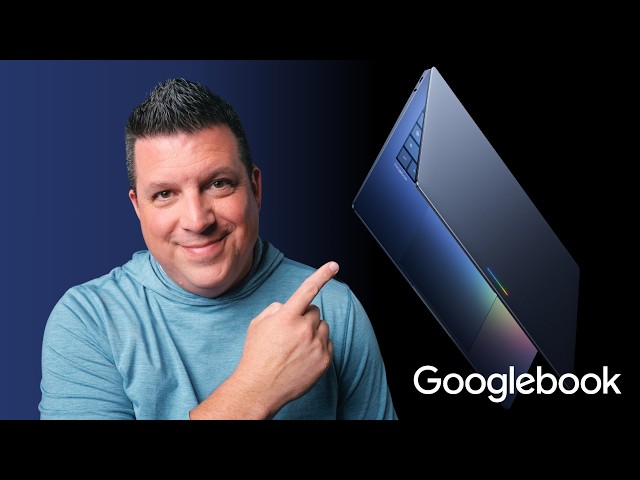
announced Google Book, a brand new
0:10
category of laptops designed from the
0:13
ground up for Gemini Intelligence that
0:15
are just the upgrade to Chromebooks many
0:17
of us have been hoping for for a very
0:19
long time. Look, there's a lot to cover
0:21
here. I'm incredibly excited about all
0:23
of it. So, let's dive in and get a bit
0:26
more familiar with Google Book and all
0:28
it is poised to do to shake up the
0:29
laptop space later this year.
0:35
According to Google, computing is
0:37
shifting from being based around an
0:39
operating system to what they're now
0:40
dubbing as an intelligence system. And
0:43
Google's completely rethinking the
0:44
laptop as a result of this. Now, unlike
0:46
the shift to Chromebook Plus a few years
0:48
back, this isn't just a rebrand. Google
0:51
Book is set to bring together the full
0:52
desktop Chrome browser experience,
0:54
native, not emulated, Android apps from
0:57
Google Play, and a new modern OS built
1:00
around AI, all wrapped up in really
1:03
premium hardware. Google Books are being
1:05
built to deliver proactive help right
1:07
where you need it. And Google showcased
1:09
an example of this in the Android show
1:10
with the Humble Cursor. Let's be honest,
1:13
for being arguably the most used tool on
1:15
your laptop, the cursor really hasn't
1:17
changed much over the past like 20
1:19
years. However, on Google book, Google
1:21
teamed up with DeepMind to create what
1:23
they are calling magic pointer. By just
1:25
wiggling your cursor, it comes to life
1:27
with Gemini to give you quick contextual
1:29
suggestions based on just whatever
1:31
you're pointing at. For instance, if you
1:32
point at a date in an email, it can set
1:34
up a meeting. If you select a picture of
1:36
your living room and a new couch, it can
1:38
instantly help you visualize those
1:40
things together. It's built to let you
1:41
go from a quick idea to a finished task
1:44
in just a couple clicks. And it looks
1:46
like something that could actually be
1:47
far more than just a gimmick, for sure.
1:49
Google is also adding a feature called
1:51
create your widget. By simply entering a
1:53
prompt, Gemini can search the internet
1:55
and pull data from your connected apps
1:57
like Gmail, calendar, photos, and build
2:00
this like completely personalized widget
2:02
for your home screen. For example, if
2:03
you're planning on like a family reunion
2:05
in Ohio, Gemini can organize your flight
2:08
info, your hotel info, restaurant
2:11
reservations, even a countdown, all in
2:13
this one like customized widget right on
2:15
your desktop. It all sounds really
2:16
awesome and I cannot wait for this on a
2:18
Google Book and on my phone, too. And I
2:21
won't take too much time to point out
2:22
the obvious, but Google Book will
2:24
finally give Chromebook users like
2:26
myself a usable desktop with icons and
2:29
widgets the way you'd expect from a
2:31
desktop OS. It's a smaller addition that
2:33
Google didn't even really point out in
2:35
the presentation, but it's yet another
2:37
thing we've wanted on Chrome OS for what
2:39
feels like forever, and I'm so happy to
2:41
see this addition with Google Book. And
2:43
speaking of things we've all wanted as
2:45
longtime Chromebook users, we've all
2:47
been hoping for tighter Android phone
2:49
integration for a long time. And it
2:51
looks like Google Book is perfectly
2:53
positioned to deliver exactly that.
2:55
Google built these laptops to be
2:57
seamlessly compatible with Android
2:58
phones since they're running Android
3:00
under the hood as well. And it keeps you
3:02
in the flow and switching between
3:03
devices far better than ever before. Not
3:06
only can Google Books run powerful apps
3:08
natively, but you can actually use the
3:10
apps from your phone directly on your
3:11
laptop screen with ease. Say you get a
3:13
reminder for your daily Dolingo lesson,
3:16
you can pop over and do it right on your
3:18
Google book without ever leaving the
3:19
screen. Or if you need to quickly tap a
3:22
phone app to get like a food order out,
3:24
you can do that and jump right back into
3:26
your work. It's the Phone Hub
3:27
integration that's been poorly
3:29
implemented on Chrome OS for years done
3:31
right and it looks really awesome. File
3:34
management is getting a massive upgrade,
3:36
too. A new quick access feature lets you
3:38
view, search, or insert your phone's
3:40
files directly from your Google books
3:42
file browser without needing to transfer
3:44
or actually move anything around. This
3:45
sort of behavior in PhoneHub on Chrome
3:47
OS has been really fantastic with things
3:49
like recent photos. But full access to
3:52
all your phone's files on your desktop
3:54
without friction sounds pretty amazing.
3:56
And we're quite certain many, many more
3:59
Better Together experiences will be on
4:01
the way by launch. As our awareness of
4:03
Project Aluminium moved along over the
4:05
past year or so, we really weren't sure
4:07
what form these new devices were going
4:08
to take. To be frank, we assumed this
4:10
would all be about a new OS that
4:12
leveraged the best of Android and Chrome
4:13
OS. But we really assumed Google would
4:16
kind of move away from branding actual
4:18
hardware that was running this new
4:20
thing. However, just like Chromebooks,
4:22
Google Books will be clearly branded as
4:24
such while still being manufactured by
4:26
other OEMs apart from Google. And I love
4:29
this approach. It means we'll still get
4:31
like varied and competitive hardware in
4:33
the Google Book space, but with Google's
4:36
oversight on everything. And that means
4:38
you won't have to wait on just Google to
4:40
make these new devices. Google is
4:42
working with industryleading partners
4:43
like Acer, Asus, Dell, HP, and Lenovo to
4:46
launch the first wave of Google books.
4:48
They're promising that every Google book
4:50
will feature premium craftsmanship,
4:52
fantastic materials across a variety of
4:55
shapes and sizes. And because Google's
4:57
name is on the branding here across the
4:59
board, I have a good feeling that they
5:01
will 100% enforce their standards and
5:04
and their regular attention to hardware
5:06
detail on every single model. Like
5:08
Chromebooks before them, Google Books
5:10
will require Google's seal of approval.
5:12
And this should keep the fragmentation
5:13
issues at bay while also maintaining a
5:16
Google hardware level of fit and finish,
5:18
too. While I'm sure Google will one day
5:20
throw their own hat into the Google Book
5:22
ecosystem, I absolutely love this
5:24
approach and I think it creates the most
5:25
space for diversity of hardware
5:28
competition and great new hardware
5:30
additions down the road. One last thing,
5:32
Google's also gone and added my favorite
5:34
hardware feature to ever adorn a
5:36
Chromebook ever, the newly named Glow
5:39
Bar. Google says it is a statement piece
5:41
that's both functional and beautiful and
5:43
we should expect not only a head turning
5:46
LED bar at the top of Google books but
5:48
something that actually has some
5:49
functionality to it as well. This is an
5:51
amazing time for Chromebook fans.
5:53
Honestly, this is the most exciting
5:54
thing to happen in this space in a very,
5:56
very long time. Seeing OEMs like Dell
5:59
get back on board tells us Google has
6:01
something special up its sleeve. And if
6:03
I'm just being transparent, Google Book
6:05
feels like something that was made for
6:06
people just like me. So, I'm more
6:09
excited about this than anything in the
6:11
personal tech space in the past decade
6:13
or so. We also have way more details in
6:16
our exclusive Google Book interview with
6:18
Google VP John Molus if you want to dive
6:20
way deeper into all of that right now.
6:22
One thing I'd love to share really
6:24
quickly from that interview is the fact
6:25
that major app developers are already on
6:27
board with Google Book. So, we can
6:29
expect all the apps and services you
6:31
would want in a premium laptop
6:33
experience to arrive with Google Book as
6:35
well. Now, we don't have exact prices or
6:37
firm release dates just yet, but the
6:39
first wave of devices are slated to
6:40
become available this fall. You can
6:43
check out more over at googlebook.com as
6:45
well right now. And again, hit the link
6:47
in the description to watch that
6:49
in-depth interview with John Molus. This
6:51
is just the start, and we absolutely
6:54
cannot wait to get our hands on the
6:56
first set of Google books later this
6:58
year. But guys, that's it for this one.
6:59
If you enjoyed this video, give us a
7:01
thumbs up. Head down there, hit that
7:02
subscribe button, and be sure to ring
7:04
the notification icon as well to be
7:06
alerted when we make future videos just
7:08
like this one. Till next time, we'll see