Up next in 10

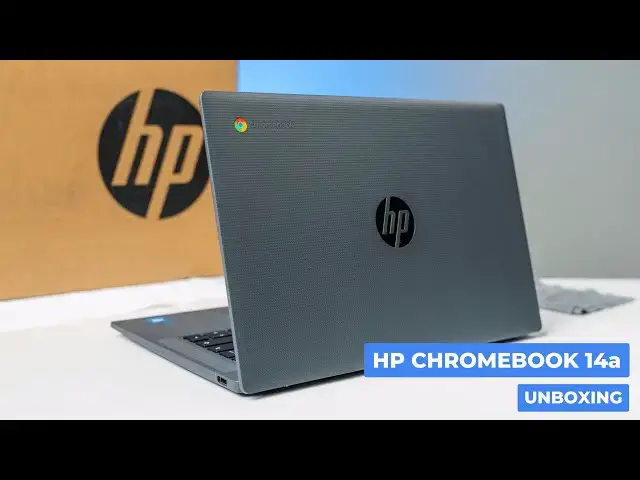
HP Chromebook 14a (2025) Unboxing & Impressions
Jul 3, 2025


Join Chrome Unboxed Plus for access to our private Discord, an ad-free website experience, ad-free podcast, AMAs, exclusive giveaways, and more! Start your 7-day FREE TRIAL here: https://chromeunboxed.com/join/
👉 Buy the HP Chromebook 14a at Amazon: http://bit.ly/40IlPcv
👉 Shop the best Chromebook deals today: https://chromeunboxed.com/the-best-chromebook-deals-today-updated/
📧 Subscribe to our newsletter: https://bit.ly/4jVq0de
・・・・・・・
HP just sent over their latest entry-level device, and it’s an interesting one for a couple of reasons. First, it’s an Amazon exclusive, and second, it comes in at a budget-friendly $389.99 starting price point. This is the new HP Chromebook 14a, and on paper, it has some decent specs for the money, including an Intel N100 processor, 8GB of RAM, and 128GB of storage.
But as is often the case with more affordable Chromebooks, the real story is in the user experience. After getting it out of the box, I found a device with some surprisingly great parts and one significant drawback.
Read more: https://chromeunboxed.com/hp-chromebook-14a-2025-unboxing-amazons-affordable-exclusive-video/
☕ Fueled by Fresh Roasted Coffee! Buy the special edition Chrome Unboxed bag here: https://chromeunboxed.com/coffee
Subscribe to the channel: http://bit.ly/2xFuj6L
Show More Show Less View Video Transcript
0:00
So, HP just sent us over this particular
0:02
Chromebook, and it's unique in a couple
0:04
ways. One, it's a sub $400 Chromebook,
0:07
$389.99 specifically, and it will be an
0:10
Amazon exclusive. It's the new
0:12
entrylevel uh HP Chromebook 14A. It's
0:15
got some interesting specs, and we don't
0:17
know a whole lot about it. So, uh let's
0:20
hop in the box, and I'm going to
0:21
discover it right alongside you.
0:24
[Music]
0:27
All right. So, without any further ado,
0:30
let's hop in here. And while I'm getting
0:31
this guy out of the box, uh you might
0:34
notice the the studio setup looks a
0:36
little bit different. Um we're in a bit
0:38
of uh what I would call I don't know
0:40
what, Flux. I think Flux is a good word.
0:42
Uh we've started an entirely different
0:44
business. Has nothing to do with Chrome
0:46
Unboxed. Uh it's a simulator golf
0:48
business. And uh it's a local place that
0:50
we're excited to have up and running
0:52
now. Um, but uh yeah, it's it's made uh
0:55
filming an interesting uh proposition
0:58
here for a little bit until we kind of
0:59
figure out where it is we're going to
1:01
set up our our permanent studio. So,
1:03
right now, uh we're in Joe's home and I
1:06
think it looks pretty good. Um and it'll
1:09
it'll work while we're trying to figure
1:10
out where we're going to go next. But
1:12
anyh who, let's uh get on to this fairly
1:15
standard charger here. Nobody's
1:18
interested in that stuff.
1:22
It's kind of interesting boxing.
1:25
Here we are again. This is a the HP
1:28
Chromebook 14A. Um, if you haven't kept
1:31
up with HP Chromebooks in a while, uh,
1:33
in general, you've got, um, their A
1:36
series, uh, B series, and C series. So,
1:39
um, a lot of you might be very familiar
1:41
with the 14C. Uh, they made that for
1:43
years. They haven't made a 14C in a
1:45
little bit, uh, which is a bit of a
1:46
bummer. Their 14C was always kind of
1:48
that, you know, $600, $700 kind of
1:50
higherend, not dragonfly like $1,000
1:52
Chromebook, but their higherend uh
1:54
Chromebook. We'd love to see a 14C uh
1:57
Chromebook Plus. I think that would be
1:58
cool. But uh the A and the B are their
2:01
more entry level models that, you know,
2:03
obviously you get more plastic and that
2:04
kind of stuff. But this one comes with
2:06
some decent specs. So you've got the
2:08
Intel um 12th gen uh Intel uh N100
2:14
processor. So it's kind of that
2:16
Alderlakeish U processor, but the N100s
2:20
and 200s that we've seen have been
2:21
really good. There is an N150 and 250
2:23
out now that are in a handful of
2:25
Chromebooks uh that do get a little bit
2:27
better performance, but the N100 has
2:29
been solid for a couple years. So, you
2:31
get that 8 gigs of RAM, 128 gigs of
2:33
storage here. So, let's take a look
2:35
around the ports. Uh we've got a USB uh
2:38
type-C and headphone microphone jack.
2:40
Are you able to catch that? The color on
2:42
this is interesting. Like, it's a dark
2:45
charcoal. Uh but it feels like it's like
2:46
absorbing the light. Um and then over
2:48
here we've got uh just a single USB
2:51
typeA. So a little skimpy on the ports.
2:54
U but a fun texture like um h how would
2:58
I describe this? Almost like a like a
3:02
coffee cup uh cardboard feel texture. I
3:04
mean it's obviously plastic, but it's uh
3:06
yeah, it's completely fingerprint
3:08
resistive for the most part. I shouldn't
3:10
say completely. Huh. Um but yeah, uh but
3:13
nice and grippy. Um, plastic top and
3:16
bottom, obviously. On the bottom, we've
3:18
got uh fan ports. Um,
3:21
maybe we're going to get some upward
3:23
firing speakers here. Let's check this
3:24
thing out. Let's open this guy up. Uh, I
3:27
did see on the outside of the box 250
3:29
net screen. Oh, same texture on the
3:31
inside, too. Um, hopefully you all can
3:33
see that. So,
3:35
yeah, I kind of dig that. I mean, if
3:37
you're going to go plastic, you know,
3:38
get creative. Why not? Uh, but yeah,
3:40
upward firing speakers here. So, we'll
3:42
give those a test and see how they how
3:43
they sound. Uh, we'll have to get signed
3:45
in here. But
3:47
HP does a great job on keyboards. Let me
3:50
just say that. Uh, they really do. Um,
3:52
I'm assuming there's no backlighting.
3:53
Yeah, no backlighting on the keyboard.
3:55
Uh, but they just do a great job even on
3:57
their more affordable keyboards of just
3:59
having great great feel, great
4:01
clickiness. Man, that that just feels
4:03
that feels excellent. Um,
4:06
good trackpad's not flopping around.
4:10
Really good click mechanism. Pretty
4:12
smooth surface. Definitely myar or some
4:13
sort of plastic here, but it's got that
4:17
almost uh edged glass feel. Nice and
4:19
smooth here. Um not a touchcreen. Um but
4:24
decently small bezels. Let me get I'm
4:27
going to guess on this. See if I get the
4:29
okay from Joe. Um you know, so decently
4:32
small bezels all around. Standard 1920 x
4:34
1080p 16x9 14inch panel here. So nothing
4:37
surprising there. Again, it's not touch,
4:39
but it is anti-glare, so that should
4:41
make, you know, the best use of those
4:43
250 nits. It's not going to be ultra
4:45
bright. You're probably going to
4:46
struggle uh if you're right next to a
4:48
window in direct sunlight, that kind of
4:49
thing. Screen reader on Chrome OS is
4:52
primarily used by people with, you know,
4:54
we've been doing this for a lot of
4:55
years, and I always forget to turn that
4:56
off. Um, so yeah, let me get uh let me
4:59
get logged in here so we can kind of
5:00
listen to the speakers uh and get a a
5:02
feel for the keyboard and the trackpad
5:04
here uh and see, you know, pretty
5:06
quickly. I'll first blush if $389.99 is
5:09
going to get you a decent Chromebook
5:11
here. Okay, got logged in and got
5:13
everything sorted here. And I want to
5:15
make one quick correction. Uh when I was
5:17
talking about the screen early on, uh I
5:19
said it was 1080p. It is not. Uh this is
5:21
a 1366 x 768 uh TN panel. So uh that
5:27
much became abundantly clear as I was
5:28
kind of setting this up. And if you
5:30
followed along with Chromebooks for any
5:32
amount of time, you know, I don't have
5:35
uh a lot of love for for panels like
5:37
this, but of the TN panels we've messed
5:39
with, uh this one is not um the worst.
5:42
I'll say that. Um the brightness is very
5:45
high. It it looks higher than 250 nits.
5:48
Uh but it definitely um you know, you'll
5:51
see it kind of wash out as as we get off
5:54
angle here. And so that's just a
5:56
characteristic of TN panels. Uh once you
5:58
have it kind of forward to back on angle
6:00
and turn it left and right like I almost
6:03
don't see any movement. See if I can get
6:04
it angled right there and then kind of
6:06
go back and forth. You don't see much
6:09
change uh in the color representation.
6:11
It's really just in the tilt of the
6:12
screen. Uh but the the pretty aggressive
6:16
uh matte finish here helps uh uh dilute
6:19
that just a little bit. Um but it is a
6:21
TN panel so I want you to know what
6:22
you're getting into. Plus, with that
6:24
resolution, um, things on the screen are
6:26
a little bit bigger. And at a 14 in,
6:29
we're pushing the the boundaries of
6:31
where I think a 768 panel should be
6:34
used. Um, but it's not terrible. Um, I I
6:37
browsed around on it a little bit. Um,
6:39
but I I just want you all to know what
6:41
you're kind of getting into if you're if
6:42
you're looking into this device. And
6:44
ultimately, something like this is a
6:46
Chromebook that I think u becomes really
6:49
interesting because I think they can get
6:50
pretty aggressive with sales prices.
6:52
It's a $389.99. I don't know that I'd
6:54
tell you to like run out and go buy it
6:56
at that price. Like it's this crazy deal
6:57
cuz we all know Chromebooks come down
7:00
into that $400 to $300, $350 price range
7:03
a lot. And there are going to be
7:04
Chromebooks that have better specs than
7:06
this that come down into that price
7:07
range. It's just the way it goes. But um
7:10
I would fully expect once this thing is
7:12
uh out and available uh especially with
7:14
Prime Day coming up, I I would assume
7:16
that we'll see some pretty aggressive
7:17
deals on this. Now, there are a handful
7:19
of things on this device that are pretty
7:21
impressive. Again, I said something
7:22
about the keyboard earlier, but having
7:24
actually, you know, gone through the
7:25
setup process, like really, really
7:27
comfortable, clicky, enjoyable keyboard
7:29
to type on. Uh, and the same thing's
7:31
true of the trackpad. Like, it's a
7:33
little bit humid uh where we are right
7:35
now. And so, there's just there's always
7:37
that um general problem with cheap
7:39
trackpads. When it gets humid, like all
7:41
of a sudden that your finger just like
7:42
sticks to the trackpad and it's a
7:43
terrible experience. Uh the glass
7:45
trackpads kind of get around that for
7:47
the most part. And this one is doing a
7:49
great job in here as well. Um and the
7:51
the click mechanism sounds good, feels
7:53
good. Um so for a a more affordable
7:55
Chromebook, that's that's a pretty cool
7:57
thing. And then um these upward firing
8:00
speakers, let me go to YouTube real
8:02
quick and pull up one of our videos. But
8:04
these upward firing speakers are um are
8:07
are pretty impressive actually. So here
8:08
it is on the desk. And don't be fooled
8:11
by its kind of common place. Super loud.
8:14
There's a lot going on here. They've got
8:15
some decent low end. So, check this out.
8:22
I mean, you get the majority of the
8:24
sound bed there instead of only hearing
8:26
like the top end and mids and stuff like
8:27
that. So, they'll they'll suit you well
8:29
for, you know, a phone call, a video
8:31
call or something like that. But, you
8:33
know, watching some basic YouTube
8:34
videos, it's not going to be terrible
8:35
either. So, uh pretty cool there. Uh,
8:38
and then I also uh pop the camera open
8:41
and
8:43
let me turn this like it's a 720p
8:45
camera, but the dynamic range is really
8:48
good and the sharpness is kind of
8:51
impressive, too. Oh, sitting here
8:54
touching like it's touchscreen. Uh, let
8:56
me turn it back to Joe there. I mean,
8:58
hopefully you can see some of the
8:59
details in that. I mean, pretty
9:02
impressive for a 720p camera. And just
9:04
goes to show you megapixel count really
9:06
isn't uh the entire story when it comes
9:08
to a camera. Usually the sensor and some
9:10
of that stuff plays into it. Uh better
9:12
than I would expect uh on the camera
9:14
front here. And so I mean all told at at
9:17
$389.99 over at Amazon uh specifically
9:21
uh and exclusively you're you're looking
9:23
at a good keyboard, a good trackpad, a
9:25
good camera, uh decent internals. The
9:28
N100's not going to blow anybody's mind,
9:30
but it's it's plenty fast to move
9:31
around. 8 gigs of RAM, 128 gigs of
9:34
storage. A pretty decent looking
9:36
Chromebook. Um, relatively rigid as well
9:39
for being an all plastic build. A little
9:41
slim on the ports, but ultimately if it
9:43
goes on sale and they can get aggressive
9:45
with it, I could see this thing
9:46
dropping, you know, I don't know, $50,
9:48
$100 off, and now you're talking a $300
9:51
Chromebook. So, I would keep an eye out
9:53
for that with this particular device.
9:55
Again, you're only going to see it at
9:56
Amazon. Uh, we'll have a link in the
9:58
description, obviously. But, uh, yeah,
10:00
that's it for this one, guys. If you
10:01
like this video, uh, give it a thumbs
10:03
up. Head down there, hit that subscribe
10:04
button, and be sure to ring the
10:05
notification icon as well if you'd like
10:07
to be alerted when we make future videos
10:09
just like this one. Till next time,
10:10
we'll see you.
10:12
[Music]
#Consumer Electronics
#Consumer Resources
#Product Reviews & Price Comparisons