Up next in 10



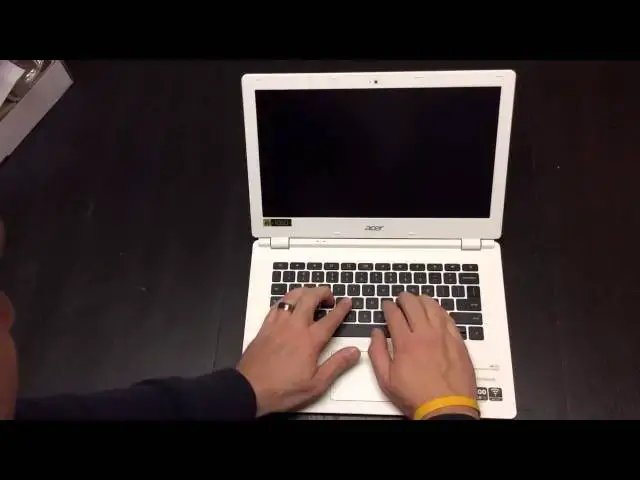
In this video, I unbox the Acer Chromebook 13. The much-anticipated Chromebook has a 13" FHD display, 4GB of RAM and the Tegra K1 Processor. How does it actually pan out? Check it out to see what my first thoughts are!
Show More Show Less View Video Transcript
0:03
hey folks robby payne with chrome
0:04
unboxed here coming at you today with an
0:06
unboxing of the acer chromebook 13.
0:10
this is a much anticipated device as
0:12
most of you probably know by this time
0:14
this device is the first chromebook
0:17
available
0:18
running the tegra k1 processor
0:21
and so what that kind of brings is a
0:23
hope of a fanless thin powerful design
0:26
it has a gp with 192 cores it is an arm
0:30
processor
0:32
but it is a very very high powered one
0:34
that is featured in the nvidia shield
0:36
tablet at this point in time
0:38
now at this point
0:40
there is also the new hp 14 that's
0:42
coming
0:43
coming out i think in october at some
0:45
point
0:45
that is also going to feature this
0:47
processor as well but for right now this
0:49
is the the main chromebook with that and
0:51
along with that
0:53
from what i've read online some some
0:55
premium build pieces too 1080p screen 4
0:58
gigs of ram a nice spacious keyboard 13
1:00
inch design
1:02
some better plastics used it is still
1:03
plastic throughout and not an ips
1:06
display and from what i've read again
1:09
not the best display in the world so
1:11
kind of bummed about that but we're
1:12
going to unbox it look and see what's
1:14
inside the box real quick kind of get an
1:16
initial hands-on and i'll be using this
1:18
uh for some
1:20
work related things in the next week
1:24
kind of get back with you and let you
1:25
know
1:26
what i find out with it
1:28
as i've said there are a lot of reviews
1:30
that dropped a few weeks ago
1:32
from some of the more uh major tech
1:35
firms there to get their hands on this
1:37
and we have time to use it
1:40
so
1:41
this isn't the first hands-on by any
1:43
means
1:44
and this box has been beat up
1:49
but having used pretty much every
1:51
chromebook that's available hopefully i
1:53
can give you a good uh
1:54
a good a good idea so uh we got a pretty
1:57
standard looking acer box here
1:59
no real frills on the outside it looks
2:01
like that same
2:03
troublesome
2:04
opening here that
2:07
i think by now i finally got good at
2:08
opening this thing
2:22
makes it easier they didn't tape
2:23
overnight over top of this part
2:26
whole lot simpler to open
2:31
and pretty standard favor when it comes
2:33
to acer packaging just looks like a
2:34
bigger version of the c720 packaging
2:37
same kind of stuff
2:38
um
2:40
plug's a little different um
2:42
a little more narrow here with the c720
2:44
we kind of get the more square but thin
2:46
um this is more along the lines of what
2:48
samsung does with theirs
2:51
and of course
2:54
your normal
2:55
acer
2:57
um warranty stuff fcc info that kind of
2:59
thing
3:01
a couple extra cardboard pieces here
3:03
excuse me
3:06
setup guide which every time i open one
3:08
of these i say this don't really need
3:10
those
3:11
so much with chromebooks
3:13
and so let's get this
3:15
out of the
3:16
way bring this guy into view now um
3:20
first blush i'm looking at it and
3:21
feeling it going feels a lot like the
3:23
c720p white um because i actually do
3:26
kind of like the feel of the the white
3:28
c720
3:29
um
3:31
very thin very slim line
3:33
hopefully you can tell that kind of from
3:35
this video very very thin
3:37
ports across the back not sure how i
3:38
feel about that yet but after some time
3:40
we'll get uh we'll get used to it and
3:42
see how it feels
3:43
3.0 here hdmi full size another 3.0
3:46
which is nice so they didn't go down to
3:48
2.0 so you got two three usb 3. uh
3:51
full-size sd card slot looks like it's
3:53
going to fit flush
3:55
in there we will find out again on that
3:57
i know a lot of you guys care about that
3:59
uh speaker ports on the bottom so we'll
4:01
see how that speaker quality sounds and
4:03
then a relatively decent finish here um
4:07
obviously matte finish i'll touch on it
4:09
here a little bit and i can't really
4:11
reflect any light off of it because it
4:12
doesn't reflect anything and so it's
4:14
pretty hard to see it does pick up some
4:16
fingerprints not too shabby on the
4:18
bottom
4:21
not really much at all a little more
4:22
texturized down here all the screw ports
4:24
are are available here so i'm assuming
4:26
you probably pop this open and maybe
4:29
mess with the the ssd in it i'm not sure
4:34
let's go ahead and open this up
4:37
no one-handed open that stinks i'm
4:40
still waiting for another chromebook to
4:41
have that feature
4:43
uh we have the full hd 1080p hd
4:47
and
4:48
it amounts to very nice travel on the
4:50
keyboards are on the keys and the
4:52
keyboard
4:53
very nice and spacious lots of room
4:58
again track pad a lot of these build
4:59
materials feel a lot like the c720p i'm
5:01
surprised nobody's really pointed that
5:02
out but i'm using the c720p the white 32
5:06
gig four gigs of ram as my daily driver
5:08
now and so uh it it feels a lot like it
5:12
and so i'll definitely put these side by
5:14
side in the review so you can kind of
5:15
see the similarities there
5:18
keys feel way better than the c720p
5:20
though
5:21
the 720 to me feels a little mushy a lot
5:24
of times these have some some good
5:25
travel some good click
5:27
yeah i like that a whole lot better
5:31
trackpad feels very similar as far as
5:33
the texture to the c720
5:36
however the uh the click sounds real
5:38
nice um and i know some of you probably
5:40
don't really care about that but uh to
5:42
me it's just a marker quality uh when
5:44
there's a loud hollow sounding kind of
5:46
clacky uh sound it it just reeks of poor
5:50
build and this this sounds very solid uh
5:53
kind of nice and quiet so uh and the
5:56
trackpad feels nice very nice smooth
5:58
plastic let me plug this guy in because
6:00
it's gonna see if it'll
6:06
as many of you all know these things
6:08
ship
6:09
and they're unable to turn on until
6:11
they've been plugged into a power source
6:13
and
6:14
that was closed
6:18
luckily there's a boiler right behind me
6:19
here so bear with me for just a second
6:21
we don't have to bother cutting away
6:35
so far i'm a big fan of the build the
6:37
feel the look um
6:40
of the device
6:41
uh i have a gut feeling i'm not gonna be
6:43
real happy with the monitor
6:45
on the display um
6:49
seems to be an ongoing trend but you can
6:51
see i mean the
6:53
hold this way
6:54
the thinness of this guy's is impressive
6:57
uh it's got some heft to it it's not uh
6:59
it's not like no creaking though i mean
7:01
it's just solid you know let's kind of
7:03
hold by the corner test and see if it
7:04
creaks and moves none of that's going on
7:07
matte finish display not not always the
7:09
biggest fan of that myself
7:11
um
7:12
it is useful if you are
7:16
outdoors but for the most part
7:19
i think it degrades the quality of the
7:21
display a little bit so i'm not a huge
7:23
fan of that
7:24
but it is what it is
7:26
it kind of gives the a grainy look to
7:28
the display and it is doing that exact
7:30
thing here
7:32
um
7:33
crank up the brightness a little bit
7:36
yeah that's that's unfortunate
7:40
let me get on the wi-fi network here so
7:42
we at least get signed in
7:49
and again we have some of the issue with
7:51
the 1080p
7:53
screen being
7:55
making things a little
7:56
small it's just going to be the way it
7:58
is until chrome os has some scaling
8:01
ability
8:02
and at that point really
8:04
um you really just need to be able to
8:06
scale up a handful of things in the in
8:08
the ui not really everything across the
8:10
board be nice if you just make the icons
8:12
a little bigger that kind of thing
8:15
keyboard feels great
8:17
really really great trackpad feels
8:19
really good too real responsive nice and
8:21
smooth
8:23
there's no way for you all to tell here
8:25
but if you've ever looked at a
8:28
at a matte finish display acer c720 i'm
8:31
trying to think of another that had a
8:33
matte finish on it it causes the
8:36
the anti-glare film kind of causes some
8:39
issue with transparency so instead of
8:42
like looking through glass and looking
8:43
at a screen it's kind of like you're
8:45
looking through uh
8:47
the best thing i can i can relate it to
8:49
is if you're looking at a phone that's
8:51
been against someone's face for a little
8:52
while and they pull it away and you look
8:54
at it it's kind of got the grimy stuff
8:56
on it from their face um that's kind of
9:00
what this looks like
9:02
it's not pixelization it's
9:05
it's just granular it's hard to explain
9:07
but it's
9:09
it's actually really pronounced way more
9:11
than um
9:14
way more than i expected it to be to be
9:16
honest with you so that's kind of a
9:18
letdown
9:19
let me set it to
9:21
darker wallpaper and see if it's less
9:22
pronounced here
9:24
if it's going to let me
9:38
yeah and on darker darker stuff it's
9:40
nowhere near as pronounced the lighter
9:42
colored stuff like even right now i can
9:44
see around here uh you get that it just
9:46
looks like there's a film on it but you
9:48
can't get that off granted it's nice
9:50
because i can tilt it anyway and there's
9:52
no glare but again with this particular
9:54
display
9:56
you can see as soon as i tilt it forward
9:57
you get polarization
9:59
when we tilt back we get
10:03
uh let polarization
10:03
see are we in the kind of sweet zone
10:05
here and then i'll turn it to the side
10:09
side viewing angles aren't bad
10:11
not at all actually
10:13
that's nice at least you get two of the
10:14
angles aren't that bad go ahead and plug
10:16
this now let's start it up
10:18
um overall
10:20
i i really enjoy the build quality the
10:22
big test for this thing obviously is
10:23
going to be this is the first one with
10:25
the k1 processor in it how's it going to
10:27
perform how's it going to feel how's it
10:28
going to do
10:29
a lot of the online reviews already have
10:31
the two
10:32
gig of ram version and i know there's a
10:34
lot of you out there that would say it
10:35
doesn't matter two gigs of ram versus
10:38
four for me uh daily use makes a huge
10:41
difference
10:42
i've used c720s and i've used the asus
10:45
chromebook and i've used multiple
10:47
chromebooks with two gigs of ram and run
10:49
into lots of issues whereas when i use
10:52
them with four gigs of ram have no
10:53
issues so perhaps i'm a heavy user or i
10:56
i don't think i like that many tabs open
10:58
but i do keep a lot of stuff going
11:01
maybe that's just a requirement i need
11:03
but i will let you know
11:05
again i've right now kind of the
11:06
reference i'm going against is an acer
11:08
c720p so touchscreen non-matte display
11:11
1366x768
11:13
it's got four gigs of ram 32 gig
11:15
internal hard drives and so
11:17
uh this is uh stacks up pretty well
11:19
against that uh this matches all of
11:21
those things we're just swapping out the
11:22
processor and removing the touchscreen
11:24
getting a 1080p display so those things
11:26
do matter 1080p versus
11:29
basic hd 1366 by 768 is a little higher
11:33
than hd but anyway
11:35
full hd versus that it's a lot more
11:37
pixels to be pushing and so
11:39
it'll be interesting to watch and see
11:40
and i will say my c720p i keep connected
11:43
to a full hd monitor almost all the time
11:45
all day every day so i have not noticed
11:48
any skips any lags any stutters none of
11:50
that stuff it really just moves through
11:51
anything i needed to do so i'm holding
11:53
this to that same
11:55
that same level of performance and
11:56
saying okay we don't need to step back
11:58
way way back uh if it has a hiccup here
12:01
there you know for the thin fanless
12:03
design that might that might be
12:05
something you say hey i'll give up on
12:07
that so that when some of these 3d games
12:09
start coming via
12:10
android
12:12
apps being on my chromebook i'll take it
12:14
and that might be you um and i will say
12:16
from right here the screen uh isn't
12:18
isn't repulsive it's not very bright
12:21
but you know it's sharp it's it's nice
12:23
looking
12:24
and again without being against white
12:26
backgrounds i guarantee i open this up
12:28
yeah i'll see that
12:30
really
12:31
really annoying
12:34
film over the screen
12:37
but on the darker stuff where there's
12:38
more color on the screen it just looks
12:39
it looks really great and to be honest
12:41
um maybe i was a little shocked when i
12:44
got the chromebook 2 with a 1080p
12:46
display it's not bothering me nearly as
12:48
much this time around
12:50
everything being a little smaller and i
12:52
would say if you wear glasses and uh
12:54
have issues seeing smaller text that is
12:57
going to bother you but anyway that's
12:59
enough about this for right now
13:01
i'll spend a week week and a half with
13:03
it get back to you with a full review
13:04
let you know kind of what i'm thinking
13:06
about it
13:07
how it's performing with with this
13:09
particular chipset in it and
13:12
how it can stack up against last year's
13:13
haswell chips and because it doesn't
13:16
look like we're seeing a lot of has
13:17
while coming down the pipe it's either
13:18
this taker k1 it's uh the bay trail
13:21
stuff so
13:22
um maybe we're at the end of seeing as
13:24
well and um possibly who knows we might
13:27
see some sort of broadwell chip i know
13:30
it's probably not going to be the core m
13:31
because those are expensive chips but
13:33
as some of those new broadwell chips
13:35
come out we'll probably see some of
13:37
those in chromebooks in the next six
13:38
months or so so
13:40
uh we're in an interesting time right
13:42
now in the in the life cycle of the
13:44
chromebook and so
13:45
hopefully hopefully this uh
13:48
step in and direction of a different arm
13:50
processor isn't a huge step back in
13:52
performance that's that's what i'm
13:53
hoping but we will see and uh i'll get
13:56
back to you like i said in a week week
13:58
and a half with some thoughts on that
14:00
some comparisons to the c720p but until
14:02
then
14:03
uh check out some of the other videos
14:05
please give this a thumbs up if you
14:06
liked it feel free to subscribe to the
14:08
channel so you'll get the update
14:10
whenever
14:11
whenever the full review goes up and the
14:13
comparison between the c720p goes up as
14:15
well
14:16
until next time guys have a good one
#Laptops & Notebooks