Up next in 10



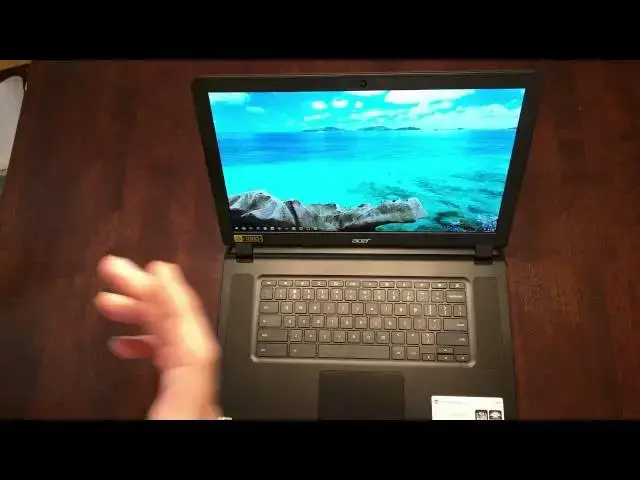
It's finally here! The Acer Chromebook 15 (C910-C37P) is in the house and I'm wasting no time getting my hands on it. There are tons of models, including a lesser-spec'd, low-res version. Many thought this model was that lower-end one. I'm happy to say it is not! Enjoy!
Show More Show Less View Video Transcript
0:01
[Music]
0:17
hey folks Robbie Payne here with chrome
0:19
unbox coming at you today with an
0:21
unboxing of the Acer Chromebook 15 now
0:23
for a lot of you I've seen there's been
0:25
a lot of looking about what uh model uh
0:29
the model that there are out there right
0:31
now uh if this thing will focus there
0:33
you go it
0:34
is find the
0:37
c910 c37 P there's a lot uh of talk
0:42
going around that this is an education
0:44
model and because it's a black one it
0:45
doesn't have uh the full HD uh you can
0:48
see here on the screen it's 15.6 in full
0:52
HD IPS LED and that's actually printed
0:55
on the box so um I went ahead and got
0:57
this at first and started cancel the
1:00
order because I was told it was an
1:02
education model uh and then Brent
1:04
Sullivan uh actually in the Chromebook
1:08
community on Google+ said that he got a
1:09
hold of a um somebody in shipping and
1:13
found out that this supposedly was full
1:15
HD so that's what it says on the box I
1:18
just got the thing in so we're going to
1:20
find out together whether that's the
1:21
case or not but it looks to be uh like
1:24
this is actually a full HD which lines
1:27
up with prices because they said the
1:29
education model was supposed to be 250
1:31
this device was in fact 350
1:35
so and as is the case with every Acer I
1:38
ever open I can't open the box without
1:41
ripping it some way shape or
1:48
form there we
1:55
go and packaging is pretty standard Acer
1:57
Fair here
2:01
power
2:02
brick cable keep those close cuz it
2:06
probably won't power on without them
2:08
getting started
2:10
guide um same old stuff so it feels like
2:13
we're opening just a very large C720
2:23
here and so those of you who are
2:26
interested in this device know they kind
2:28
of went with a uh f fabric like finish
2:30
is what they said it is plastic it's not
2:32
actually fabric uh feels
2:35
interesting uh but it will looks like
2:37
it's going to resist fingerprints pretty
2:38
well and the bottom actually has that
2:41
same finish to it so it's kind of a see
2:44
if the camera will pick up on it kind
2:47
like a diamond weave I it's interesting
2:49
carbon fiber is but it does feel kind of
2:51
like fabric so it's uh it's interesting
2:54
uh but it looks good and again it
2:56
resists fingerprints so let's get all
2:59
this out of here
3:00
[Music]
3:02
and for comparison for those of you who
3:05
own the
3:08
hp14 here's it on top of
3:10
it kind of lined up here so it is
3:13
considerably larger than the
3:16
HP4 and that to be expected you're going
3:19
from a 14in to a 15.6 in display and
3:22
this isn't going to be for everybody
3:24
obviously um if you're looking for a
3:26
Chromebook that easily fits into a purse
3:28
or bag or something like that this isn't
3:30
the Chromebook for
3:31
you but it is uh what it does have
3:34
inside is the um uh Broadwell celon
3:38
processor the 3020 U I believe is what
3:41
it is um so it's the first Chromebook
3:43
technically to hit the market with that
3:44
in it 4 gigs of RAM uh 32 gigs internal
3:49
storage and it is
3:52
massive and probably not going to power
3:54
up okay we're back um real quick before
3:57
we dive into anything else I'm take a
3:59
quick hard tour around the hardware here
4:01
across the front not much of anything
4:03
save some LED lights here for charging
4:06
probably network connection on the side
4:08
here full sizee SD card slot uh USB 2.0
4:11
in a
4:12
Kensington back here just got a port for
4:14
fans also some fan spots on the bottom
4:17
there as
4:17
well and then along the side full sizee
4:20
SD card slot USB 3.0 uh headphone
4:23
microphone Jack and charging
4:26
port um
4:30
it picks up a little bit of fingerprints
4:31
but not too bad across the top um seems
4:34
like more of perspiration kind of
4:37
stuff all right now that we've got it
4:39
all powered up and fired up let's take a
4:42
look around the internals there are some
4:44
interesting things actually under the
4:45
lid on this device it seems like for
4:47
many Chromebooks in a row there wasn't
4:49
anything really new to introduce you
4:51
open it up here we go it's a 1366 X 768
4:55
panel uh that kind of stuff now the
4:57
Toshiba Chromebook did bring uh IPS to
5:00
um uh to the Forefront and this device
5:03
does the same thing whether it
5:06
technically is IPS or not uh it's that's
5:09
just hard to say there's no way for me
5:11
to know that what I can tell you is that
5:13
the viewing angles are very wide uh from
5:15
top to bottom left to right everything
5:17
looks really great colors are crisp the
5:20
blacks are really black uh everything
5:21
looks really nice uh 1080p across 15.6
5:25
in looks awesome um so you're not going
5:28
to have to worry about any kind of
5:29
scaling any of those things even though
5:31
chrom OS takes care of that very well
5:32
now uh trackpad is huge um very smooth
5:36
very responsive um clicks are very nice
5:39
uh impressed so far with what I've done
5:41
with that and just typing passwords and
5:43
stuff like that um the the keyboard
5:45
travel feels really well really good um
5:47
and uh the keys travel pretty well which
5:49
you would expect with a deeper uh
5:51
thicker device here um there's not a lot
5:53
of give anywhere in this it's not creaky
5:56
which is very good and then we have
5:58
upward facing speakers here here so uh
6:00
no gimmicks of sound coming through the
6:02
keyboard This is straight up speakers
6:04
right here on the face so I am going to
6:06
play um a little bit of music real quick
6:09
and see how that
6:11
uh see how that works out and see how it
6:18
sounds now of course in the review we'll
6:20
we'll do some benchmarks I'll give you a
6:22
better idea of battery life it's rated
6:24
for 9 hours we'll see how that works out
6:27
um and talk about performance of
6:29
Broadwell over Haswell and see how it
6:31
lines up from what I've seen online some
6:33
people that have gotten the c740 which
6:36
also has the Celeron Broadwell in it uh
6:38
I've seen some people run um Octane and
6:41
get somewhere between 13 and 14,000 on
6:43
that so that's a bump in general usually
6:45
I was getting 10 to 11 uh from the
6:48
Haswell uh class Chromebook so that's a
6:51
pretty good jump um 25 to
6:55
30% and so
7:04
let's
7:07
see let's do this
7:12
[Music]
7:16
one for every time the tears are falling
7:20
down your
7:23
[Music]
7:28
face time when all you can
7:33
say let it
7:34
[Music]
7:35
[Applause]
7:40
ready so yeah kind of what you'd expect
7:42
from laptop speakers they're pretty thin
7:44
sounding there's not a lot of back end
7:46
uh not a lot of lows but they're really
7:49
really loud um so that's kind of cool
7:51
and it seems like that probably will be
7:52
a good thing uh we'll test out some some
7:55
uh Google Hangouts uh seems like it' be
7:57
a really good thing if you're doing any
7:59
video conferencing on it to have these
8:00
speakers kind of right here in your face
8:02
so uh that's it for today guys I just
8:04
wanted to show you around open the box
8:06
and let everybody know finally uh that's
8:08
talking about it in the community and
8:10
online that the C I've already forgotten
8:14
the model of it again let's
8:17
see the c910 c37 p is in fact a full HD
8:22
version it is not the education model um
8:25
so there are quite a few retailers
8:27
actually that have this CDW a
8:29
or ABT um and there's a couple others uh
8:34
you can hit I'll tag Brent Sullivan uh
8:36
when I put this on um Google+ he keeps
8:39
up with who carries what where and so
8:42
he's uh the one that helped me find this
8:44
one and I don't think anybody else has
8:46
attempted to buy one to see so just to
8:48
let you guys know it is 1080p it looks
8:51
like at least something approaching an
8:53
IPS display and from all counts at this
8:56
point I'm very impressed with this
8:58
device so um I'll be back in a week week
9:01
and a half maybe two weeks uh let you
9:03
know I plan on working from this thing
9:04
exclusively for the next couple weeks
9:06
let you know how it holds up uh under
9:08
day-to-day stress um and I plan from
9:11
working from this device by itself no
9:13
extra attachments keyboards monitors I
9:15
just want to sit in front of this device
9:16
for a little bit to kind of see how it
9:18
works so I look forward to getting the
9:20
review to you if uh you're new to the
9:22
channel haven't been around uh please
9:24
give the video a thumbs up if you like
9:26
what you see subscribe to the channel
9:28
and like I said about a week or so two
9:30
weeks uh you'll see a review come up of
9:32
this device until then have a good one
#Computer Hardware
#Consumer Electronics