Up next in 10



Check out the new site for all kinds of Chrome OS goodness: http://chromeunboxed.com
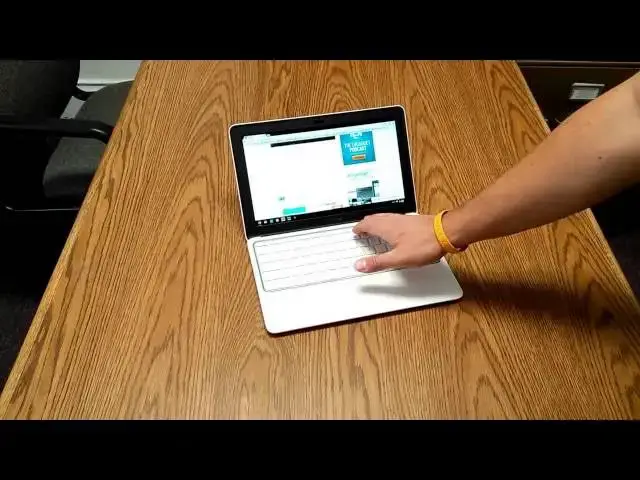
In this video, I unbox the HP Chromebook 11 and give some initial reactions. After a few days of real-world action, I will post a more in-depth review and explain how the HP Chromebook 11 holds up to actual work.
Enjoy!
Show More Show Less View Video Transcript
0:01
hey guys this is Robbie Payne uh doing a
0:04
quick unboxing of the HP Chromebook 11
0:08
just came in the mail today so check out
0:10
and see what's in the box
0:13
um probably just going to power it on
0:17
today um and that's about
0:20
it going to spend a couple days with it
0:22
I'm also spending some time with the um
0:26
the Chromebook 14 as well which is many
0:29
of you know is the Haswell Celeron
0:32
version uh at 14 in but this guy's got a
0:36
lot more
0:38
U uh fun things on the exterior uh but
0:43
the the same arm processor that the
0:46
Samsung Chromebook had from last year so
0:48
I'll get a chance to do some side by
0:50
side kind of stuff with that uh over the
0:52
next week really get to work with it and
0:54
see kind of what the performance
0:55
differences are um and see how they
0:58
stack up against one another uh but this
1:00
kind of is uh Google's baby for the next
1:03
year as far as Chromebooks go um really
1:06
cool packaging uh nice rounded Corners
1:09
um and they even um were thoughtful
1:11
enough to put the color that I ordered
1:13
on the outside so it's not generic it
1:15
actually goes with the particular device
1:17
which is kind of
1:21
neat I'll say so far this this winds and
1:24
packaging between this and the uh the
1:27
hp14
1:50
all right so um kind of cool
1:57
packaging set this aside for a second
2:00
[Music]
2:02
um yeah a get started thing that's kind
2:04
of part of the thing with Chrome OS
2:06
really you don't need all this stuff you
2:07
just sign in and go um as mentioned in
2:11
um pretty much everything about this so
2:13
far the uh the charging brick is micro
2:17
USB um let's see
2:21
the yeah it's a 3 amp so a lot of
2:24
tablets you see a 2 amp charger that's
2:26
actually a three amp charger so it's
2:27
going to put out uh pretty well
2:30
um probably charge your phone really
2:32
really quickly so that's all that's in
2:34
the box that's it nice and clean so
2:37
we'll get that out of the way as well
2:39
and and this guy up here there is a
2:42
requisite plastic
2:46
[Music]
2:56
sheath and we're in
3:01
and the device strikes a nice profile
3:04
very thin um you know very plasticy um
3:09
that's not a surprise to anybody um this
3:11
has got a nice uh nice soft touch to it
3:14
and and the device is very very very
3:16
light and I have been dealing with the
3:19
uh Chromebook 14 which which comes in at
3:22
a whopping 4 PBS um as in this one is I
3:26
think 2.3 if I remember correctly uh so
3:29
considerably lighter um much smaller so
3:33
let's uh open it
3:36
up we get the nice little accents and
3:40
hopefully unlike the 14 this one will
3:41
just power on off the
3:51
get-go the big difference in this one uh
3:54
again is uh a lot of the aesthetic stuff
3:57
so the screen uh being that IPS display
4:00
I can kind of already tell has some much
4:02
better viewing angles um then okay um we
4:08
got some usable Wi-Fi there for a minute
4:10
off the hotspot and we're able to get
4:12
the latest and greatest uh Chrome build
4:15
30 uh interesting note this one and the
4:18
hp14 right now and I think the C720
4:22
that's coming uh will be the only ones
4:24
right now that have stable build 30
4:26
everybody else is on stable 29 so I have
4:29
heard some reports as well um of a
4:31
couple guys who have gotten their hands
4:32
on this already and have moved to the
4:34
dev Channel which is a couple usually a
4:36
couple builds in front of what's stable
4:39
and they are reporting that uh casting
4:41
tabs on chomecast which uh if you've
4:44
ever had the Samsung Chromebook with the
4:46
same processor in it as this guy U you
4:48
would know that uh casting a tab is uh
4:51
just kind of a nightmare on that thing
4:53
it just really cannot handle it
4:54
whatsoever um and they're having they're
4:56
reporting being able to play full motion
4:57
video with no problem over chomecast so
5:01
that's a huge huge huge uh development
5:04
if if that's the case across the board
5:06
and and hopefully what it means is that
5:08
uh Google's choice to stick with the uh
5:11
the exos uh dual processor in this one
5:14
uh was was hopefully because uh they're
5:17
actually gearing Chrome OS to be able to
5:19
run better on this architecture because
5:22
if you've looked in the past the uh the
5:24
Nexus 10 still scores incredibly high on
5:26
all the benchmarks um even even right
5:28
now and it's the exact same processor
5:30
now granted Android obviously is
5:32
probably a way better coded to work on
5:34
our processors that's pretty much all it
5:36
does and so um hopefully the the guys
5:39
that are developing for Chrome OS uh are
5:41
pushing in that direction since this is
5:43
kind of what they've what they've
5:44
decided to go with so U just a quick
5:46
show real quick um you can see this is
5:49
in gadget loaded up and in gadget has
5:51
quite a bit of stuff going on on it um
5:53
you've got uh uh videos loaded up you've
5:56
got ads that are moving and um a lot of
5:58
media and long page and with a two
6:01
finger scroll um incredibly smooth on
6:04
this um a little Checker boarding there
6:07
and that's probably due to um uh the the
6:10
2 gig ram constraints more than likely
6:13
but interestingly enough it seems like
6:14
the processor is kind of holding its own
6:16
on this um and so uh other couple quick
6:21
observations um the trackpad doesn't
6:23
bother me at all uh feels great tracks
6:25
really well with the finger um two
6:27
finger scrolling is working really
6:29
really well uh the keyboard is uh has
6:32
very good travel um tactile feels good
6:36
um the screen uh we'll crank the
6:38
brightness all the way up is bright I
6:40
don't think it's that much brighter if
6:42
at all any brighter than the the 14inch
6:44
uh but the side viewing angles I'm
6:46
standing kind of to the side right now
6:47
I'm over here um are are way way better
6:51
obviously than the TM panel that's on
6:53
the Chromebook 14 and that's to be
6:55
expected and then you know the the text
6:57
looks more crisp just because you're
6:59
taking the same
7:00
the same resolution and squashing it
7:02
down into a smaller form factor so um
7:05
you guys probably already know all those
7:06
things but uh yeah first blush it does
7:08
it looks really nice um it is very very
7:11
firm uh there's no give in the in the
7:14
computer at all no flex in the keyboard
7:16
uh which is very nice um has a really
7:19
really nice profile um it almost it does
7:24
you can open it right up without
7:25
actually having to pry it open which uh
7:27
is a is a thing that I covet from from
7:31
MacBooks
7:32
um and let me see if I can pull up
7:34
something to give you a taste of the
7:37
speakers here this Hotpot isn't
7:39
performing that admirably so bear with
7:42
me just a second let see if we can get a
7:45
YouTube video below that
8:00
and part of the performance you're
8:01
probably seeing right now is all of a
8:03
sudden Chrome is now installing all my
8:05
extensions on top of what it's doing so
8:10
uh if you're going to look at that and
8:11
say oh I saw lag I saw lag you know you
8:15
might want to give it a break just a
8:16
little bit so I'm going to load it one
8:18
of my own videos so I don't get in
8:19
trouble for any copyright kind of stuff
8:21
and we're going to crank the sound and
8:22
see what it sounds is Robbie pay with a
8:25
quick unboxing SL login with the allnew
8:29
HP Chromebook 14 now this is the green
8:32
model um and it doesn't look that green
8:36
we got this I'm going to go ahead and on
8:38
the Nexus recing this with right now um
8:42
there's a slight green Hue to but it has
8:44
a lot of blue so I know it's I think
8:45
it's ocean turquoise is what they're
8:47
calling the color and so you can kind of
8:49
see on the side of the box here um they
8:52
make the green look incredibly green and
8:54
so I didn't really want this I wanted
8:55
the white one they just didn't have one
8:57
at stock um so I know I did get this I
8:59
picked this up today uh at Walmart so
9:02
yeah speakers are loud and it's really
9:04
interesting um and I've read this but
9:06
it's it's an interesting thing to
9:07
experience the sound actually coming up
9:09
out of the keyboard uh is a pretty neat
9:12
experience uh rather than it trying to
9:13
come from underneath um or somewhere up
9:16
in the up in the panel um so very good
9:21
um some of the quality issues on that
9:22
are obviously we're we're pretty low
9:24
band with right now
9:27
um so yeah that's uh that's kind of just
9:29
my first impressions open it up get my
9:31
hands on it the first time um I'm going
9:33
to put it through its Paces right now
9:35
I've got the hp14 I've got Linux
9:37
installed on it um actually worked from
9:39
it all day today and it was incredibly
9:41
enjoyable um so I'll do the same with
9:43
this and put them both through their
9:45
Paces uh I'll have some full reviews up
9:47
of both in the next coming days and then
9:49
we'll maybe do a kind of head-to-head
9:51
and compare the two for those of you who
9:53
are on the fence about which one to get
9:56
um but that's all for today thanks for
9:58
watching
#Computer Hardware
#Laptops & Notebooks
#Consumer Electronics
#Science