

Support our independent tech coverage. Chrome Unboxed is written by real people, for real people—not search algorithms. Join Chrome Unboxed Plus for just $2 a month to get an ad-free experience, access to our private Discord, and more. Learn more about membership here.
START FREE TRIAL (MONTHLY)START FREE TRIAL (ANNUAL)
With Google’s private media event in New York City just around the corner, the hardware surrounding the launch of Googlebook continues to leak out left and right.
While we’ve spent plenty of time obsessing the flagship clamshells, convertibles and the upcoming Lenovo Googlebook Duet m tablet, the official accessories built for these devices are starting to make regulatory rounds as well.
According to a report from GbookHub, Lenovo’s dedicated stylus – officially branded as the “Lenovo Pen Pro for Googlebook” – has now passed through the Bluetooth SIG, following an earlier filing with the FCC under model number A5M-SE01.
This isn’t just a generic USI stylus with a fresh name slapped on it. The regulatory filings point to a genuinely premium, feature-packed digital pen designed specifically to complement the new Googlebook hardware experience.
Wireless charging, magnetic docking, and USI support
For years, apart from only one well-implemented solution in the HP Chromebook x2 11, stylus support on ChromeOS devices has been a mixed bag. You have either had to keep track of replaceable AAAA batteries, plug a cable awkwardly into the side of the pen, or settle for an undersized “garaged” stylus that felt uncomfortable to hold for long writing sessions. The Lenovo Pen Pro for Googlebook fixes that entire equation.
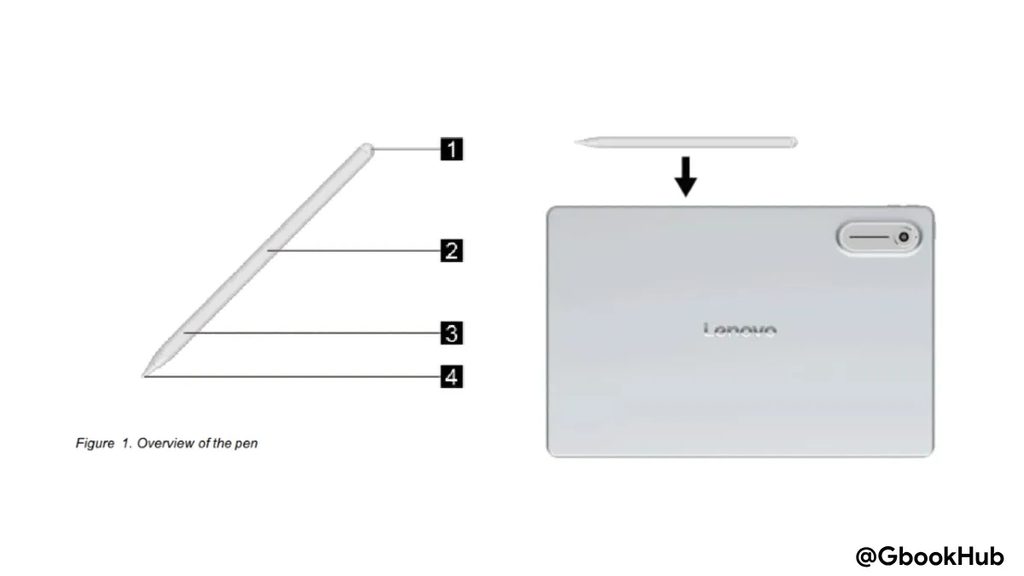
Building on the universal USI standard, the Pen Pro features a full-sized form factor that magnetically snaps to the top of the Googlebook Duet m for automatic wireless recharging. The design schematics from the filing match the exact rear chassis and camera housing layout seen in the leaked renders of Lenovo’s upcoming 13-inch detachable tablet, confirming that this pen is purpose-built as the primary companion for the Duet m.
Dedicated gesture controls and Circle to Search
Beyond standard writing, pressure sensitivity, and a built-in top eraser function, the user manual details an active side switch with integrated gesture support:
- Squeeze & Circle to Search: Squeezing the side switch and circling content on the display triggers an instant contextual search, bringing a native hardware shortcut for “Circle to Search” directly to the stylus.
- Double-Tap for Screenshots: A quick double-tap on the physical side button captures a full or regional screenshot.
- Side-Switch Swipe Gestures: Swiping your finger up or down along the side-switch area lets you fluidly scroll through long web pages, PDF documents, or presentation slides.
- Tap to Select: Tapping once with the pen tip quickly activates item selection modes across desktop and tablet interfaces.
- Long-Press Pairing: Holding down the side area initiates fast Bluetooth pairing with nearby Googlebooks.
The Googlebook accessory ecosystem is taking shape
Seeing high-end peripherals like the Pen Pro alongside separate sightings of Lenovo’s upcoming AI Mouse M830 reinforces just how thoroughly Google and its OEM partners have prepared for this launch.
Instead of treating styluses and mice as an afterthought, Lenovo is building bespoke, productivity-focused hardware tailored to Googlebook’s hybrid desktop-and-touch interface.
We expect to see the Lenovo Pen Pro for Googlebook showcased in person alongside the Duet m at the media preview on September 15, and we’ll be putting these gestures and writing latency to the test the second we get our hands on them!
SUBSCRIBE TO UPSTREAM
Get Chrome Unboxed delivered straight to your inbox
Upstream is our flagship, curated newsletter with the top stories, most click-worthy deals, giveaways, and trending articles from Chrome Unboxed sent directly to your inbox a few times a week. Join 31,000+ subscribers.

