

Support our independent tech coverage. Chrome Unboxed is written by real people, for real people—not search algorithms. Join Chrome Unboxed Plus for just $2 a month to get an ad-free experience, access to our private Discord, and more. Learn more about membership here.
START FREE TRIAL (MONTHLY)START FREE TRIAL (ANNUAL)
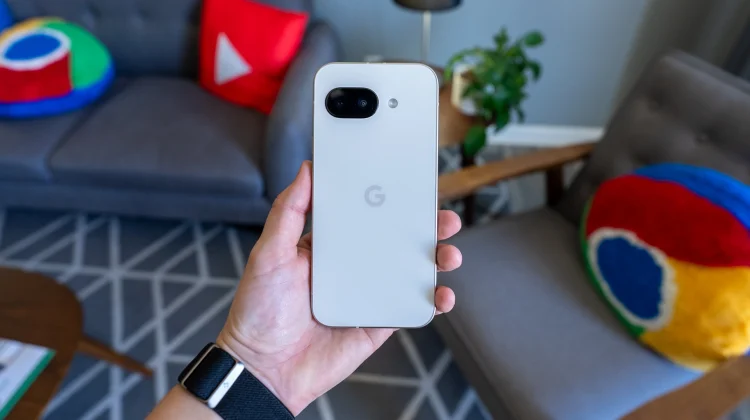
The Google Pixel 9a was only launched a few months ago, but that isn’t stopping it from getting a significant discount for those in the market for a new phone without a flagship price tag. Google’s mid-range handset has already proven to be a reliable powerhouse, and for a limited time, it’s an even better value.
Right now, Best Buy is offering the 128GB Pixel 9a for just $399.99, a full $100 off its regular $499.99 price. This deal includes all four of the phone’s color options: Iris, Obsidian, Peony, and Porcelain. For those needing a bit more storage, Best Buy has also discounted the 256GB model to $499.99 ($100 off its $599.99 MSRP), though it is currently only available in the Iris and Obsidian colors.
A flagship feel without the flagship price
What makes the Pixel 9a such a compelling device is how effectively it delivers a high-end experience that belies its mid-range price. In day-to-day use, the phone feels remarkably premium, with very few of the compromises one might expect. The 6.3-inch OLED display is bright and colorful, and its buttery-smooth 120Hz refresh rate makes interactions fluid and responsive.
That feeling continues to the hardware inside. Powered by Google’s Tensor G4 chip and 8GB of RAM, the Pixel 9a handles games, media, and daily tasks without lag or any real evidence that it isn’t a much more expensive phone. Add in solid speakers, reliable biometrics with both face unlock and an optical fingerprint scanner, and the largest battery yet in a Pixel A-series phone, and you have a device that consistently performs well at all the core smartphone tasks.
Pixel 9a Full Specs
- Display: 6.3-inch “Actua” OLED display (1080p+ resolution, 20:9), 60-120Hz refresh rate, 1800 nits brightness (2700 peak), HDR support
- Processor: Google Tensor G4
- RAM: 8GB
- Storage: 128GB/256GB
- Battery: 5100 mAh (Rated for 30+ hours, 100+ with Extreme Battery Saver)
- Rear Cameras: 48MP wide (f/1.7, 82° FoV) + 13MP ultrawide (f/2.2, 120° FoV)
- Front Camera: 13MP (f/2.2, 96.5° FoV)
- Video: Up to 4K 60fps / 1080p 60fps, 5x digital zoom
A clear winner in its class
When compared to its direct competition, the value of the Pixel 9a becomes even clearer. For instance, the similarly priced iPhone 16e features a smaller 6.1-inch display with a slower 60Hz refresh rate and only has a single rear camera. The Pixel 9a not only has a faster screen but also includes an extra 13-megapixel ultrawide lens to complement its excellent 48-megapixel main camera.
While the flagship Pixel 10 series is set to be announced on August 20th, those devices will launch at a much higher price point. For anyone looking for a reliable, powerful, and enjoyable smartphone experience while wanting to save as much money as possible, getting the Pixel 9a for just $400 is an exceptional deal that’s tough to ignore.
SUBSCRIBE TO UPSTREAM
Get Chrome Unboxed delivered straight to your inbox
Upstream is our flagship, curated newsletter with the top stories, most click-worthy deals, giveaways, and trending articles from Chrome Unboxed sent directly to your inbox a few times a week. Join 31,000+ subscribers.

