


Support our independent tech coverage. Chrome Unboxed is written by real people, for real people—not search algorithms. Join Chrome Unboxed Plus for just $2 a month to get an ad-free experience, access to our private Discord, and more. Learn more about membership here.
START FREE TRIAL (MONTHLY)START FREE TRIAL (ANNUAL)
As we inch closer to Google’s September 15 media showcase in New York City, the software built specifically for Googlebook continues to emerge piece by piece. Over the past few weeks, we’ve tracked early sightings of dedicated platform tools like Magic Pointer, the native Desktop Camera app, and the newly surfaced Look up contextual search tool. Now, another key piece of system software has broken cover.
According to an APK teardown from Android Authority, an early build of Google’s “Device Intelligence” app for Googlebook has surfaced. The teardown confirms two major desktop workflow enhancements: AI-driven automatic local file organization and direct system share-sheet integration with Gemini Notebook.
Automatic local file sorting into “Collections”
If your downloads folder looks anything like mine after a busy week of work, it is usually a chaotic pile of images, drafts, PDFs, invoices, screenshots and more. Googlebook appears to be tackling that desktop clutter natively through a new feature that scans local storage and automatically clusters related files into smart folders called “Collections.”
These groupings are organized around topics, ongoing tasks, or specific events. For instance, if you are coordinating an upcoming trip, the system can automatically gather flight confirmation PDFs, hotel receipts, and itinerary documents scattered across your local drive into a single, unified travel collection without you having to manually organize anything. A companion desktop widget was also uncovered (via the app being installed on a phone), allowing you to jump straight into active project collections right from the home screen without digging through the Files app.
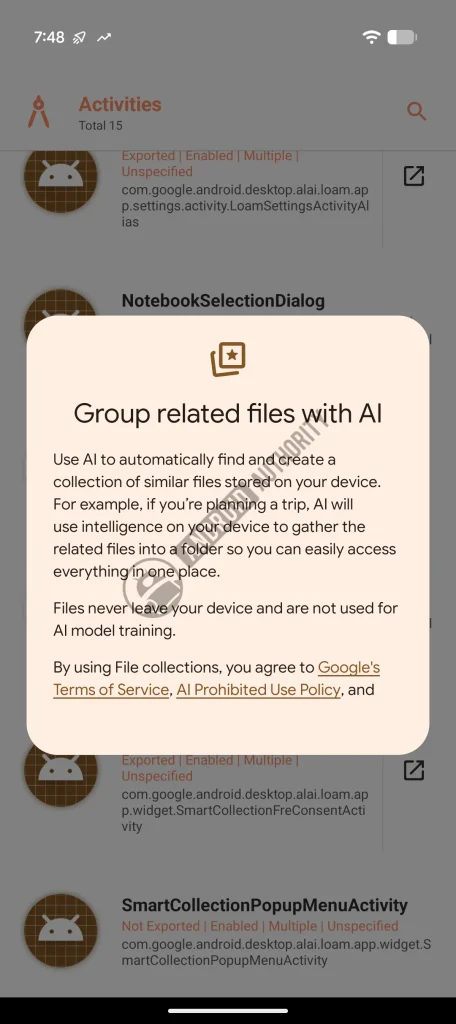
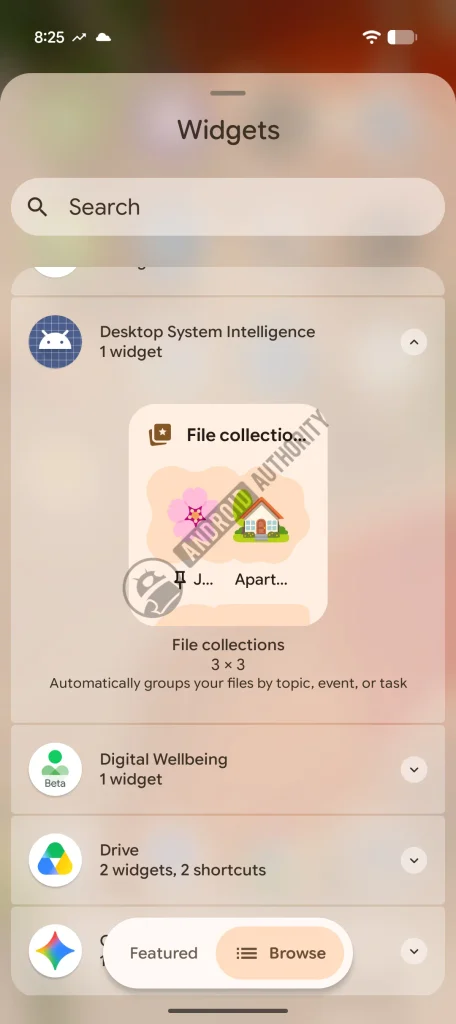
As a critical and important note, Google is handling this with a strict privacy-first, on-device architecture. The setup screen explicitly notes that all file analysis happens locally on the hardware NPU, guaranteeing that your personal files never leave the laptop and are never used to train Google’s AI models. The feature was also discovered disabled by default, ensuring users retain complete opt-in control over whether they want the system organizing their drives.
Direct file sharing into Gemini Notebook
The second major capability uncovered in Device Intelligence ties directly into Google’s AI research workspace, Gemini Notebook (formerly NotebookLM). Currently, getting local files into a notebook requires opening a browser tab and manually browsing your storage to upload sources.
On Googlebook, Gemini Notebook becomes a native system share target inside the Android share sheet. Whether you are browsing images in Google Photos or reviewing documents in a local file viewer, tapping the share icon lets you select Gemini Notebook directly.
From there, you can choose to append the files straight into an existing research project or spin up a brand-new notebook on the fly. The only minor limitation noted in the teardown is a maximum file size cap of 200MB per share, which is more than enough for heavy PDFs and multi-page research documents.
Practical productivity on the desktop canvas
Seeing features like Device Intelligence surface right now reinforces a very encouraging pattern in Google’s development for Googlebook. While marketing campaigns will inevitably focus on flashy generative AI tricks, practical features like on-device file sorting and native share-sheet workflows solve real, everyday desktop friction.
Being able to keep messy folders organized locally and instantly send research materials to Gemini Notebook without breaking stride makes the entire desktop experience feel cohesive and built for real productivity.
I’d expect to see Device Intelligence demonstrated heavily in Manhattan next Tuesday at the press event, so stay tuned to Chrome Unboxed as we’ll be covering this set of features and much more in the coming weeks!
SUBSCRIBE TO UPSTREAM
Get Chrome Unboxed delivered straight to your inbox
Upstream is our flagship, curated newsletter with the top stories, most click-worthy deals, giveaways, and trending articles from Chrome Unboxed sent directly to your inbox a few times a week. Join 31,000+ subscribers.

