


Support our independent tech coverage. Chrome Unboxed is written by real people, for real people—not search algorithms. Join Chrome Unboxed Plus for just $2 a month to get an ad-free experience, access to our private Discord, and more. Learn more about membership here.
START FREE TRIAL (MONTHLY)START FREE TRIAL (ANNUAL)
I know, I know – “Michael needs to stop talking about Google Collections. It’s getting a bit ridiculous and he’s not really on to anything here”, I hear you saying, but Google has been leaning more heavily into the idea of letting users curate content via its new bookmark icon that’s been popping up across almost all of its services – Google Travel, Maps, Search, Google TV – you name it. Now, a new Reference Remote that they’ve been working on for Android TV shows that you may soon be able to access your Watchlist with the press of a hardware button!
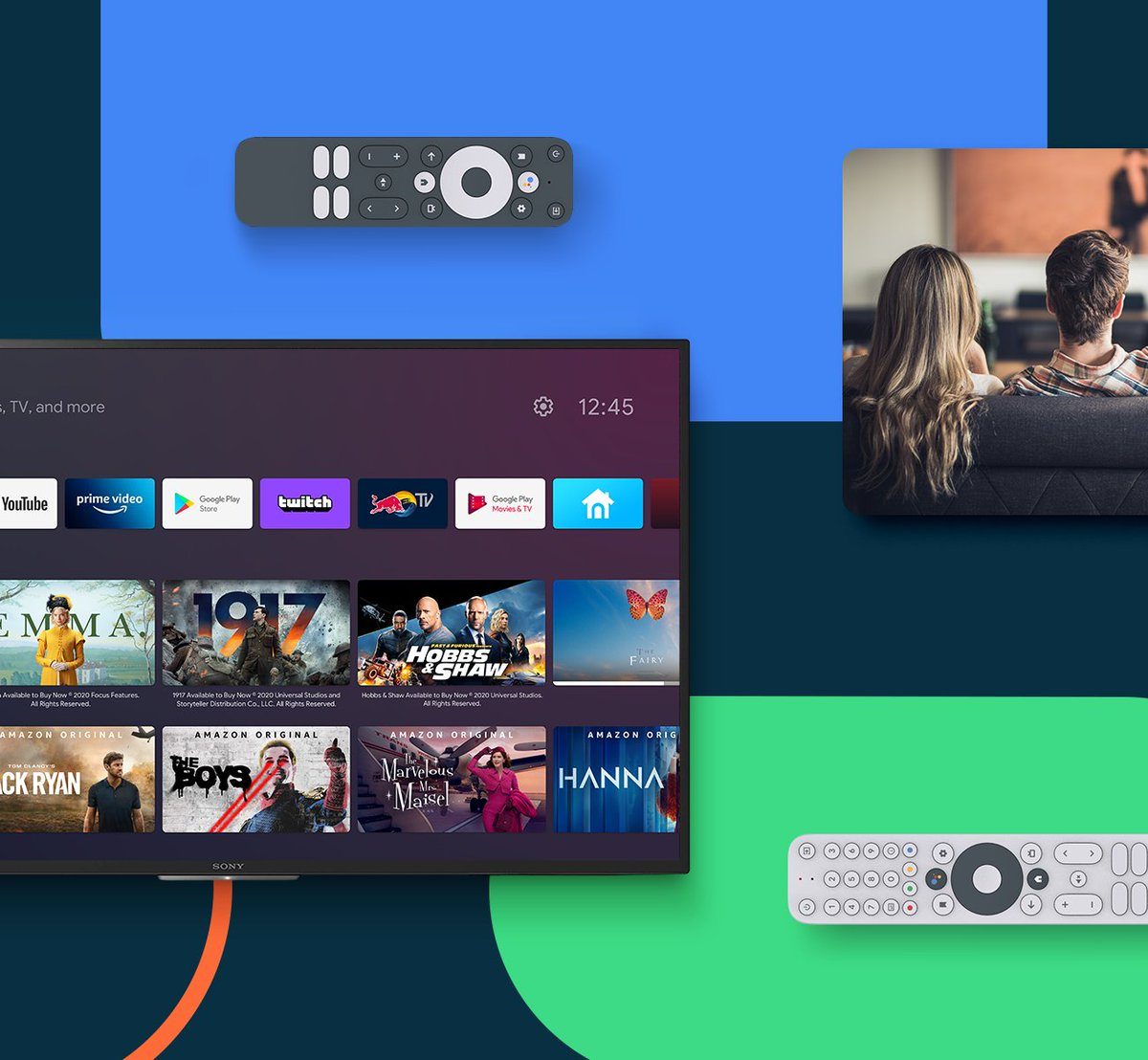

The Watchlist feature allows you to save movies and shows for later viewing by clicking the bookmark icon that appears on their listing via the Google TV interface while searching for them on the web, and more. These Watchlist items then appear in your Google Collections among other types of saved content and can be accessed from the Search app on your phone or via the web.
It seems only natural then to include a button to access these items on the physical remote, right? Doing so should significantly increase user engagement and directly lead to more watch time and thus, more money for Google and other streaming content providers. It’s important to note that a reference remote is not an actual remote, but rather a design guideline for OEMs looking to make remotes for Android TV and Google TV-enabled devices. Google is “strongly” suggesting that hardware manufacturers use this design including the Watchlist button, likely in order to achieve the aforementioned result.
The reference appeared today on the Android TV Guide Twitter account. This specific account is geared towards finding the latest Android TV news, rumors, leaks, and exclusives from around the web. It’s not an official Google account, though these images are certainly real. About thirty minutes ago, they replied to the same tweet showing off an Android TV dongle from New Zealand that uses a remote with the same exact layout – the SmartVU SV1, made by SEI Robotics. Another device using this design is the Nokia Streaming Box 8000 which can be seen below.
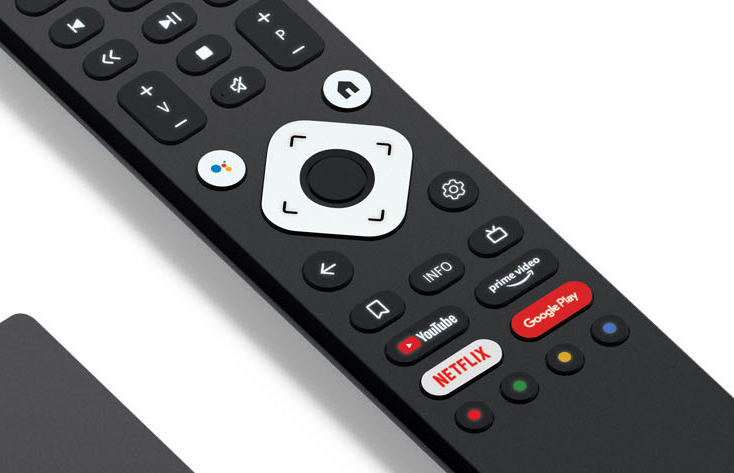
The design of the remote very much points to the fact that Google is trying to gently guide OEM hardware decisions to line up with the goal of phasing out Android TV in favor of Google TV – something they’ve stated they want to achieve before 2022.
I recently published a trifecta of articles surrounding Google’s Collections feature and why I think they’re going to continue to invest in it. It’s easy to brush them off as something Google will sunset in the next few years, but I think this about much more than simply accessing saved shows and movies on your TV – it’s about user-generated data curation as a whole and how it could be the future of big tech. The more you bookmark or “collect” across Google services, the more likely you are to purchase those things. Put simply, the more you save, the more you spend thanks to the idea of collecting things being central to the psychology of ownership.
In the case of the data being a part of the open web and not belonging to the user until they actually press the ‘buy’ button, I’d call it perceived ownership instead. The more big companies can help users make data actionable using AI and machine learning, the more it translates into revenue for them. That’s not a bad thing, per se, since they’re for-profit companies, but it needs to be handled ethically.
With the Collections bookmark icon already appearing on physical hardware remotes, and the idea of it possibly becoming a standard, this theory is given much more weight. A lot of people have expressed how much they already don’t like Collections or simply don’t really understand what Google is trying to achieve with them, but I believe they will soon get more love as time passes. One thing is for certain though and that’s that they’re not going anywhere. The universal sign for saving something and taking “ownership” of it is a bookmark icon, (the save floppy disk is for storing changes, so it doesn’t exactly apply here – besides, it’s already taken!) so I believe that it’s a natural progression of the human psyche and I think that there’s really no going back from it – it just makes a lot of sense to pursue it and Google knows that.
However, with that said, Google needs to make Collections easier for users to understand. If they want to get people to engage with them in a more meaningful way, they need to remove the friction to user adoption. There are at least five things I can think of that can improve Google Collections in big ways. Adding a physical button for your Watchlist items on a hardware remote is a great way of removing friction too, so hats off to them for this. If you’re interested in learning how to use Google Collections to inspire your 2021 goals, or if you just want to know how to manage your saved movies and TV shows, I’m trying to plan a video tutorial around this, as has been requested a few times – I just don’t know when I’ll be able to give it my full attention, so stay tuned!
SUBSCRIBE TO UPSTREAM
Get Chrome Unboxed delivered straight to your inbox
Upstream is our flagship, curated newsletter with the top stories, most click-worthy deals, giveaways, and trending articles from Chrome Unboxed sent directly to your inbox a few times a week. Join 31,000+ subscribers.

