

Support our independent tech coverage. Chrome Unboxed is written by real people, for real people—not search algorithms. Join Chrome Unboxed Plus for just $2 a month to get an ad-free experience, access to our private Discord, and more. Learn more about membership here.
START FREE TRIAL (MONTHLY)START FREE TRIAL (ANNUAL)
I recently published an article that discussed what Google’s Collections feature is and how you can use it to inspire your 2021 goals. Today, we’re going to round off the trifecta of articles I had originally planned around this topic by taking a deep dive into how the service can improve and how it could one day replace the likes of Pinterest for Google users.
User Trust
Google needs to gain back user trust. Depending on who you ask, this is either a very obvious statement or one that has little merit. Either way you slice it, each time I write about Collections, the comments are full of discussions about why they should not be used or why someone should not invest time into them. Google has made a terrible pastime of “sunsetting” their products in favor of rapidly innovating while sacrificing ecosystem stability. This has directly led to a drop in a user’s desire to invest time and energy (and trust) into a new product like Collections.
While Google does provide Takeout – their exporting and backup service for all of your data, I think that many of their fans just want the assurance that these new tools aren’t exactly going anywhere – something Stadia keeps reiterating. You can innovate all you want, but you must bring your users on that journey with you.
Simply placing an export button right in the Collections manager which leads to Google Takeout and giving a pop up to users upon initiating the service explaining that they can backup and export their collections at any time could go a long way to boosting user engagement.
Discovery
The biggest problem with Google Collections right now, aside from user trust, is the lack of discovery features. When I visit Pinterest, I’m immediately inspired by images relevant to my interests. Collections is largely predicated on the idea that your image searches will drive you toward different content types as it’s highly visual, but when you visit Google image search, you just have a search bar – that’s it. Now I get it, Google was built on its simplicity and that’s how it won out over its competitors initially, but adding an image feed on the home page of image search would immediately drive traffic and cause people to become interested in saving recipes, cool images, products, and more to their collections.
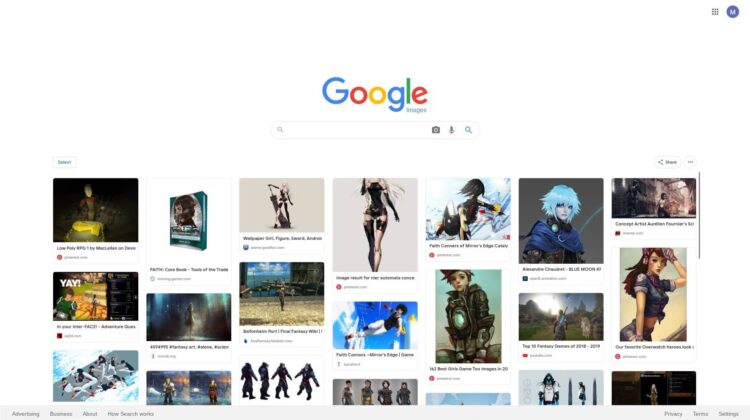
As you can see below, I’ve mocked up a screenshot that shows what it could look like to have a Google version of something like Pinterest. You can already just select an image and click the bookmark icon to add it to your collections, so why is this not already a thing too? Image search already has “suggestion chips” at the top of a user’s search, which recommends similar things, so it would be quite easy to implement a machine learning-based discovery feature, because, well, it’s already there! With how much everyone already uses Google search for pretty much everything, I think they could drive some serious traffic if they made the act of searching and collecting things more fun – they just need to inspire users with suggested content!
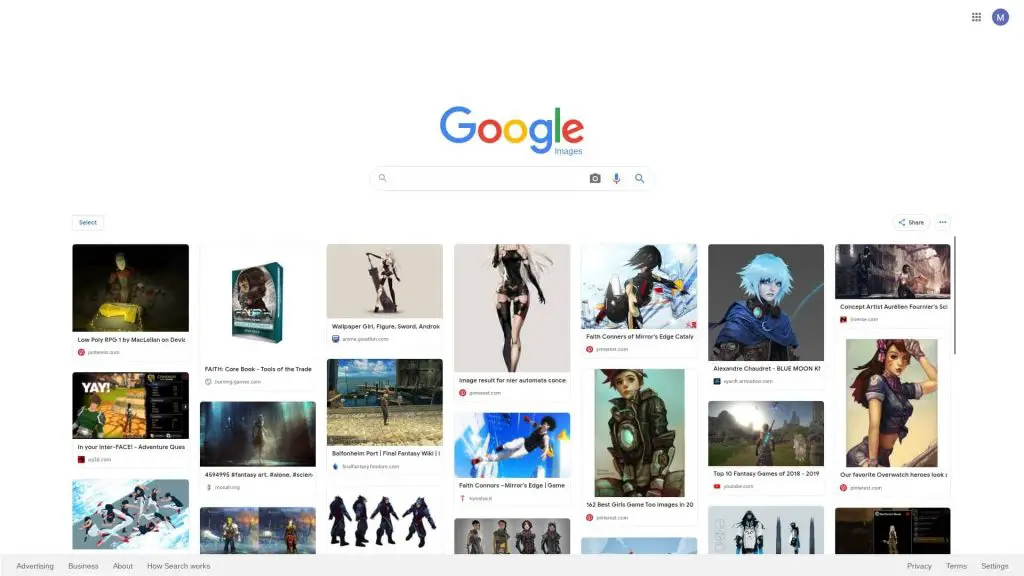
Google Image Search Refresh Mockup
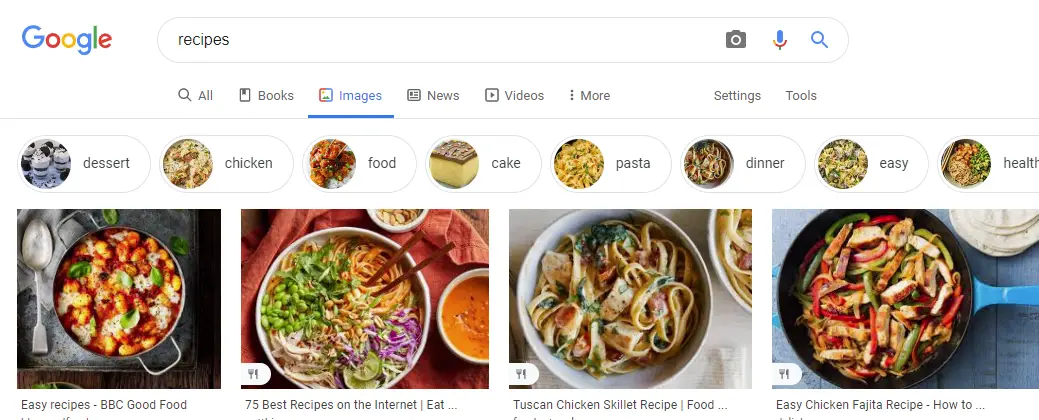
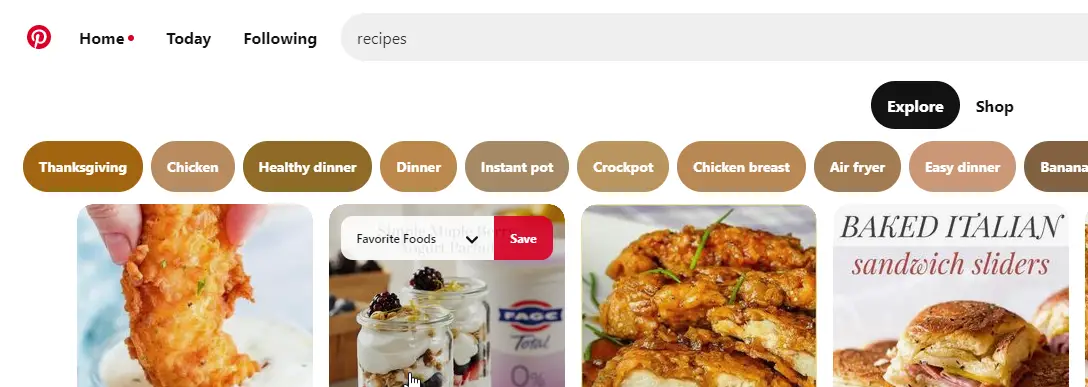
Being that the service uses a mixed content approach, this could work out really well too – especially if they added content type filters to Google Search. They technically already have this for images, videos, etc., but not for things like recipes and other user-oriented content.
I have reason to believe that Collections is a part of Google’s larger strategy to finally dominate the social sphere in a way that they couldn’t do with Google+, Buzz, Wave, and other failed attempts – something I’ll talk about another day – so if they have an interest in making Collections a sort of “Social Spine” to their services, then they need to integrate it faster. They are working fairly quickly, but as I spoke about in my 10 year Google Play Books Wishlist article, the fact that they have yet to integrate the bookmarking-style feature in the Play Books app and other obvious places like Search and on the web shows that they’re dragging their feet quite a bit.
Similar to the upcoming Kaleidoscope feature, and the new tab page shopping, and recipe modules, Google could add images to the new tab page too to create a sort of discovery feed where you can click to save things you’d like to revisit later. This could even become an extension of the current Discover feature too as Discover now appears on the mobile web on Android, for example.
Read Later and Collaboration
My biggest gripe with all of this so far (and Robby’s too) is that you can’t save websites to your collections from the web as articles you want to ‘read later’. I make a case for why Google did this in my previous posts on Collections – data should only be able to be added and accessed or used where it is most relevant and useful or actionable. This is what places Collections in a better position than classic bookmarking strategies, but it has a lot to learn before it gets it right. As of right now, people see collections as unnecessary in many ways and would prefer just to do things the way they’re used to doing them, but I see tons of potential in this feature.
We collect bookmarks like we drink water, and our ability to organize and recall data when it’s relevant is limited to our scope of understanding for that data’s use – and it’s limited. However, machine learning and AI can do a much better job at helping us make that data actionable – we just need to see it done well before we believe it, I think. I also think we will.
Google also needs to tie Google Discover and Google News together (as they may very well be doing already), and then tie all of that back into the upcoming Reading List feature. From there, the Reading List needs to become a part of Collections, I think. This is just my opinion, but one I strongly hold. Once you think of the power Collections have to help you save and organize all sorts of data like recipes, shopping wishlist items and more, the only type of data left to manage is articles a user would want to read later. It would be amazing to be able to use Collections to store this sort of thing instead of a service like Trello or Pocket – especially for journalists who are aggregating sources.
Right now, I think that if you look at the image below, it needs a list view, and better collaborative features for teams to start. Perhaps this sort of Collections approach would be best suited to Google Workspace accounts, but I can see regular account holders benefitting from this too. Right now, you can save bookmarks to websites you want to read later in Chrome, Google News, and via Collections in Discover from your phone (but only from Webview, not from the three dots menu) – it’s just a hot mess.

Saving articles to Collections is not idea right now
Better Content Filtering and organization
If Google wants Collections to stick around and to be successful – as evidenced by their constant work on it despite the fact that many people aren’t seeing these changes – then they need to make sure that they’re doing everything in their power to remove the friction that comes with using it.
First, they need to allow users to organize newly added Collection items via an ‘organize’ pop-up the moment it’s bookmarked – just as Gmail does when saving an attachment to Drive. Instead, you click the bookmark icon on an item via Google image search, and then you must visit your Collections tab at the top right to organize them when you find time via your Favorite Pages or Favorite Images collections. The problem is that most people will not go back and organize these – and why should they? Shouldn’t the motto be “Make Google do it?”
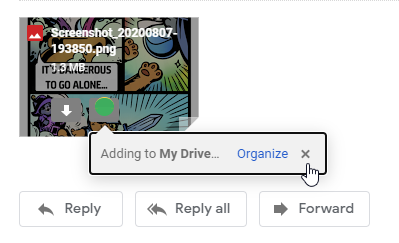
Saving to Drive via Gmail 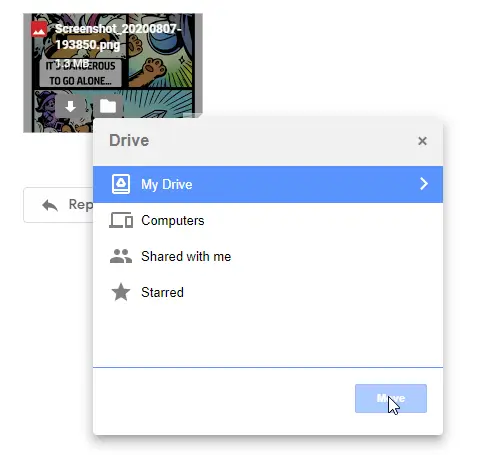
There is an ‘Organize’ Pop up that I think Collections could copy!
I also think that Google should create a more intelligent separation of collections based on the service that they’re being displayed in. For example, if you visit Google Shopping and go to your saved items, you will see all of your collections, but only the ones with shopping items in them will be useful to you! This could be blamed on the aforementioned mixed content approach that I discussed, but I feel like Google can come up with a better approach here. Perhaps if there are no shopping items in a list then they just hide that specific list in the overview and only display it when you’re saving an item for later.
Lastly, I believe that as good as it is that Google is trying to be in control of where they display different types of data and how useful it is to a user at what time as to make certain it’s actionable, they should provide a bit more user control. For example, you can save food items to your “Cookbook” collection via the Nest Hub, but not from the web. Instead, you have to save it to your very own “Recipes” collection, fragmenting the experience because then you can’t call it up by voice and start following the cooking instructions.
An easy solution to this is to simply designate a specific type of data to be able to be used in a specific place. If something is tagged as a ‘Recipe’, let it be added to the Cookbook from anywhere, not just the Nest Hub! Google image search can already be seen placing several different labels on content types – pretty cool, right? Below, you can see labels for recipes, videos, products, and more. I think that these allow Google to position themselves, with all of their users, as a worthy Pinterest competitor. I also think that users would utilize Collections more if Google were more open about this. Like I said in the past though, I think that they’re just building the service up and getting it ready for an irresistible public launch to avoid another failed bookmarking service. It’s smart, but I’m getting impatient as I’m very excited about what the service could become where previous attempts have failed!


Aside from the concerns for Google abandoning Collections, which I don’t believe they will do despite their track record as I think they’ve built something truly special, what would you like to see the feature become? Do you agree with any of my suggestions for how Google can improve Collections? Let us know in the comments!
SUBSCRIBE TO UPSTREAM
Get Chrome Unboxed delivered straight to your inbox
Upstream is our flagship, curated newsletter with the top stories, most click-worthy deals, giveaways, and trending articles from Chrome Unboxed sent directly to your inbox a few times a week. Join 31,000+ subscribers.

