

• Skip to main content
  • Skip to primary sidebar
  • Deals
  • Features
  • Guides
  • Chromebooks
  • Videos
  • Podcast
  • More +
    • Reviews
    • Unboxing
    • Upcoming Devices
    • Chromebook Plus
    • Chrome
    • ChromeOS
    • Chrome OS Flex
  • Search
  • Sign Up
  • Log In
Chrome Unboxed – The Latest Chrome OS News

Chrome Unboxed - The Latest Chrome OS News

A Space for All Things Chrome, Google, and More!

  • Deals
  • Features
  • Guides
  • Chromebooks
  • Videos
  • Podcast
  • More +
    • Reviews
    • Unboxing
    • Upcoming Devices
    • Chromebook Plus
    • Chrome
    • ChromeOS
    • Chrome OS Flex
  • Search
  • Sign Up
  • Log In

Google Slides, Sheets, and Drawings add Smart Compose to make commenting faster

August 4, 2021 By Michael Perrigo View Comments

Support our independent tech coverage. Chrome Unboxed is written by real people, for real people—not search algorithms. Join Chrome Unboxed Plus for just $2 a month to get an ad-free experience, access to our private Discord, and more. Learn more about membership here.
START FREE TRIAL (MONTHLY)START FREE TRIAL (ANNUAL)

Smart Compose – Google’s AI and machine learning implementation of autocomplete in Android and Gmail made its way to Google Docs last year so users would be able to quickly and efficiently complete comments and cut back on wasted time. Not only that, but the feature also helps reduce grammatical and spelling mistakes. Through intelligent recommendations, they save the day as much as Grammarly ever did.

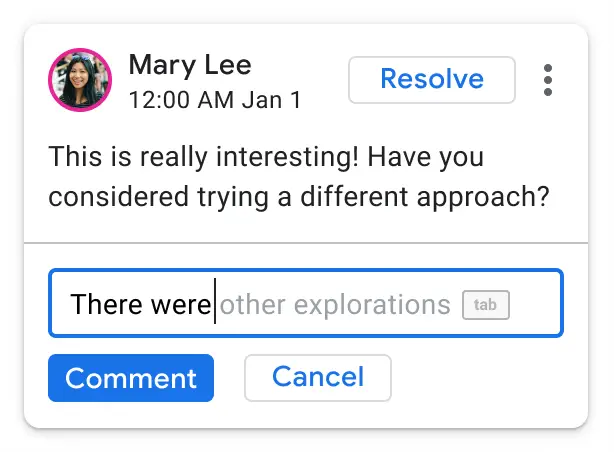
Now, that same technology is finally making its way to several other Workspace apps – namely Google Slides, Sheets, and Drawings – completing the bundle of popular services (Well, Drawings doesn’t seem too popular these days)! All you’ll have to do is highlight something in any one of these document types and create a comment via the Insert menu or by pressing Ctrl+Alt+M on your keyboard. Alternatively, Google has placed a nice comment and suggestion icon to the right of documents, which makes this more visual.
Xremove ads

As you type, you’ll begin to notice light grey text appear to the right of your cursor. These are Google’s suggestions for what it thinks you want to say. If it’s correct, tapping the ‘Tab’ key, as shown above, will autocomplete the sentence on your behalf. If you’re not already using this in Gmail, Android, and elsewhere, you really ought to be. It’s a serious time saver!

Smart Compose is already rolled out to all Workspace users that fall under any of the tiers found below and is turned on by default, but if for any reason you’re not seeing it, just visit the Tools menu and then click on Preferences. From there, you can click ‘Show Smart Compose suggestions’, and then confirm your changes with ‘Ok’. If you’re a Workspace admin, you can also visit your admin dashboard and go to Apps > Google Workspace > Drive and Docs > Features and Applications > Smart Compose in order to check your settings.

Featured Videos

Xremove ads

Workspace Essentials
Business Starter
Business Standard
Business Plus
Frontline
Enterprise Standard
Enterprise Plus
Education Fundamentals
Education Plus
Nonprofits
Cloud Identity Free
Cloud Identity Premium

Availability

SUBSCRIBE TO UPSTREAM

Get Chrome Unboxed delivered straight to your inbox

Upstream is our flagship, curated newsletter with the top stories, most click-worthy deals, giveaways, and trending articles from Chrome Unboxed sent directly to your inbox a few times a week. Join 31,000+ subscribers.

SUBSCRIBE HERE!

Filed Under: Education, Enterprise, New & Upcoming Features, News, Updates, Workspace Sessions

About Michael Perrigo

Known as "Google Mike" to his customers, Michael worked at Best Buy as a Chromebook Expert who dedicated his time to understanding the user experience from a regular Chromebook owner's perspective. Having spent nearly 20 years meeting you face-to-face, he strives to help you understand your technology through carefully crafted guides and coverage, relentlessly seeking out the spark in what's new and exciting about ChromeOS.

Primary Sidebar

Googlebook

Your Android phone might soon double as a wireless mouse for Googlebook

By Robby Payne
September 5, 2026

Google’s John Solomon explains why Googlebook is Google’s next Chromebook moment

By Robby Payne
September 4, 2026

Googlebook is designed for AI, but that’s not why I’m excited for it

By Robby Payne
September 3, 2026

Leaked Googlebook ‘Look up’ app appears on the Play Store ahead of launch

By Robby Payne
September 2, 2026

Acer teases its first Googlebook at IFA ahead of Google’s press event

By Robby Payne
September 2, 2026

More Googlebook

Xremove ads

Deals

The best Chromebook deals today

By Robby Payne
September 2, 2026

The best Chromebook ever made is $350 off at Best Buy right now

By Robby Payne
August 21, 2026

The excellent, powerful Acer Chromebook Plus Spin 514 is $150 off right now

By Robby Payne
August 12, 2026

Acer’s new Chromebook 315 is wildly affordable and points to the real future of Chromebooks

By Robby Payne
August 11, 2026

You can score the massively upgraded ASUS CX54 Chromebook Plus for just $599 right now

By Joseph Humphrey
July 28, 2026

More Deals

Xremove ads

Reviews

Acer Chromebook Plus Spin 514 Review: the best convertible you can buy [VIDEO]

By Robby Payne
July 1, 2026

Lenovo Chromebook Plus 2-in-1 Review: pretty great in a vacuum

By Robby Payne
April 23, 2026

My review after 6 weeks with the Lenovo Chromebook Plus 14 [VIDEO]

By Robby Payne
August 11, 2025

One week with the best small Android tablet you can buy, and I’m sold

By Robby Payne
May 9, 2025

Best Chromebooks of 2024 [VIDEO]

By Robby Payne
November 28, 2024

More Reviews

Xremove ads

TWITTER · FACEBOOK · INSTAGRAM · YOUTUBE · EMAIL · ABOUT

Copyright © 2026 · Chrome Unboxed · Chrome is a registered trademark of Google Inc.
We are participants in various affiliate advertising programs designed to provide a means for us to earn fees by linking to affiliated sites.

PRIVACY POLICY