

Support our independent tech coverage. Chrome Unboxed is written by real people, for real people—not search algorithms. Join Chrome Unboxed Plus for just $2 a month to get an ad-free experience, access to our private Discord, and more. Learn more about membership here.
START FREE TRIAL (MONTHLY)START FREE TRIAL (ANNUAL)
Yesterday, Google Presents: Search On ’21 took place – the company’s virtual event that displays new innovations and advancements in search technology. Earlier this year, we were introduced to MUM, or Multitask Unified Model, which is a new breakthrough algorithm for understanding information. It allows Google to transfer information across languages and even types. This means that it can take an image or a different language, and apply that same logic to text or products, for example.
During the event, we finally got a look at what it would be capable of. While searching with Google Lens, you’ll soon be able to ‘Add a question’. As you can see below, doing so helps to hone in on something more specific. It takes the shirt pattern found in the example and applies it across from the image to a product without that data being lost. In the past, you’d have to know exactly what the pattern was called and then fire up a new search query!
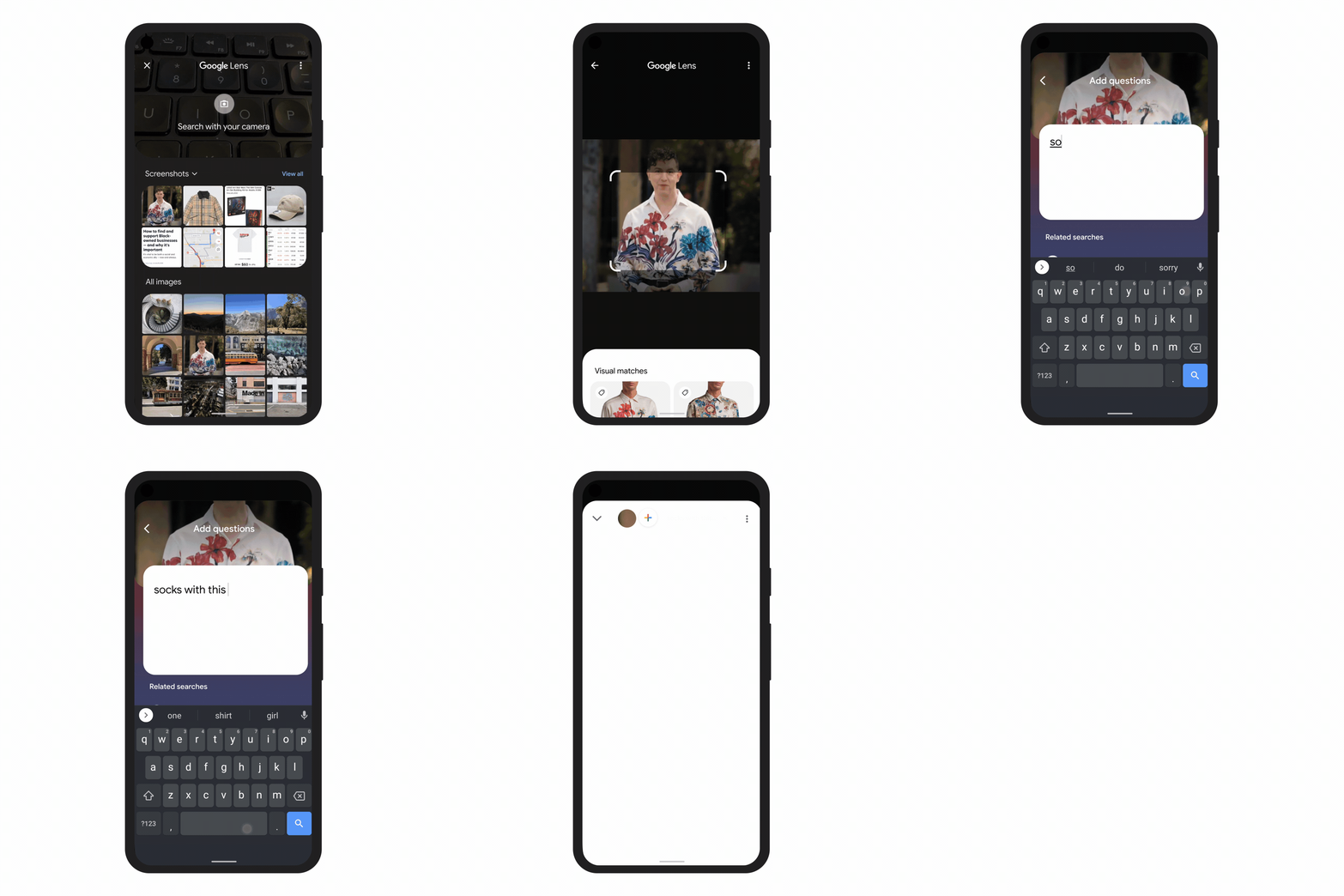
You could type “white floral Victorian socks,” but you might not find the exact pattern you’re looking for. By combining images and text into a single query, we’re making it easier to search visually and express your questions in more natural ways.
The Keyword
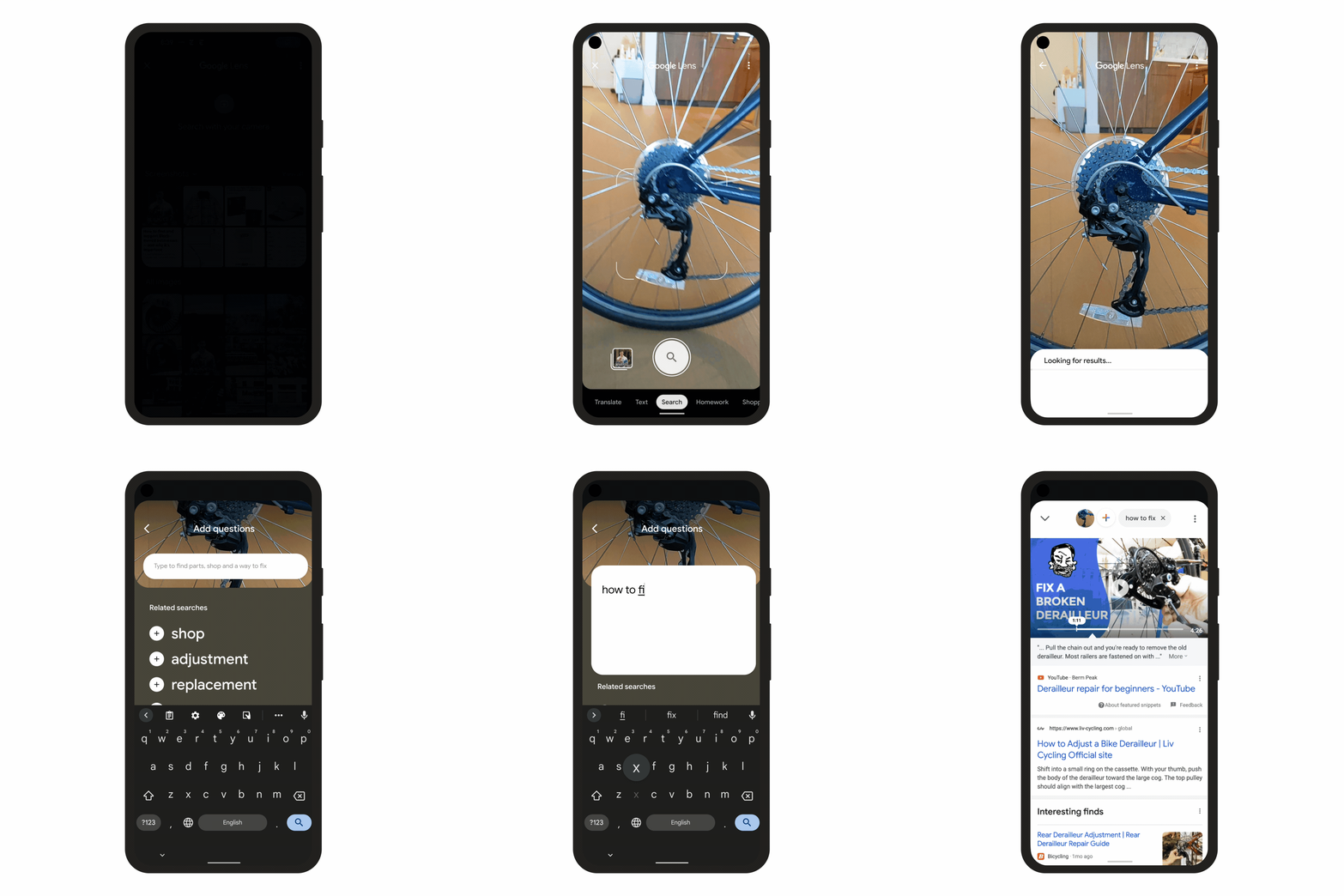
This is just one use case for this incredible new tech. Another impressive thing you can do is point at something like a bicycle chain or something else that may be broken and add a question like “how do I fix this?”. Google will understand the object in the image, and apply that image data across to a text search along with your question.
So, instead of just returning more images of bike chains, it will do “How do I fix a bike chain?” in the background. Keep in mind that this requires nothing on your end except to take a photo of the item in question, even if you don’t know what the heck it is, and ask the question – just like you’d do in real life!
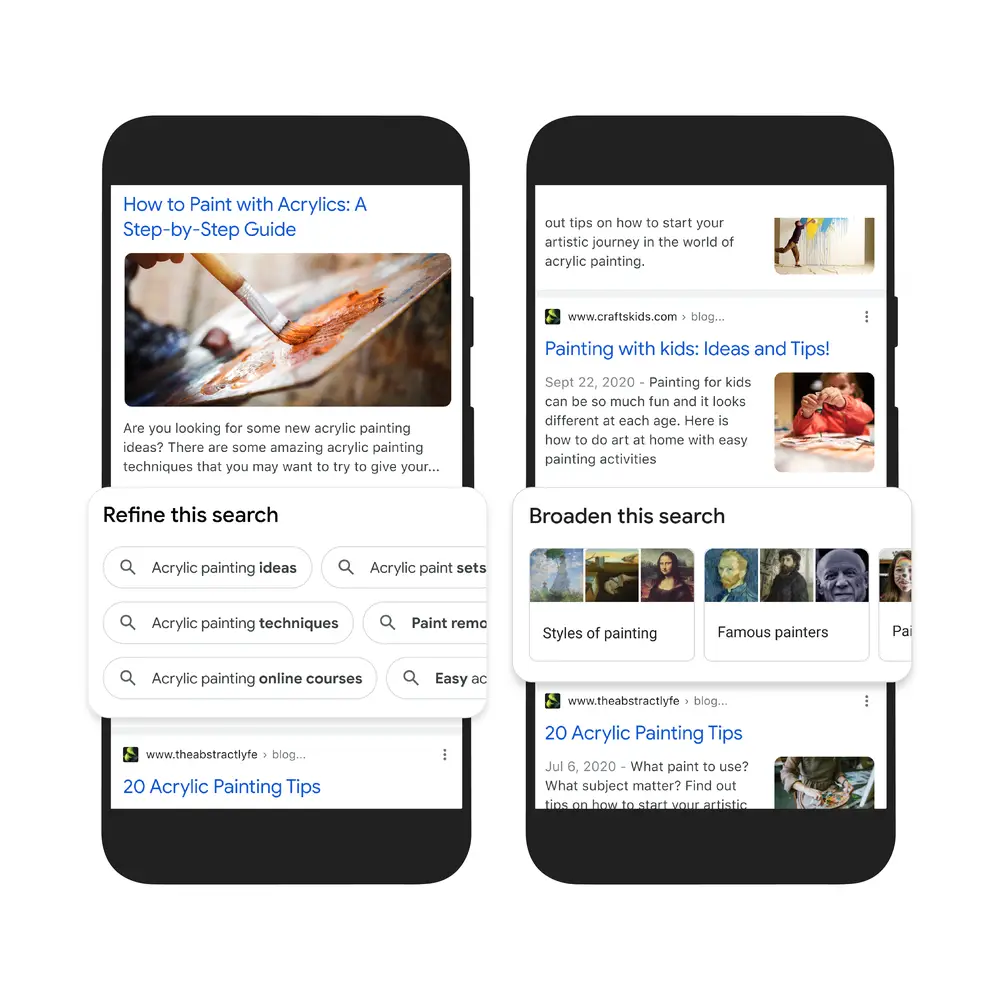
Additionally, MUM is going to become a big part of how Google displays search results. To make them more natural and intuitive, new topics like ‘Things to know’ or anything that people commonly search for in conjunction with your query will preemptively come up so you can search further. Let’s say you search for ‘Acrylic painting’ – over 350 topics including step-by-step painting tutorials, tips and tricks for painting with kids, techniques, online courses, paint removal, and more will all populate intelligently in the ‘Refine this search’ section via search chips!
You’ll also be able to ‘Broaden this search’. Google is adding this next part to help you branch out from your query instead of honing in. Let’s say we stick with the ‘Acrylic paint’ example from above. When this rolls out, you’ll be able to explore paintings that use the style, famous painters who made use of acrylics, and more! The Knowledge Graph panel kind of already does this, but not to this extent.
Lastly, and over the next few weeks, MUM will be directly responsible for identifying things in videos while you search – even if those topics aren’t explicitly listed in the video. In a similar way that Youtube lists video chapters, MUM will extract things from the video based on its audio and visuals and display them as timestamps for you to jump between.
You can probably start to see how useful and amazing this is now, can’t you? It opens up an entirely new level of comprehension in the engine and removes the language barrier between humans and AI. Google is learning to speak your language – not the other way around. I can’t wait to see what’s next.
The company stated that it’s just ‘scratching the surface’ with what’s possible. Last October, Lens began offering styling advice for any clothing you take a photo of – things are really evolving! Let me know your thoughts on all of this in the comments below. We’ll be discussing the other announcements from Search On ’21 later today.
SUBSCRIBE TO UPSTREAM
Get Chrome Unboxed delivered straight to your inbox
Upstream is our flagship, curated newsletter with the top stories, most click-worthy deals, giveaways, and trending articles from Chrome Unboxed sent directly to your inbox a few times a week. Join 31,000+ subscribers.


