


Support our independent tech coverage. Chrome Unboxed is written by real people, for real people—not search algorithms. Join Chrome Unboxed Plus for just $2 a month to get an ad-free experience, access to our private Discord, and more. Learn more about membership here.
START FREE TRIAL (MONTHLY)START FREE TRIAL (ANNUAL)
Google really seems to care about your post-pandemic look. First, they have their Sci-Fi Duplex service call and book a haircut on your behalf and now they’re gearing up to begin offering styling advice on your clothing using Google Lens. It’s 2020 folks – right when you think you’ve heard it all, right? Google Lens leverages computer vision and artificial intelligence to understand information and pulls from a massive database of images that users ‘donate’ to it. The technology also uses Google’s Knowledge Graph so that it can understand how humans make meaningful connections between people, places, and things. Knowledge Graph was initially developed for Google Search.
Last year at Google I/O, Lens gained the ability to identify clothing brands just by seeing a photo of them and then helped you shop for them too. With this latest update, you will be able to see tips for styling the clothing you find through their new ‘Style Engine’ technology. Using the world’s largest database of products and millions of images, it uses pattern-matching algorithms to understand concepts like “ruffled sleeves” or “vintage denim”, to give a few examples. It can also recommend style pairings for the item you’re researching. All you’ll have to do is tap and hold an image on the Google app or on Chrome for Android and the Style Engine will find the exact or similar items. Scrolling down further will show the aforementioned tips.
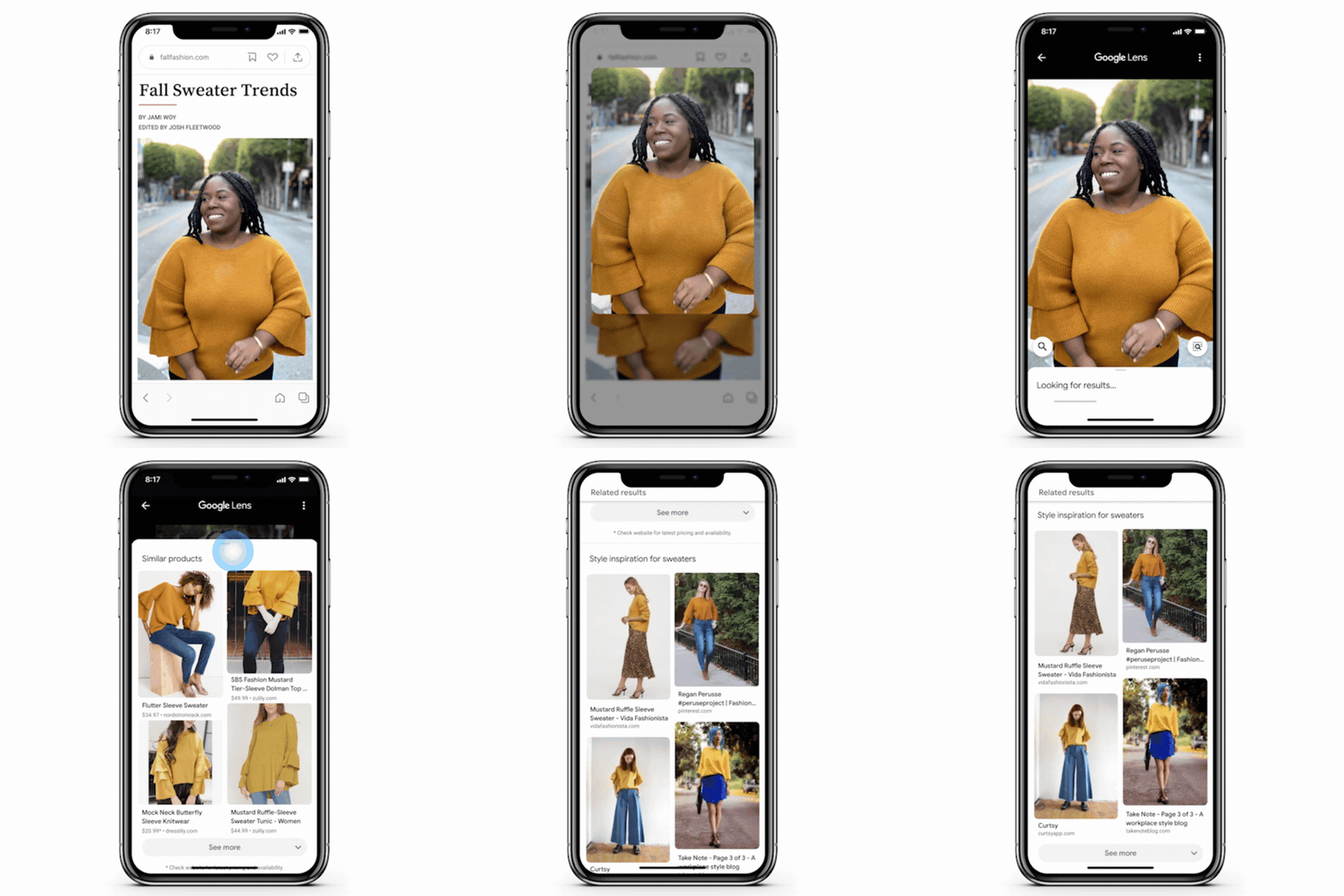
You’ll be able to start using the Style Engine update to Google Lens soon on Android and shortly thereafter on iOS devices. While it wouldn’t really make much sense for this to be available on Chromebooks since it primarily relies on your camera, I would love to see some of the technology here applied to existing images users have saved in their Google Collections. Having the ability to get style advice on clothing from a wishlist on your laptop instead of the moment you snap a photo could be valuable for many. For example, I like to take photos of clothes while shopping and then research them later on my Chromebook from the comfort of my home. If you’re interested in learning more about Google Lens, you can watch a recap of last year’s keynote updates below.
I have to say that while many may find what Google Assistant and Lens are doing to be a bit overboard, I’m loving it. When Google said that Assistant would be personal, I wasn’t exactly expecting to be treated like Jarvis treats Tony Stark. As these services become more helpful and more personal, I certainly hope that Google adds in a bit more sarcasm and humor to spice things up. With how natural Duplex speaks, I imagine that we’re not far off from having it take over the Assistant voice for personal use.
SUBSCRIBE TO UPSTREAM
Get Chrome Unboxed delivered straight to your inbox
Upstream is our flagship, curated newsletter with the top stories, most click-worthy deals, giveaways, and trending articles from Chrome Unboxed sent directly to your inbox a few times a week. Join 31,000+ subscribers.

