

• Skip to main content
  • Skip to primary sidebar
  • Deals
  • Features
  • Guides
  • Chromebooks
  • Videos
  • Podcast
  • More +
    • Reviews
    • Unboxing
    • Upcoming Devices
    • Chromebook Plus
    • Chrome
    • ChromeOS
    • Chrome OS Flex
  • Search
  • Sign Up
  • Log In
Chrome Unboxed – The Latest Chrome OS News

Chrome Unboxed - The Latest Chrome OS News

A Space for All Things Chrome, Google, and More!

  • Deals
  • Features
  • Guides
  • Chromebooks
  • Videos
  • Podcast
  • More +
    • Reviews
    • Unboxing
    • Upcoming Devices
    • Chromebook Plus
    • Chrome
    • ChromeOS
    • Chrome OS Flex
  • Search
  • Sign Up
  • Log In

Google Search for mobile does let you save websites to Collections, but it’s not obvious

March 31, 2023 By Michael Perrigo View Comments

Support our independent tech coverage. Chrome Unboxed is written by real people, for real people—not search algorithms. Join Chrome Unboxed Plus for just $2 a month to get an ad-free experience, access to our private Discord, and more. Learn more about membership here.
START FREE TRIAL (MONTHLY)START FREE TRIAL (ANNUAL)

Collections is a feature within Google Search that allows you to save recipes, images, Maps locations, and so much more across the company’s services for later reference. It’s a handy tool for anyone who needs to save things for a more appropriate time, like when they’re in the kitchen cooking or planning a trip somewhere.

When you’re on image search, tucking things away for later in your Google Collections is easy. You can simply tap the bookmark icon to do so. Similarly, if you’re browsing through recipes, you can save them by tapping on the same icon next to their title.

Xremove ads

However, “collecting” a website or article for later reading or use is a different story entirely. It doesn’t present you with a bookmark icon, which has led me and others to believe that they must resort to either using traditional bookmarks or clicking the link before taking any action. Despite this, the option to collect mobile web searches without tapping on them is actually there, it’s just hidden. To access it, tap the three dots “more” options menu item next to a result.
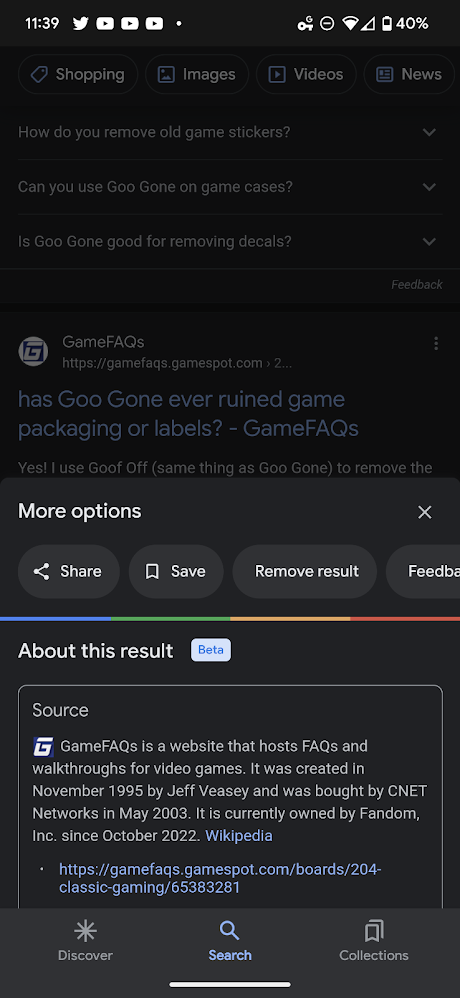
You’ll actually see a bookmark icon right next to the “Share” button. Tapping this will allow you to add it to your default Collection, and a sorting dialogue box will appear at the bottom of your phone’s screen. You can change its location here, or you can leave it in the hodgepodge of items so you can sort it later.

Featured Videos

Xremove ads

To access Google Collections – a service I’ve done numerous write-ups about, you can just visit it on the web. It’s also available to you through the Google Search mobile app via the bottom navigation bar (pictured above). While not the most popular Google service, it’s one that I’ve enjoyed quite a bit, and have invested in for the past few years.

Another benefit of these three dots menus on search results is that you can see more information about a link before opening it. It’s something the company implemented a while back to help users inspect URLs for safety reasons. Truth be told, I’ve never really used it as I don’t visit links I don’t trust anyway, but now that I know Collections and share options exist there, I’ll be sure to do so more often.

If you’re looking for ways to inspire your goals, create a vision board, find new and exciting things to cook, places, to go and more, it’s worth taking a few minutes to learn how to use the Collections feature. Let me know in the comments if you’ve taken to it since it was released or if you even knew it was a thing to begin with.

Xremove ads

SUBSCRIBE TO UPSTREAM

Get Chrome Unboxed delivered straight to your inbox

Upstream is our flagship, curated newsletter with the top stories, most click-worthy deals, giveaways, and trending articles from Chrome Unboxed sent directly to your inbox a few times a week. Join 31,000+ subscribers.

SUBSCRIBE HERE!

Filed Under: Google Search, Guides and How-To's

About Michael Perrigo

Known as "Google Mike" to his customers, Michael worked at Best Buy as a Chromebook Expert who dedicated his time to understanding the user experience from a regular Chromebook owner's perspective. Having spent nearly 20 years meeting you face-to-face, he strives to help you understand your technology through carefully crafted guides and coverage, relentlessly seeking out the spark in what's new and exciting about ChromeOS.

Primary Sidebar

Googlebook

Google’s classic ‘Text’ app is now an Android app for Googlebook on the Play Store

By Robby Payne
September 24, 2026

Why we can now rule out hardware or software bugs for the missing Lenovo Duet m

By Robby Payne
September 24, 2026

Best Buy is giving away free Pixel Buds 2a with any Googlebook pre-order

By Robby Payne
September 23, 2026

Every new Googlebook includes nearly $600 in free software perks

By Robby Payne
September 23, 2026

Our first real look at Googlebook OS in the wild features CapCut, Figma, offline downloads, and games

By Robby Payne
September 23, 2026

More Googlebook

Xremove ads

Deals

The best Chromebook deals today

By Robby Payne
September 2, 2026

The best Chromebook ever made is $350 off at Best Buy right now

By Robby Payne
August 21, 2026

The excellent, powerful Acer Chromebook Plus Spin 514 is $150 off right now

By Robby Payne
August 12, 2026

Acer’s new Chromebook 315 is wildly affordable and points to the real future of Chromebooks

By Robby Payne
August 11, 2026

You can score the massively upgraded ASUS CX54 Chromebook Plus for just $599 right now

By Joseph Humphrey
July 28, 2026

More Deals

Xremove ads

Reviews

Acer Chromebook Plus Spin 514 Review: the best convertible you can buy [VIDEO]

By Robby Payne
July 1, 2026

Lenovo Chromebook Plus 2-in-1 Review: pretty great in a vacuum

By Robby Payne
April 23, 2026

My review after 6 weeks with the Lenovo Chromebook Plus 14 [VIDEO]

By Robby Payne
August 11, 2025

One week with the best small Android tablet you can buy, and I’m sold

By Robby Payne
May 9, 2025

Best Chromebooks of 2024 [VIDEO]

By Robby Payne
November 28, 2024

More Reviews

Xremove ads

TWITTER · FACEBOOK · INSTAGRAM · YOUTUBE · EMAIL · ABOUT

Copyright © 2026 · Chrome Unboxed · Chrome is a registered trademark of Google Inc.
We are participants in various affiliate advertising programs designed to provide a means for us to earn fees by linking to affiliated sites.

PRIVACY POLICY