

Support our independent tech coverage. Chrome Unboxed is written by real people, for real people—not search algorithms. Join Chrome Unboxed Plus for just $2 a month to get an ad-free experience, access to our private Discord, and more. Learn more about membership here.
START FREE TRIAL (MONTHLY)START FREE TRIAL (ANNUAL)
Ever since Google pulled back the curtain on Googlebook in New York City, most demonstrations focused on headline keynote features like Magic Pointer cursor gestures, Rambler speech-to-text cleanup, and Android phone continuity.
While those features look great in presentation slides, the question every prospective buyer wants answered is much more practical: How does this new Android-based desktop operating system actually feel when you are bouncing between a dozen windows at once?
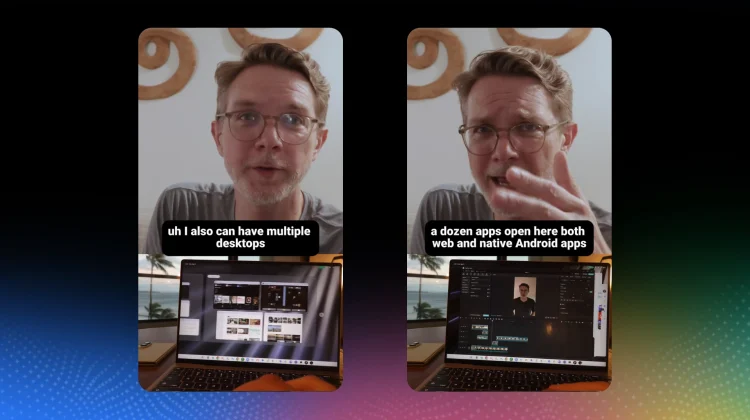
Until we get our review units, we can’t answer that question for you. But thanks to Google’s own Dieter Bohn, we now have our first genuine glimpse at everyday life on Googlebook OS. In a video shared directly from his hotel room on the eve of the Qualcomm Snapdragon Summit in Hawaii, Dieter walked through his active, day-to-day workflow on his personal Dell XPS Googlebook.
If you were worried that Googlebook might feel like an awkward mobile tablet interface stretched onto a laptop display, this walkthrough shows how natural the windowing and desktop environment actually is in actual practice.
Video editing and true desktop window management
Dieter started the demo inside CapCut, arranging video clips along an active editing timeline while running browser tabs alongside it to look up editing tips. The entire interface and workflow look ultra fluid and at-once familiar for those who have been using ChromeOS for years, including:
- Desktop overview: Swiping up on the trackpad (or pressing the dedicated square navigation key on the keyboard) instantly pulls up the desktop overview showing all open applications.
- Web apps that feel native: Dieter showcased web applications like Figma, emphasizing that even though it is a progressive web app, it runs with the speed and responsiveness of a dedicated native desktop client.
- Snaping & Split-Screen: Dragging any application window to the side of the display instantly snaps it into a side-by-side split screen as you’d expect.
- Two types of full-screen: Dragging a window to the top edge maximizes it on your current desktop. Alternatively, Googlebook OS allows apps to go truly full-screen (akin to MacOS) into their own dedicated virtual space off to the side, cleanly hiding system menus and window top bars for focused tasks.
Native Android offline media, games, and multiple desktops
One of the biggest strengths of building Googlebook on an Android foundation is native access to mobile app capabilities that traditional desktop browsers often restrict. Dieter demonstrated this by swiping over to the Amazon Prime Video Android app, where he initiated an offline video download for his upcoming flight.
He also showed how virtual workspaces (or virtual desks) help separate tasks. Swiping between dedicated desktops, he pulled up an “Entertainment Desktop” featuring native Android indie hit Baba Is You running alongside Spotify and YouTube.
Across all spaces, he had roughly a dozen active applications running concurrently, spanning video editing, design tools, background video downloads, and music playback.
Throughout the entire demonstration, Qualcomm’s Snapdragon X Elite handled the workload without hitching, frame drops, or stuttering window animations. The whole thing looks fluid and really awesome to work from. I cannot wait to start the journey of working daily from each of the Googlebooks in the initial launch wave, and I can’t wait to tell all of you about it as soon as possible. We’re well inside 2 weeks now, so we don’t have long to dream about it. October 4th will be here before we know it!
SUBSCRIBE TO UPSTREAM
Get Chrome Unboxed delivered straight to your inbox
Upstream is our flagship, curated newsletter with the top stories, most click-worthy deals, giveaways, and trending articles from Chrome Unboxed sent directly to your inbox a few times a week. Join 31,000+ subscribers.

