


Support our independent tech coverage. Chrome Unboxed is written by real people, for real people—not search algorithms. Join Chrome Unboxed Plus for just $2 a month to get an ad-free experience, access to our private Discord, and more. Learn more about membership here.
START FREE TRIAL (MONTHLY)START FREE TRIAL (ANNUAL)
Welcome to the Workspace Sessions. Workspace Sessions brings you the latest from Google Workspace, the Google Admin Console, and all things related to Enterprise and Education from the world of Google.
In order to refine your search in Gmail on the web, you must click the slider icon to the right of the search box found at the top of the page. Once you do, you’re presented with a wall of text options for tightening your query, and this is very helpful while trying to pinpoint a specific email based on whether it contains a specific word, is from a certain contact, has an attachment, and more.
Unfortunately, that wall of text options – while not too difficult to read – can become cumbersome if you’re using it often. That’s why Google rolled out an update to the interface that injected the same familiar ‘search chips’ found across Android, Chrome for Android, and more in February of last year! Today, however, these ‘chips’, which you can see below, will now feature dropdown lists of relevant data to help speed up the process of finding things.
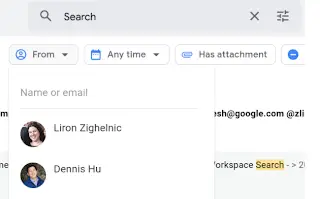
To keep you from having to select a chip and then type your refinement keyword into the search box above it, wasting all of that precious time moving your mouse (I’m joking – it’s not that bad, but it’s still an improvement) you’ll instead see a list of senders you’ve recently interacted with or who are in your Google Contacts when you click the ‘From’ dropdown, for example. What’s more, is that you can select multiple senders as well, if you’d like.
The same goes for all of the other filter chips. Selecting them will present you with the aforementioned drop-down list, but for the others, the options that appear will be more contextually relevant – think dates, attachments, etc. This richer experience (Google sure does love their chips this year, doesn’t it?) is already available to all Google Workspace customers, G Suite Basic and Business license holders, and even those of us with personal Google Accounts – surprise!
I know you’re used to having a two-week wait period when we report on these things, but in some rare instances, said update is instantaneous. I’d love to hear from you now! Do you use Gmail’s search filters at all, or do you simply keep the most relevant emails immediate, unread, or starred? If it’s an older email, do you organize them into labels to keep tabs on them? As a huge productivity tools and processes nerd, I’m always trying to see how you all use Google’s services.
This installment of Workspace Sessions is sponsored in part by CTL. CTL is an industry leader in the deployment and management of Chrome and Chrome OS hardware. Headquartered in the USA, CTL designs and purpose builds Chrome devices specifically to meet the needs of its customers. Find out more about CTL here.
SUBSCRIBE TO UPSTREAM
Get Chrome Unboxed delivered straight to your inbox
Upstream is our flagship, curated newsletter with the top stories, most click-worthy deals, giveaways, and trending articles from Chrome Unboxed sent directly to your inbox a few times a week. Join 31,000+ subscribers.


