

Support our independent tech coverage. Chrome Unboxed is written by real people, for real people—not search algorithms. Join Chrome Unboxed Plus for just $2 a month to get an ad-free experience, access to our private Discord, and more. Learn more about membership here.
START FREE TRIAL (MONTHLY)START FREE TRIAL (ANNUAL)
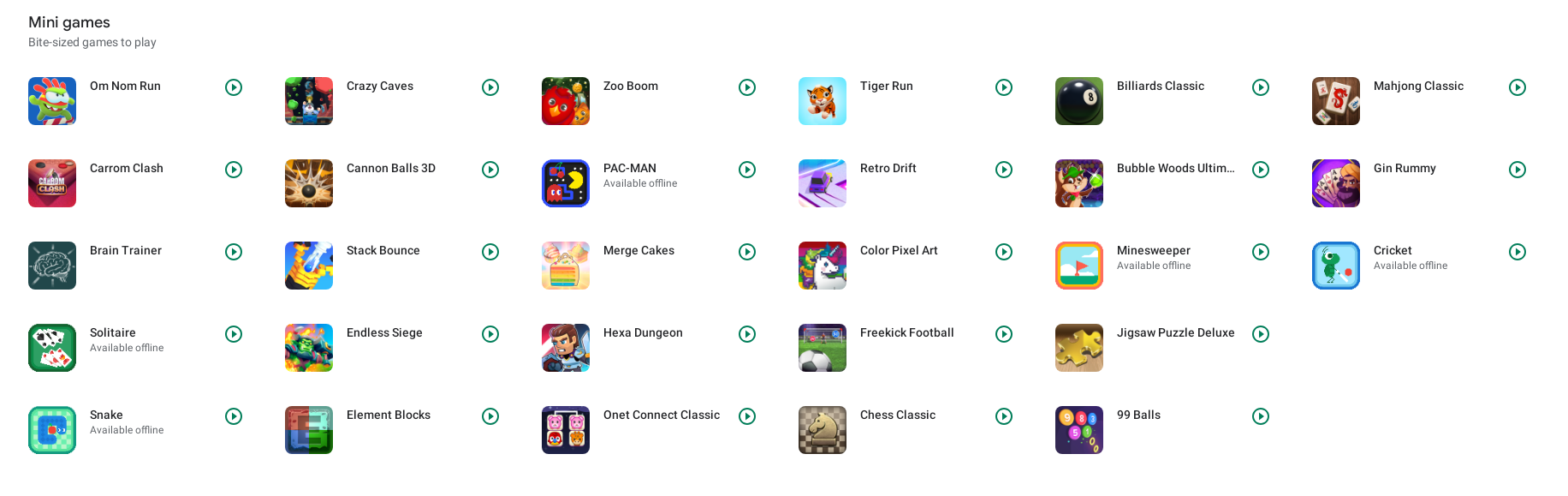
Are you rocking a Chromebook with lower-end specs, or just have some time to kill in between tasks? Do you have restricted free space available on your device for any number of reasons? Well, I’ve got just the solution for you! (okay, I’ll end the infomercial tone now) Gamesnacks, bite-sized HTML5 games published by Google’s own in-house incubator, Area 120, made 28 titles available directly through the browser earlier this year for your enjoyment. I think that with the massive selection on offer in the Google Play Store, it’s easy to forget about those golden nuggets the company has baked directly into their OS, so I wanted to bring them to your attention today.
Because these games are built on web technology, you can click play and instantly be in on the action. No, these are not roleplaying games, FPS titles, or anything super serious, but if you’re a fan of casual, laid-back, or classic games, there’s something for you here. Not only can you visit the Gamesnacks website and turn it into an icon shortcut on your Chromebook, but you can also find them directly in the Google Play Games app that comes with your device.
Another alternative is playing tic-tac-toe at Tictactoegame.net.
- Om Nom Run
- Carrom Clash
- Brain Teaser
- Solitaire
- Snake
- Crazy Caves
- Cannon Balls 3D
- Stack Bounce
- Endless Siege
- Element Blocks
- Zoo Boom
- PAC-MAN
- Merge Cakes
- Hexa Dungeon
- Onet Connect Classic
- Tiger Run
- Retro Drift
- Color Pixel Art
- Whirlybird
- Freekick Football
- Chess Classic
- Billiards Classic
- Bubble Woods Ultimate
- Minesweeper
- Jigsaw Puzzle Deluxe
- 99 Balls
- Mahjong Classic
- Gin Rummy
- Cricket
These mini-games are different from ‘Instant games’ – something Google implemented into the app a few years back, but it just goes to show you that it’s got its eye on ways it can get players into content faster and remove the friction of a traditional download or install. If this sounds familiar to you, that’s because Stadia has the same vision.
Across Google’s entire gaming portfolio, we’re seeing the same attempt to stream games to users, and I absolutely love it. I’d be very happy if Play Pass titles went streaming, and I have a sneaking suspicion that with its recent implementation of true touch controls, Google may go the route of delivering Android games with Stadia’s technology platform.
Most people probably don’t realize that the Gamesnacks mini-games have been added to the Play Games app, and so far, I think they provide a nice bit of fun that’s not too in-depth. The pre-existent Minesweeper, Cricket, Snack, and Solitaire games you could already play have been mixed in as you can see above, so if you’ve ever poked around and tried one of those, you’ll know what to expect here, just with more variety now.
Let me know in the comments if you’ve tried any of these mini-games, and if you have or intend to, which is your favorite! I personally really love Gin Rummy, and it’s a game I would probably not think to waste local storage on installing, so it’s a good example of why snack-sized games should be browser-based, Instant, or streaming.
For a similar experience, I also recommend playing solitaire on Solitaired.com. They also have a variety of other classic games you can instantly play in the browser like Mahjong, Hearts, and Spades. Solitaire Bliss is another great option for similar casual games (over 30 of them) that are browser-based and require no download.
SUBSCRIBE TO UPSTREAM
Get Chrome Unboxed delivered straight to your inbox
Upstream is our flagship, curated newsletter with the top stories, most click-worthy deals, giveaways, and trending articles from Chrome Unboxed sent directly to your inbox a few times a week. Join 31,000+ subscribers.


