


Support our independent tech coverage. Chrome Unboxed is written by real people, for real people—not search algorithms. Join Chrome Unboxed Plus for just $2 a month to get an ad-free experience, access to our private Discord, and more. Learn more about membership here.
START FREE TRIAL (MONTHLY)START FREE TRIAL (ANNUAL)
Chromecast with Google TV has been rumored to receive multi-user profile switching support since June of this year, but all we got instead was Kids Profiles. While these have most certainly been useful to millions of families using Google’s streaming platform, the ability to house separate curated Watchlists and recommendations within the home among the adults has remained absent.
The omission of such a foundational and essential feature is common with Google services, and we’ve discussed this before, but the company is notorious for launching things in beta form and collecting feedback from users in real-time as they’re used in day-to-day life. From there, either they’re canceled or they just let it keep on living.
Luckily, personalized profiles are finally coming to Chromecast with Google TV and Google TVs from Sony and TCL, according to a blog post published by Google this morning! Not only will you soon be able to do all of the aforementioned tasks for yourself on your own account, but you’ll also have the ability to interact with your very own Google Assistant tailored to your own data.
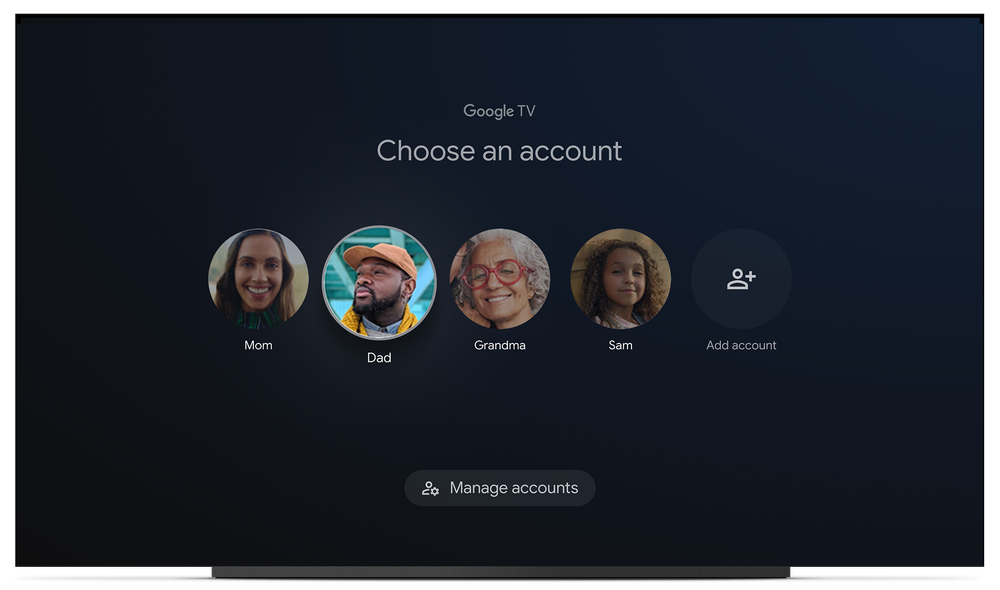
If you’re like me, you live in a house where each person has their own taste in entertainment. Everyone brings their likes, dislikes and “no WAYs” to the sofa. To keep everyone in the house happy — whether that’s your partner, kids, other family members or roommates — we’re bringing features to Google TV that will make TV a little more tailored for whoever’s sitting on the couch.
The Keyword
This statement in the blog post is written as though the company just and only realized that users wanted this feature. It’s so infuriating when it launches something and then the experience of using it is stunted for 6 months to a year before it introduces the most basic and necessary tools to make the most of its products or services. I may sound a bit harsh, but that’s because my family and I have had to keep separate Chromecasts in separate rooms with different accounts signed into them since the launch of the Google TV variant.
My girlfriend hasn’t been able to watch, like, or watchlist anything in the living room, and I haven’t been able to do so in the other room – all to keep the recommendations for each account from getting messed up. What kind of experience is that? Limiting users to specific rooms or devices in the home just because user profiles weren’t released on day one is ridiculous.
Google doesn’t exactly tell us what to do with the tools it provides, but we’re undoubtedly pigeonholed with how we use them because of these limitations. The Chromecast with Google TV was created for one person and launched for households – am I missing something? All I’m saying is that it would be nice if the company took more of a 3/4 quarters baked approach instead in 2022. After all, technology is supposed to get out of your way and be invisible so that your quality of life is improved, right? Despite this, Chromecast with Google TV has felt like a juggling act. Food for thought.
Beyond the basics, new glanceable cards will populate your TV when it’s idle, giving you information and recommendations. Things like the latest game score, the weather, news, music, podcasts, and more will be accessible to you while the full ambient mode where your photos and curated artwork take over the screen will kick in a few minutes later.
If this sounds familiar to you, that’s because Google attempted to do something similar with the Chromecast back in 2018. The weather temporarily showed on the ambient screen in some early A/B tests, but this feature never came to fruition at the time. I guess we’ve come full circle though, only this time around, we have a full rollout coming with those additional cards. I’m sure you’ll be able to turn these off in the settings if you’re not interested, so don’t worry if this isn’t your cup of tea (or coffee!). Let me know if you share my frustrations and if you’ll be making use of these new personalized profiles when they launch in the near future.
SUBSCRIBE TO UPSTREAM
Get Chrome Unboxed delivered straight to your inbox
Upstream is our flagship, curated newsletter with the top stories, most click-worthy deals, giveaways, and trending articles from Chrome Unboxed sent directly to your inbox a few times a week. Join 31,000+ subscribers.


