

• Skip to main content
  • Skip to primary sidebar
  • Deals
  • Features
  • Guides
  • Chromebooks
  • Videos
  • Podcast
  • More +
    • Reviews
    • Unboxing
    • Upcoming Devices
    • Chromebook Plus
    • Chrome
    • ChromeOS
    • Chrome OS Flex
  • Search
  • Sign Up
  • Log In
Chrome Unboxed – The Latest Chrome OS News

Chrome Unboxed - The Latest Chrome OS News

A Space for All Things Chrome, Google, and More!

  • Deals
  • Features
  • Guides
  • Chromebooks
  • Videos
  • Podcast
  • More +
    • Reviews
    • Unboxing
    • Upcoming Devices
    • Chromebook Plus
    • Chrome
    • ChromeOS
    • Chrome OS Flex
  • Search
  • Sign Up
  • Log In

Chrome Journeys and Side Panel will help you compare search results and continue tasks

October 1, 2021 By Michael Perrigo View Comments

Support our independent tech coverage. Chrome Unboxed is written by real people, for real people—not search algorithms. Join Chrome Unboxed Plus for just $2 a month to get an ad-free experience, access to our private Discord, and more. Learn more about membership here.
START FREE TRIAL (MONTHLY)START FREE TRIAL (ANNUAL)

It’s only been a week since Chrome’s history clusters, or ‘Journeys’ began appearing on the Canary channel, and now, Google has released a new development blog post detailing it as an official experiment for Chrome Canary and Dev. Detailed as an experiment that’s meant to help users continue a search task, Journeys will appear on your browser’s History page once you enable the flag.

You’ll notice that in the example below, ‘Yosemite’ is being researched as the user prepares for a vacation. Instead of having to trudge through all of the History based on date, they can now see all searches related to Yosemite, even if it doesn’t include that keyword. Journeys groups or clusters things based on their relevance. This way, if you end up emailing a friend, or shopping for a pair of shoes in between, your journey to the national park isn’t split up into fragments.

Xremove ads

Honestly, I love this. This feels like a continued effort of the ‘Recents’ section that Google Assistant has, which groups tabs to allow you to ‘Rediscover topics you looked for in the Google app recently.’ I can’t think of any instance where I’ve actually used it as it’s buried in your profile image in the Google Search app, but having it on desktop seems more accessible.

Chrome Journeys lets you continue a search task

Google says you can turn Journeys off and that you’re in control of them, and it only groups history on your current device – not others that have your account signed in. Additionally, if future feedback and interest point to a need or desire for it, the feature could make its way into Chrome Sync and appear on multiple devices, but not at this time.

Featured Videos

Xremove ads

For example: you can turn off Journeys at any time, and as always, you can easily clear your browsing history right from your Chrome settings, or by typing “clear browsing data” into the address bar. If you’d like, you can also clear history that’s related to a particular journey vs. your history overall.

Chromium Blog

Another experiment that’s rolling out is the ‘Side Panel’ or the ability to compare two search results without leaving the tab you’re on. After visiting a result from Google search, a new Google icon will appear to the left of your Omnibox. Clicking it will open a left-hand side panel (not to be confused with the new right-hand side panel for Reading List, Bookmarks, and Lens results) that will have a copy of said Google results so you can jump between them in the main window.
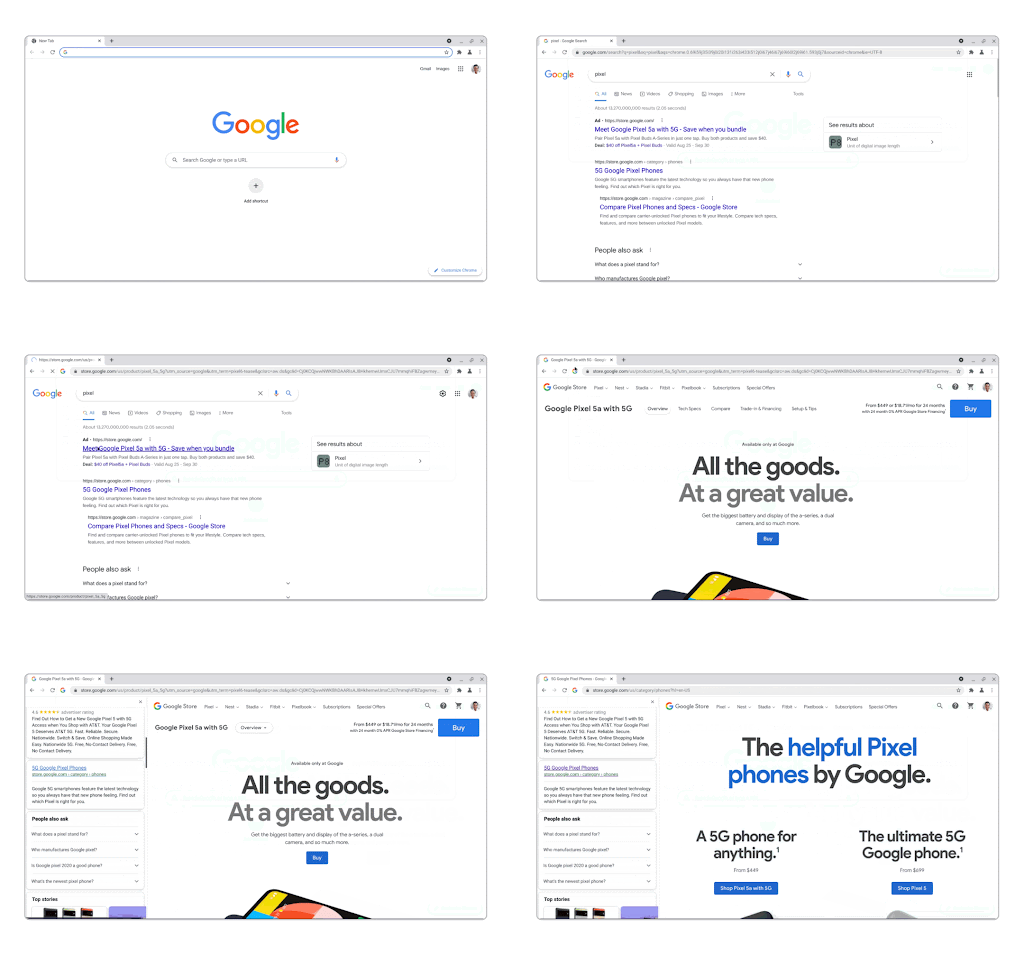
Side Panel lets you compare search results

If you recall the recent implementation of this same thing on Chrome for Android, then you’ll probably have expected it to roll out to desktop at some point. For now, enabling the Side Panel flag will toggle this on for you. It’s a useful tool since any search journey you’re going on will take you all over the web, but having both side panels open at the same time sure does look and feel funny. Go ahead and send some feedback if you like these experiments or have something to say about how they’ve been implemented.

SUBSCRIBE TO UPSTREAM

Get Chrome Unboxed delivered straight to your inbox

Upstream is our flagship, curated newsletter with the top stories, most click-worthy deals, giveaways, and trending articles from Chrome Unboxed sent directly to your inbox a few times a week. Join 31,000+ subscribers.

Xremove ads
SUBSCRIBE HERE!

Filed Under: Chrome, New & Upcoming Features, News, Updates

About Michael Perrigo

Known as "Google Mike" to his customers, Michael worked at Best Buy as a Chromebook Expert who dedicated his time to understanding the user experience from a regular Chromebook owner's perspective. Having spent nearly 20 years meeting you face-to-face, he strives to help you understand your technology through carefully crafted guides and coverage, relentlessly seeking out the spark in what's new and exciting about ChromeOS.

Primary Sidebar

Googlebook

If your Googlebook ‘Better Together’ features stopped working, you need to check this

By Robby Payne
October 16, 2026

One of the best Pixel-exclusive apps is quietly available on your new Googlebook

By Robby Payne
October 16, 2026

One of the biggest missing features in Googlebook’s Chrome browser is getting fixed

By Robby Payne
October 15, 2026

A new affordable wave of Snapdragon-powered Googlebooks is in the works

By Robby Payne
October 15, 2026

Googlebooks just solved one of the most annoying parts of using a laptop for work

By Robby Payne
October 14, 2026

More Googlebook

Xremove ads

Deals

My favorite convertible Chromebook is $150 off right now and primed for Googlebook OS

By Robby Payne
September 29, 2026

Google Pixel Buds 2a in Hazel bundled with a new Googlebook laptop at Best Buy

Score a free $129 pair of Pixel Buds 2a with any Googlebook pre-order at Best Buy

By Robby Payne
September 28, 2026

The best Chromebook deals today

By Robby Payne
September 2, 2026

The best Chromebook ever made is $350 off at Best Buy right now

By Robby Payne
August 21, 2026

The excellent, powerful Acer Chromebook Plus Spin 514 is $150 off right now

By Robby Payne
August 12, 2026

More Deals

Xremove ads

Reviews

Acer Chromebook Plus Spin 514 Review: the best convertible you can buy [VIDEO]

By Robby Payne
July 1, 2026

Lenovo Chromebook Plus 2-in-1 Review: pretty great in a vacuum

By Robby Payne
April 23, 2026

My review after 6 weeks with the Lenovo Chromebook Plus 14 [VIDEO]

By Robby Payne
August 11, 2025

One week with the best small Android tablet you can buy, and I’m sold

By Robby Payne
May 9, 2025

Best Chromebooks of 2024 [VIDEO]

By Robby Payne
November 28, 2024

More Reviews

Xremove ads

TWITTER · FACEBOOK · INSTAGRAM · YOUTUBE · EMAIL · ABOUT

Copyright © 2026 · Chrome Unboxed · Chrome is a registered trademark of Google Inc.
We are participants in various affiliate advertising programs designed to provide a means for us to earn fees by linking to affiliated sites.

PRIVACY POLICY