

Support our independent tech coverage. Chrome Unboxed is written by real people, for real people—not search algorithms. Join Chrome Unboxed Plus for just $2 a month to get an ad-free experience, access to our private Discord, and more. Learn more about membership here.
START FREE TRIAL (MONTHLY)START FREE TRIAL (ANNUAL)
YouTube Music has been adding many tweaks to improve the user experience over the last few weeks, and instead of covering them all separately, I figured I’d put them together for your information. From discovery to creation tools, and even more quality-of-life fixes, there’s a lot to talk about, so let’s get started!
Hashtag playlist pages
First and foremost, new hashtag-driven discovery pages for playlists are becoming available to users. By renaming any of your playlists with a hashtag before it and then searching for that hashtag, you can not only quickly jump to your own music, but other community-created playlists that use the same hashtag.
Hashtags are keywords preceded by a # symbol. Hashtags allow you to easily connect your content with other videos or playlists which share the same hashtag on YouTube and YouTube Music. Hashtags also allow viewers and listeners to find related content via search.
Google Support
More colorful and obvious casting controls
I noticed this one just a few days ago. While I previously reported on the top of a casting dialogue box recommending devices you often connect to as a priority, the center of the “Now Playing” screen has a popup for the most used smart home speaker or device in your home. This is also extremely colorful and grabs your attention, sporting a teal green, blue, purple, and pink hue gradient.

Casting lyrics to the big screen
Most recently, Google added a neat little trick for users who want to use YouTube Music for karaoke nights. You can now cast now only your music, but also the current song’s lyrics to the big screen. In the case of this user on Reddit who first noticed the feature was live, they used a projector and cast the words to their bedroom wall!
Shown here are the active lyrics being spoken or sung in a brighter white color, the album art, the album title, and the artist’s name. Additionally, the background has a blurred copy of the album art and is very similar to Apple Music’s UI for the same functionality. Because the Redditor has expressed a desire to keep images of his home off of the internet, we’re respecting their privacy and directing you to their post to see the image so long as they choose to keep it publicly available.
Your 2022 Rewind
We covered this one before, but I felt that it bears repeating. Your official 2022 YouTube Music recap is now available to you, and I’ve found myself listening to this more than any other aspect of my library. I mean, it should be obvious that this is both a cause and effect. The Recap shows what you listened to the most for the year, and also turns out to be the best thing to listen to for that very reason!
This year, Google has done things a bit differently though, and has even given you the ability to discover your “music personality type”. It’s offering you tools for filtering your playlist by “Deep cuts”, “chill”, and more based on what you’ve consumed the most.
Oh! and this is the coolest part – your very own Google Photos collage mixed with music in the form of an Instagram Story or some similar feature across other social networks. Tap to see photos, and hear a specific song play over them!

Custom Radio Stations built by you
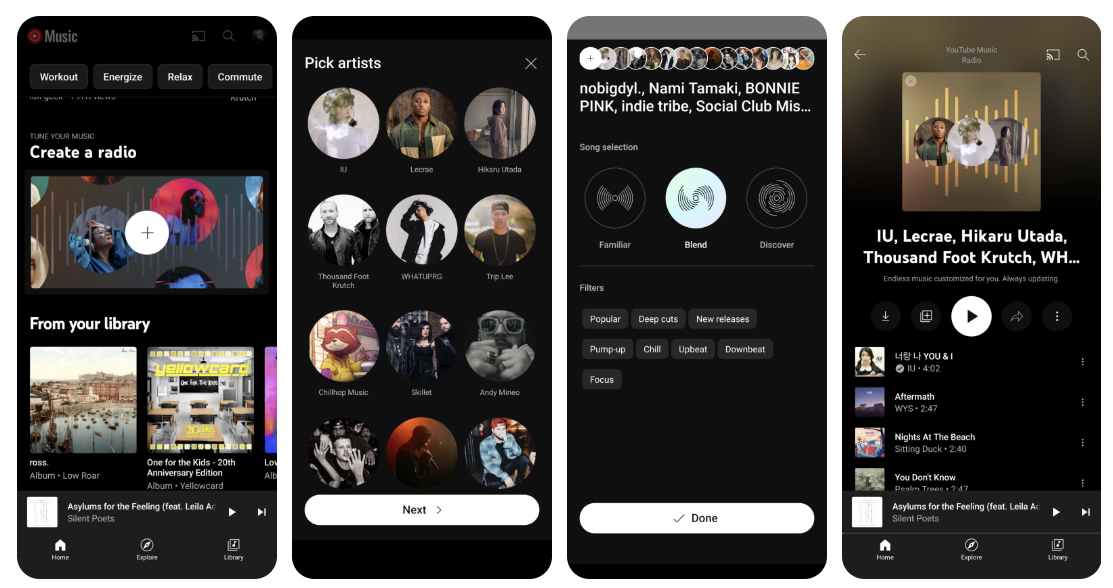
Okay, last one, and then I’ll toss in a few bonus updates that are less consequential, but still neat. You can now become the DJ with YouTube Music’s new “Create a Radio” feature. By tapping the new splash page on your YTM homepage, you can pick a few artists, choose a filter, and decide if you want to play familiar songs, discover new ones, or blend the two together.
This new radio station can’t be renamed, sadly, but you can tweak it whenever you’d like and the content chosen by the algorithm is largely influenced by your decisions, as opposed to standard radio stations on the service where you have no input.
YouTube Music still has a lot of work to do
The more I use YouTube Music, the better it gets, but if I’m honest, it took way too freaking long for Google to care about it. After killing off Google Play Music, I felt they would be all in on the new golden child, but now and only now we’re seeing life breathed into the service.
A few bonus updates that have rolled out recently include less repetitive radio content, more diverse videos, these awesome, stylish, new playlist cards that feature a colored backdrop, and an updated “Now playing” screen, which I’ve covered already in a previous post. I was just about to jump ship to Spotify when all of this happened, and I felt it would be fun to chat about these updates with you all.
I still think YouTube Music needs to hurry up and integrate Google Podcasts, audiobooks from Play Books, and more. When I snuck over to Spotify last week and saw all that it had to offer, I saw just how lazy or particular Google has been with its music service, and was just so disappointed. Here’s to hoping things improve even more in 2023!
SUBSCRIBE TO UPSTREAM
Get Chrome Unboxed delivered straight to your inbox
Upstream is our flagship, curated newsletter with the top stories, most click-worthy deals, giveaways, and trending articles from Chrome Unboxed sent directly to your inbox a few times a week. Join 31,000+ subscribers.

